
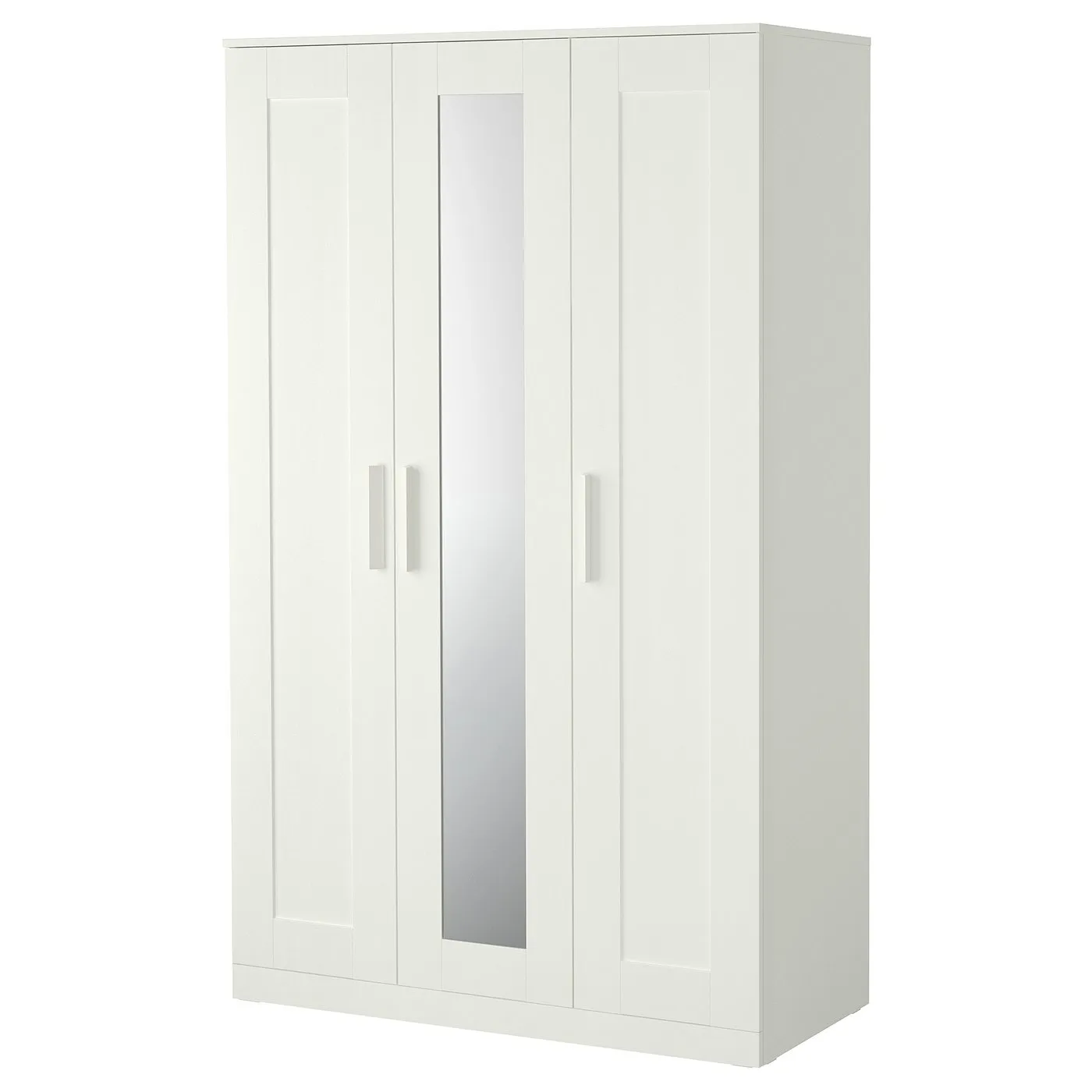
How to assemble IKEA BRIMNES wardrobe with 3 doors

BRIMNES wardrobe with 3 doors, white, 46x193/4x743/4"

This guide covers the white IKEA BRIMNES wardrobe with 3 doors, article 905.748.00. Follow the wardrobe assembly diagrams and video, matching your parts to each illustration.

View on IKEA
BRIMNES wardrobe with 3 doors

Interactive assembly guide

Step-by-Step Instructions

1 different parts, 1 boxes total — click on a package to see step-by-step assembly instructions

BRIMNES Wardrobe with 3 doors

905.748.00

x1

21 ¾ "

Width

2 ¼ "

Height

76 ½ "

Length

64 lb 16 oz

Weight

Start Assembly

Written guide

Step-by-step instructions with diagrams

Follow the numbered assembly steps below, or open the interactive guide above to track progress and zoom into each diagram. This guide includes 46 illustrated steps.

BRIMNES Wardrobe with 3 doors

  1. Before you begin

    General anti-tipover safety warning panel with hazard icons and multilingual instructions (English, French, Spanish) about securing furniture, avoiding TV placement, preventing climbing, limiting open drawers, and placing heavy items low.
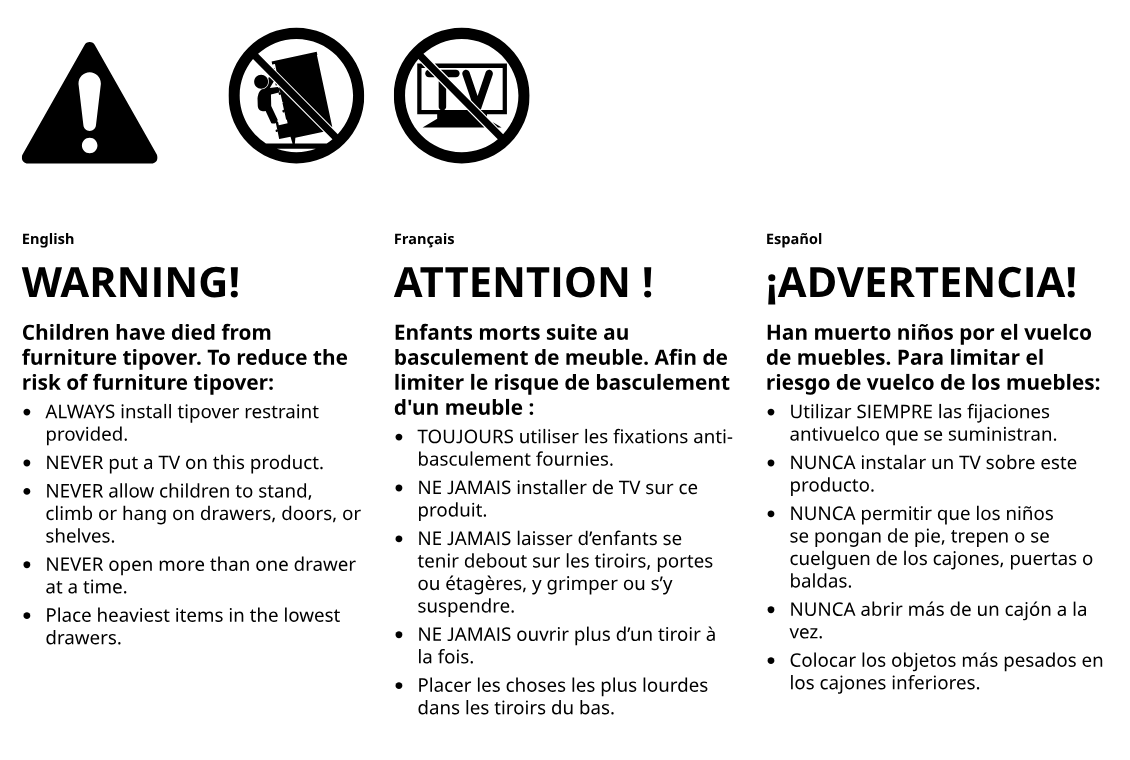
    Illustration for assembly note: General anti-tipover safety warning panel with hazard icons and multilingual instructions (English, French, Spanish) about securing furniture, avoiding TV placement, preventing climbing, limiting open drawers, and placing heavy items low.
  2. Before you begin

    Preparation and tool guidance panel showing required tools, correct drill bit sizes for different wall materials, and wall anchoring examples.
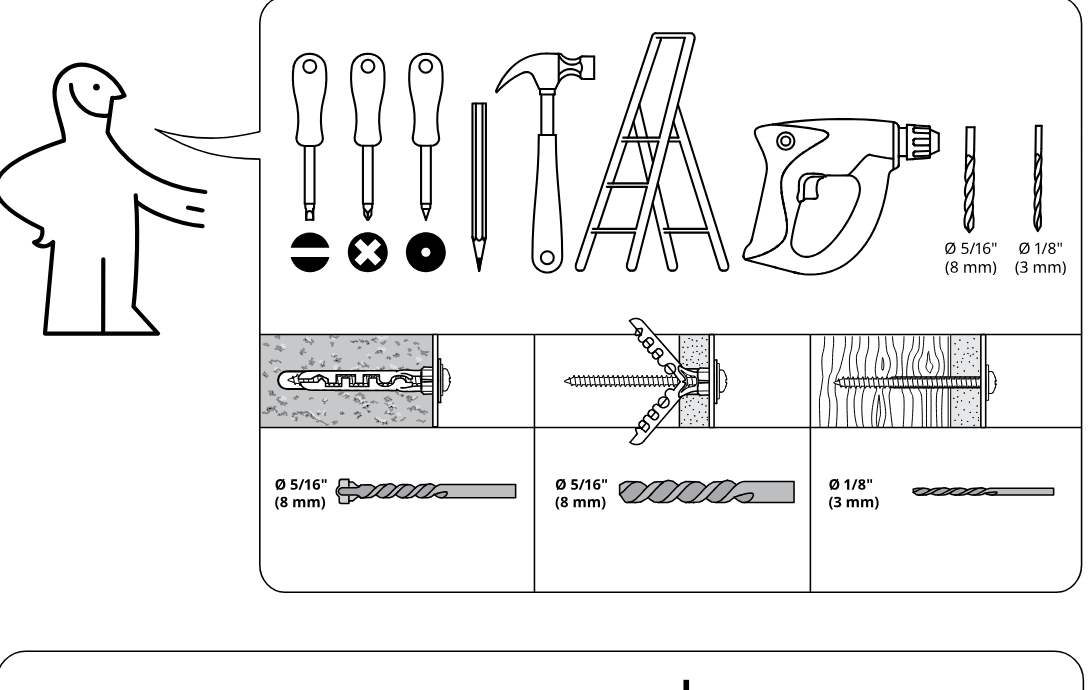
    Illustration for assembly note: Preparation and tool guidance panel showing required tools, correct drill bit sizes for different wall materials, and wall anchoring examples.
  3. Before you begin

    Hardware-bag and load guidance panel indicating wall-fixing hardware and that assembly/load support depends on proper wall attachment.
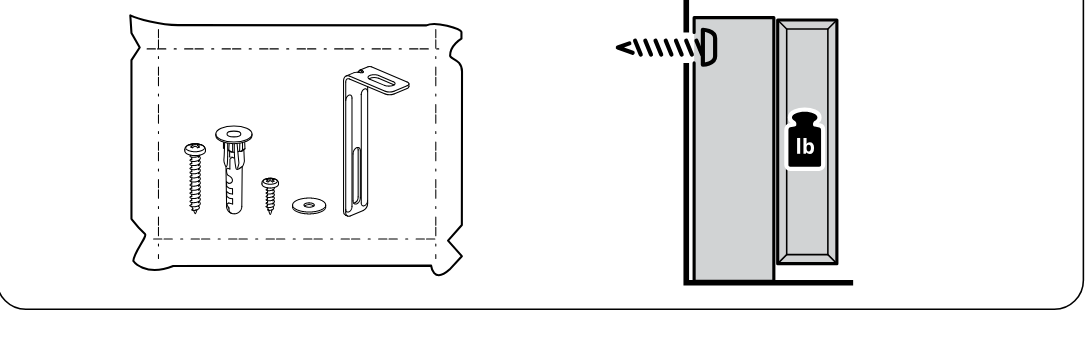
    Illustration for assembly note: Hardware-bag and load guidance panel indicating wall-fixing hardware and that assembly/load support depends on proper wall attachment.
  4. Before you begin

    Safety behavior panel showing correct/incorrect handling with a screwdriver and crossed-out unsafe practice.
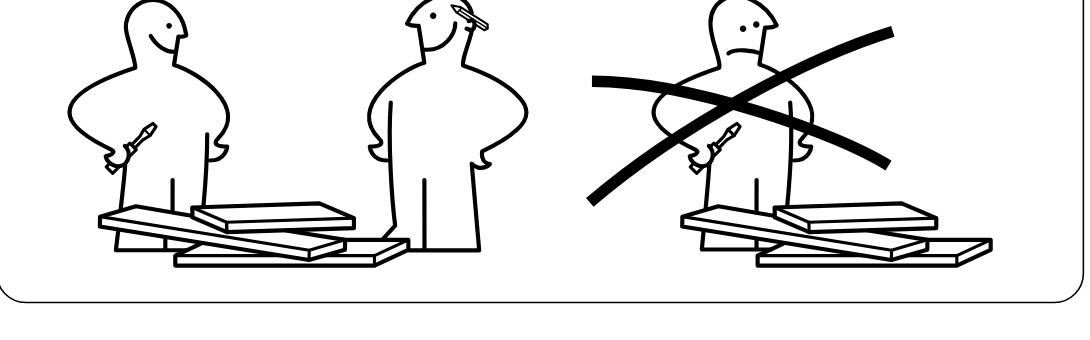
    Illustration for assembly note: Safety behavior panel showing correct/incorrect handling with a screwdriver and crossed-out unsafe practice.
  5. Step 1

    The panel is laid on a soft surface and two cam screws (118331) are inserted into the marked holes with correct edge orientation, with a close-up showing screw direction and a crossed-out incorrect side.
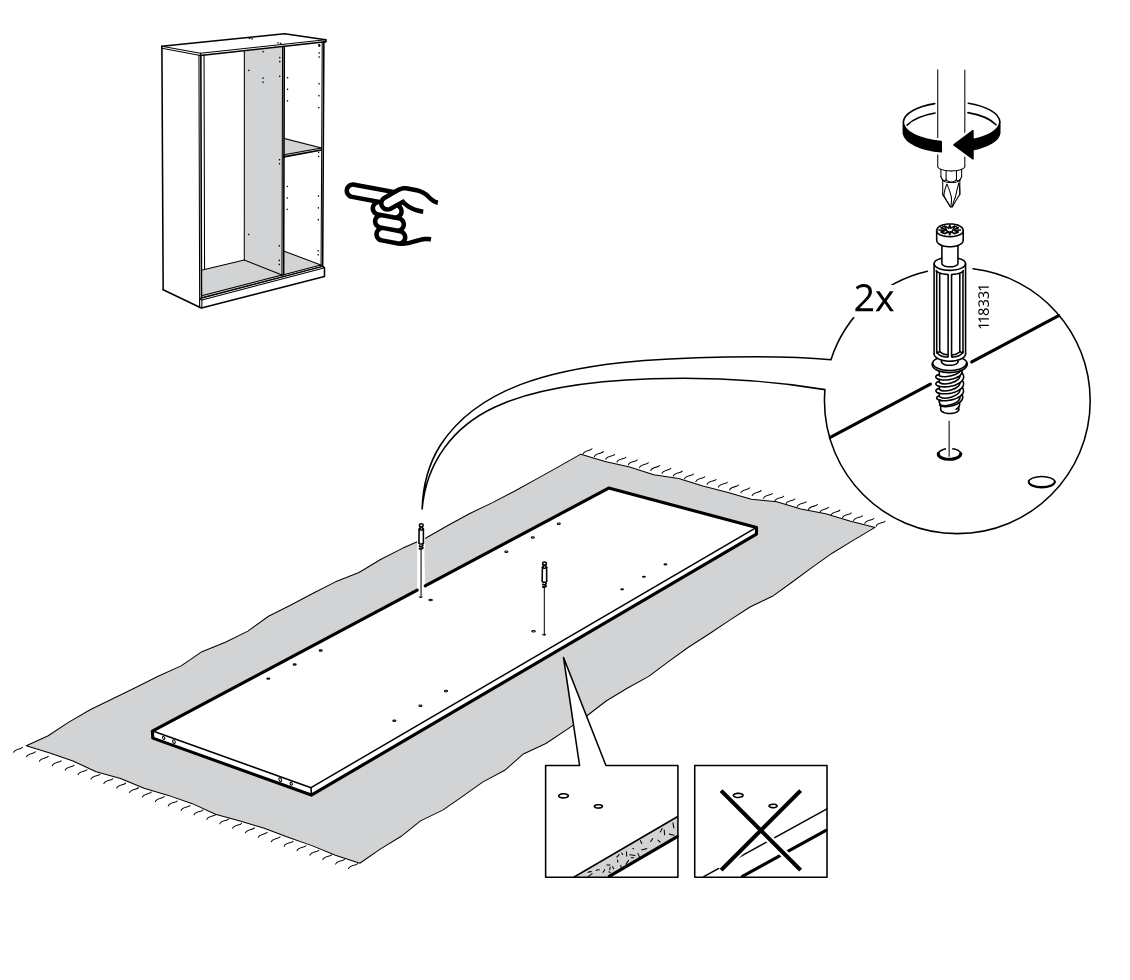
    Diagram for step 1: The panel is laid on a soft surface and two cam screws (118331) are inserted into the marked holes with correct edge orientation, with a close-up showing screw direction and a crossed-out incorrect side.
  6. Step 2

    Insert two 101345 wooden dowels into the base panel holes and position the vertical panel onto the base in the correct orientation, as indicated by the do/don't inset.
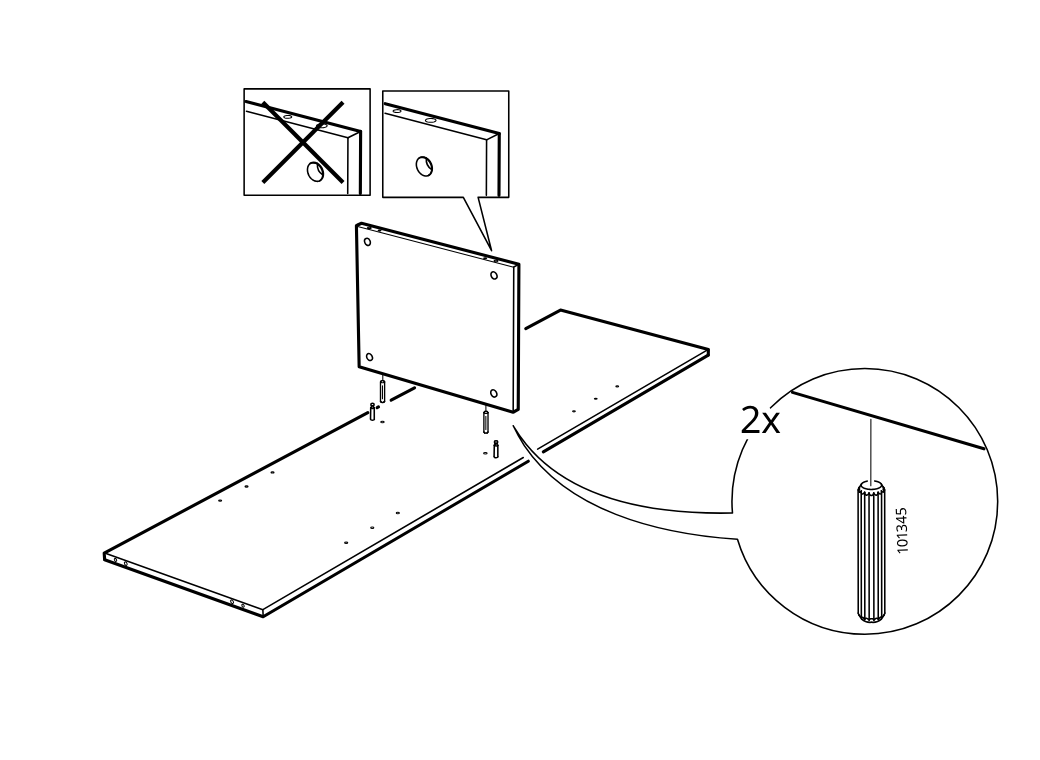
    Diagram for step 2: Insert two 101345 wooden dowels into the base panel holes and position the vertical panel onto the base in the correct orientation, as indicated by the do/don't inset.
  7. Step 3

    Install and tighten two cam-lock fasteners (119250/119251/119252) from the side to secure the vertical panel to the base panel.
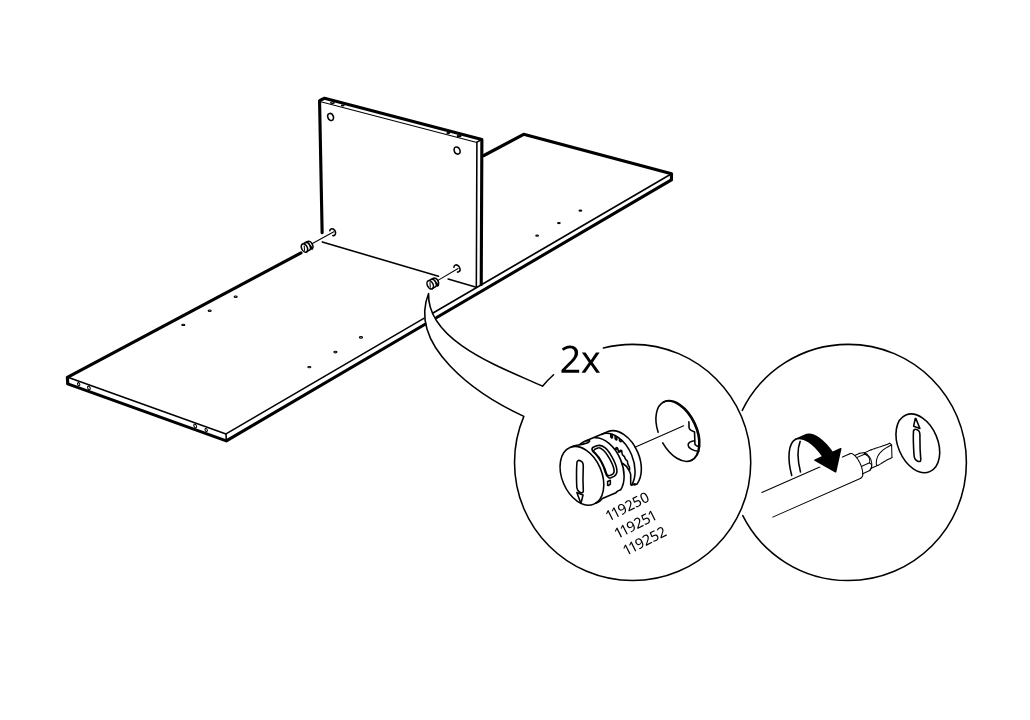
    Diagram for step 3: Install and tighten two cam-lock fasteners (119250/119251/119252) from the side to secure the vertical panel to the base panel.
  8. Step 4

    The frame assembly is rotated and two wooden dowels (101345) are inserted into the side panel holes.
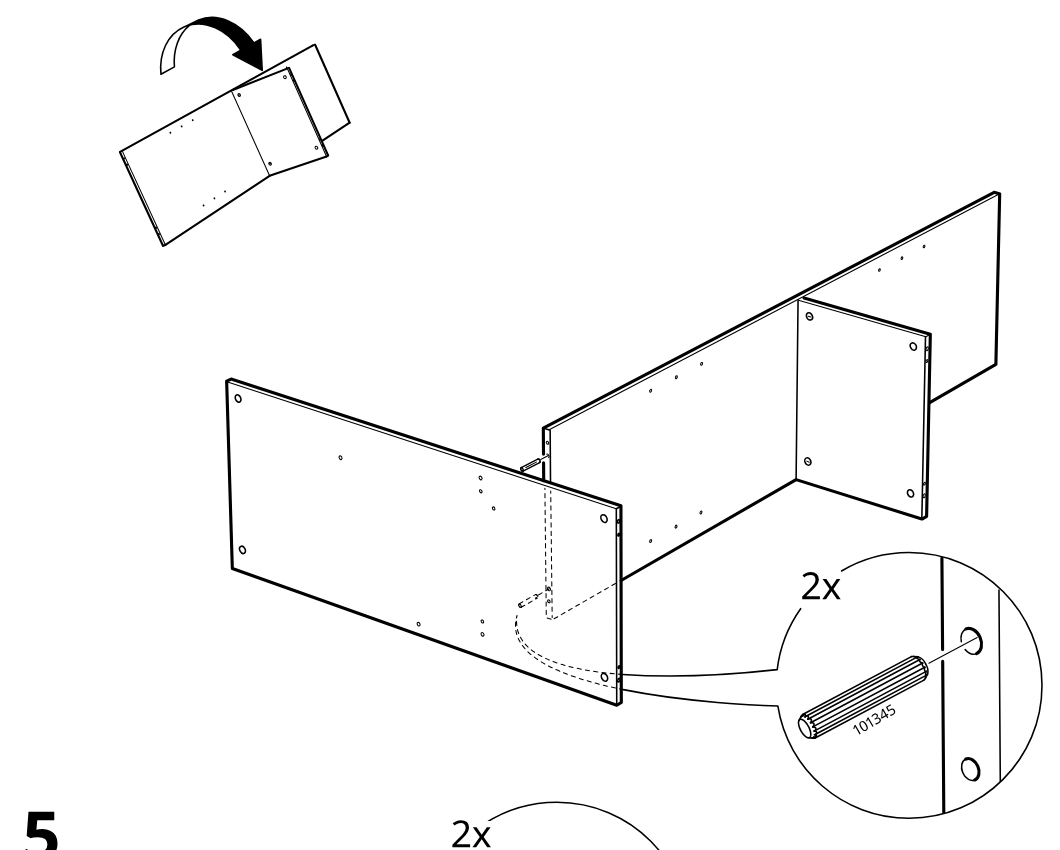
    Diagram for step 4: The frame assembly is rotated and two wooden dowels (101345) are inserted into the side panel holes.
  9. Step 5

    Two screws (100214) are driven into the side panel using the included hex key to secure the assembly.
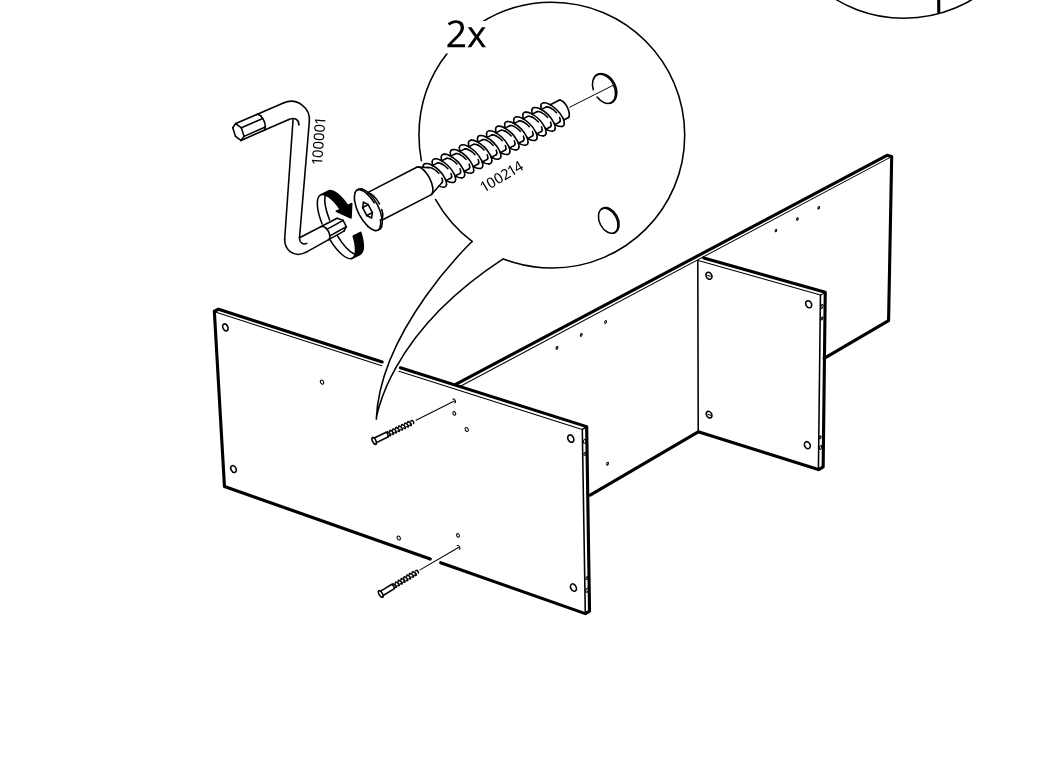
    Diagram for step 5: Two screws (100214) are driven into the side panel using the included hex key to secure the assembly.
  10. Step 6

    The user identifies board orientation with corner close-ups and installs three 109220 bracket plates on each of two long panels using 105248 screws tightened with a screwdriver.
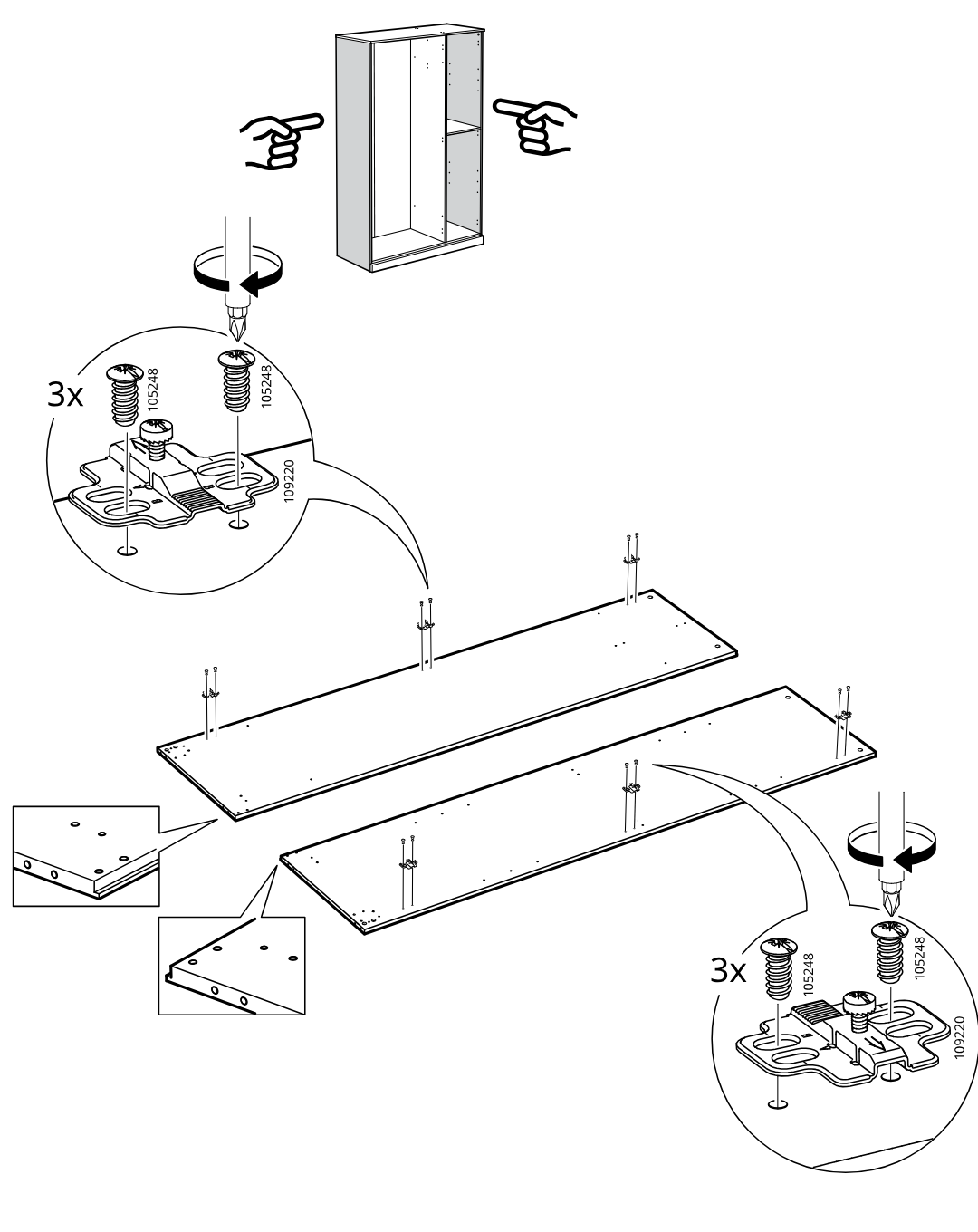
    Diagram for step 6: The user identifies board orientation with corner close-ups and installs three 109220 bracket plates on each of two long panels using 105248 screws tightened with a screwdriver.
  11. Step 7

    Eight cam screws (118331) are inserted and tightened into the predrilled holes on the long and short panels, as shown in the zoomed detail.
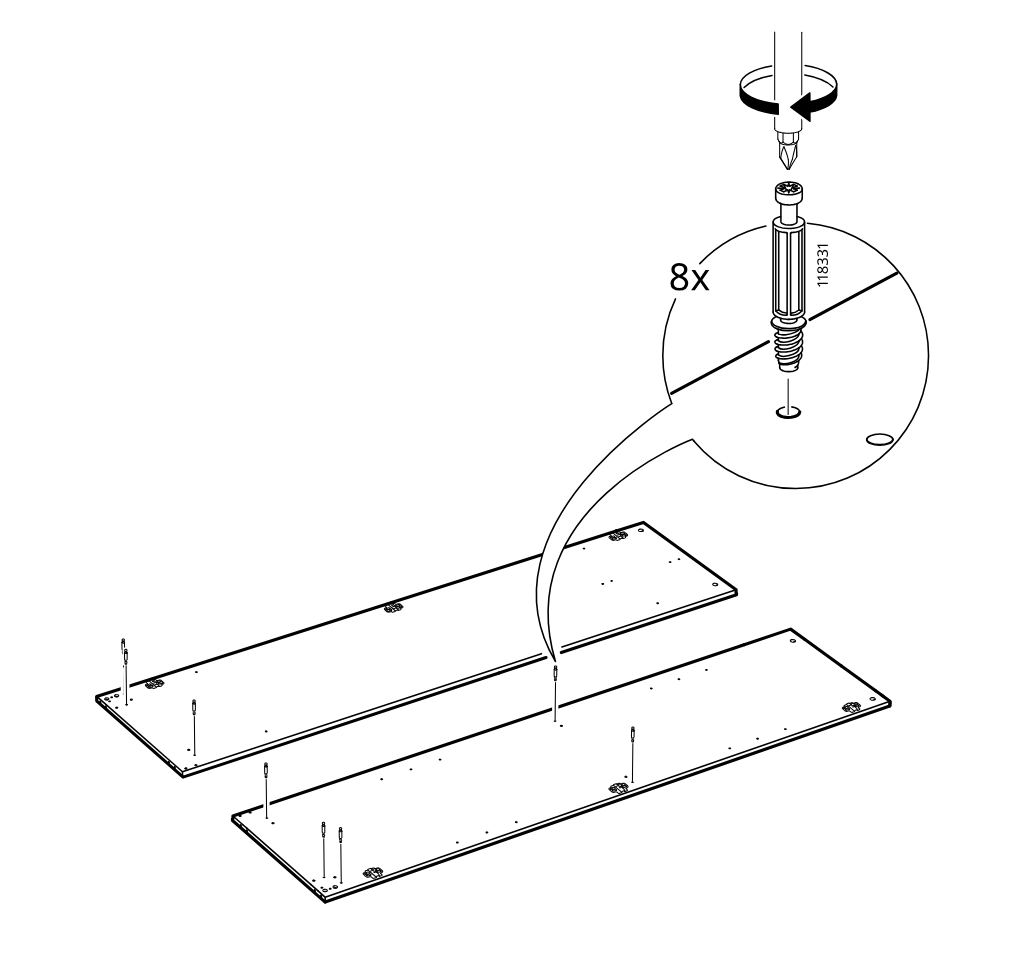
    Diagram for step 7: Eight cam screws (118331) are inserted and tightened into the predrilled holes on the long and short panels, as shown in the zoomed detail.
  12. Step 8

    The side and divider panels are aligned onto the long panel and six wooden dowels (101345) are inserted at the indicated joints, as shown in the zoom callout.
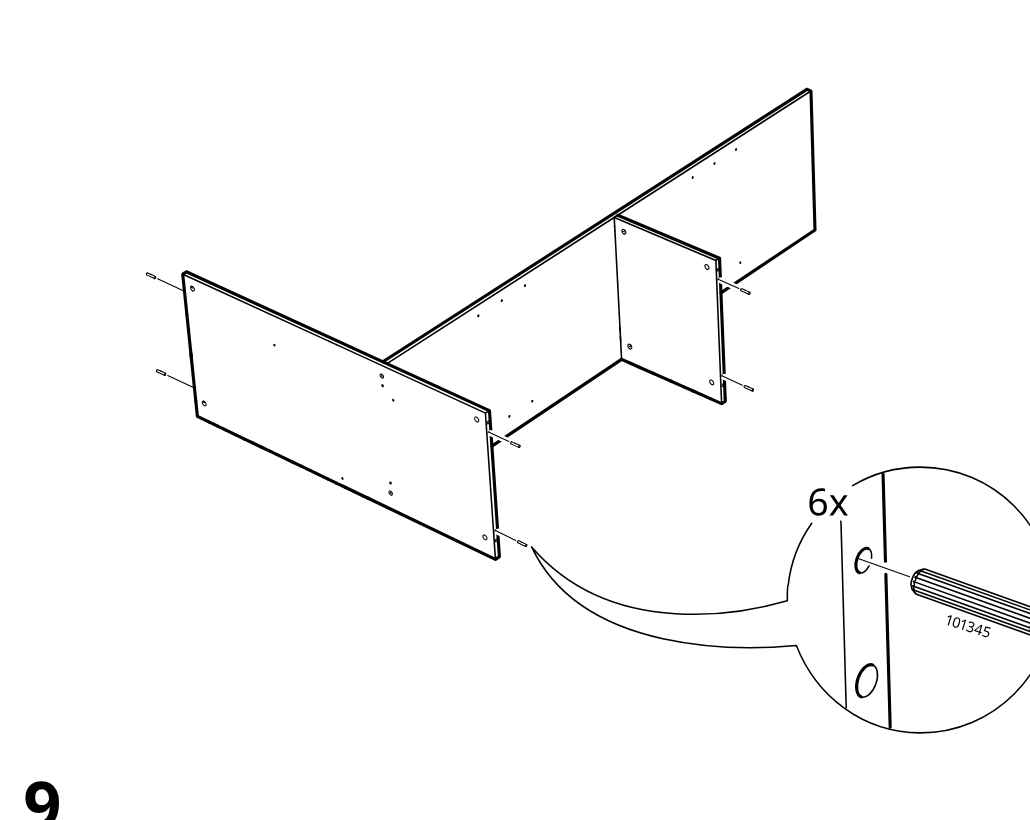
    Diagram for step 8: The side and divider panels are aligned onto the long panel and six wooden dowels (101345) are inserted at the indicated joints, as shown in the zoom callout.
  13. Step 9

    A large panel is brought into position and connected to the partially assembled frame to continue forming the cabinet body.
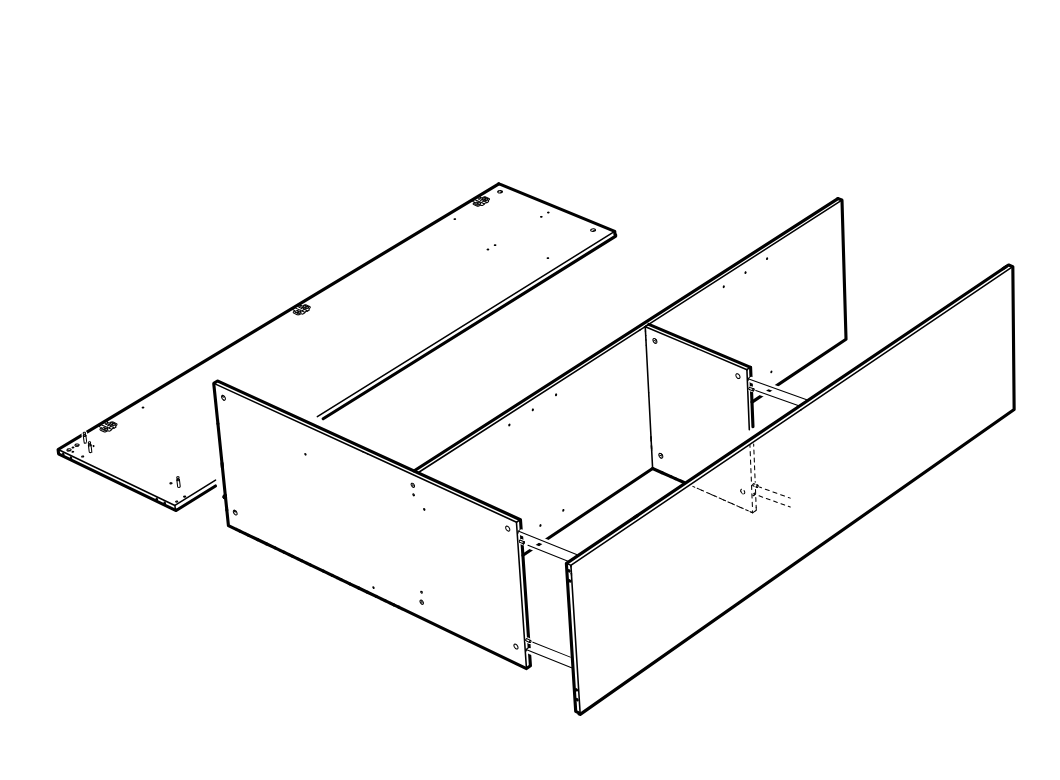
    Diagram for step 9: A large panel is brought into position and connected to the partially assembled frame to continue forming the cabinet body.
  14. Step 10

    The cabinet frame is assembled and four cam locks are inserted and tightened using a screwdriver, as shown in the two zoom callouts.
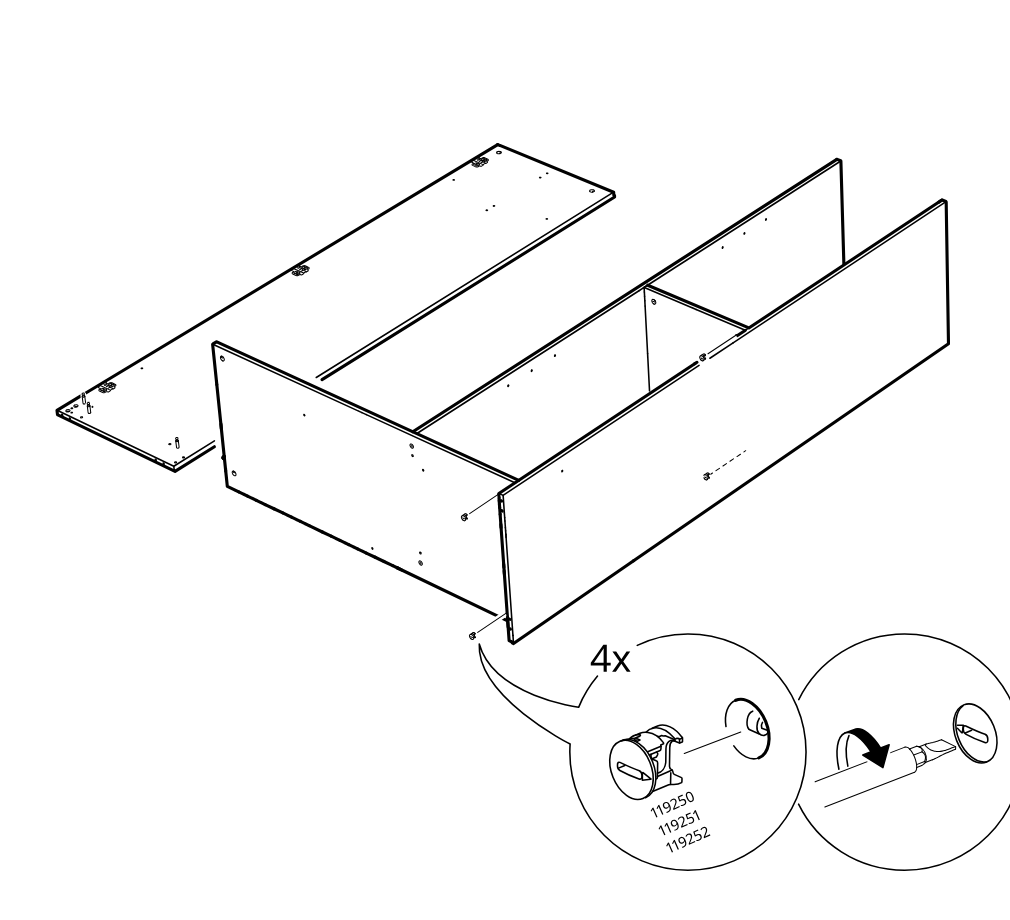
    Diagram for step 10: The cabinet frame is assembled and four cam locks are inserted and tightened using a screwdriver, as shown in the two zoom callouts.
  15. Step 11

    Attach two angle brackets to both ends of the long rail using two screws per bracket, as shown in the zoom inset.
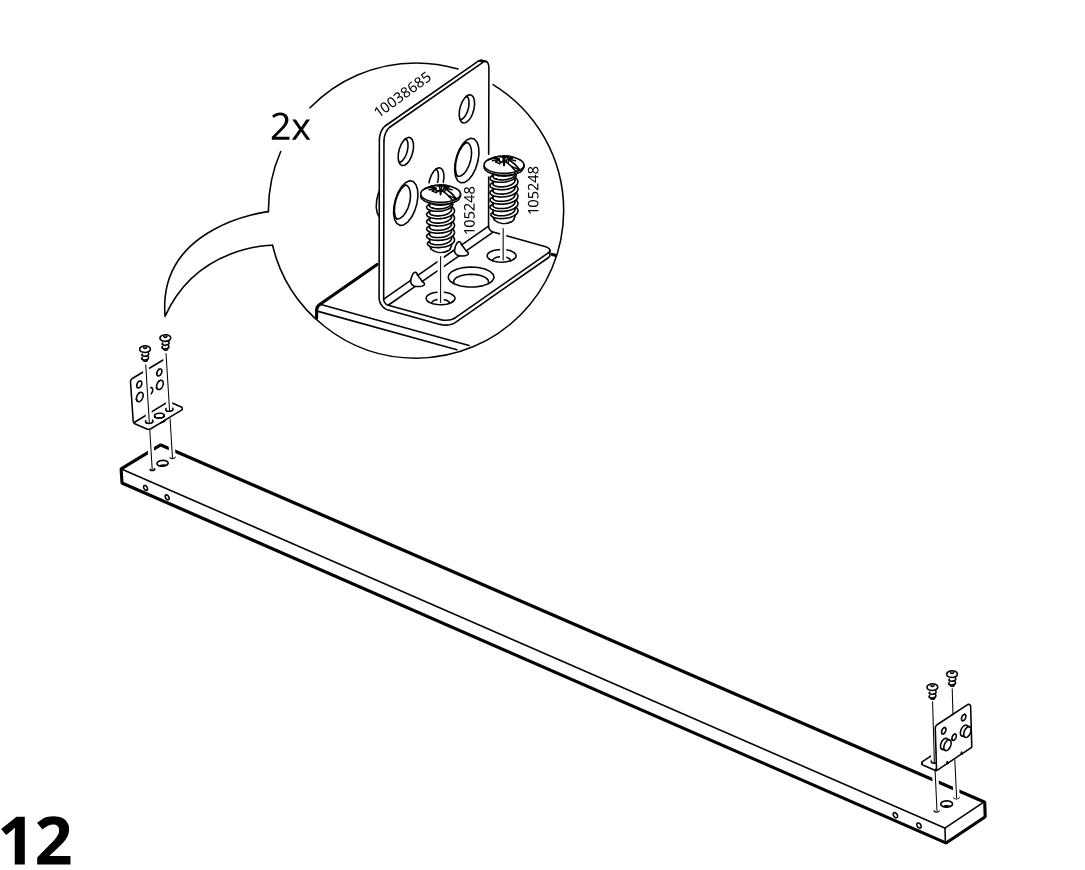
    Diagram for step 11: Attach two angle brackets to both ends of the long rail using two screws per bracket, as shown in the zoom inset.
  16. Step 12

    Slide two end caps onto the protruding pins at the rail ends and press them into place, as shown in the zoom inset.
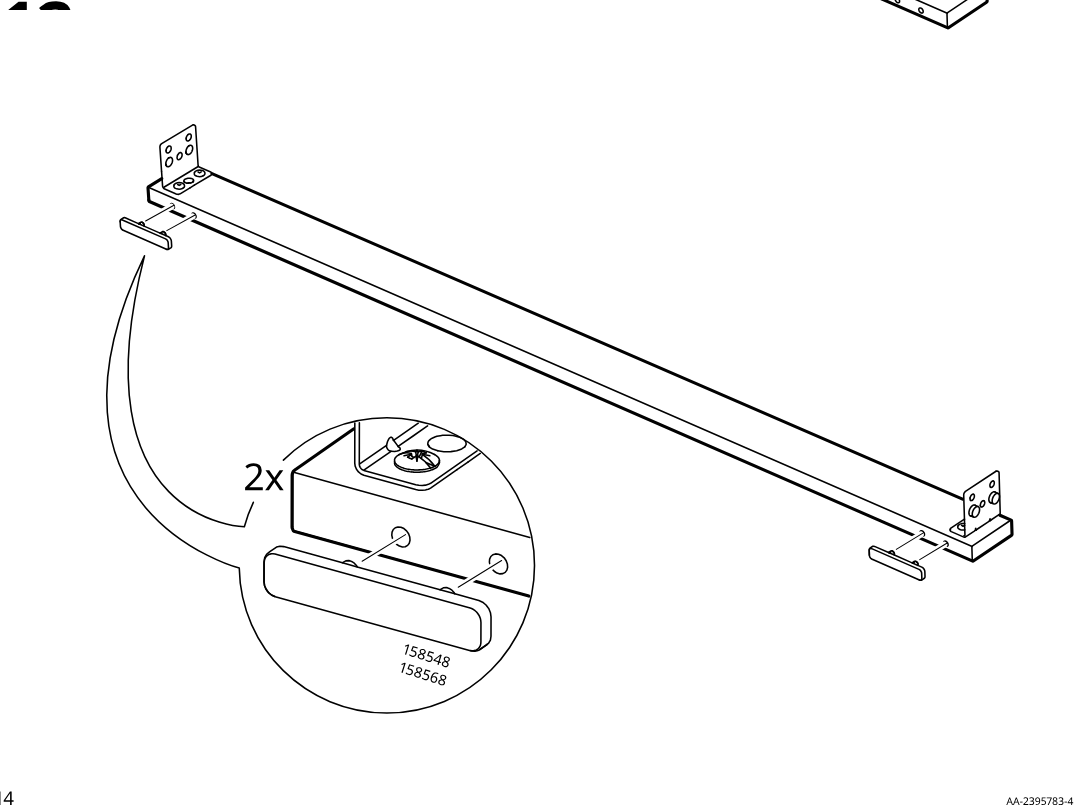
    Diagram for step 12: Slide two end caps onto the protruding pins at the rail ends and press them into place, as shown in the zoom inset.
  17. Step 13

    The side and internal panels are aligned and connected at the front corner using two screws (105248) in the shown bracketed joint.
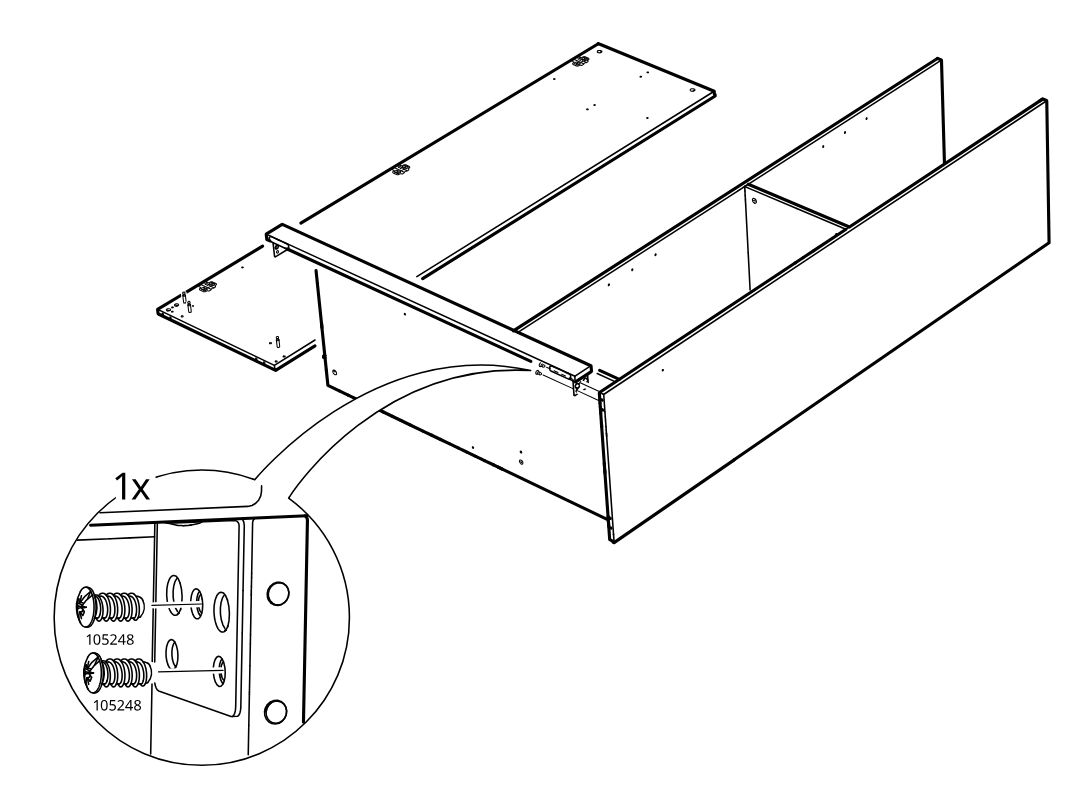
    Diagram for step 13: The side and internal panels are aligned and connected at the front corner using two screws (105248) in the shown bracketed joint.
  18. Step 14

    Two long rails are prepared by inserting six dowels (101345) into the predrilled end and side holes as indicated in the zoom callout.
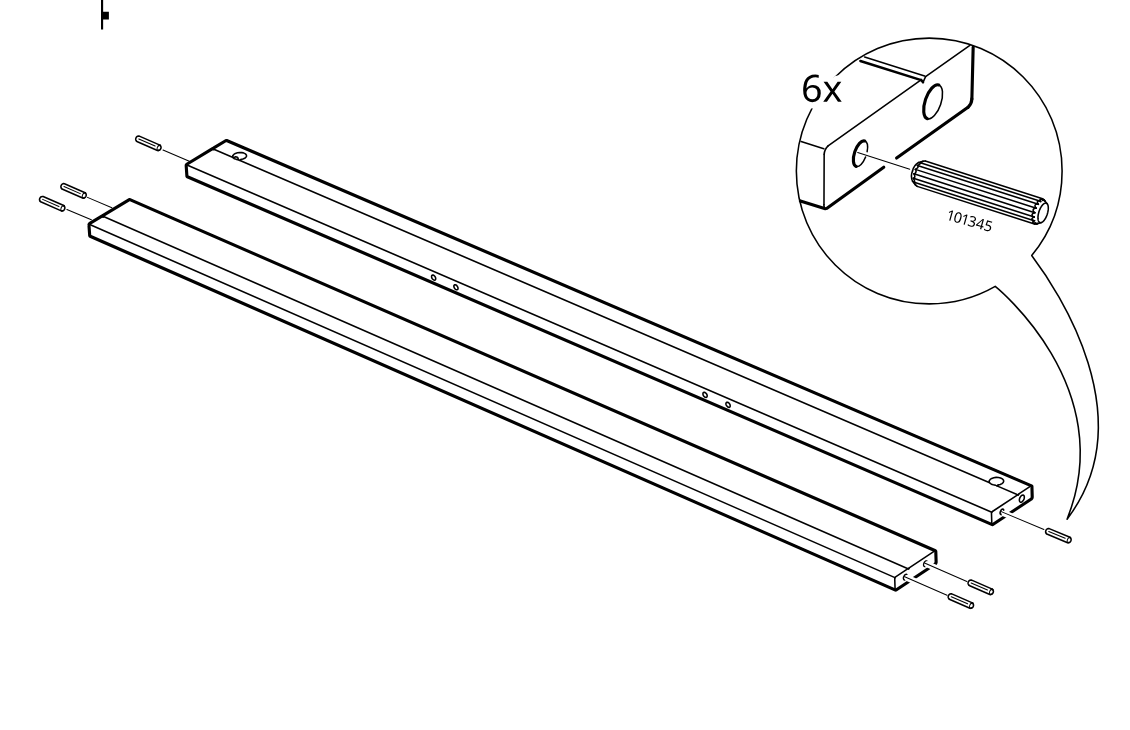
    Diagram for step 14: Two long rails are prepared by inserting six dowels (101345) into the predrilled end and side holes as indicated in the zoom callout.
  19. Step 15

    The front rail is slid into place on the side/front panel assembly, with inset guidance showing correct dowel alignment and forbidden orientation.
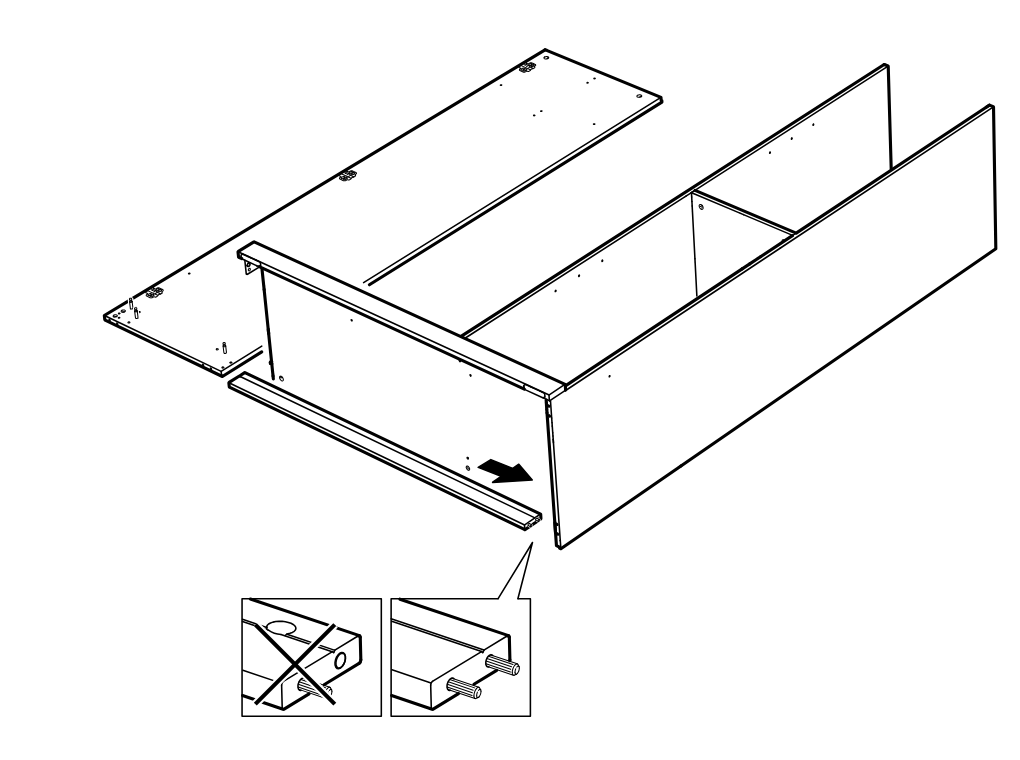
    Diagram for step 15: The front rail is slid into place on the side/front panel assembly, with inset guidance showing correct dowel alignment and forbidden orientation.
  20. Step 16

    Two people position and rotate the large side panel onto the frame while sliding the front rail to engage and align the connections.
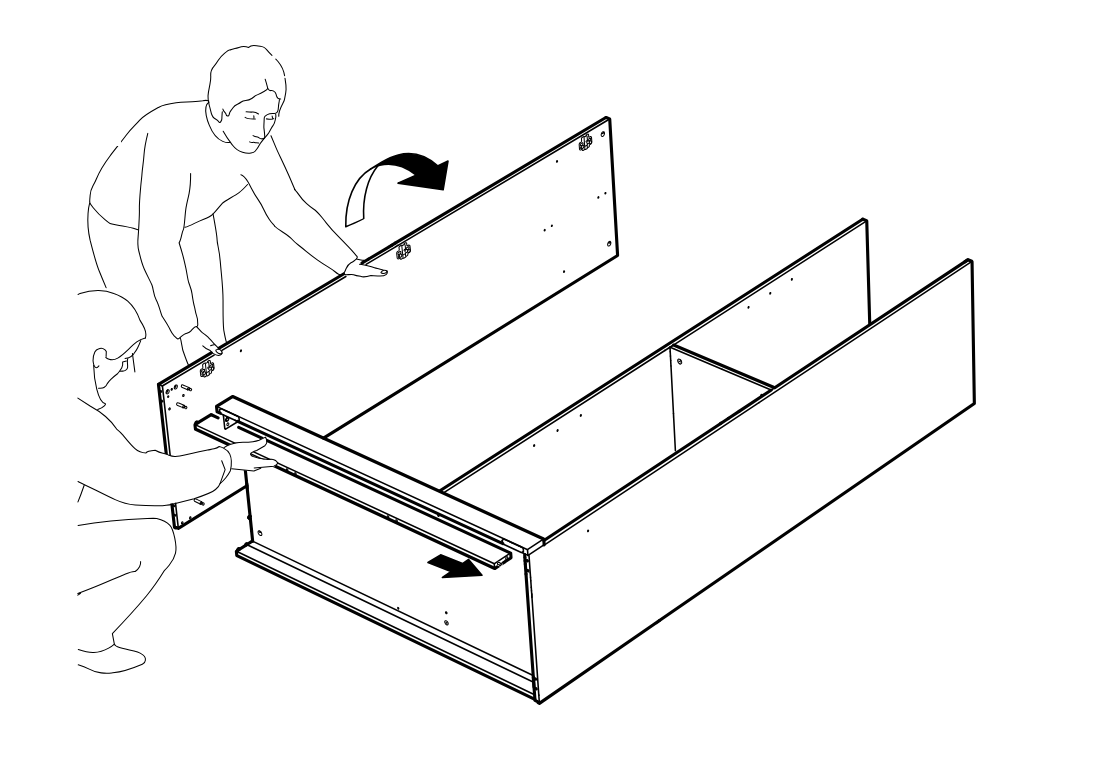
    Diagram for step 16: Two people position and rotate the large side panel onto the frame while sliding the front rail to engage and align the connections.
  21. Step 17

    The cam locks are inserted and turned to secure the upper side panel assembly, with a zoom callout showing the lock orientation and rotation.
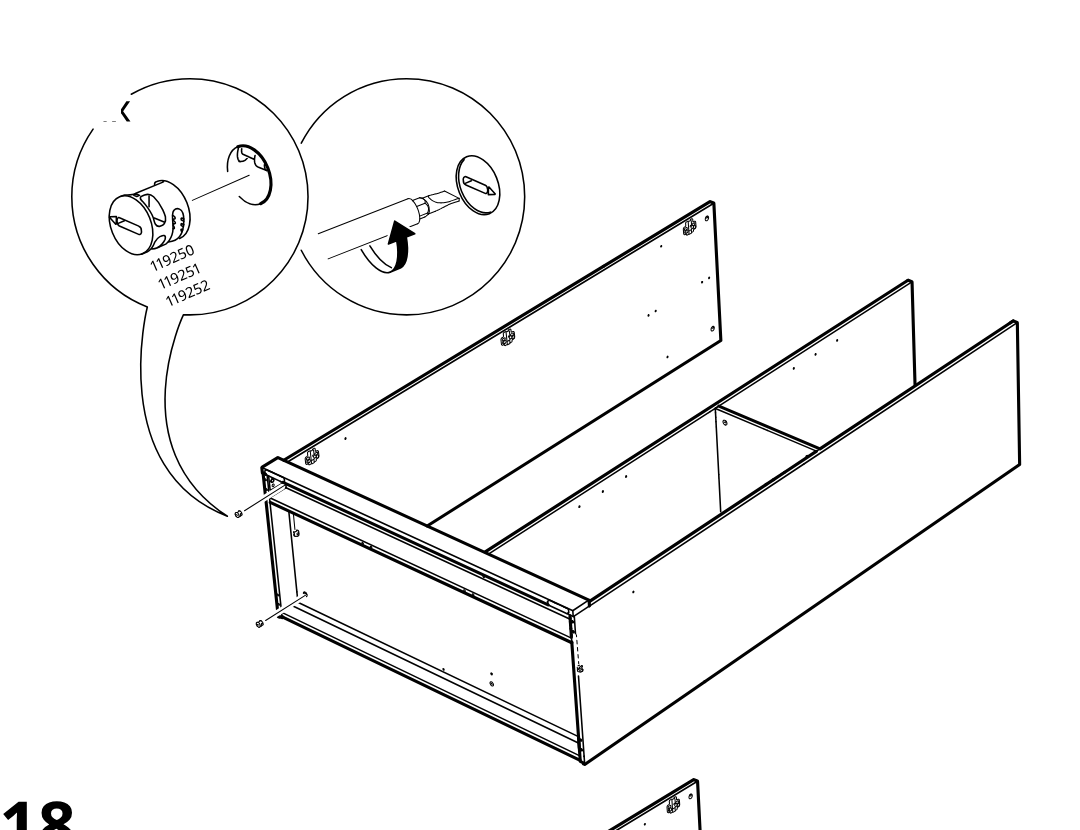
    Diagram for step 17: The cam locks are inserted and turned to secure the upper side panel assembly, with a zoom callout showing the lock orientation and rotation.
  22. Step 18

    Two screws are driven into the front corner bracket to fasten the lower frame connection, as shown in the enlarged zoom detail.
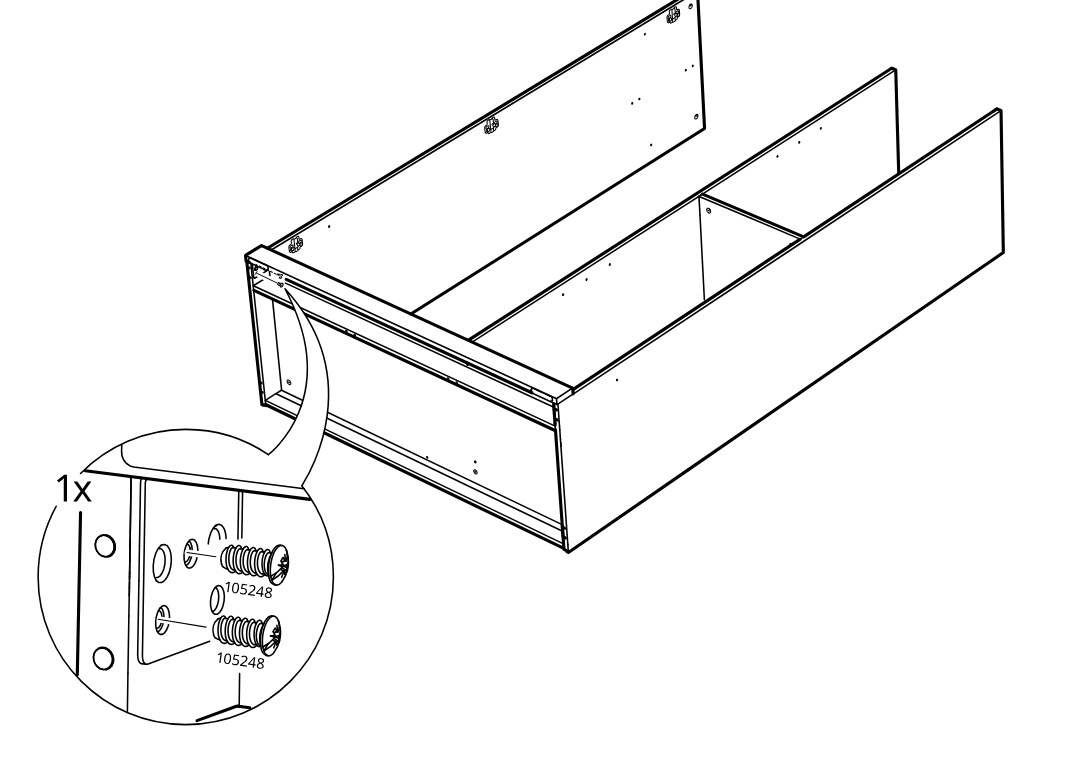
    Diagram for step 18: Two screws are driven into the front corner bracket to fasten the lower frame connection, as shown in the enlarged zoom detail.
  23. Step 19

    Attach three angle brackets to the front inside area using screw 105248 into bracket 102553 with a screwdriver.
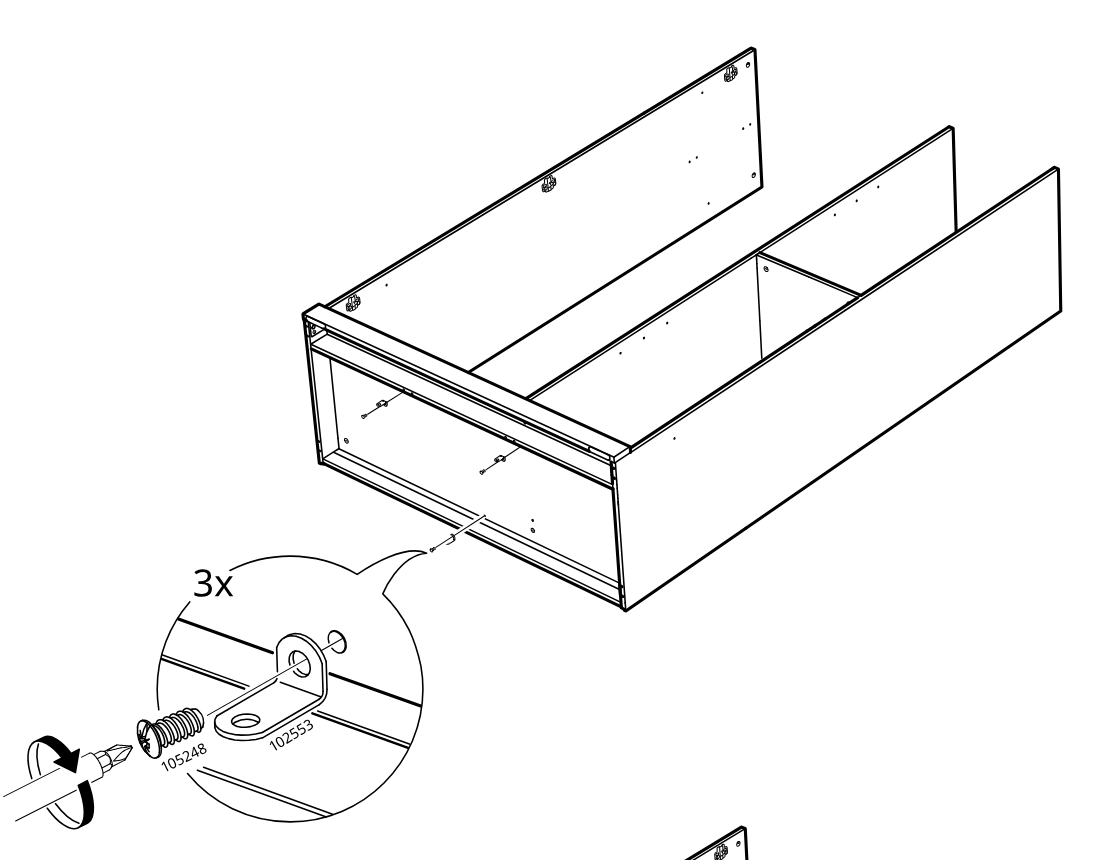
    Diagram for step 19: Attach three angle brackets to the front inside area using screw 105248 into bracket 102553 with a screwdriver.
  24. Step 20

    Fasten three screws 109049 vertically into the same bracket points and use only the approved screw type, not 109567.
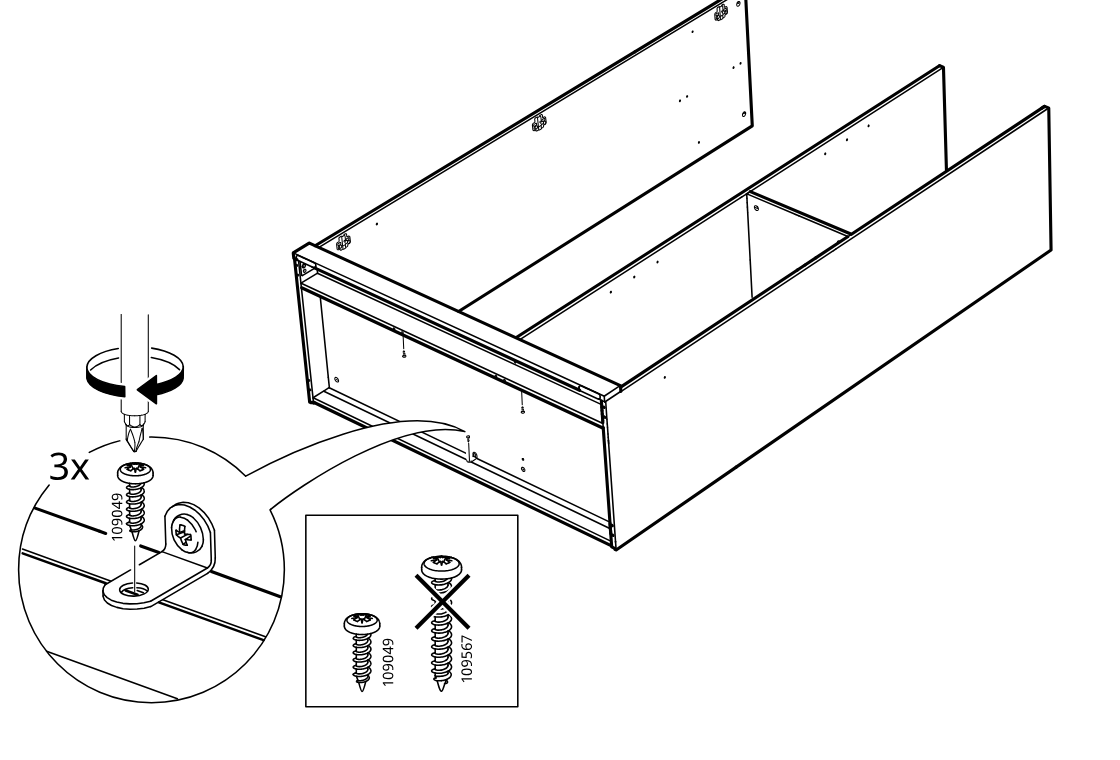
    Diagram for step 20: Fasten three screws 109049 vertically into the same bracket points and use only the approved screw type, not 109567.
  25. Step 21

    Six wooden dowels are inserted into the side panel and the panel is positioned onto the drawer-like frame assembly.
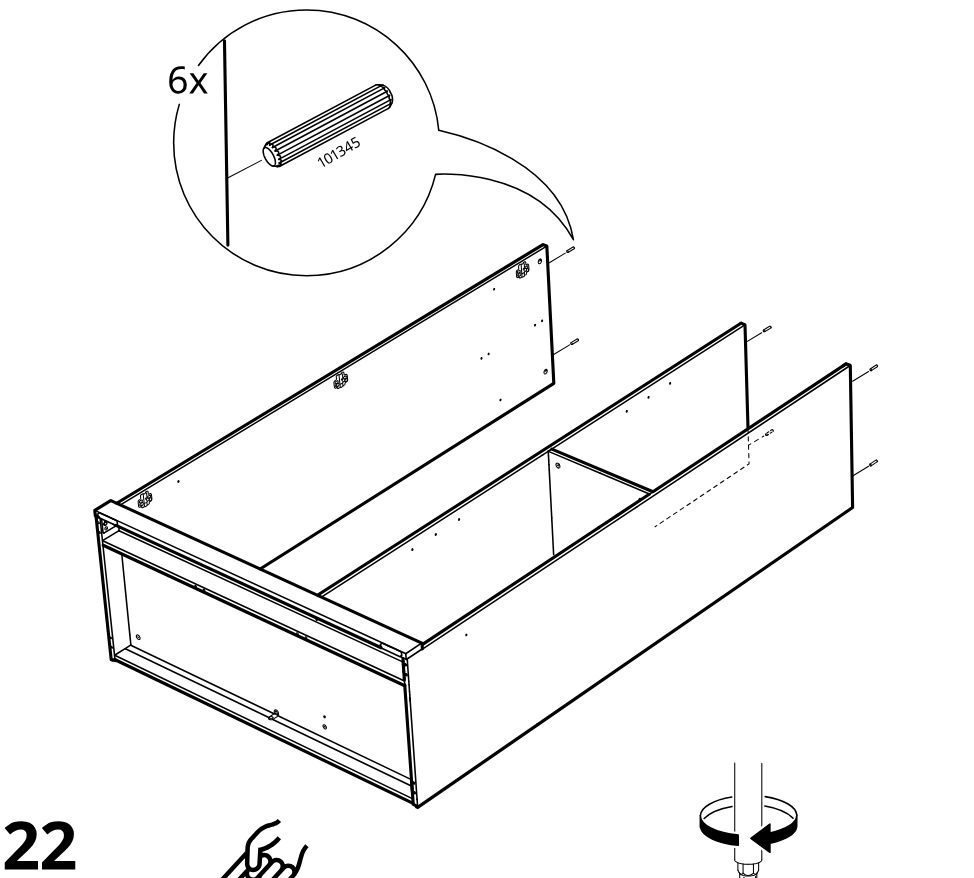
    Diagram for step 21: Six wooden dowels are inserted into the side panel and the panel is positioned onto the drawer-like frame assembly.
  26. Step 22

    Four cam screws are installed into the large bottom panel, with a close-up showing screw orientation and the board edge direction.
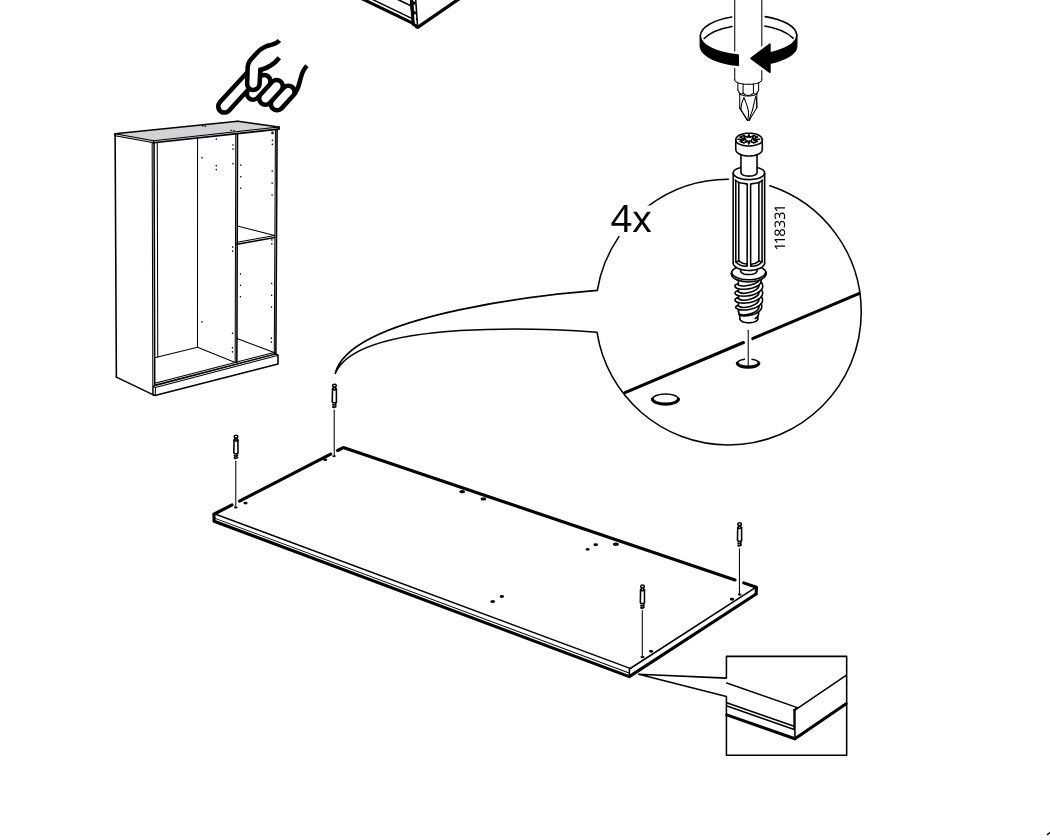
    Diagram for step 22: Four cam screws are installed into the large bottom panel, with a close-up showing screw orientation and the board edge direction.
  27. Step 23

    Insert three 101239/1002840 studs into the board and tap them in with a hammer, as shown in the zoom callout.
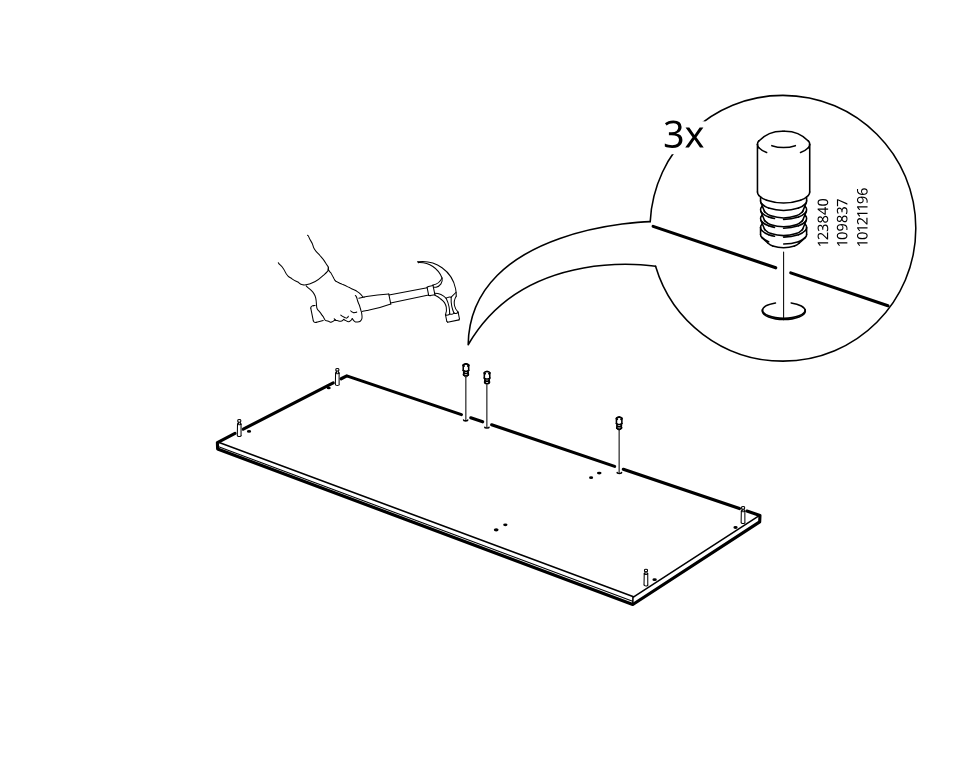
    Diagram for step 23: Insert three 101239/1002840 studs into the board and tap them in with a hammer, as shown in the zoom callout.
  28. Step 24

    Place the prepared top panel onto the cabinet frame, aligning it with the side and inner divider panels.
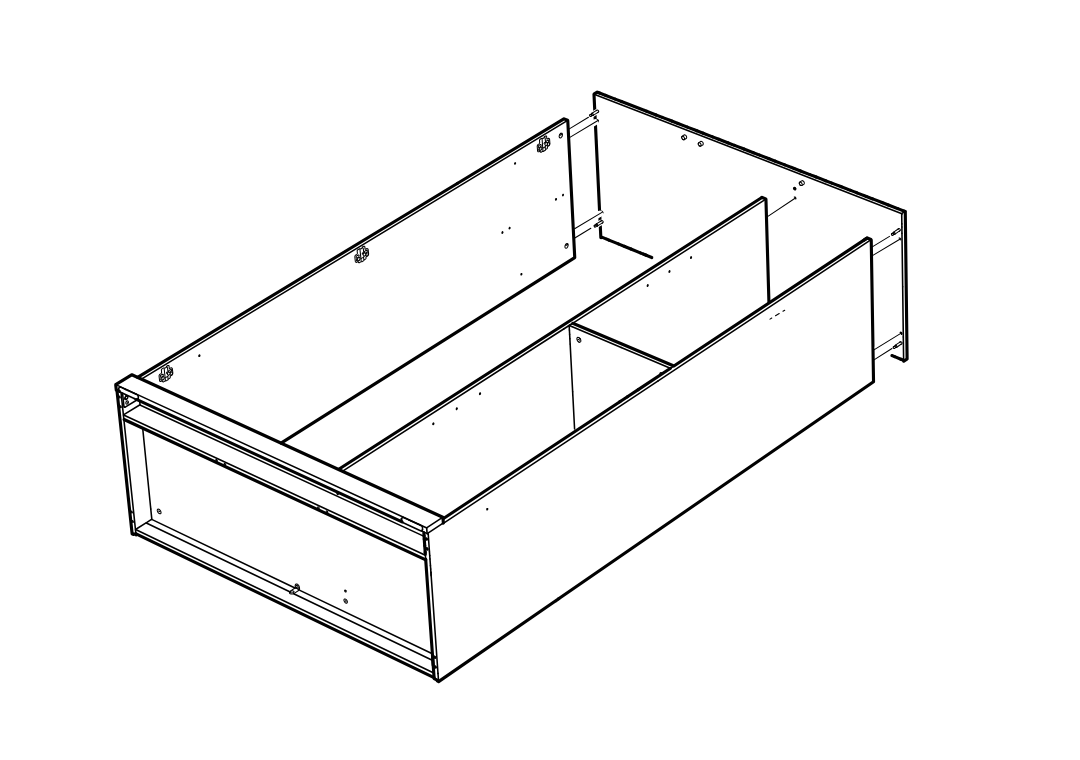
    Diagram for step 24: Place the prepared top panel onto the cabinet frame, aligning it with the side and inner divider panels.
  29. Step 25

    The builder inserts and turns four cam lock covers/fittings into the cabinet side holes using a flat screwdriver.
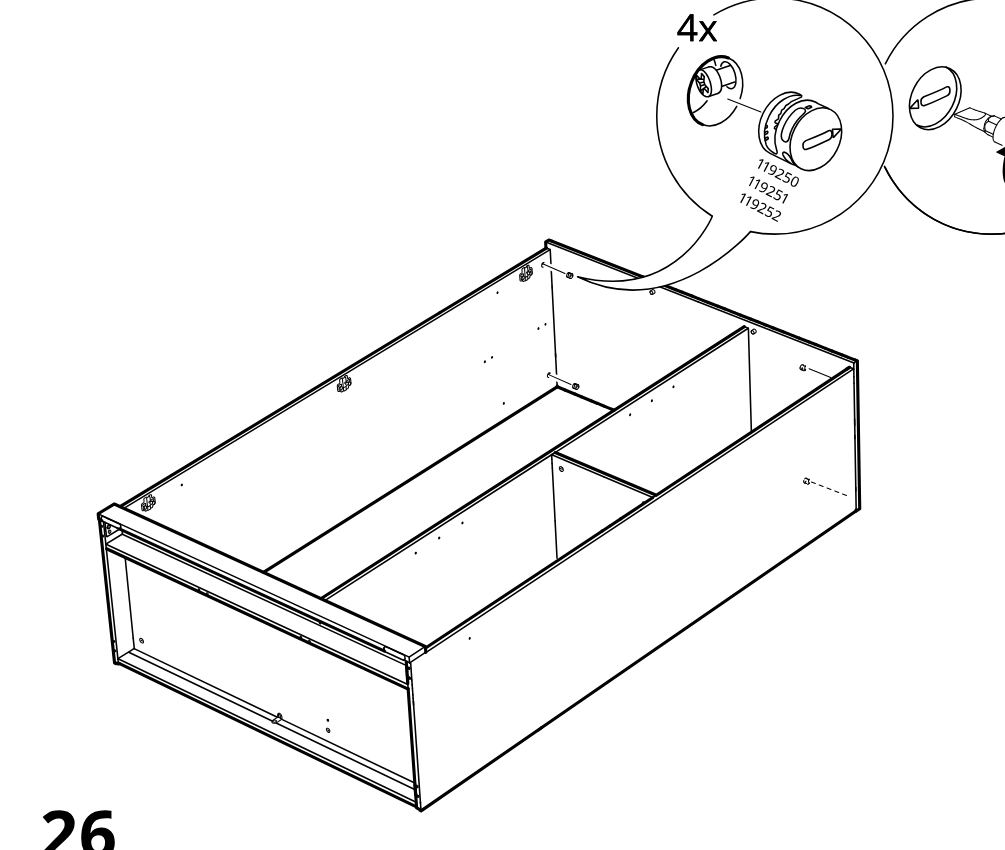
    Diagram for step 25: The builder inserts and turns four cam lock covers/fittings into the cabinet side holes using a flat screwdriver.
  30. Step 26

    The builder drives two long screws into the right side of the cabinet using the included hex key.
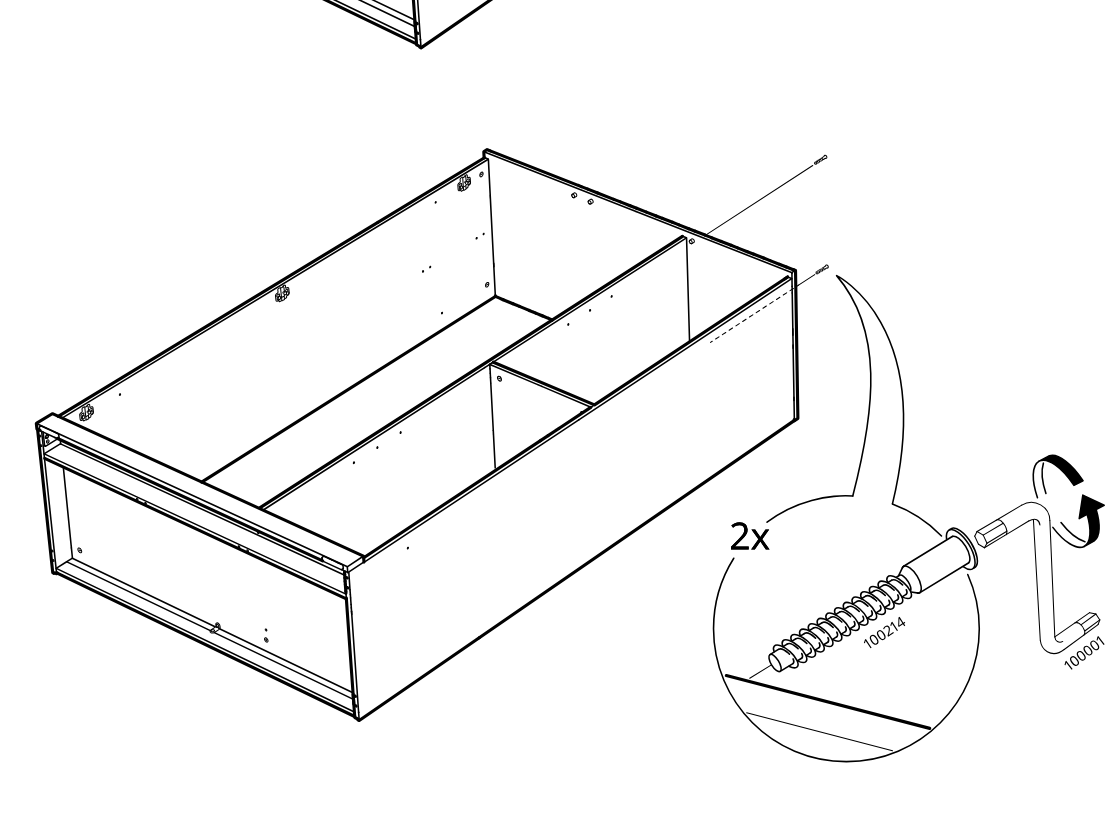
    Diagram for step 26: The builder drives two long screws into the right side of the cabinet using the included hex key.
  31. Step 27

    The assembler inserts and taps in six side pegs/plugs at the marked front holes using a hammer.
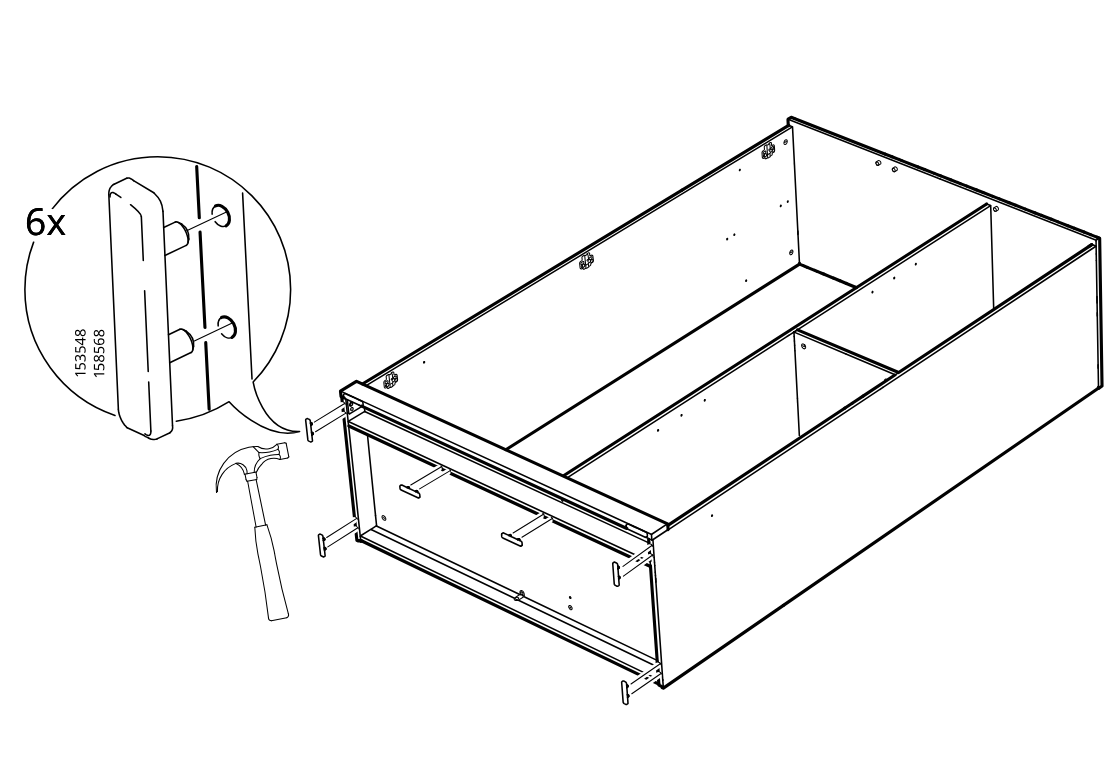
    Diagram for step 27: The assembler inserts and taps in six side pegs/plugs at the marked front holes using a hammer.
  32. Step 28

    Two people rotate the assembled frame over together in the direction shown by the curved arrow.
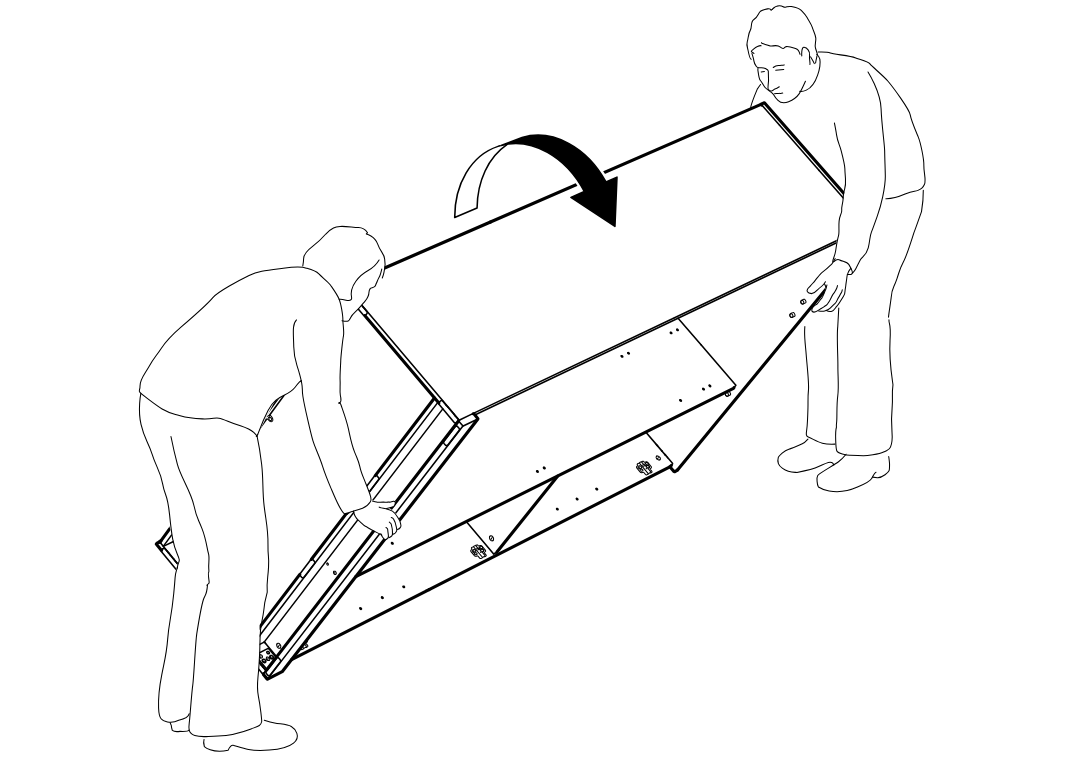
    Diagram for step 28: Two people rotate the assembled frame over together in the direction shown by the curved arrow.
  33. Step 29

    The panel is lowered onto the frame and aligned so the seam sits correctly, with callouts showing the correct placement and an incorrect offset position.
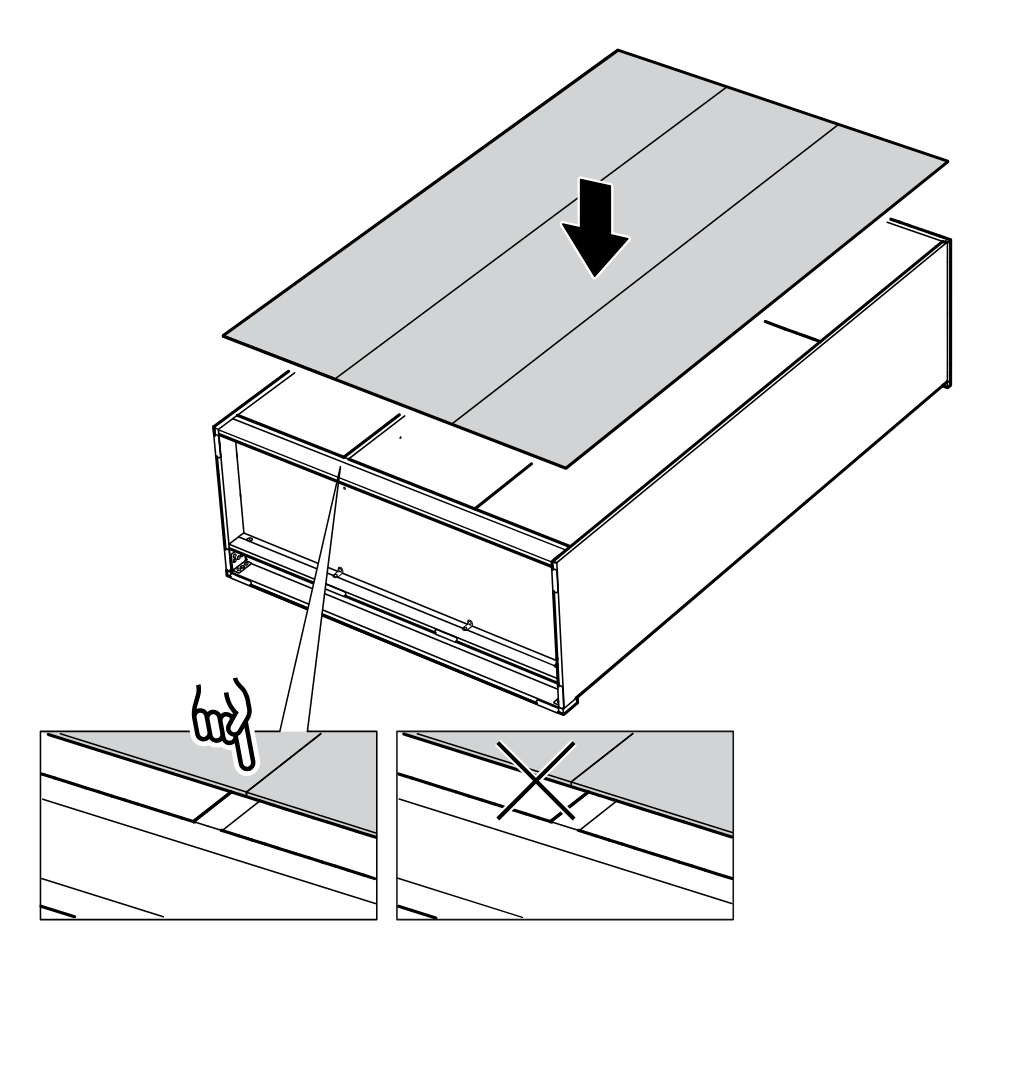
    Diagram for step 29: The panel is lowered onto the frame and aligned so the seam sits correctly, with callouts showing the correct placement and an incorrect offset position.
  34. Step 30

    Install one 105494 clip with pin 101293 into the top corner hole and press it fully into position at the cabinet edge as indicated.
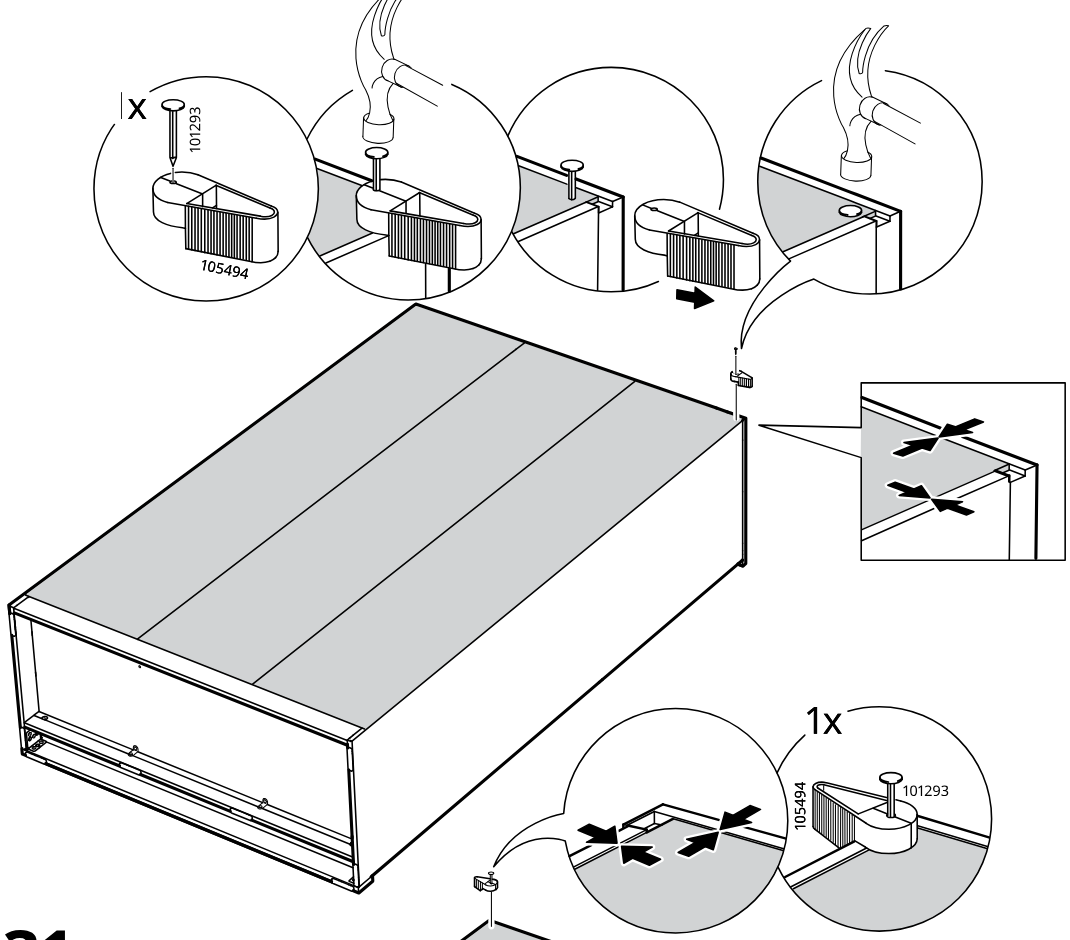
    Diagram for step 30: Install one 105494 clip with pin 101293 into the top corner hole and press it fully into position at the cabinet edge as indicated.
  35. Step 31

    Install one 105494 clip with pin 101293 at the next top corner position and press it into the seam until seated.
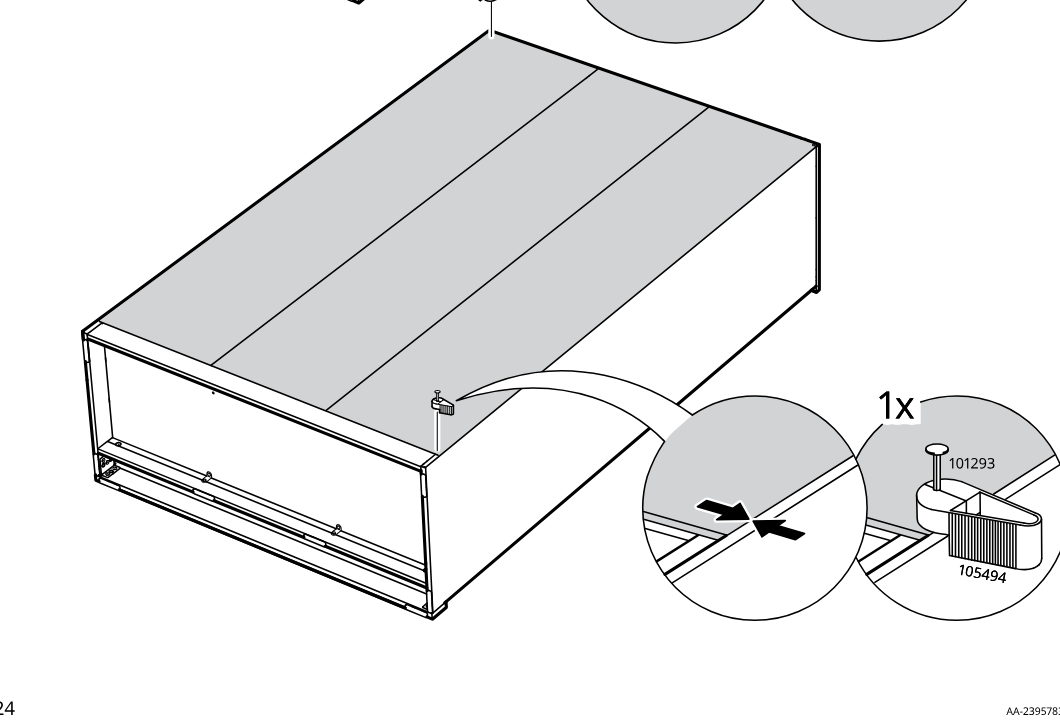
    Diagram for step 31: Install one 105494 clip with pin 101293 at the next top corner position and press it into the seam until seated.
  36. Step 32

    Press the panel joint into place and install one 101293 fastener at the indicated corner using part 105494.
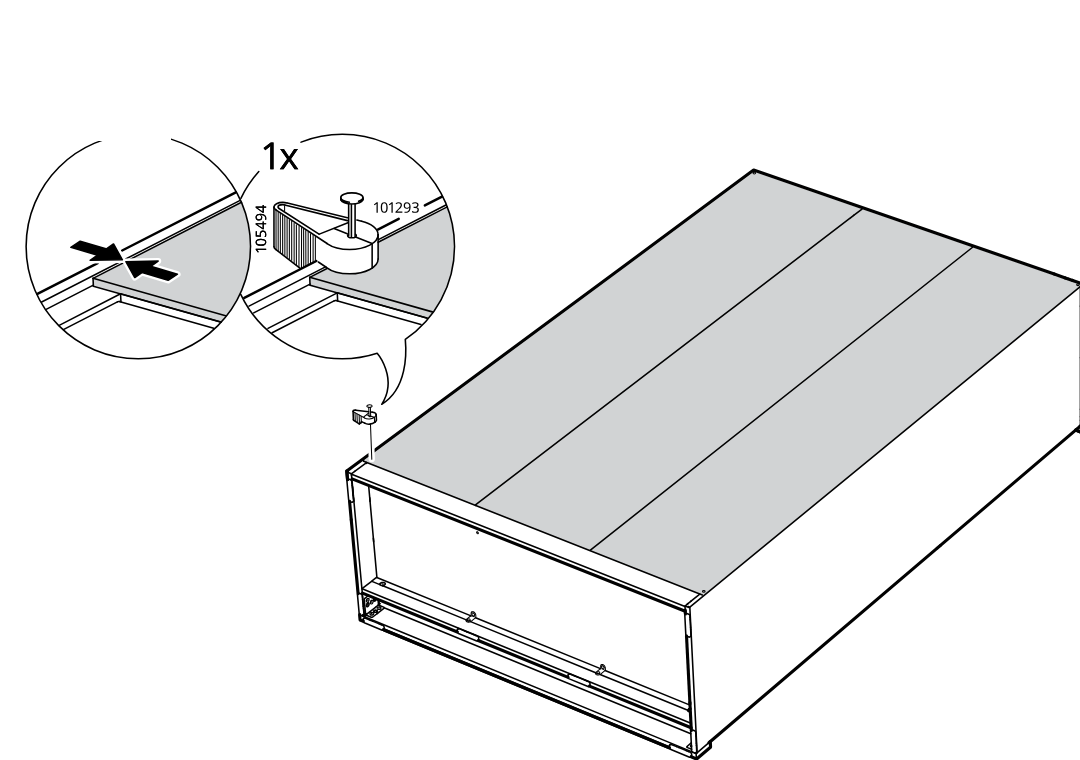
    Diagram for step 32: Press the panel joint into place and install one 101293 fastener at the indicated corner using part 105494.
  37. Step 33

    Install 35 of the 101293 fasteners with 105494 around the top perimeter of the unit.
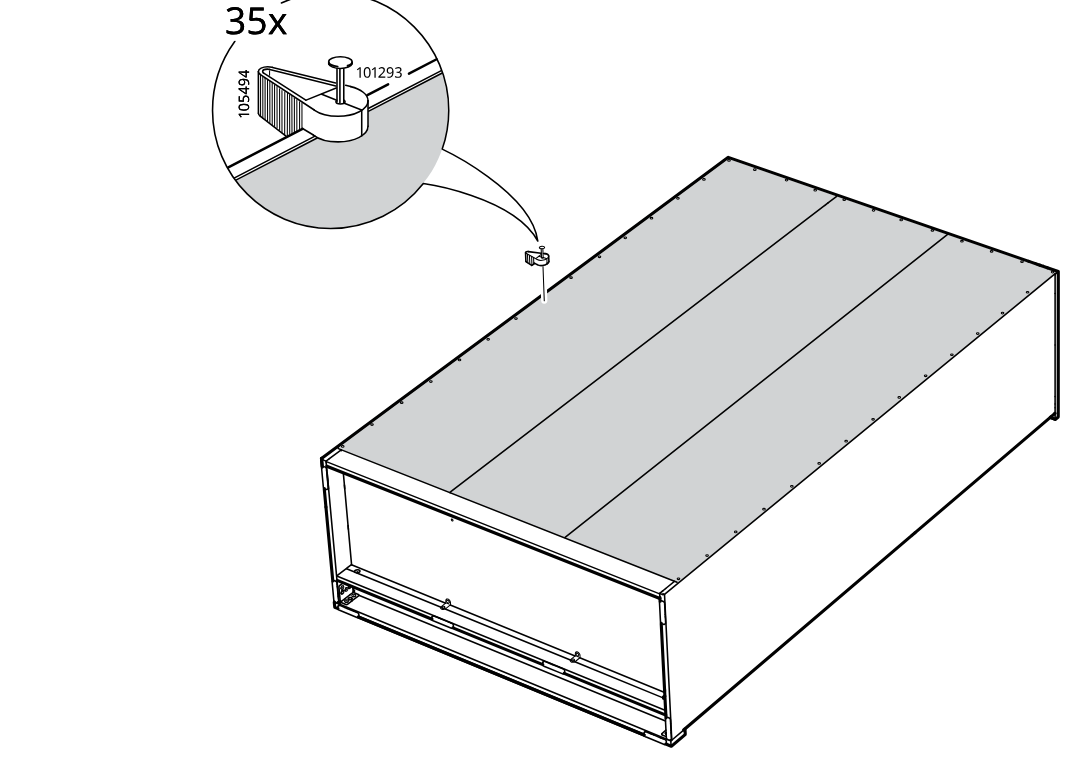
    Diagram for step 33: Install 35 of the 101293 fasteners with 105494 around the top perimeter of the unit.
  38. Step 34

    The assembler secures the back panel to the frame by hammering in part 101293 at two highlighted areas, 10 times each.
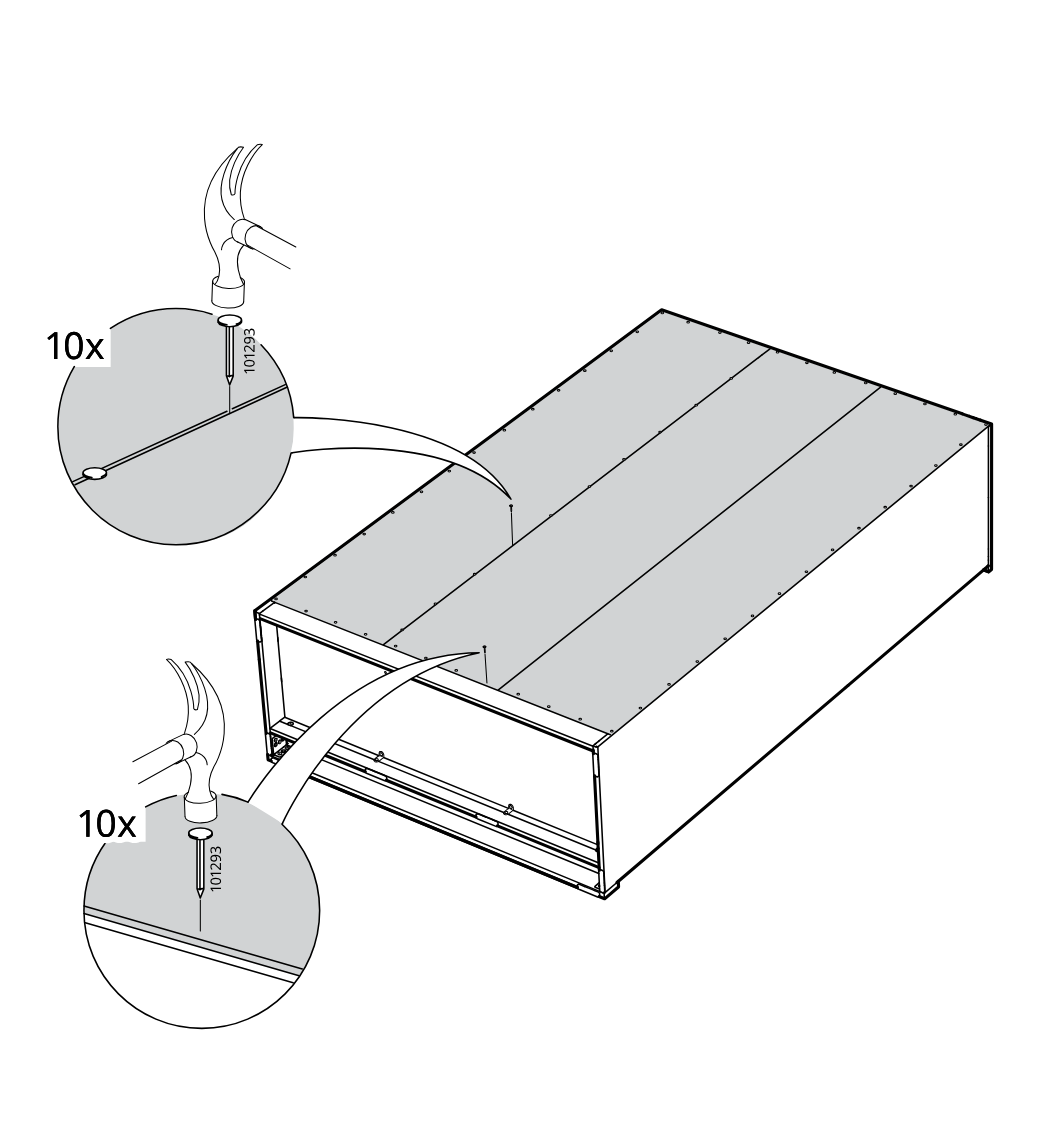
    Diagram for step 34: The assembler secures the back panel to the frame by hammering in part 101293 at two highlighted areas, 10 times each.
  39. Step 35

    Attach the two wall-fixing brackets with the specified washer and screw hardware, then lift and tilt the assembled unit upright with two people.
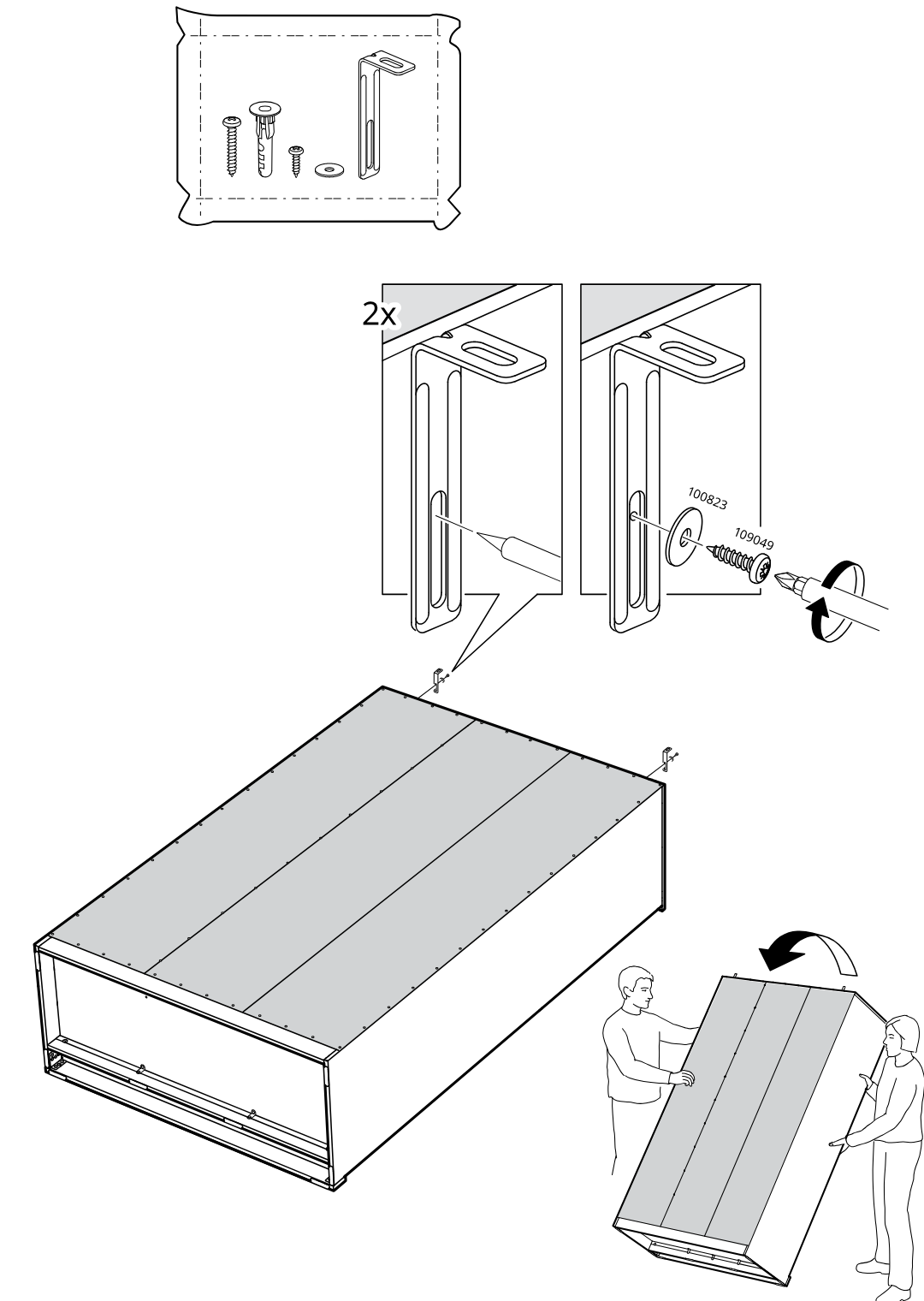
    Diagram for step 35: Attach the two wall-fixing brackets with the specified washer and screw hardware, then lift and tilt the assembled unit upright with two people.
  40. Step 36

    The cabinet is secured to the wall at two top brackets using wall-appropriate fasteners, with zoom callouts showing to position the bracket, mark, pre-drill, and tighten the screw.
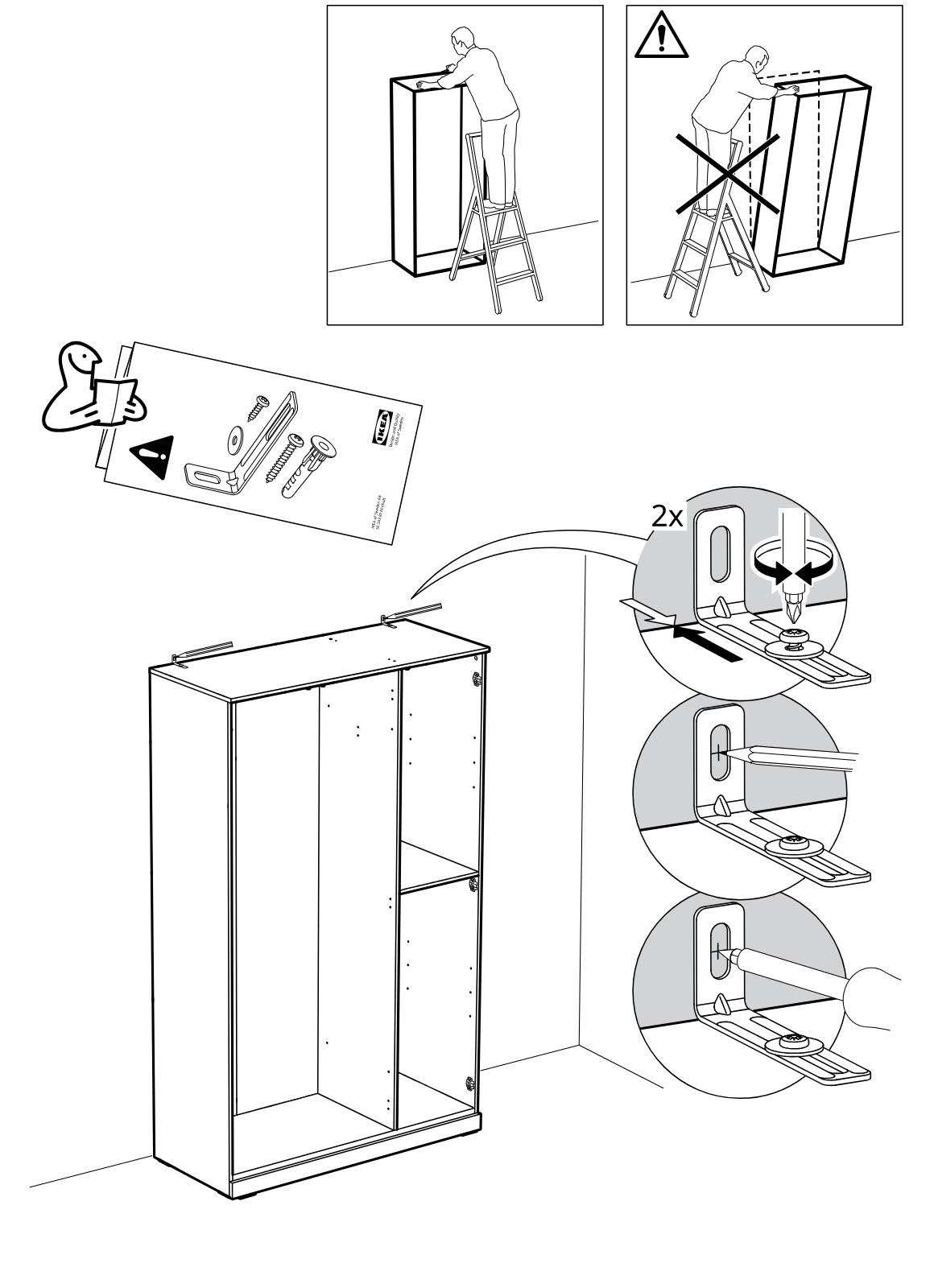
    Diagram for step 36: The cabinet is secured to the wall at two top brackets using wall-appropriate fasteners, with zoom callouts showing to position the bracket, mark, pre-drill, and tighten the screw.
  41. Step 37

    The cabinet frame is shown upright and positioned against the wall, with arrows indicating it should be moved back into place.
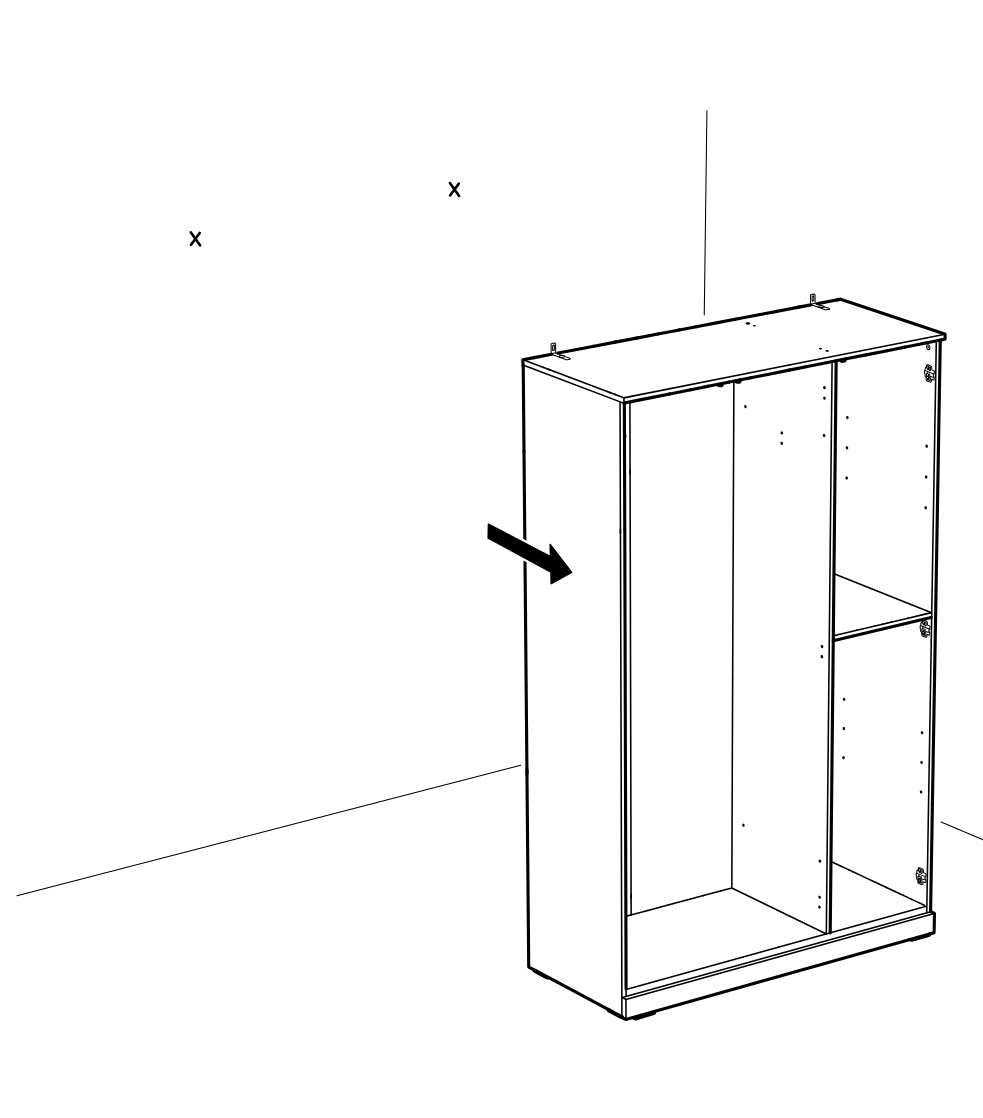
    Diagram for step 37: The cabinet frame is shown upright and positioned against the wall, with arrows indicating it should be moved back into place.
  42. Step 39

    The cabinet frame is shown upright while two top mounting brackets are secured using screws, with a zoomed inset indicating the screw orientation and tightening direction.
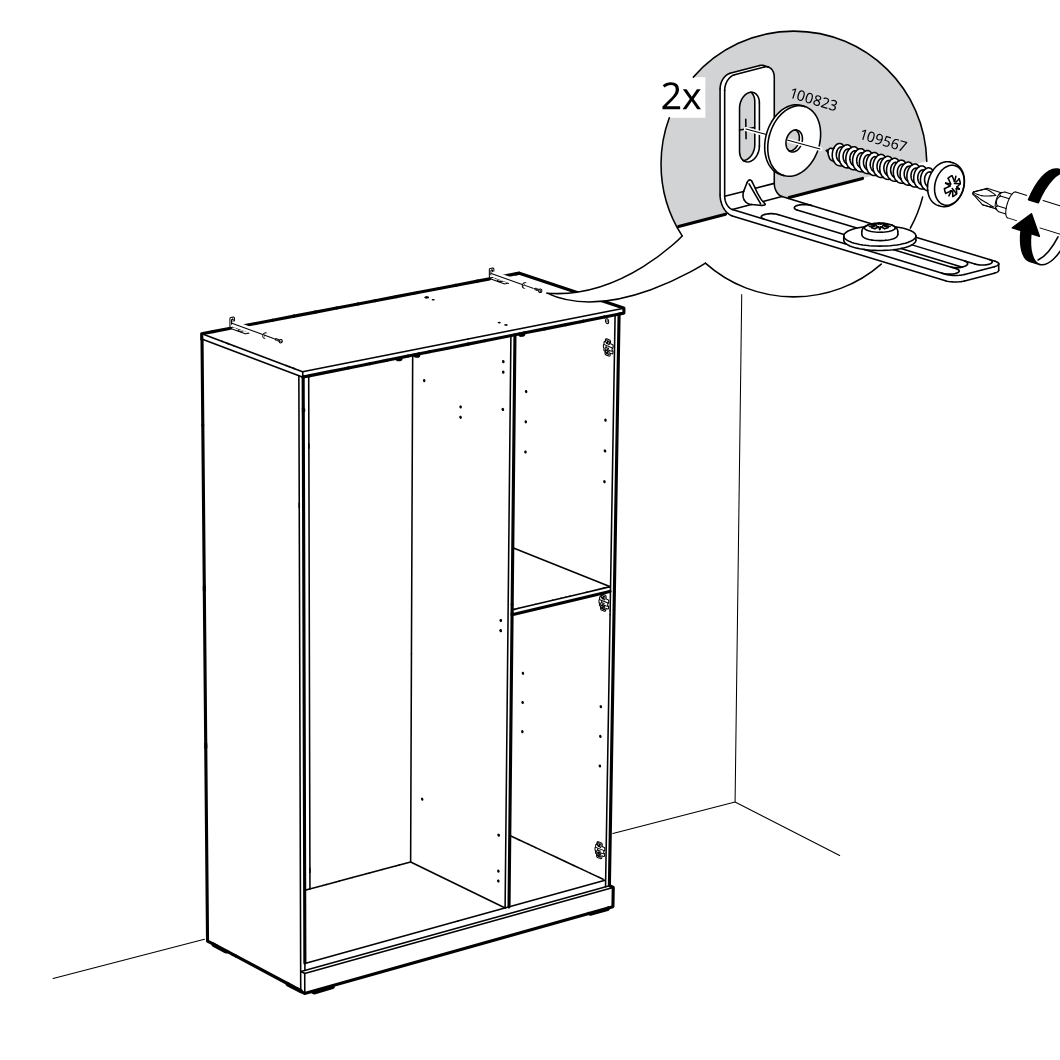
    Diagram for step 39: The cabinet frame is shown upright while two top mounting brackets are secured using screws, with a zoomed inset indicating the screw orientation and tightening direction.
  43. Step 40

    The bracket plates are positioned in the cabinet and secured with screws in three locations, with a zoom inset showing the plate orientation and tightening direction.
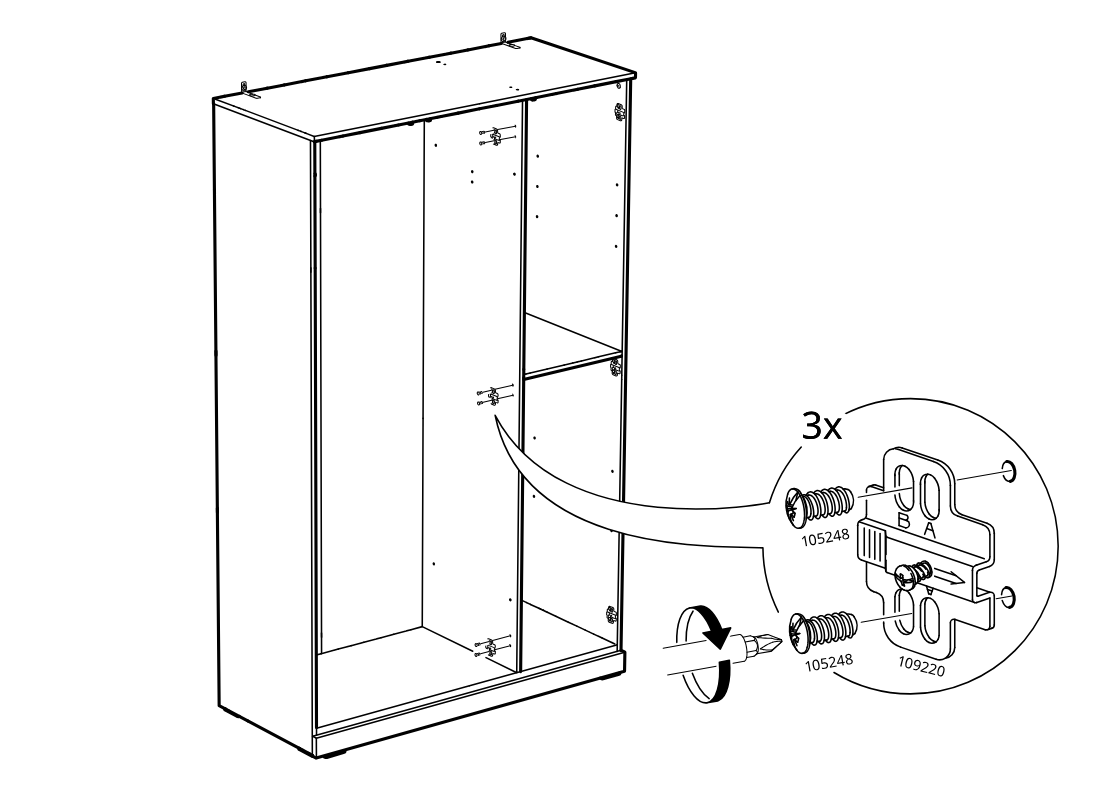
    Diagram for step 40: The bracket plates are positioned in the cabinet and secured with screws in three locations, with a zoom inset showing the plate orientation and tightening direction.
  44. Step 41

    Nine screws are tightened into the mounting plates on the laid-out door panels, with a zoom inset showing screwdriver rotation and fastener placement.
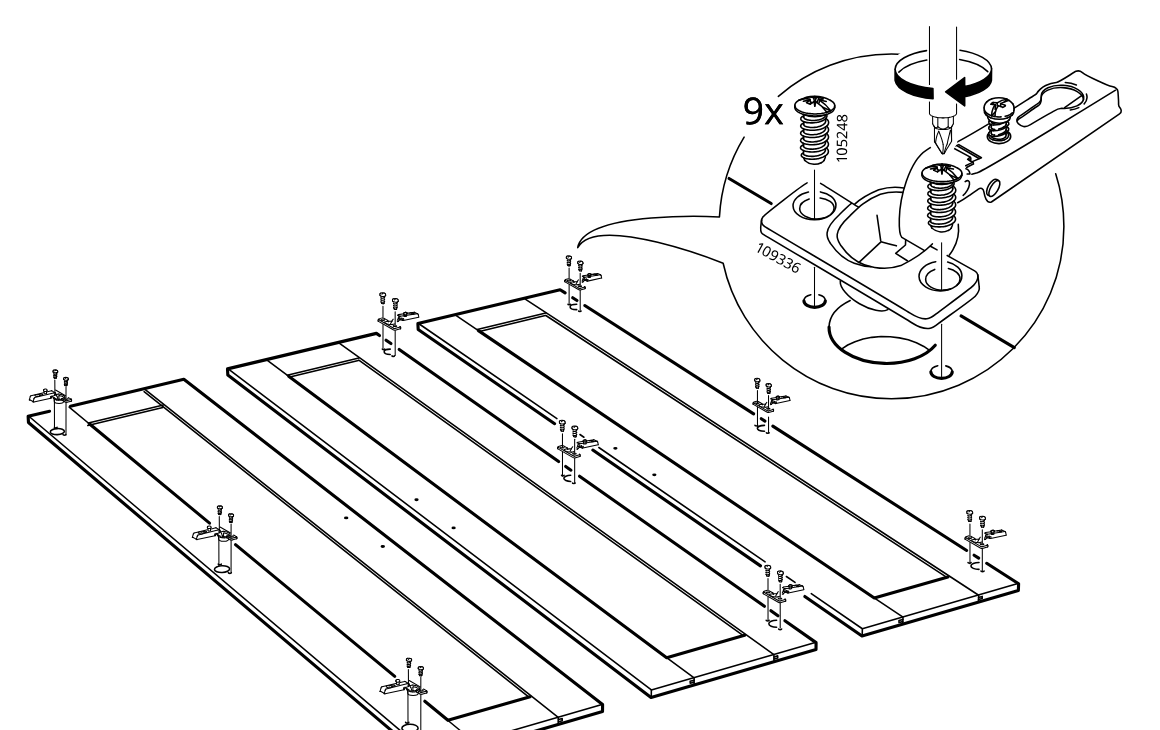
    Diagram for step 41: Nine screws are tightened into the mounting plates on the laid-out door panels, with a zoom inset showing screwdriver rotation and fastener placement.
  45. Step 42

    The door is aligned to the hinge plates and secured by tightening the hinge screws, repeated for a total of 9 hinge fixings.
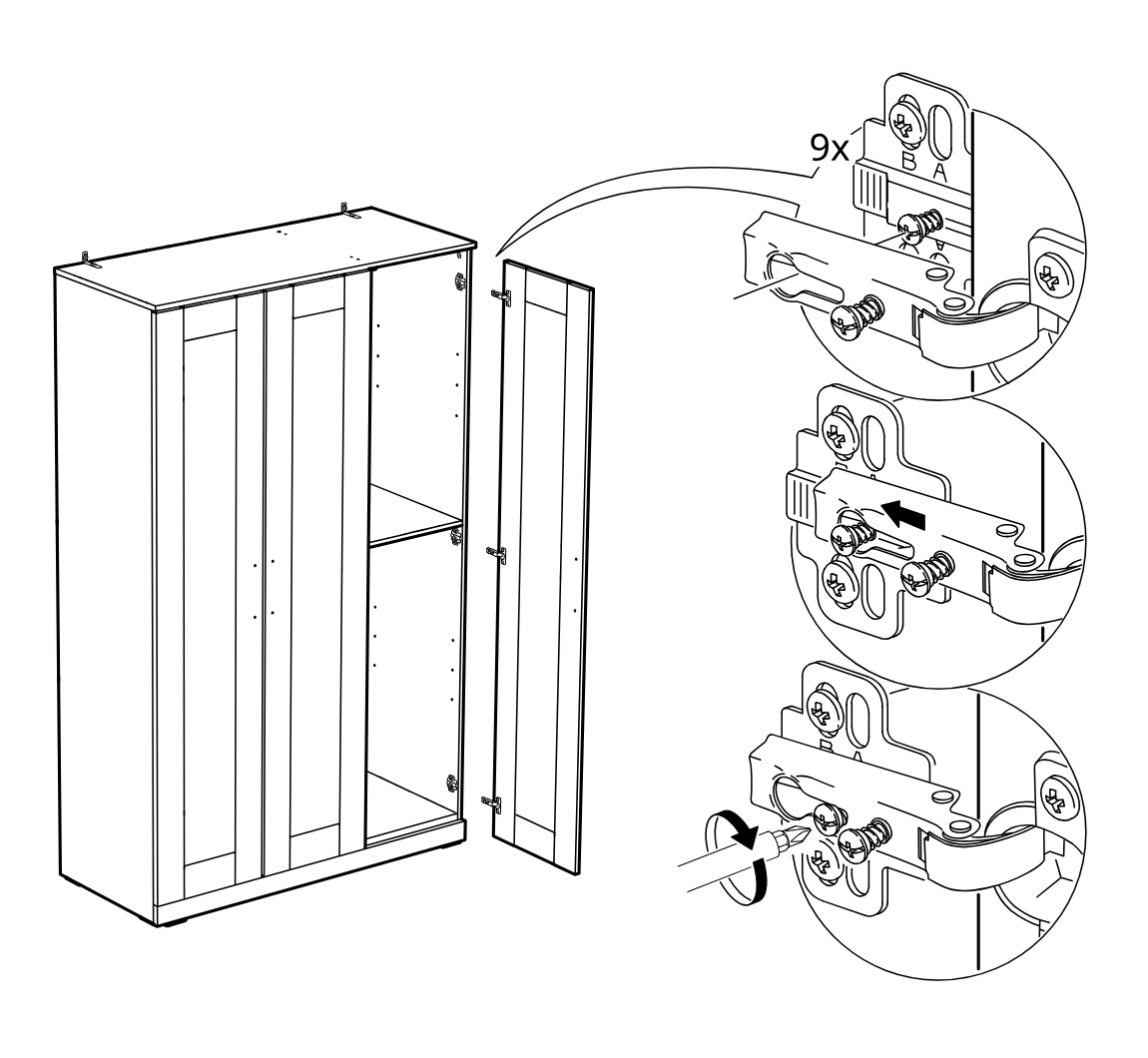
    Diagram for step 42: The door is aligned to the hinge plates and secured by tightening the hinge screws, repeated for a total of 9 hinge fixings.
  46. Step 43

    The handles are fastened onto the cabinet doors using four screws, with two handle placements indicated for two door variants.
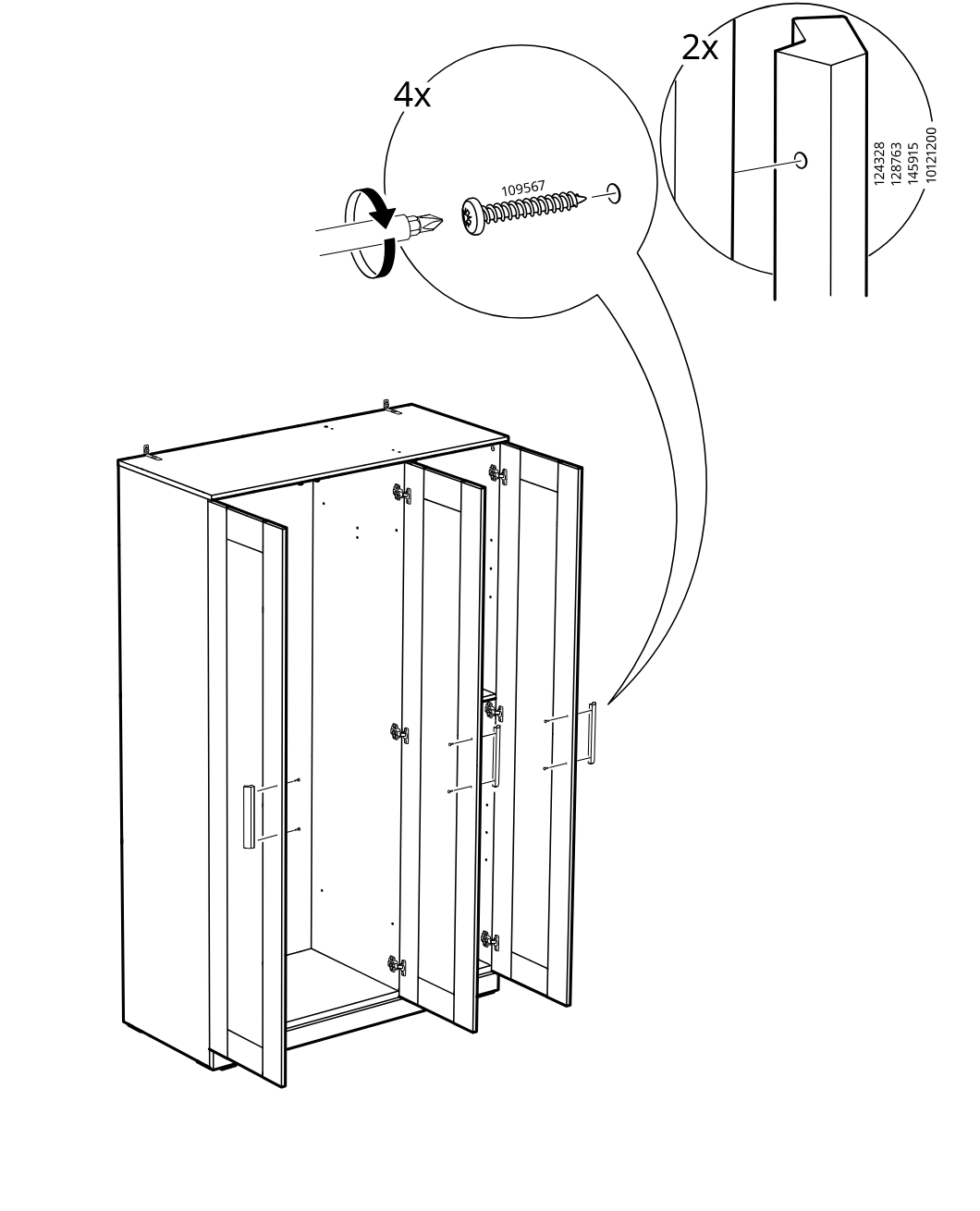
    Diagram for step 43: The handles are fastened onto the cabinet doors using four screws, with two handle placements indicated for two door variants.
  47. Step 44

    The shelf is inserted into the cabinet and secured using four 101532 pins, with zoom callouts showing the pin part and insertion direction.
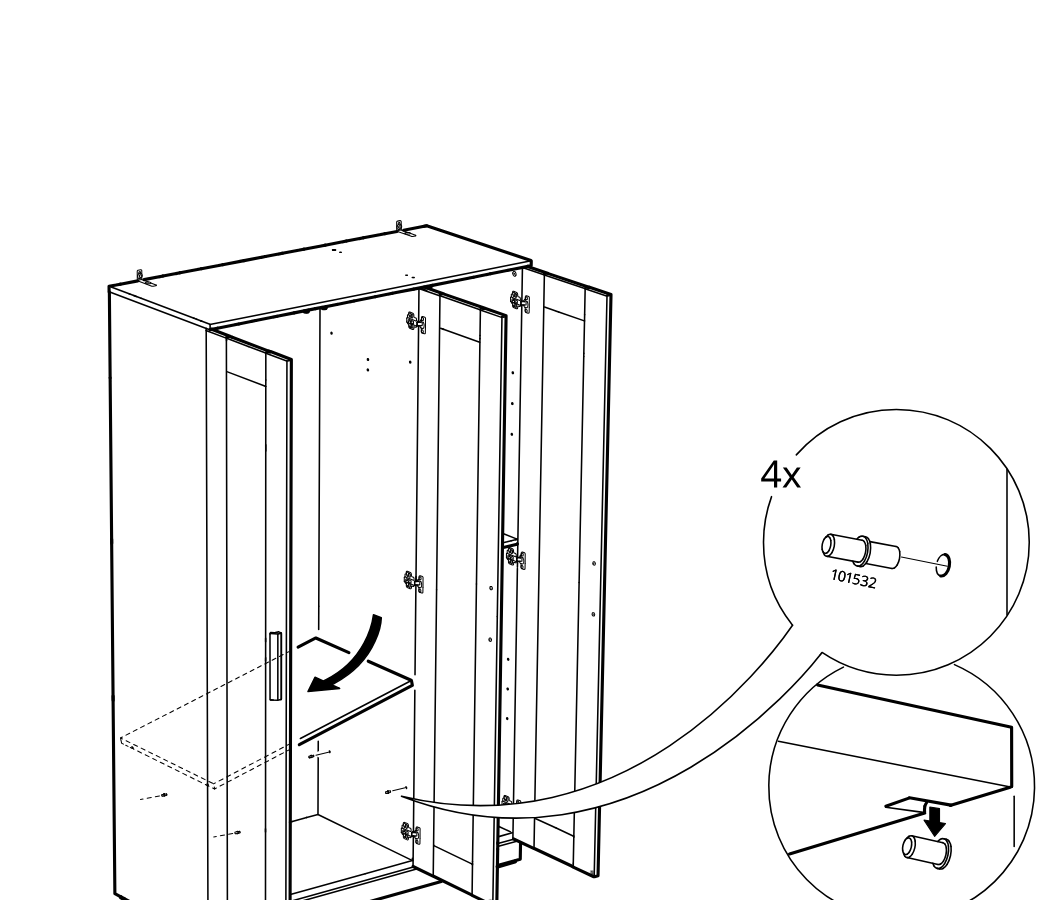
    Diagram for step 44: The shelf is inserted into the cabinet and secured using four 101532 pins, with zoom callouts showing the pin part and insertion direction.
  48. Step 45

    The installer positions and secures the top sliding-door guide hardware with screws, then seats the door downward into the guide as shown in the enlarged callouts.
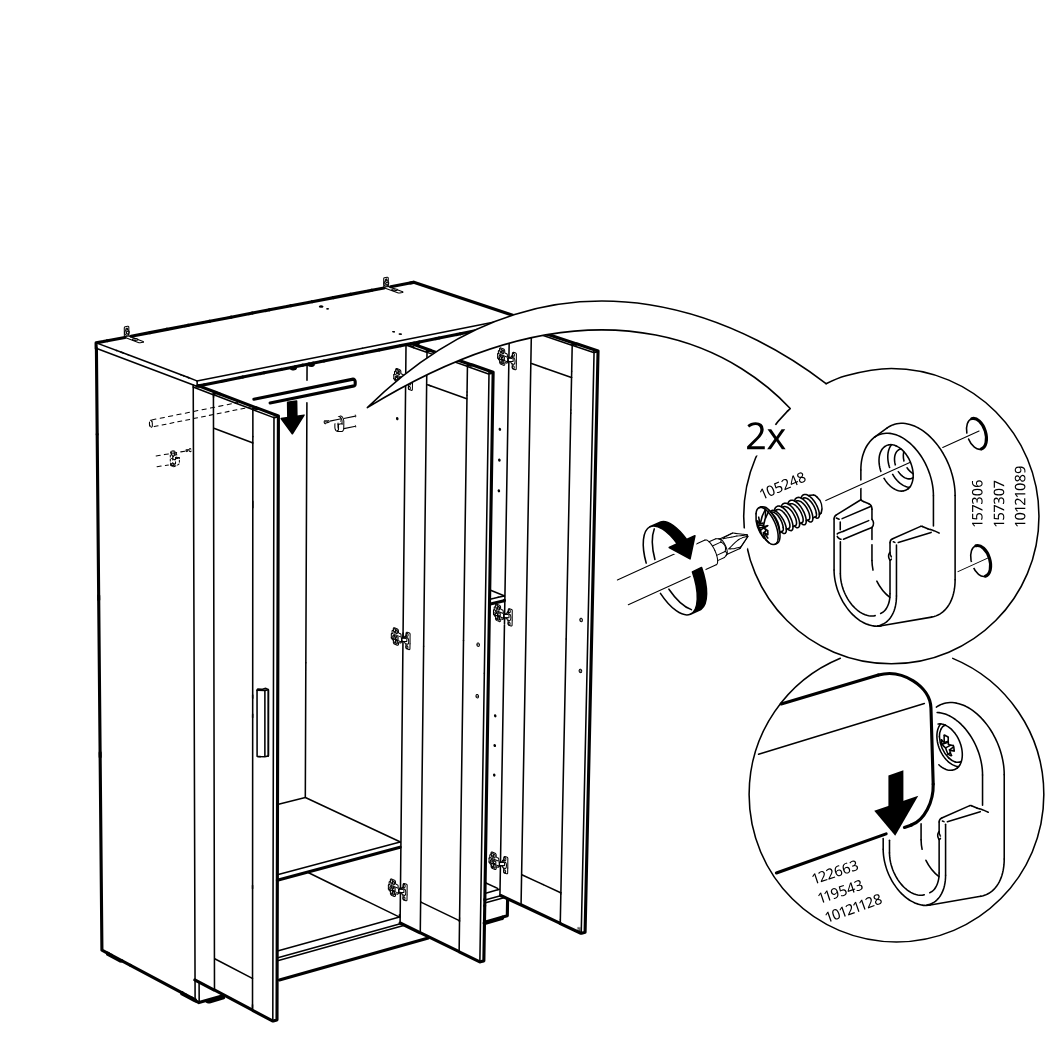
    Diagram for step 45: The installer positions and secures the top sliding-door guide hardware with screws, then seats the door downward into the guide as shown in the enlarged callouts.
  49. Step 46

    Insert four shelf support pins (101532) into the cabinet side holes and place two shelves onto the supports at the indicated heights.
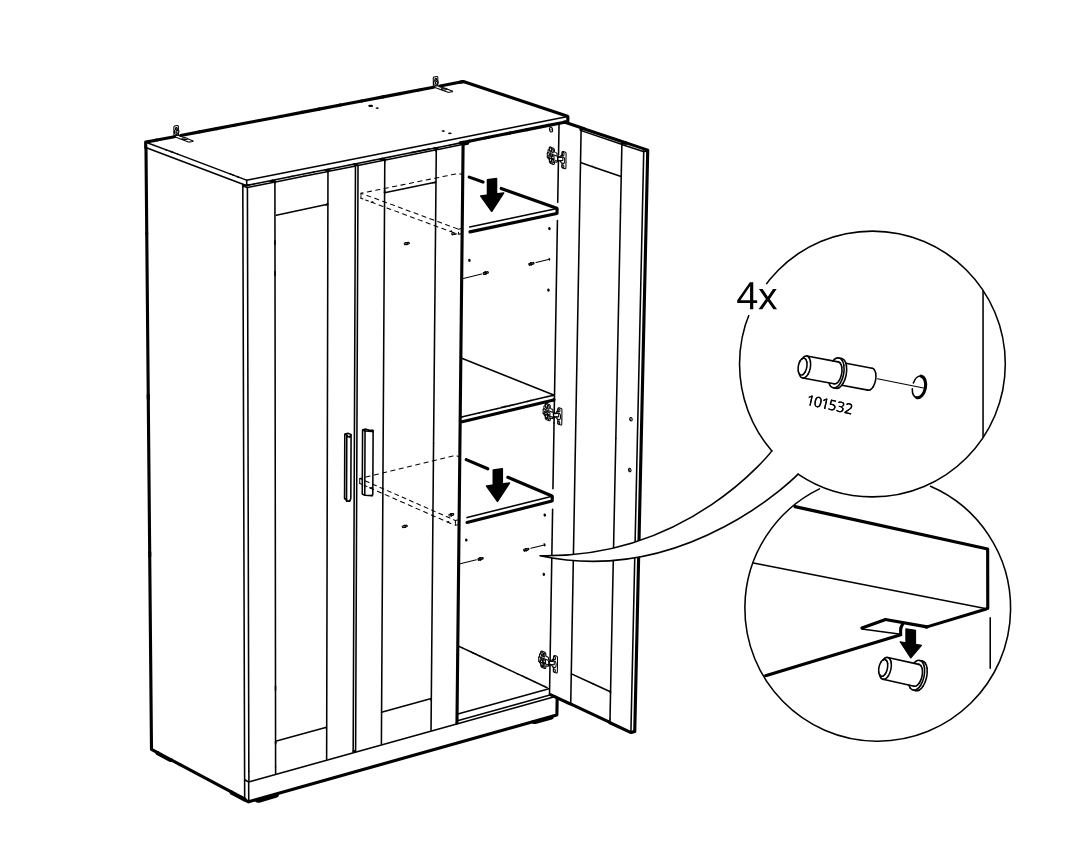
    Diagram for step 46: Insert four shelf support pins (101532) into the cabinet side holes and place two shelves onto the supports at the indicated heights.
  50. Step 47

    Attach three adhesive bumper pads (part 107091) to the indicated inner side area of the cabinet doors, as shown in the zoom callout.
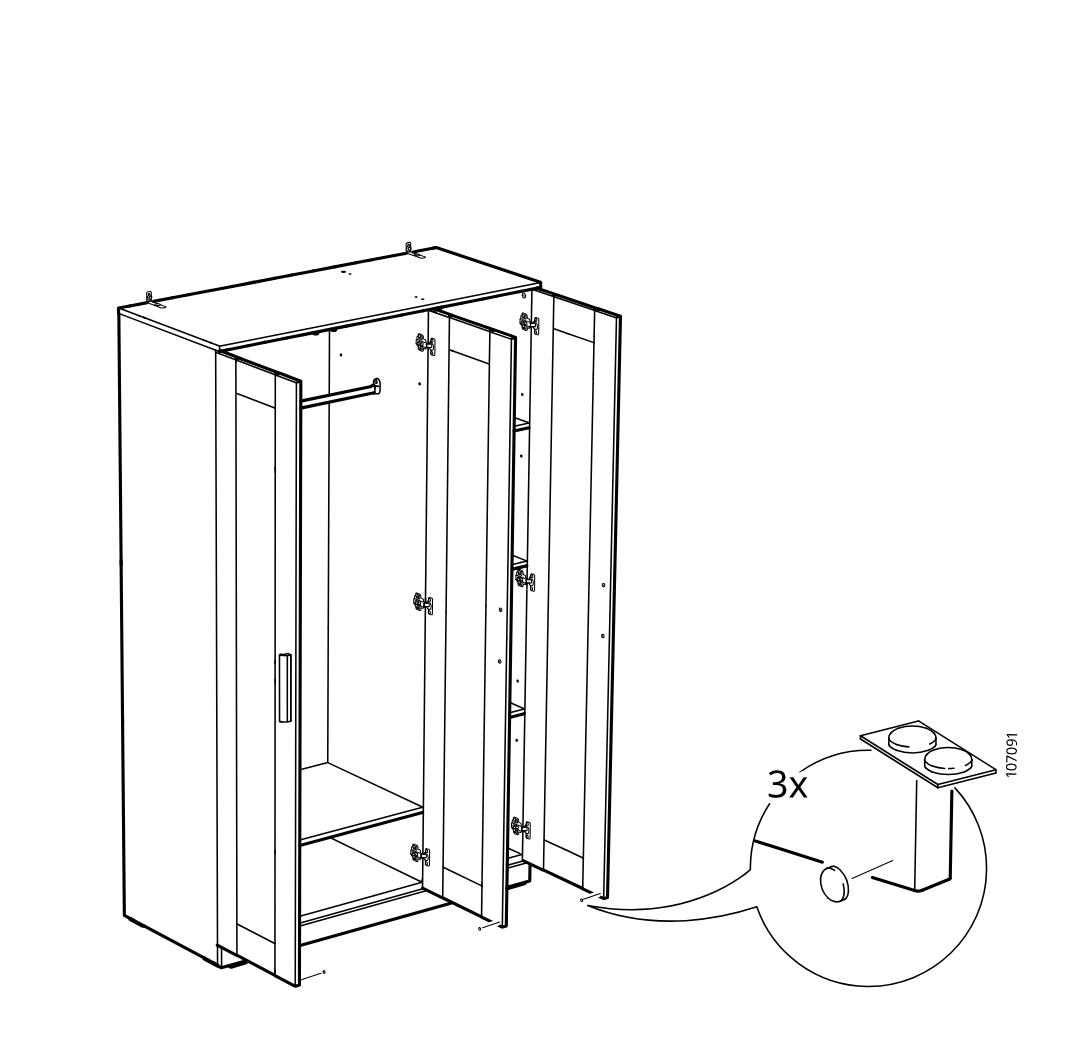
    Diagram for step 47: Attach three adhesive bumper pads (part 107091) to the indicated inner side area of the cabinet doors, as shown in the zoom callout.
  51. Before you begin

    Standalone circled-info panel shows three door hinge adjustment procedures: vertical adjustment, depth/lateral adjustment, and fine alignment using hinge screws with directional arrows.
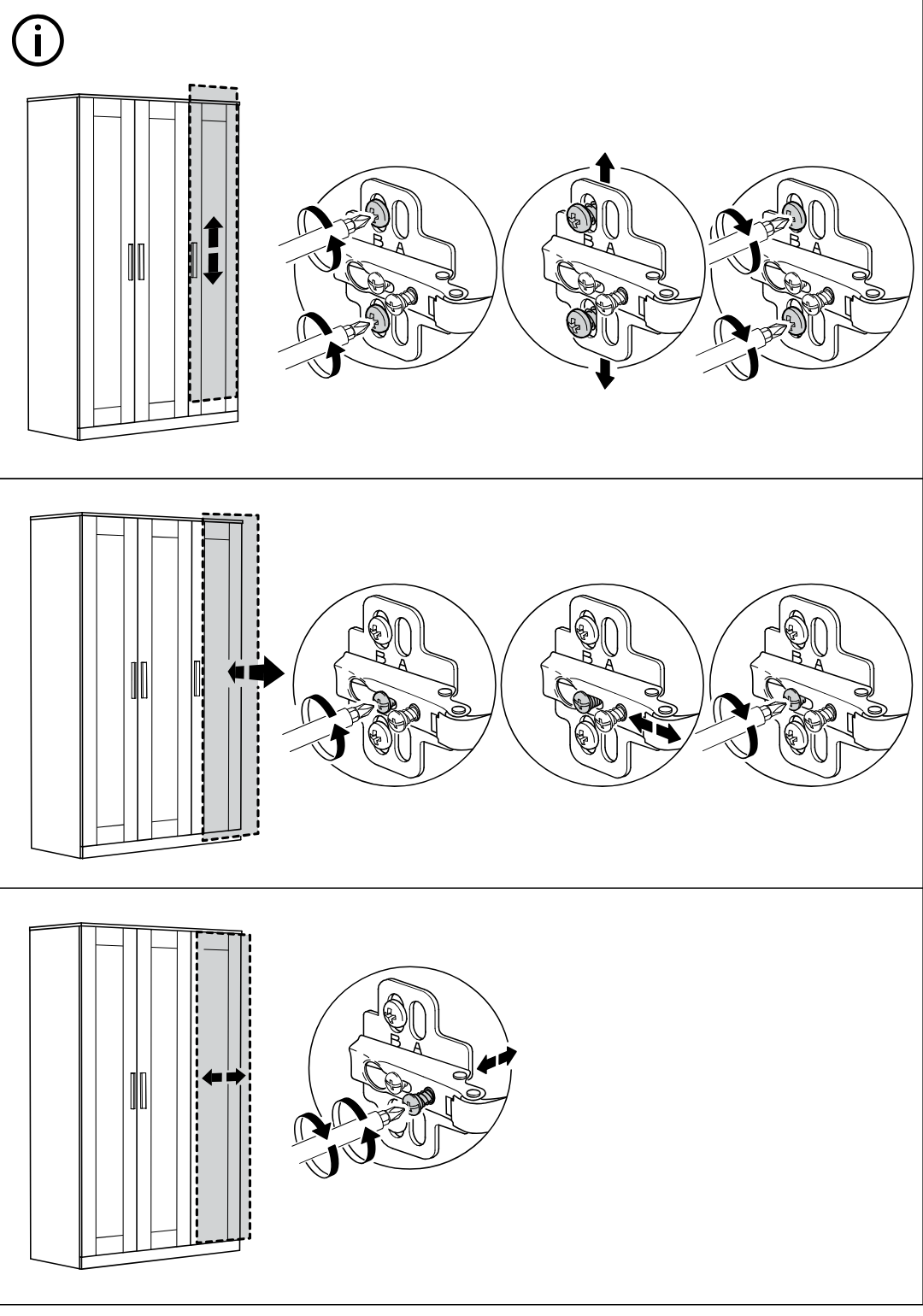
    Illustration for assembly note: Standalone circled-info panel shows three door hinge adjustment procedures: vertical adjustment, depth/lateral adjustment, and fine alignment using hinge screws with directional arrows.

Video guide