
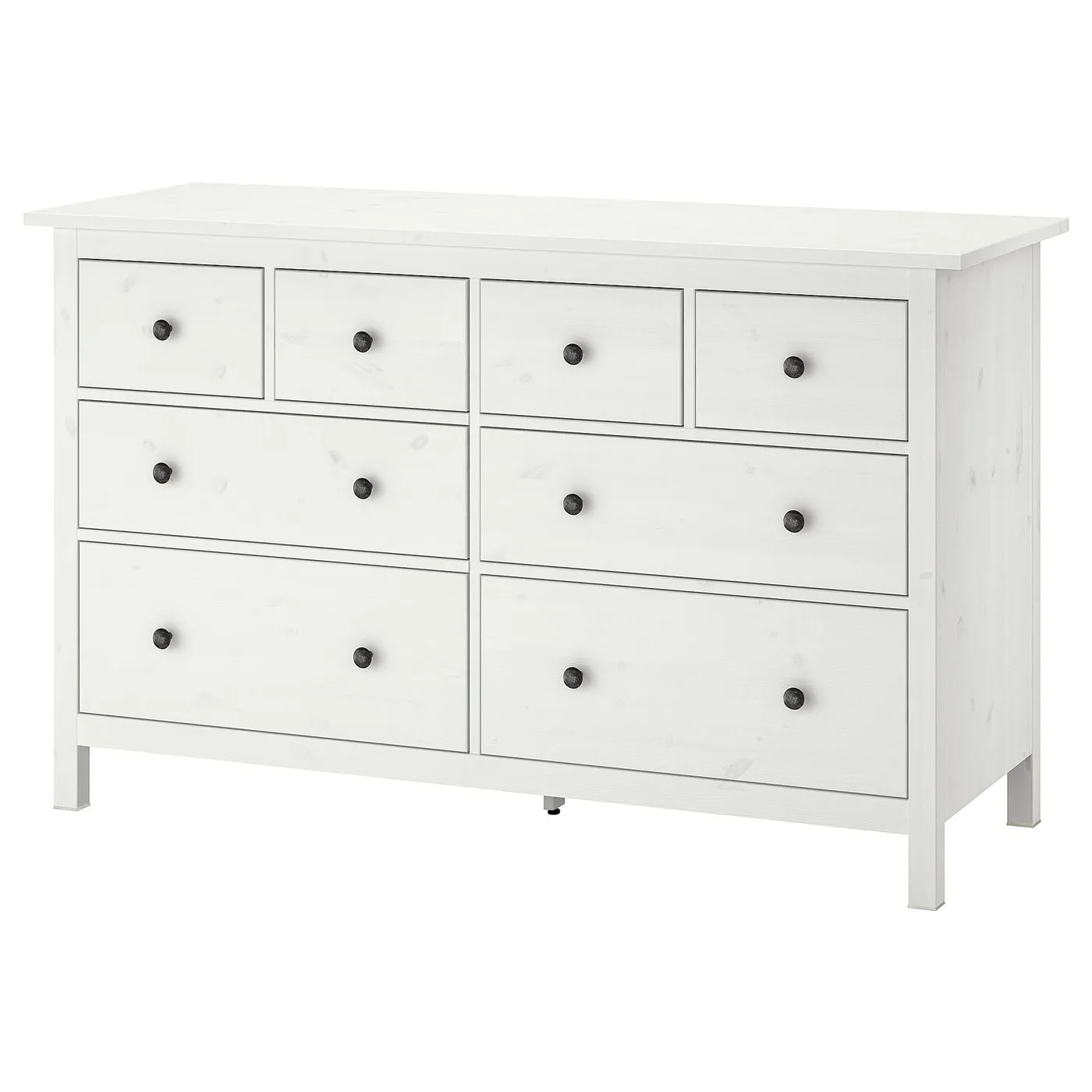
How to assemble IKEA HEMNES 8-drawer dresser

HEMNES 8-drawer dresser, white stain, 63x373/4"

This guide covers the IKEA HEMNES 8-drawer dresser in white stain, article 105.761.91, measuring 63 inches wide. Follow the dresser assembly diagrams and video for this model.

View on IKEA
HEMNES 8-drawer dresser

Interactive assembly guide

Step-by-Step Instructions

1 different parts, 1 boxes total — click on a package to see step-by-step assembly instructions

HEMNES 8-drawer dresser

105.761.91

x1

21 ¼ "

Width

3 ¼ "

Height

66 "

Length

67 lb 7 oz

Weight

Start Assembly

Written guide

Step-by-step instructions with diagrams

Follow the numbered assembly steps below, or open the interactive guide above to track progress and zoom into each diagram. This guide includes 71 illustrated steps.

HEMNES 8-drawer dresser

  1. Before you begin

    Full-page anti-tip safety warning panel with hazard icons and tipping-prevention instructions in English, French, and Spanish.
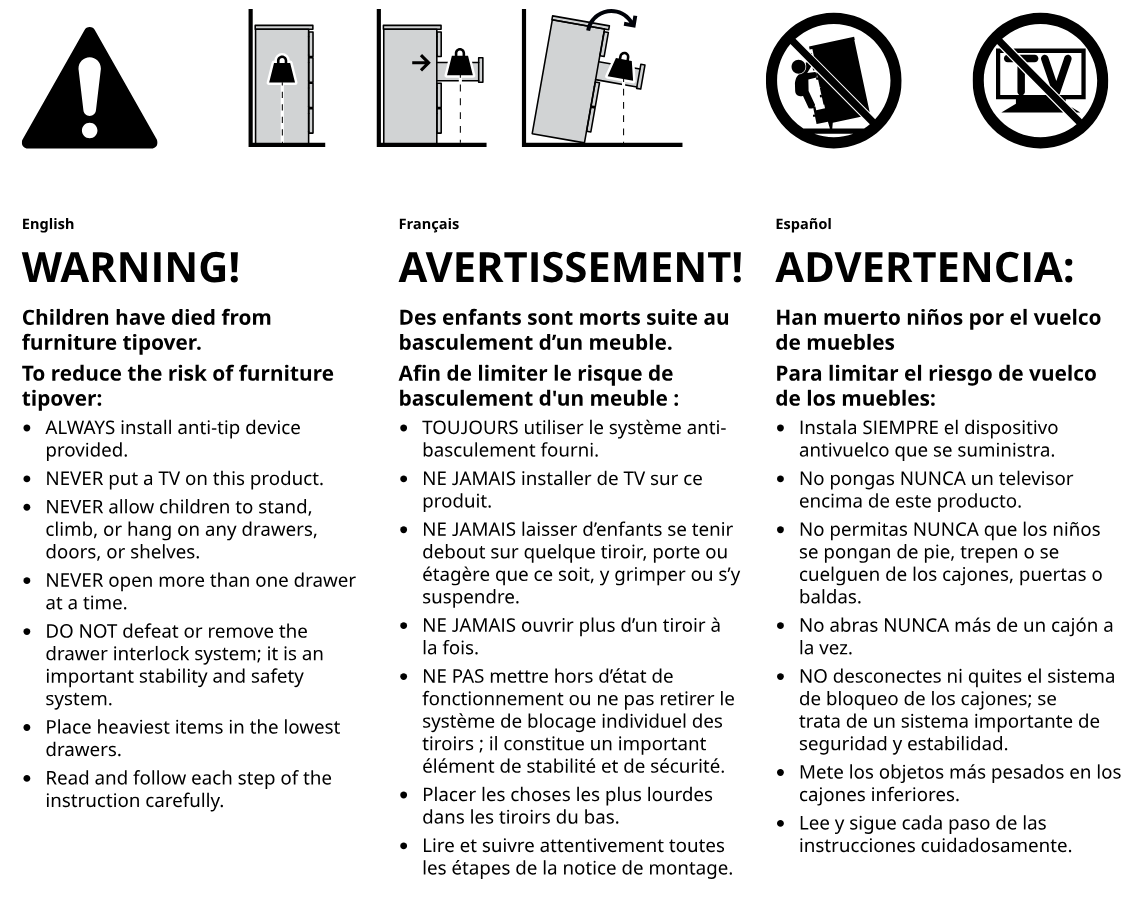
    Illustration for assembly note: Full-page anti-tip safety warning panel with hazard icons and tipping-prevention instructions in English, French, and Spanish.
  2. Before you begin

    Preparation and wall-mounting guidance panel showing required tools, drill bit sizes for different wall materials, and anchor usage.
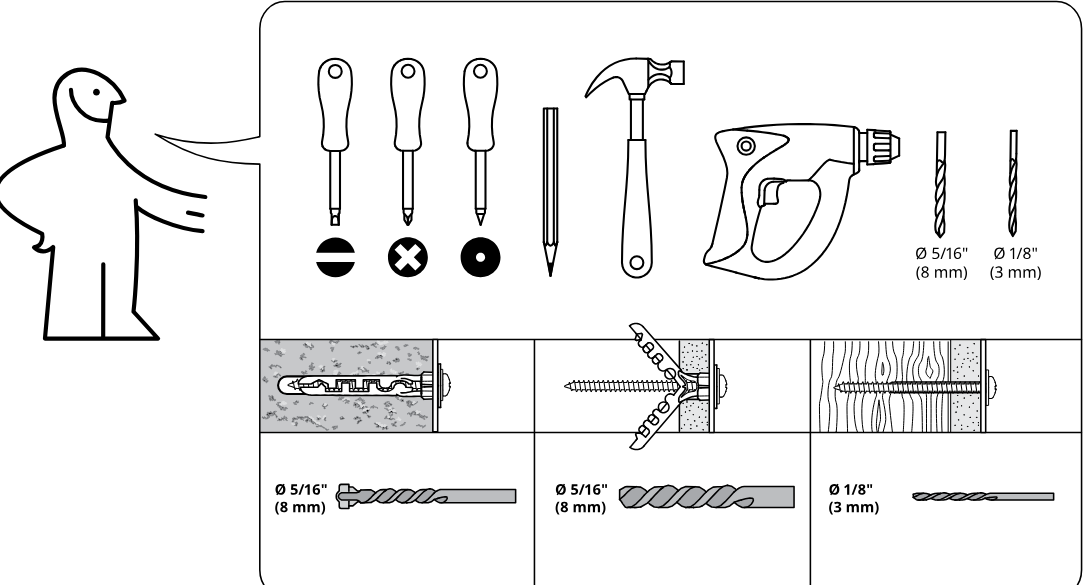
    Illustration for assembly note: Preparation and wall-mounting guidance panel showing required tools, drill bit sizes for different wall materials, and anchor usage.
  3. Before you begin

    Hardware bag and load warning panel indicating wall attachment hardware and caution about loading when attached to wall.
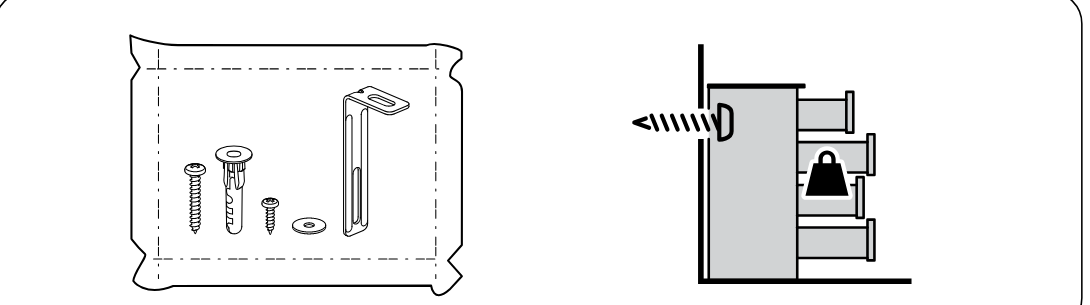
    Illustration for assembly note: Hardware bag and load warning panel indicating wall attachment hardware and caution about loading when attached to wall.
  4. Before you begin

    Safety panel showing two people required for assembly and not assembling alone.
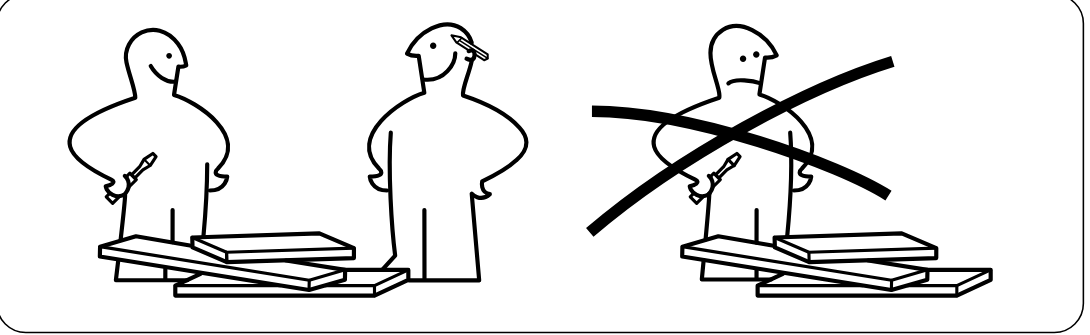
    Illustration for assembly note: Safety panel showing two people required for assembly and not assembling alone.
  5. Before you begin

    Parts-bag reference panel 1 showing hardware set with item IDs 118331, 101353, 101350, 110630, and 107716 and their required quantities.
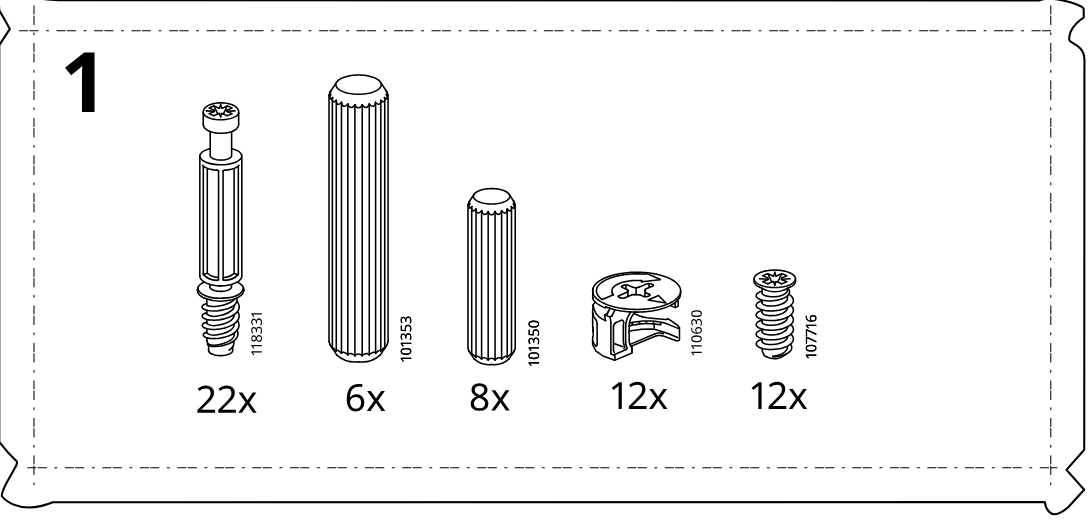
    Illustration for assembly note: Parts-bag reference panel 1 showing hardware set with item IDs 118331, 101353, 101350, 110630, and 107716 and their required quantities.
  6. Before you begin

    Parts-bag reference panel 2 showing hardware/tools set with item IDs 118331, 100232, 100214, 101350, 110630, 108462, 107862, 100006, 100001, plus bagged sets 101221 and 603440 with quantities.
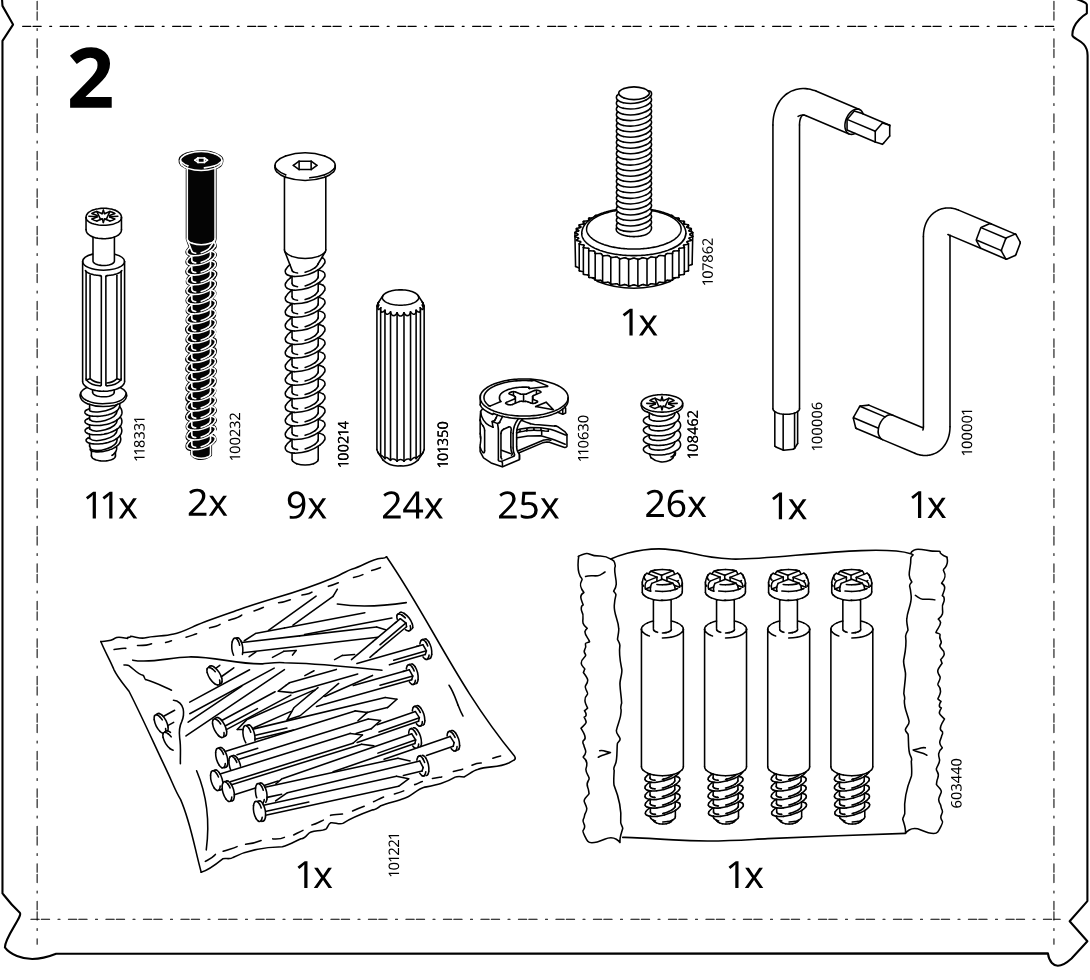
    Illustration for assembly note: Parts-bag reference panel 2 showing hardware/tools set with item IDs 118331, 100232, 100214, 101350, 110630, 108462, 107862, 100006, 100001, plus bagged sets 101221 and 603440 with quantities.
  7. Before you begin

    Parts-bag hardware panel labeled 3 showing required fasteners and fittings with quantities.
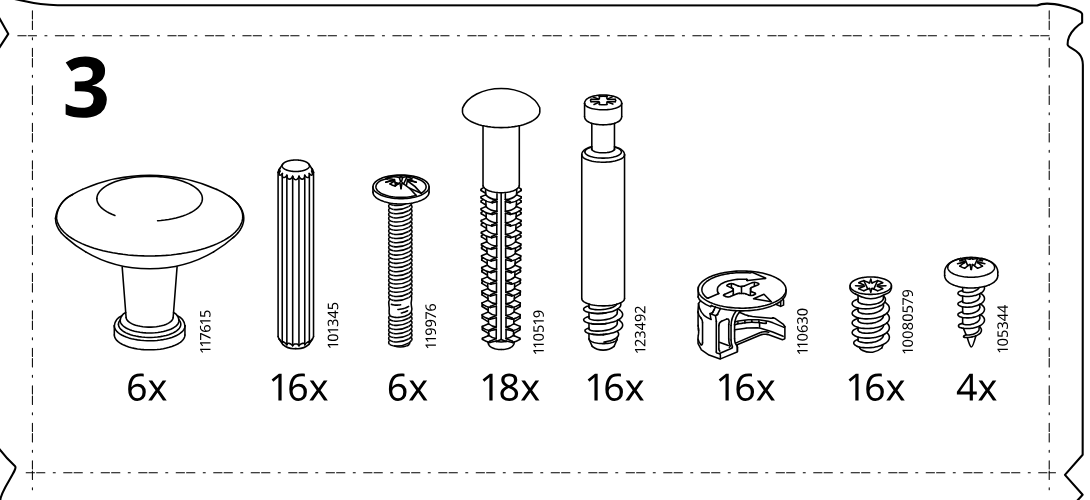
    Illustration for assembly note: Parts-bag hardware panel labeled 3 showing required fasteners and fittings with quantities.
  8. Step 1

    The user lays out rails L1, L2, R2, and R1, inserts 12 cam bolts (118331) into the marked holes with a screwdriver, and follows the insets showing the correct insertion orientation and depth.
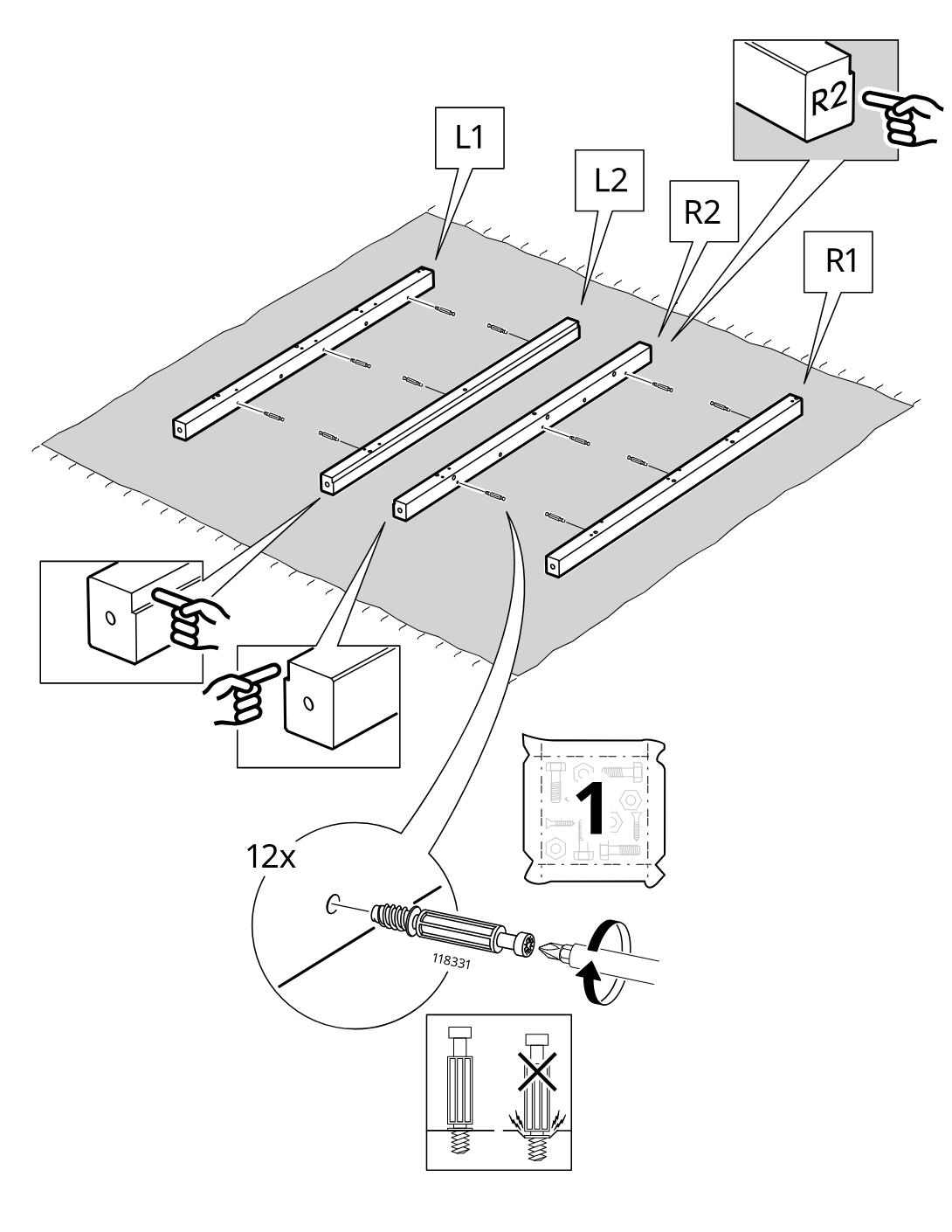
    Diagram for step 1: The user lays out rails L1, L2, R2, and R1, inserts 12 cam bolts (118331) into the marked holes with a screwdriver, and follows the insets showing the correct insertion orientation and depth.
  9. Step 2

    The side rails are aligned to the large panels and eight 101350 dowels are inserted in the indicated edge holes, with a comparison callout showing the correct dowel type.
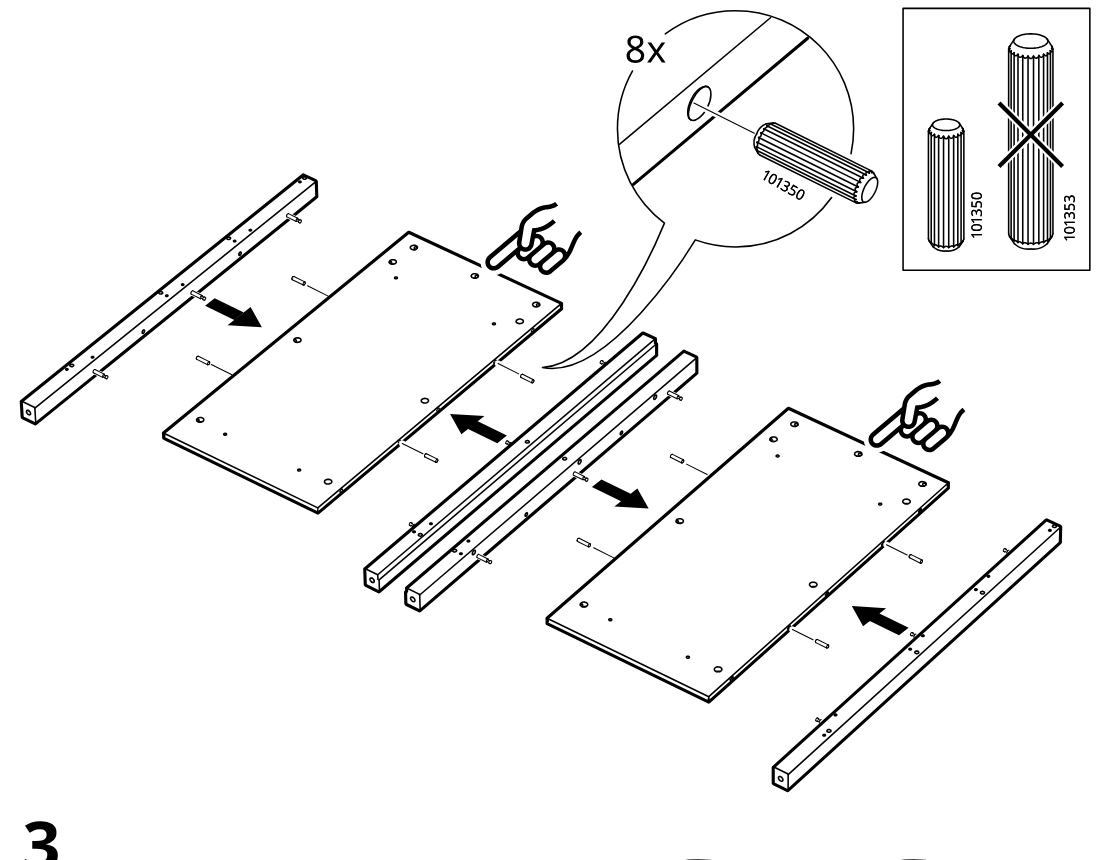
    Diagram for step 2: The side rails are aligned to the large panels and eight 101350 dowels are inserted in the indicated edge holes, with a comparison callout showing the correct dowel type.
  10. Step 3

    Twelve 110630 cam locks are placed into the round holes on both panel assemblies and then turned with a screwdriver as shown in the zoom callout.
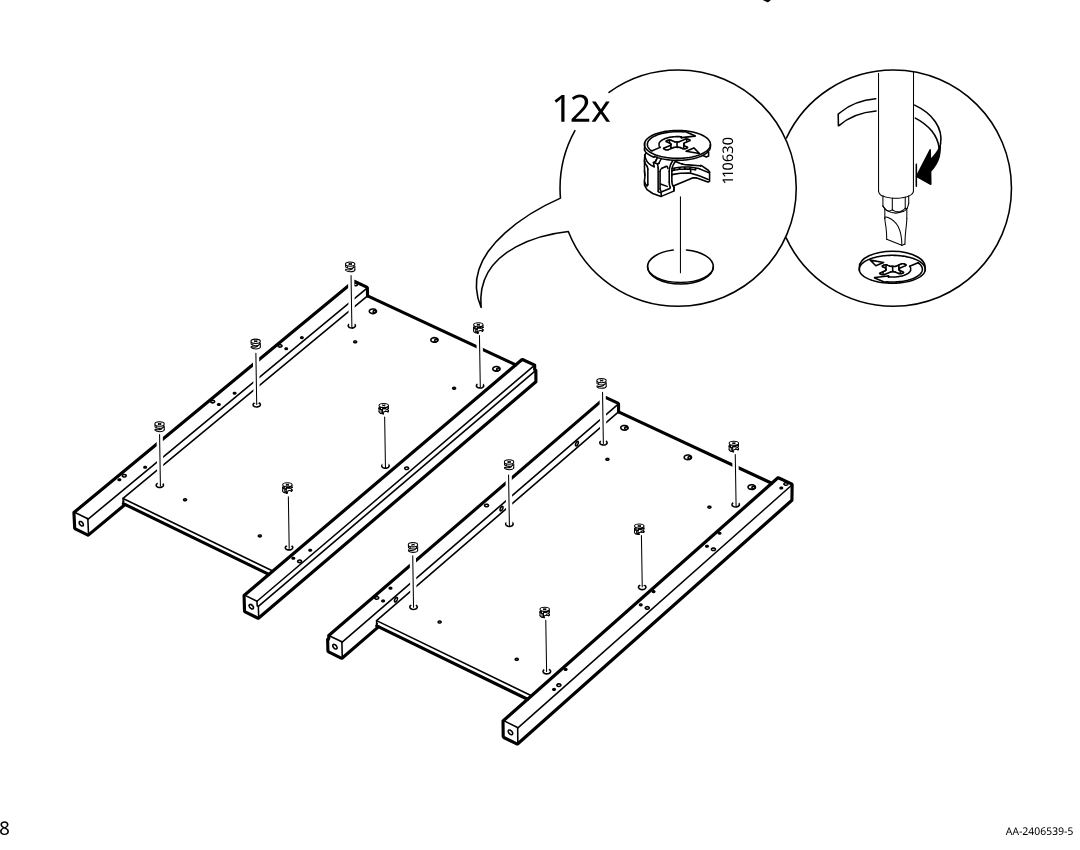
    Diagram for step 3: Twelve 110630 cam locks are placed into the round holes on both panel assemblies and then turned with a screwdriver as shown in the zoom callout.
  11. Step 4

    Insert six 101353 dowels into the indicated holes, then slide and position the inner rail assemblies on both mirrored panels as shown, with the inset indicating rail orientation/engagement.
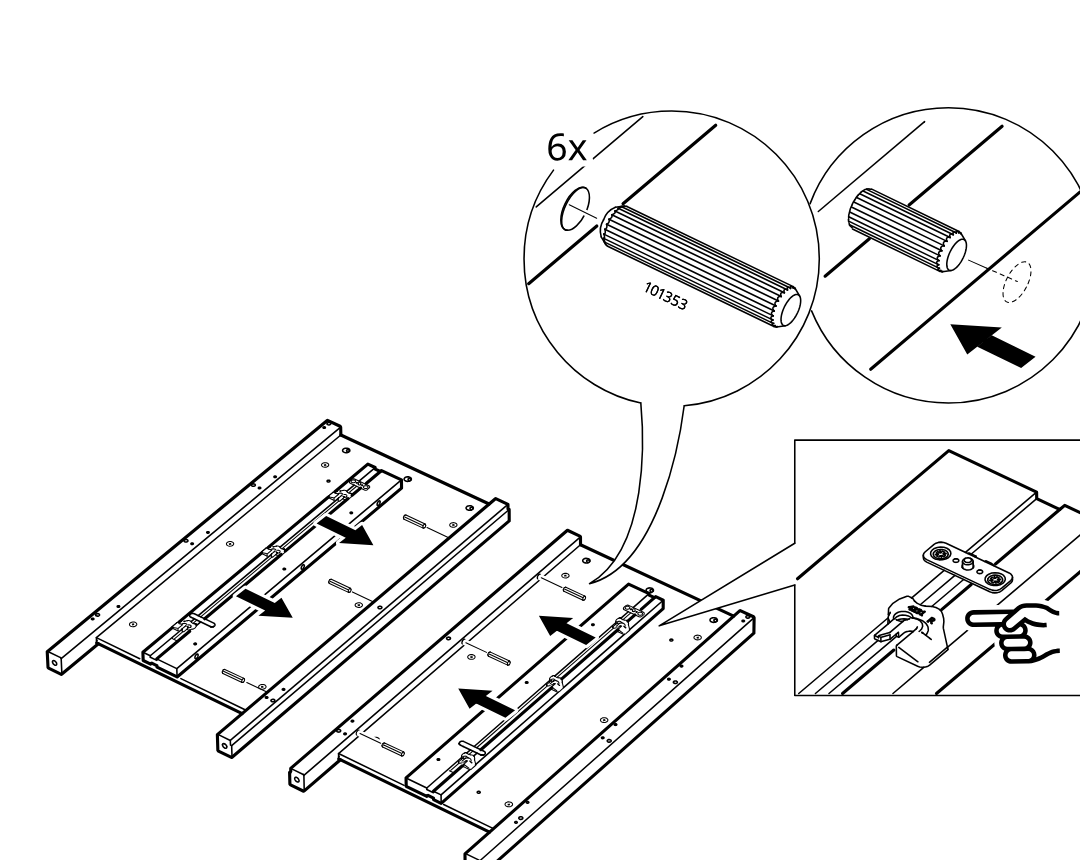
    Diagram for step 4: Insert six 101353 dowels into the indicated holes, then slide and position the inner rail assemblies on both mirrored panels as shown, with the inset indicating rail orientation/engagement.
  12. Step 5

    The user positions the IKEA CR panel and fastens six 107716 screws into the rail wheel-bracket points, as indicated by the zoom detail and screw-type warning box.
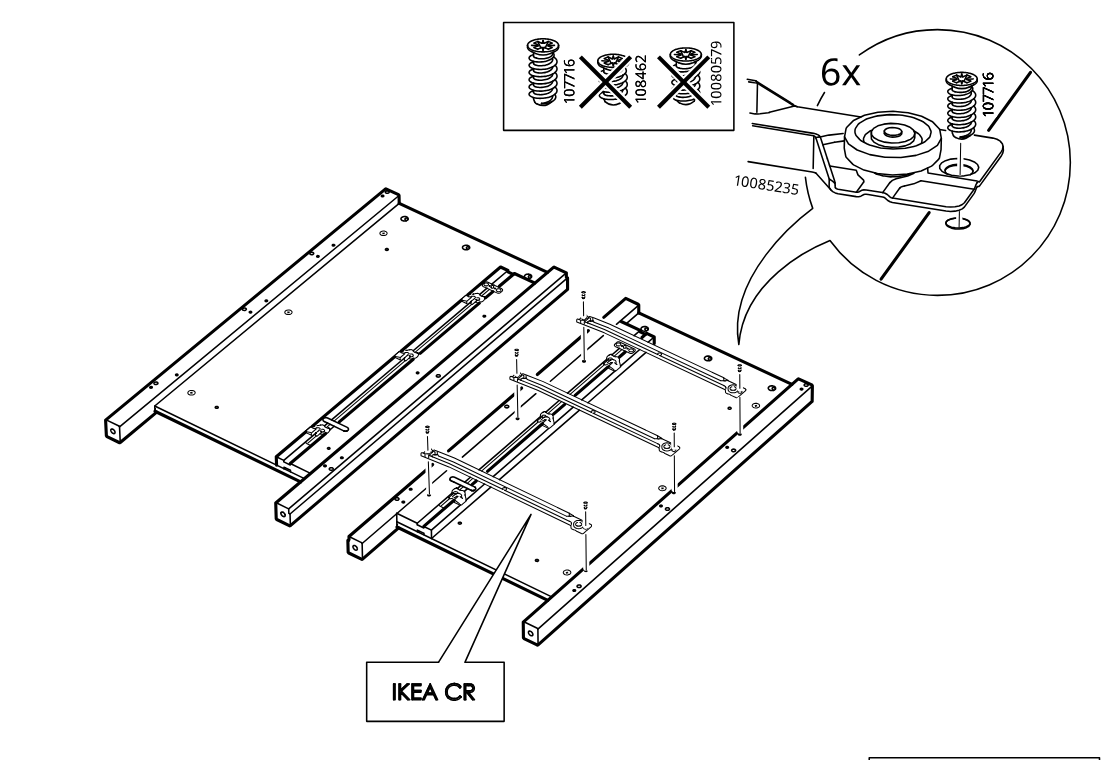
    Diagram for step 5: The user positions the IKEA CR panel and fastens six 107716 screws into the rail wheel-bracket points, as indicated by the zoom detail and screw-type warning box.
  13. Step 6

    The user positions the IKEA CL panel and fastens six 107716 screws into the rail wheel-bracket points, following the mirrored layout shown with the zoom detail and screw-type warning box.
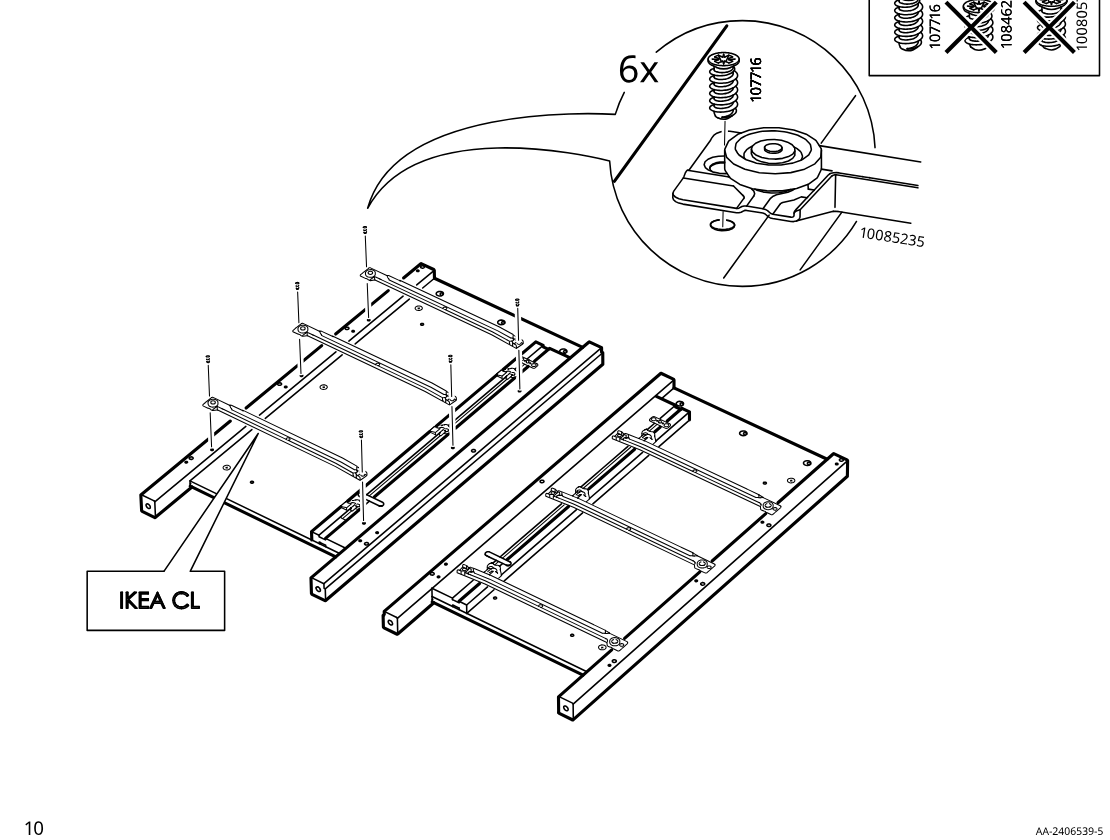
    Diagram for step 6: The user positions the IKEA CL panel and fastens six 107716 screws into the rail wheel-bracket points, following the mirrored layout shown with the zoom detail and screw-type warning box.
  14. Step 7

    Push two cover pieces onto each side assembly end, using one orientation on one side and the mirrored orientation on the other side.
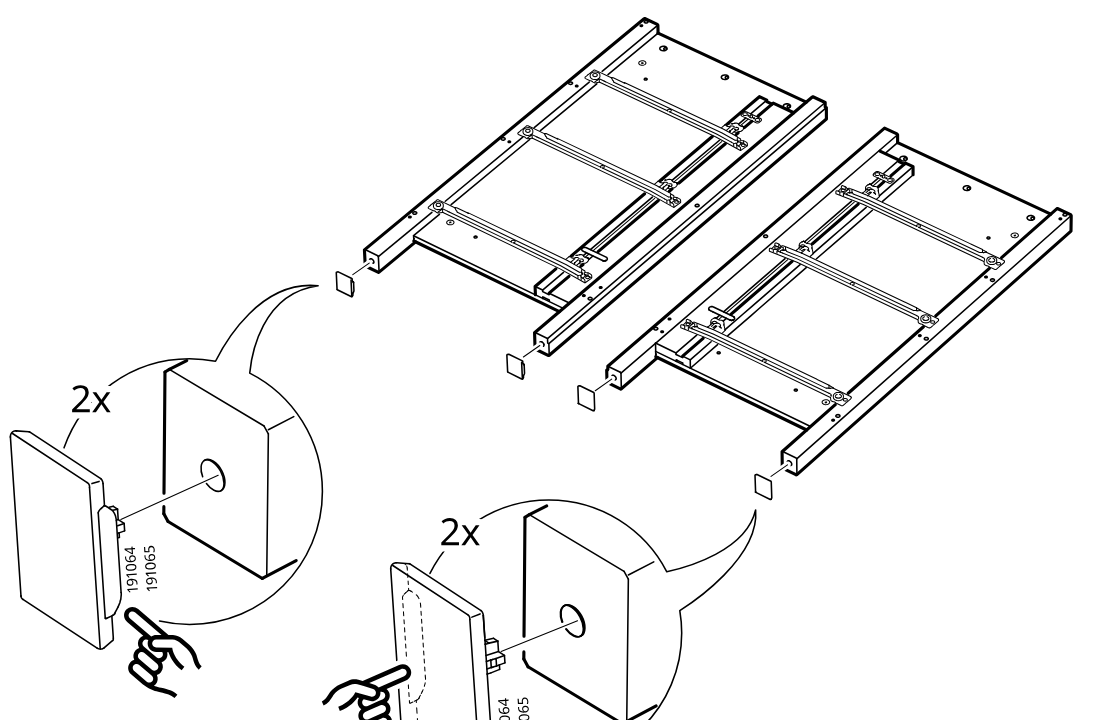
    Diagram for step 7: Push two cover pieces onto each side assembly end, using one orientation on one side and the mirrored orientation on the other side.
  15. Step 8

    Insert ten threaded fittings (118331) into the predrilled holes on both side assemblies and ensure they are seated correctly without damage, as shown in the warning callouts.
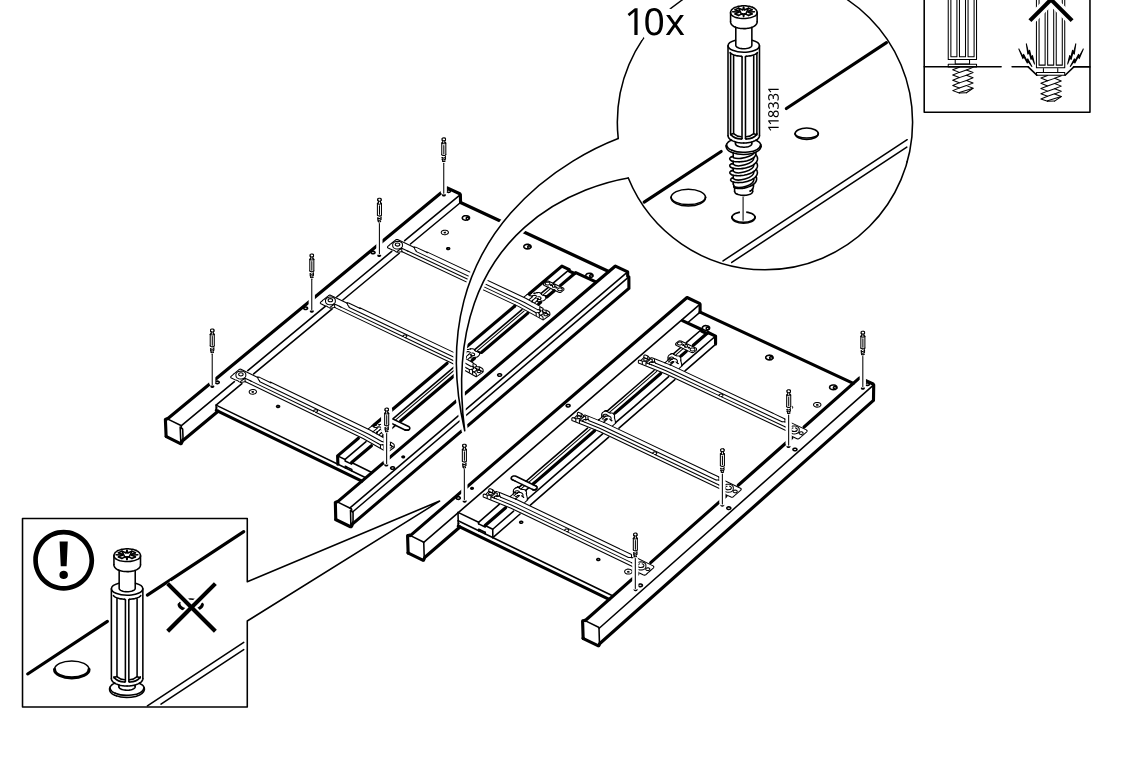
    Diagram for step 8: Insert ten threaded fittings (118331) into the predrilled holes on both side assemblies and ensure they are seated correctly without damage, as shown in the warning callouts.
  16. Step 9

    Insert fourteen 101350 dowels from hardware bag 2 into the predrilled holes at the ends of the long rails, as shown in the zoom callout.
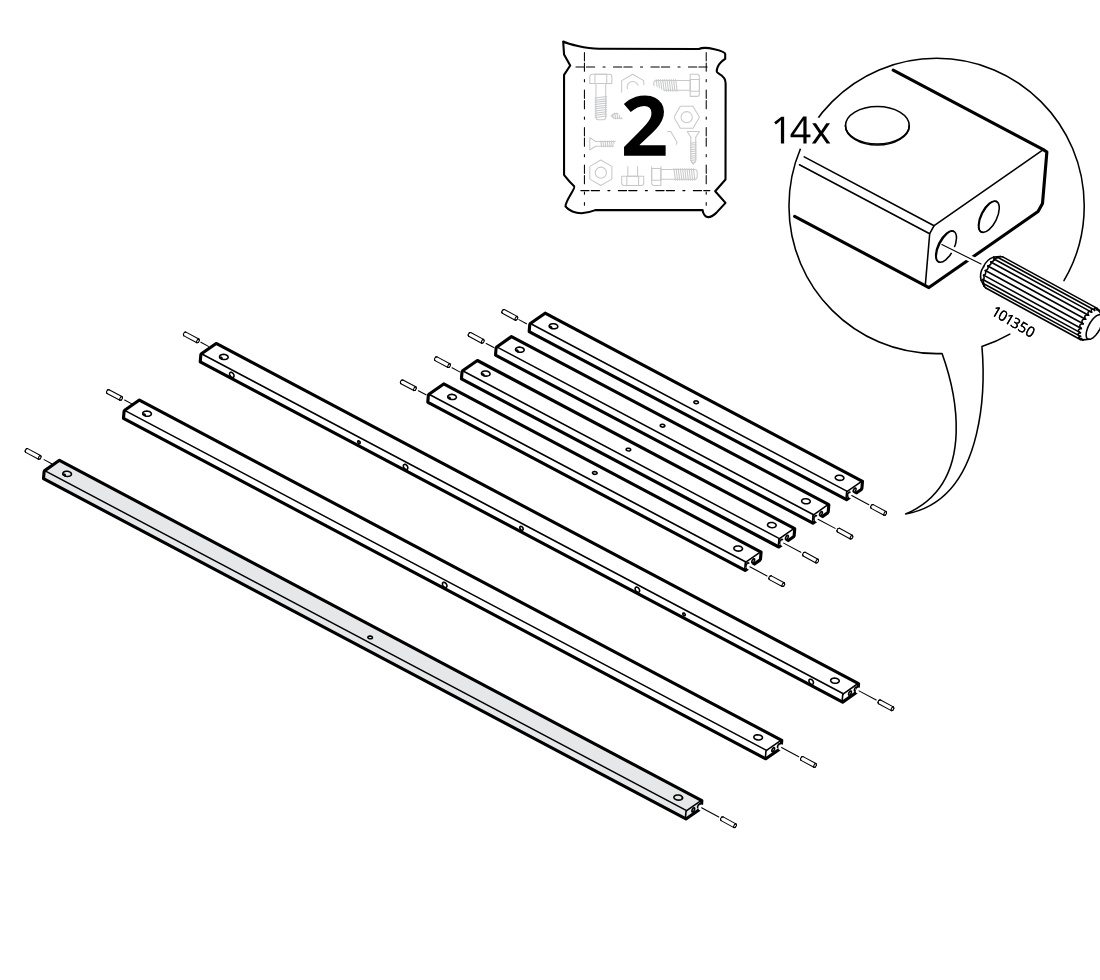
    Diagram for step 9: Insert fourteen 101350 dowels from hardware bag 2 into the predrilled holes at the ends of the long rails, as shown in the zoom callout.
  17. Step 10

    Two vertical posts are inserted downward into the right base section while the frame lies upside down.
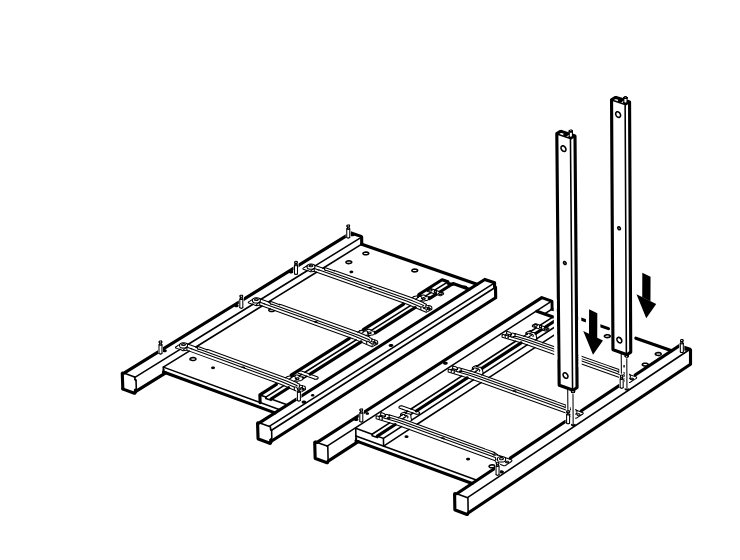
    Diagram for step 10: Two vertical posts are inserted downward into the right base section while the frame lies upside down.
  18. Step 11

    Four vertical posts are positioned and pressed downward into the base, with hand icons indicating the orientation points.
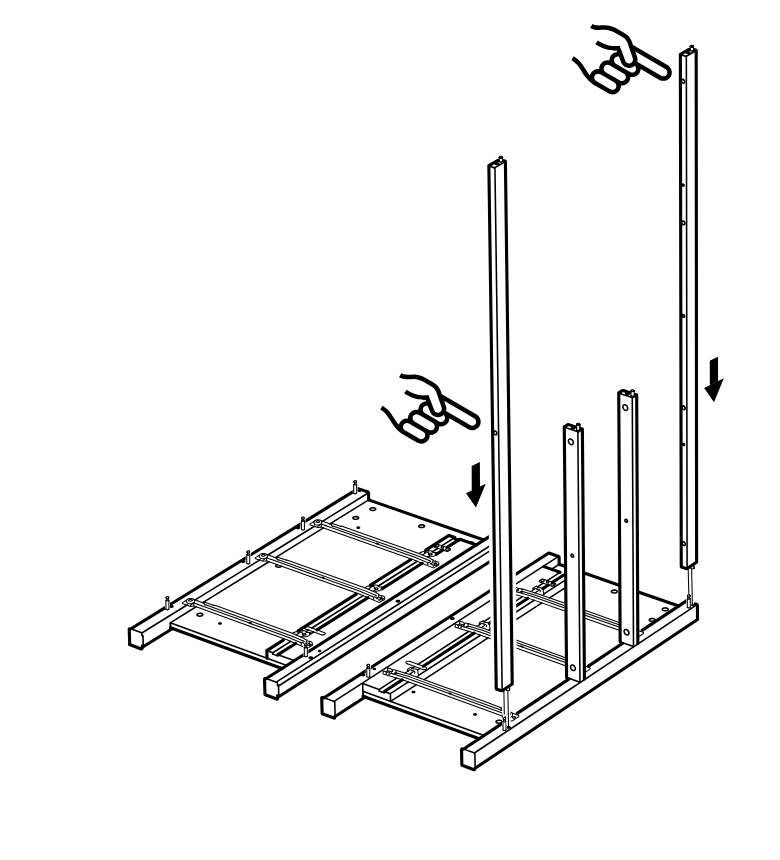
    Diagram for step 11: Four vertical posts are positioned and pressed downward into the base, with hand icons indicating the orientation points.
  19. Step 12

    The side and inner vertical posts are positioned upright onto the base frame, with a hand icon indicating placement direction.
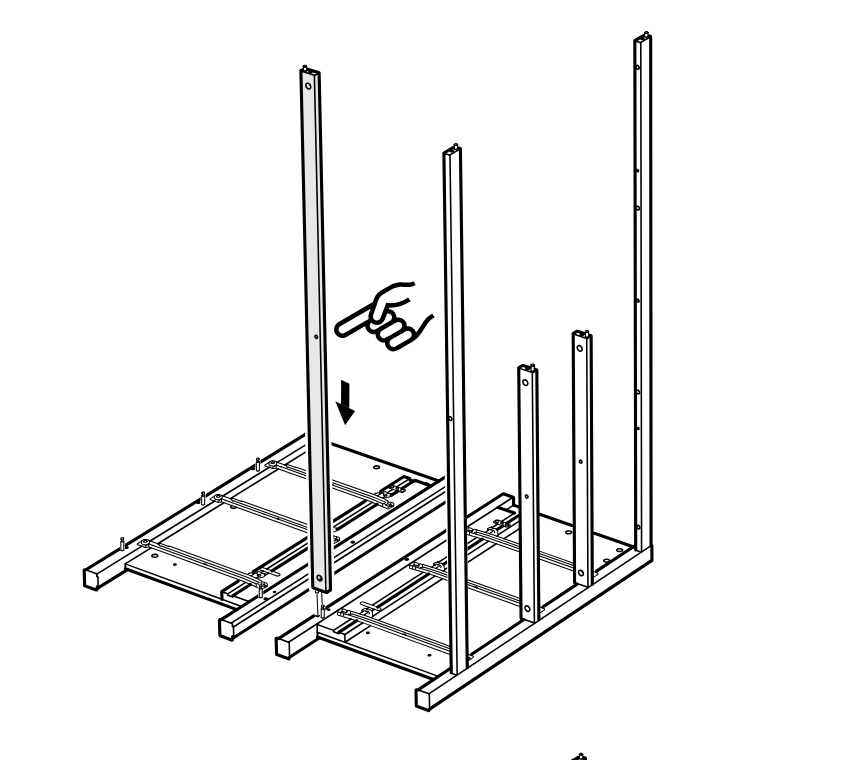
    Diagram for step 12: The side and inner vertical posts are positioned upright onto the base frame, with a hand icon indicating placement direction.
  20. Step 13

    Five cam locks (110630) are inserted and tightened along the frame, with zoom callouts showing lock orientation and screwdriver turning direction.
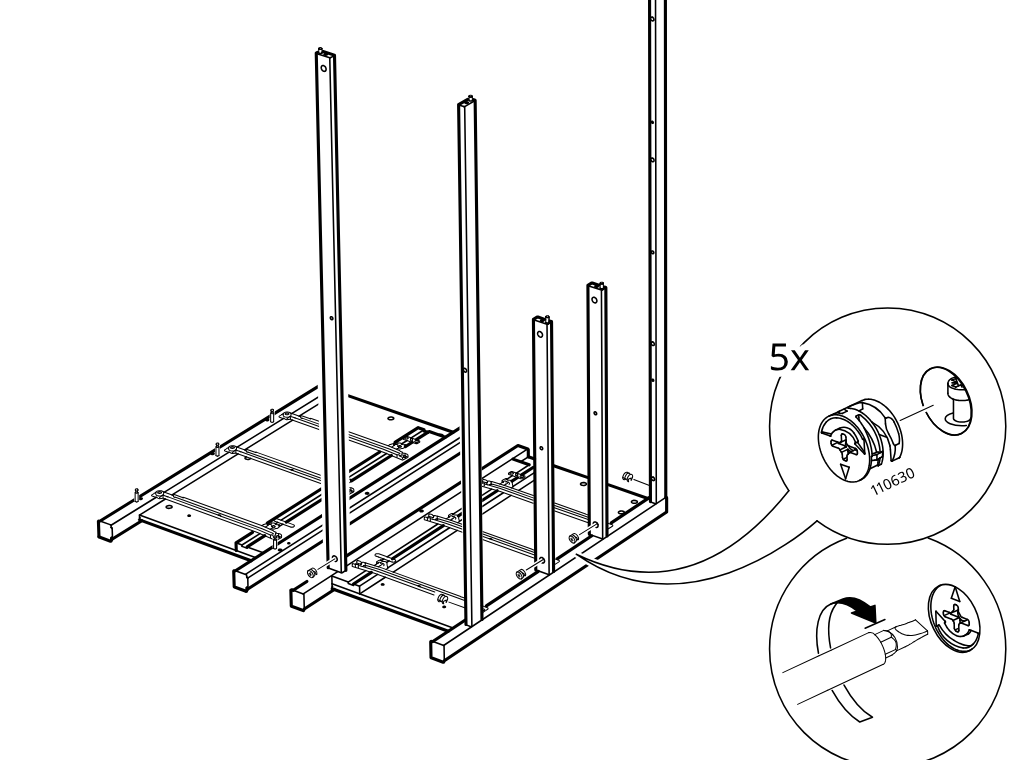
    Diagram for step 13: Five cam locks (110630) are inserted and tightened along the frame, with zoom callouts showing lock orientation and screwdriver turning direction.
  21. Step 14

    The rails are positioned on the frame, nine screws are installed into each rail bracket location, and the assembly orientation is shown for turning before the next step.
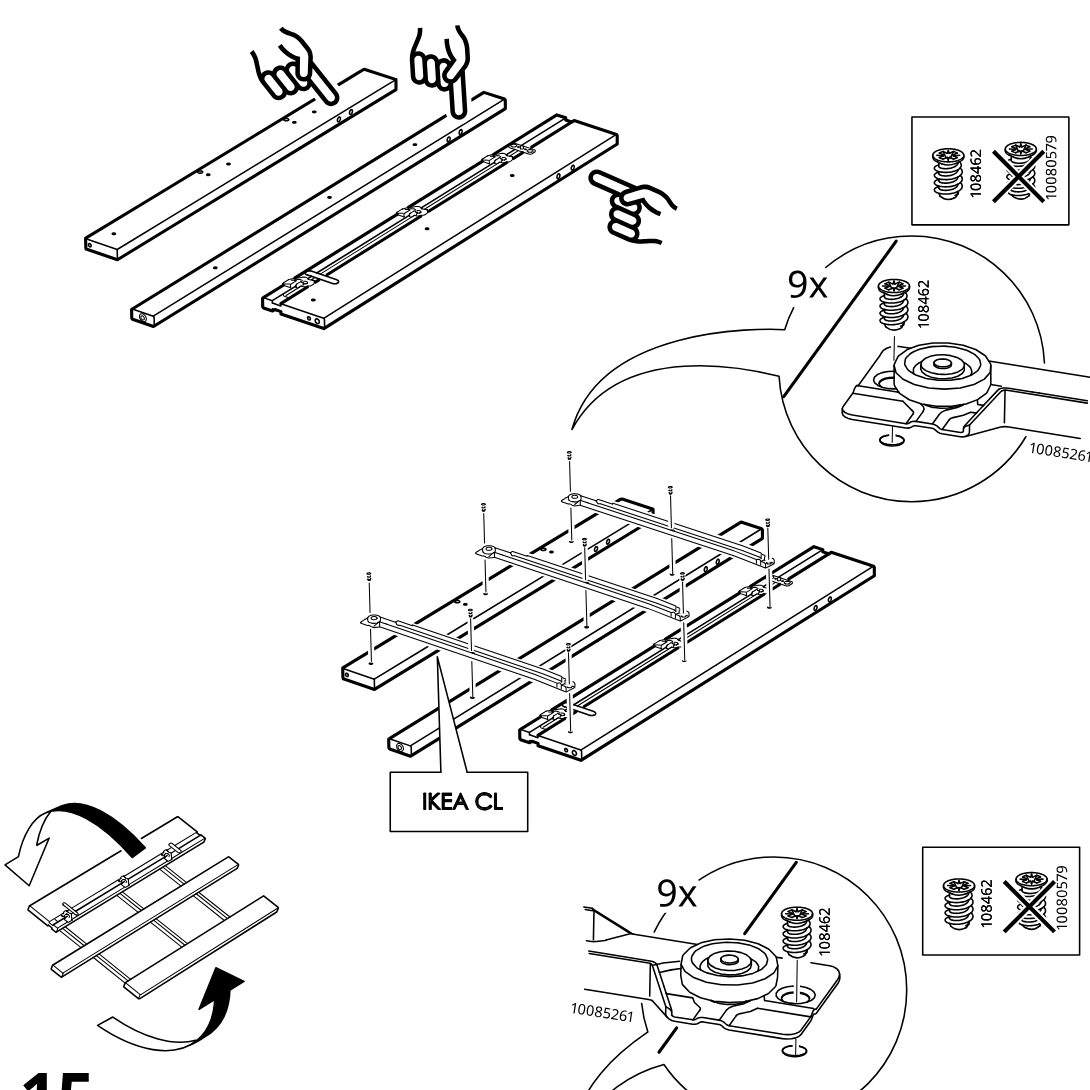
    Diagram for step 14: The rails are positioned on the frame, nine screws are installed into each rail bracket location, and the assembly orientation is shown for turning before the next step.
  22. Step 15

    After rotating the assembly, the opposite side rail set is aligned and fixed with nine screws into the corresponding bracket points.
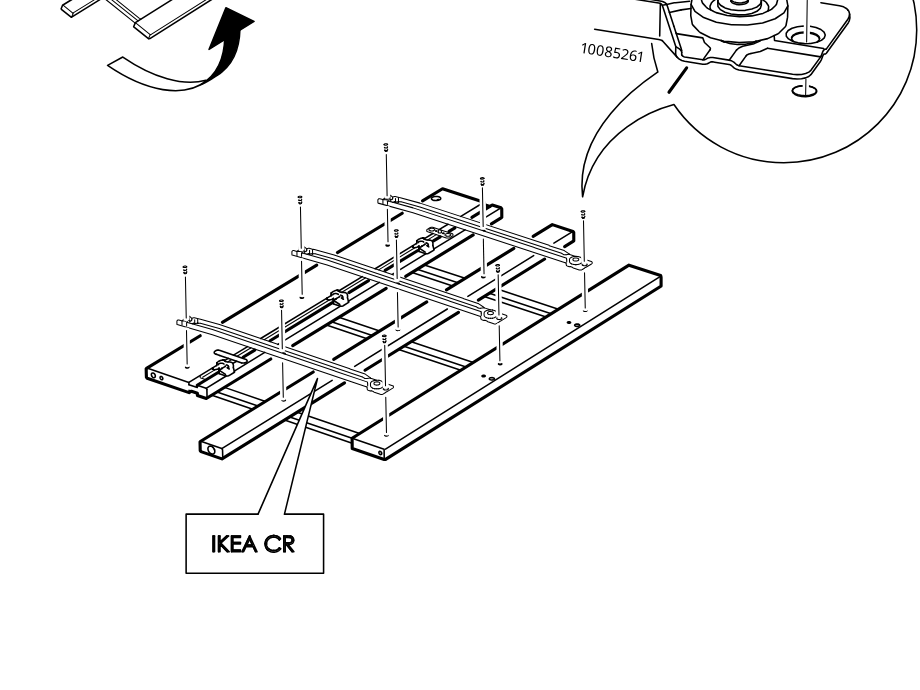
    Diagram for step 15: After rotating the assembly, the opposite side rail set is aligned and fixed with nine screws into the corresponding bracket points.
  23. Step 16

    The frame is turned and four cam screws (603440) are inserted and tightened into the side panel holes.
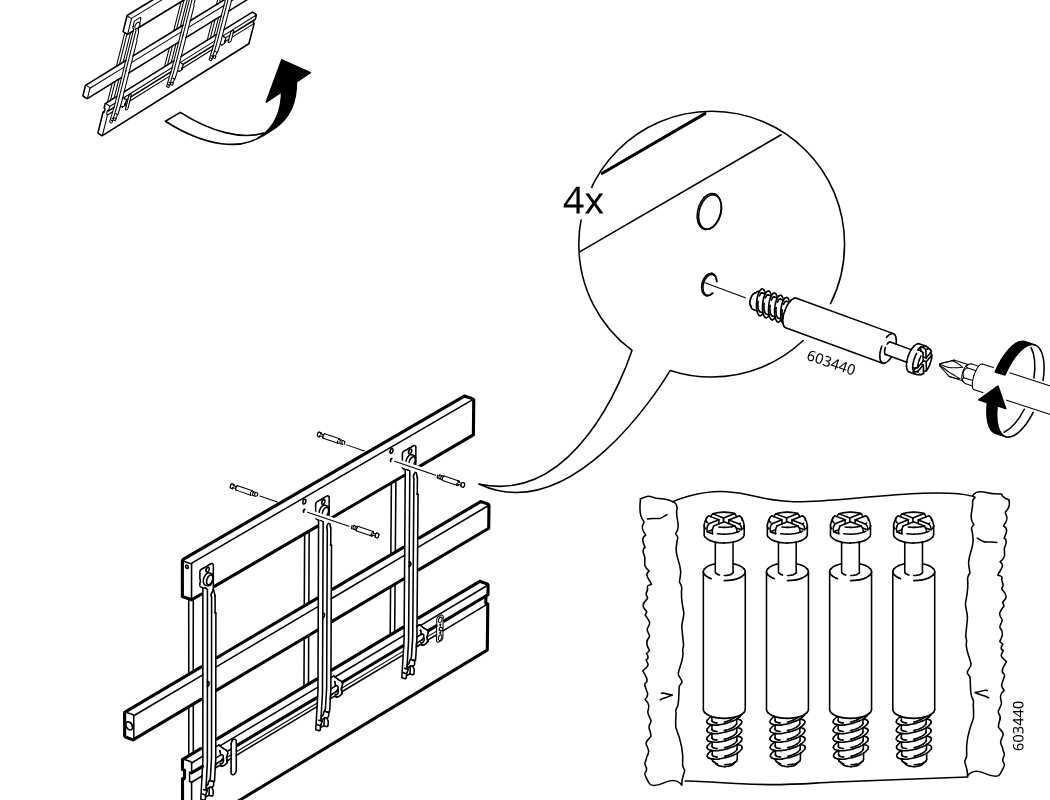
    Diagram for step 16: The frame is turned and four cam screws (603440) are inserted and tightened into the side panel holes.
  24. Step 17

    One wooden dowel (101350) is inserted into the lower side hole of the frame.
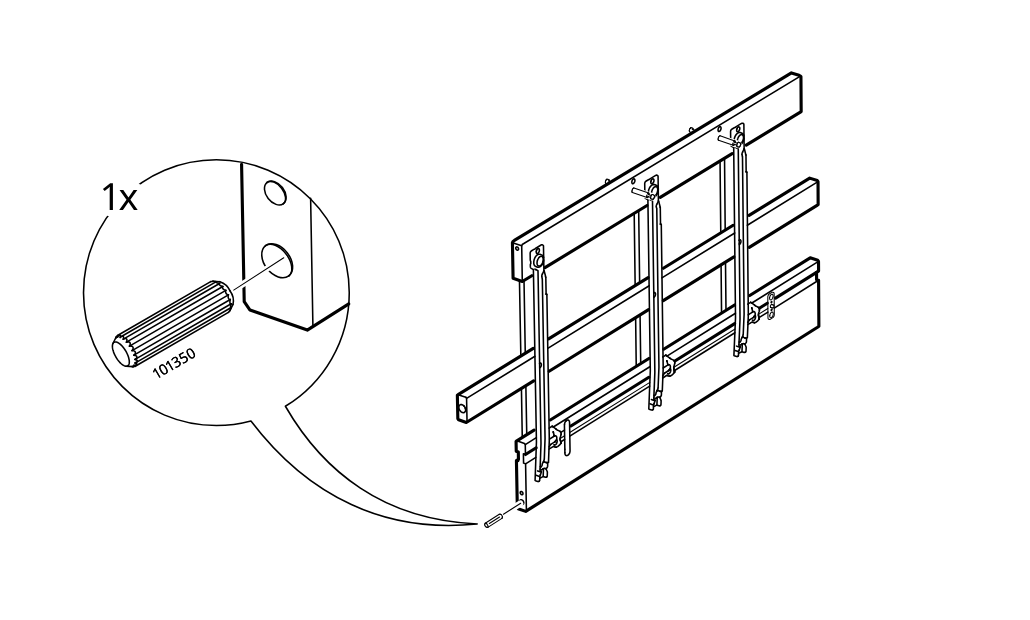
    Diagram for step 17: One wooden dowel (101350) is inserted into the lower side hole of the frame.
  25. Step 18

    A dowel (101350) is inserted into the side hole of the upper frame assembly, as shown in the zoom callout.
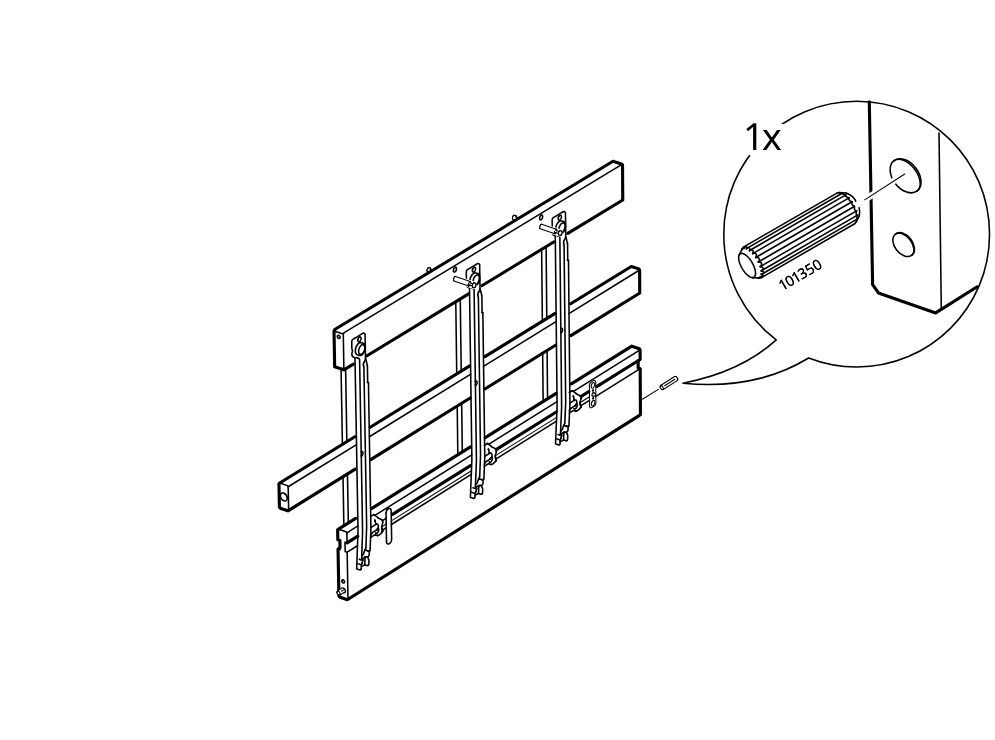
    Diagram for step 18: A dowel (101350) is inserted into the side hole of the upper frame assembly, as shown in the zoom callout.
  26. Step 19

    The upper frame section is lowered and aligned onto the standing structure with a downward placement motion.
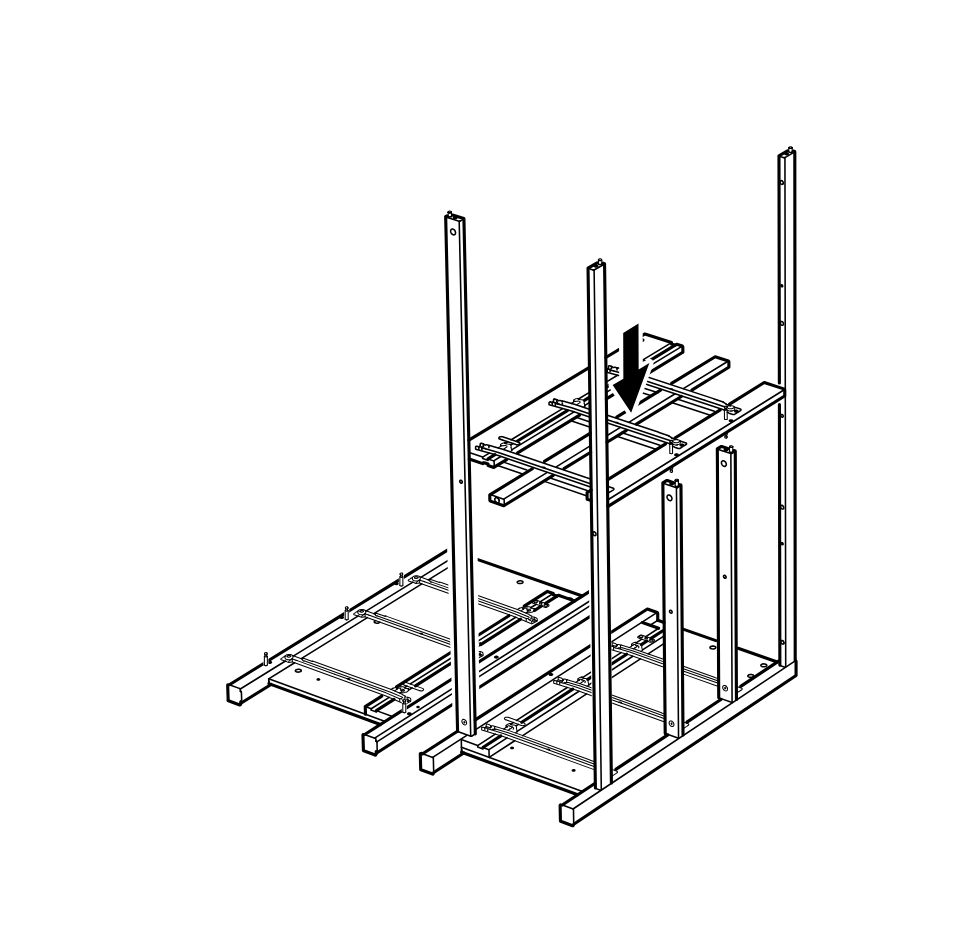
    Diagram for step 19: The upper frame section is lowered and aligned onto the standing structure with a downward placement motion.
  27. Step 20

    Use three 100214 screws with the 100001 hex key to fasten the upper frame joints, then insert and rotate two 110630 cam locks to secure the side connection points.
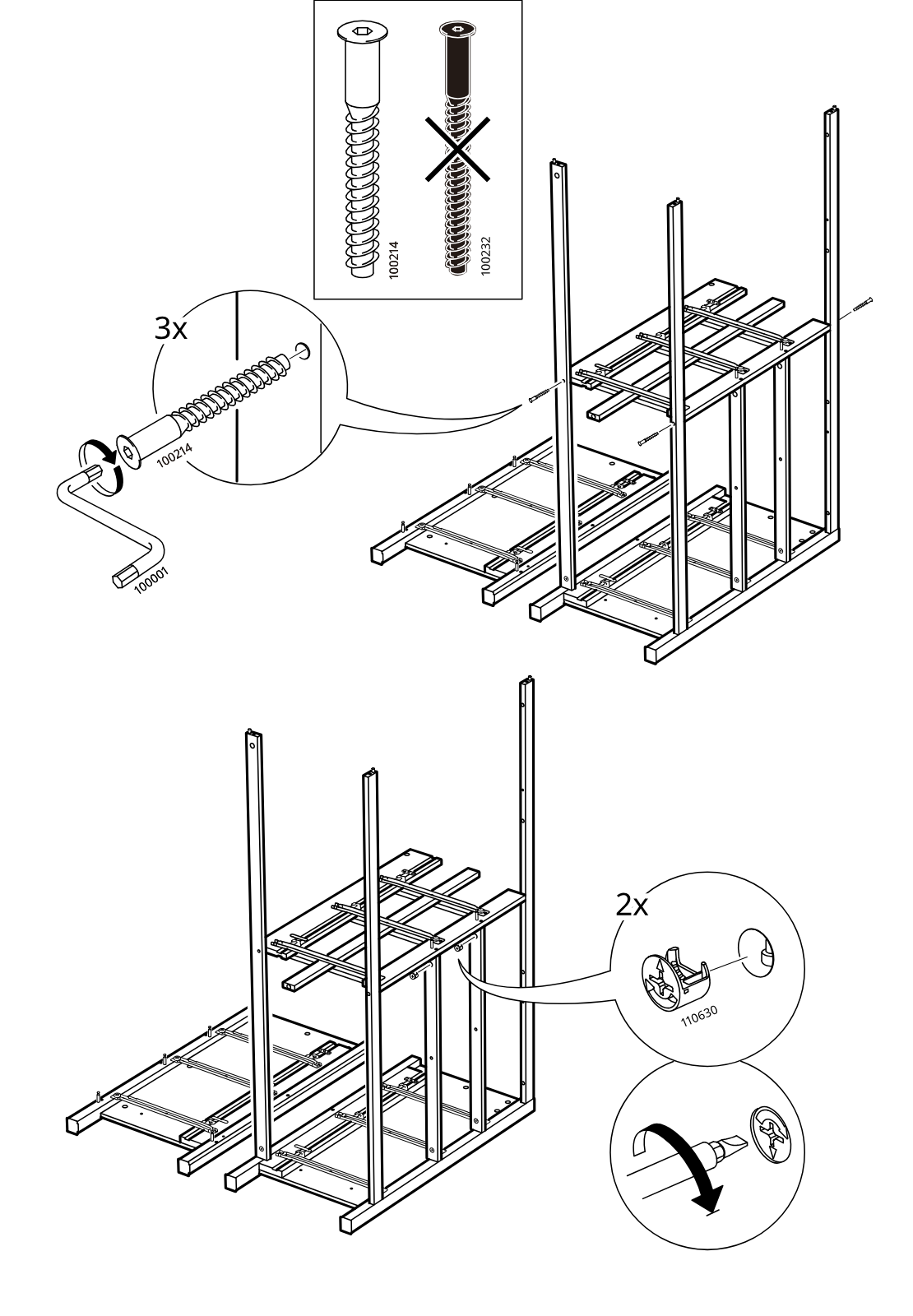
    Diagram for step 20: Use three 100214 screws with the 100001 hex key to fasten the upper frame joints, then insert and rotate two 110630 cam locks to secure the side connection points.
  28. Step 21

    Two upright side posts are inserted downward into the upper frame of the upside-down assembly.
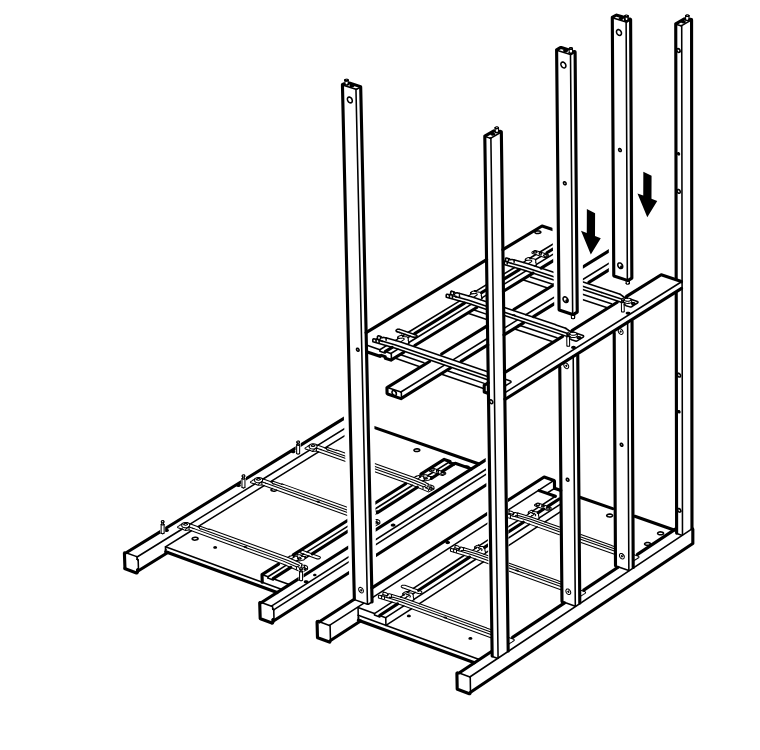
    Diagram for step 21: Two upright side posts are inserted downward into the upper frame of the upside-down assembly.
  29. Step 22

    Two cam-lock fittings (110630) are placed and then tightened with a screwdriver, as shown in the zoom callouts.
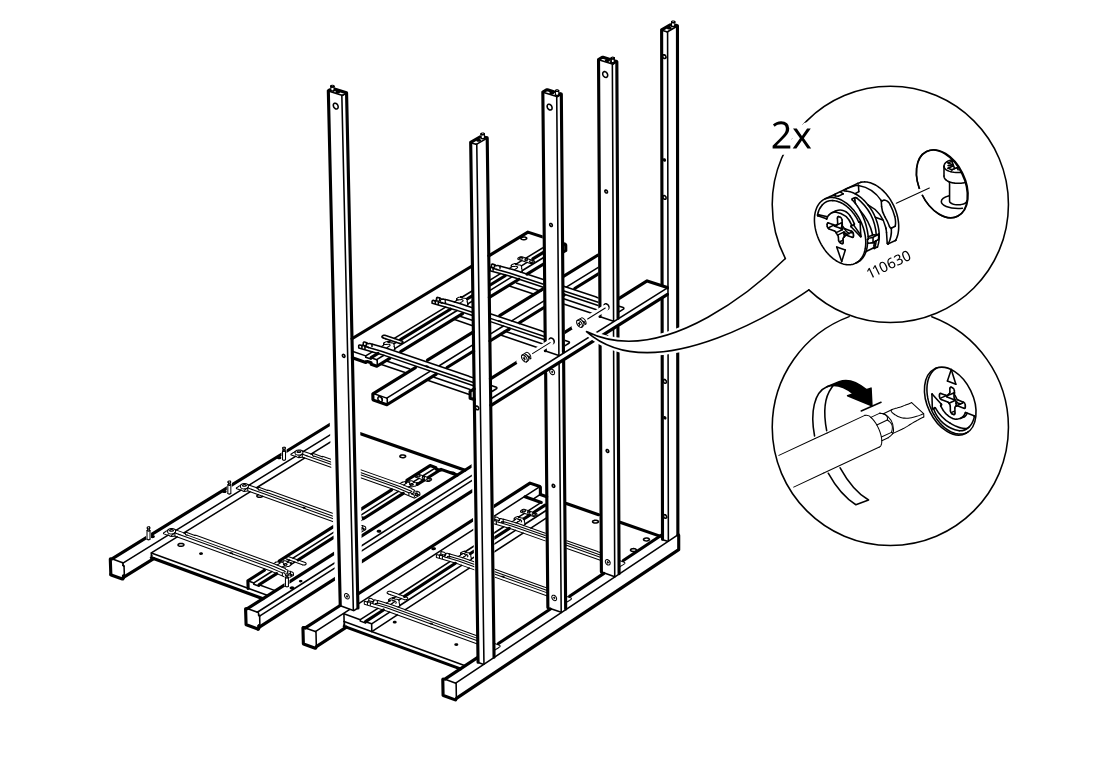
    Diagram for step 22: Two cam-lock fittings (110630) are placed and then tightened with a screwdriver, as shown in the zoom callouts.
  30. Step 23

    The top panel is lowered onto the upright frame to seat onto the side rails.
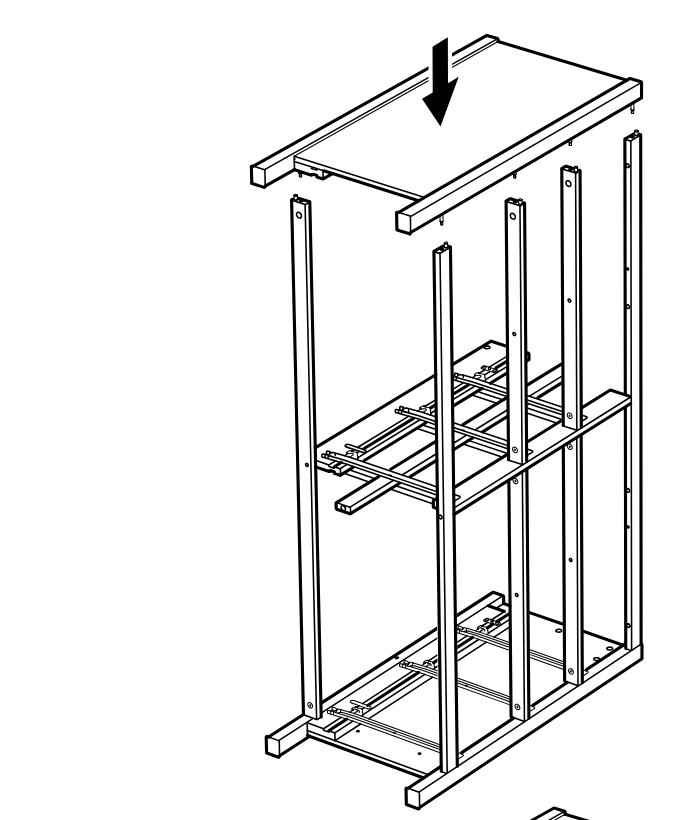
    Diagram for step 23: The top panel is lowered onto the upright frame to seat onto the side rails.
  31. Step 24

    Five cam locks (110630) are inserted and then tightened with a screwdriver to secure the top panel.
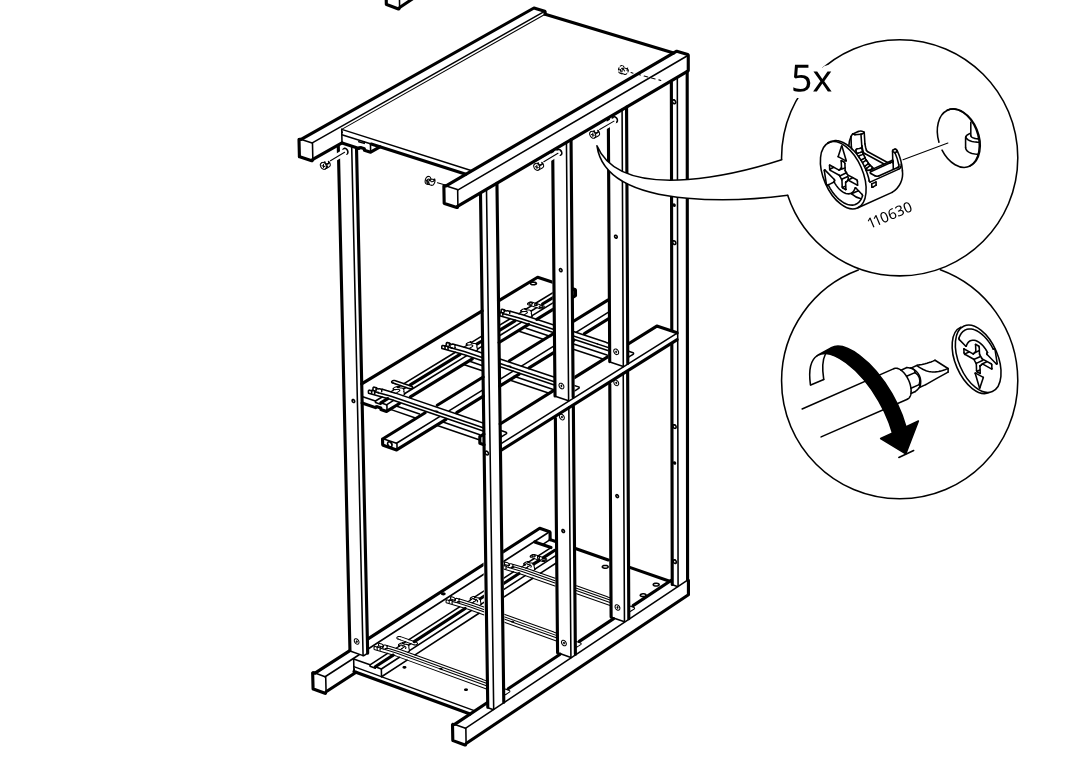
    Diagram for step 24: Five cam locks (110630) are inserted and then tightened with a screwdriver to secure the top panel.
  32. Step 25

    The frame stands upright and a single connector screw (107862) is tightened into the side hole, as shown in the zoom callout with a turning arrow.
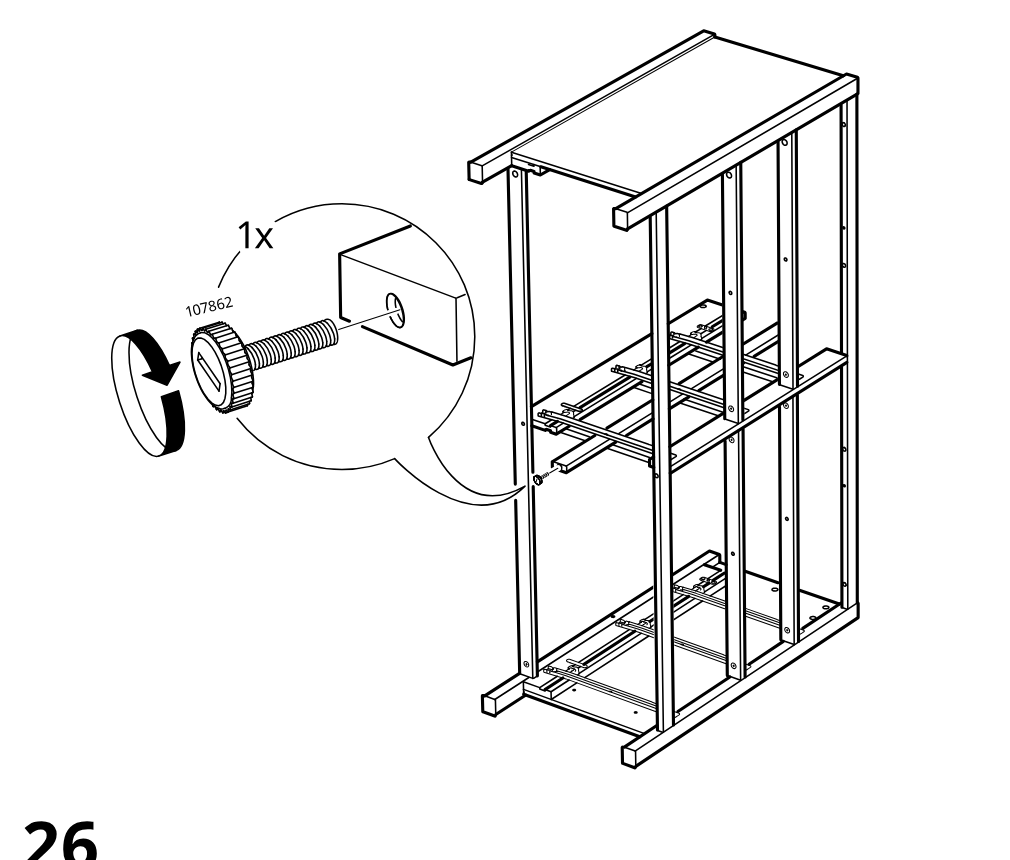
    Diagram for step 25: The frame stands upright and a single connector screw (107862) is tightened into the side hole, as shown in the zoom callout with a turning arrow.
  33. Step 26

    The assembled frame is rotated down onto its back, indicated by the large curved arrow above the structure.
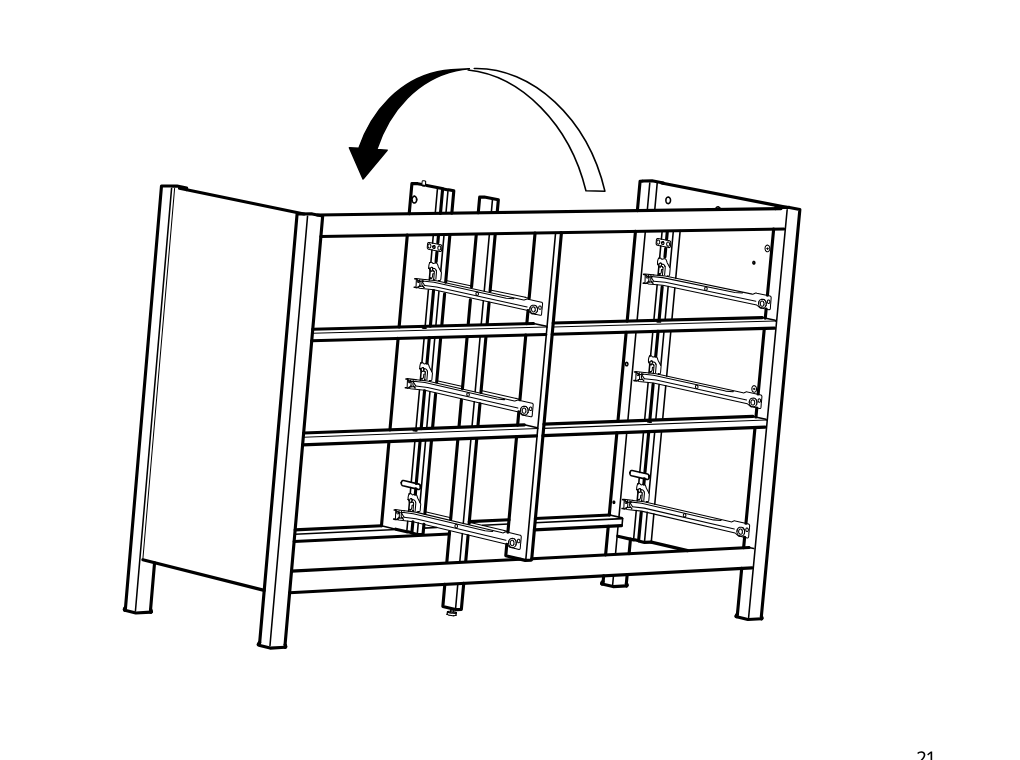
    Diagram for step 26: The assembled frame is rotated down onto its back, indicated by the large curved arrow above the structure.
  34. Step 27

    Attach the rail hardware to the board with two 108462 screws (not 10080579), then orient the panel as shown.
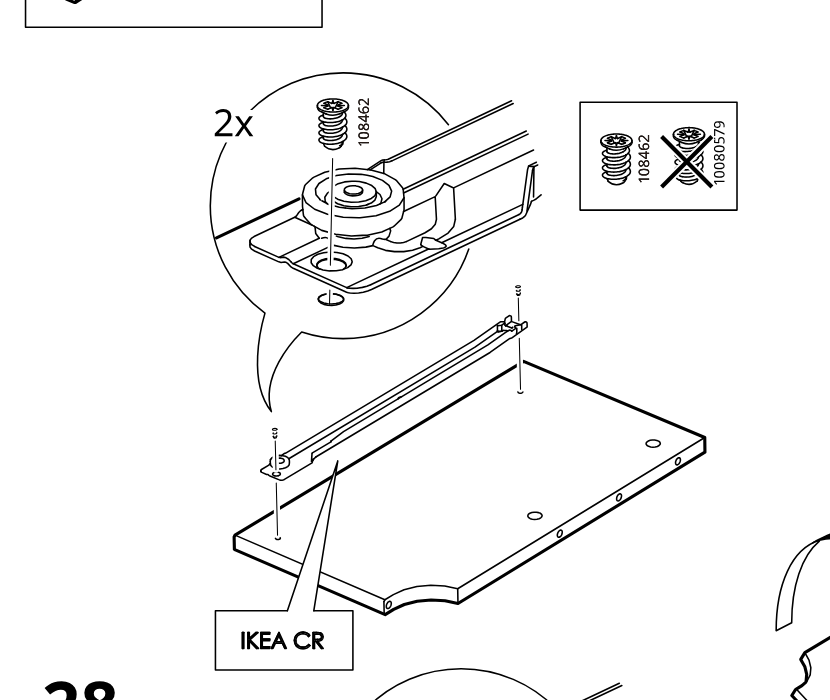
    Diagram for step 27: Attach the rail hardware to the board with two 108462 screws (not 10080579), then orient the panel as shown.
  35. Step 28

    Repeat the rail attachment on the mirrored board using two 108462 screws and the IKEA CL orientation.
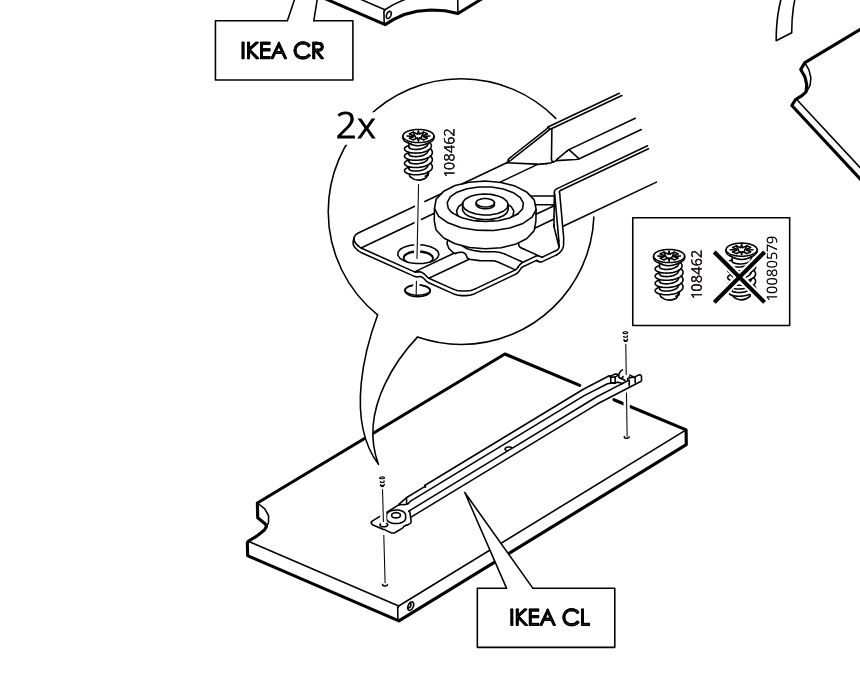
    Diagram for step 28: Repeat the rail attachment on the mirrored board using two 108462 screws and the IKEA CL orientation.
  36. Step 29

    The panel is rotated and a 101350 dowel is inserted into the top hole, with a zoomed detail showing the correct placement.
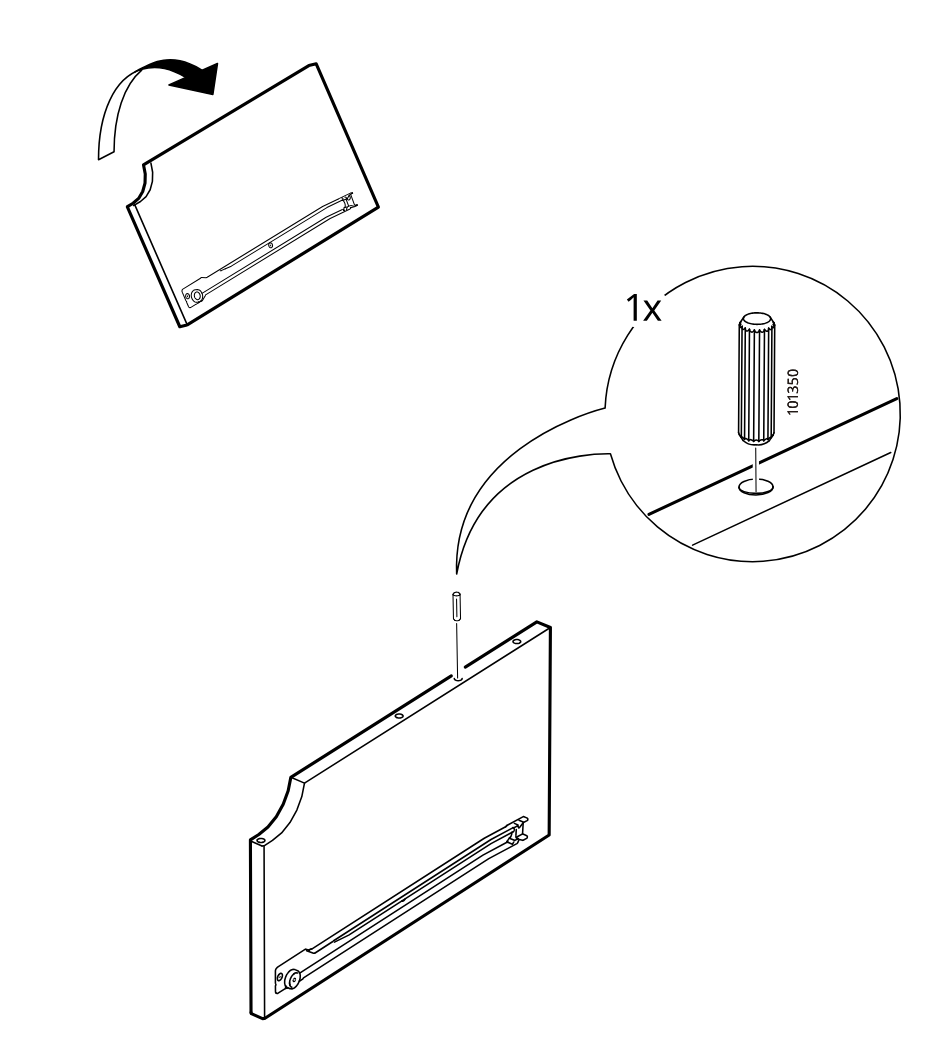
    Diagram for step 29: The panel is rotated and a 101350 dowel is inserted into the top hole, with a zoomed detail showing the correct placement.
  37. Step 30

    Using the Allen key, the assembler installs two screws of type 100232 at the upper position and two screws of type 100214 at the lower position in the frame, while following the do/not-do hardware orientation shown in the two boxed comparison callouts.
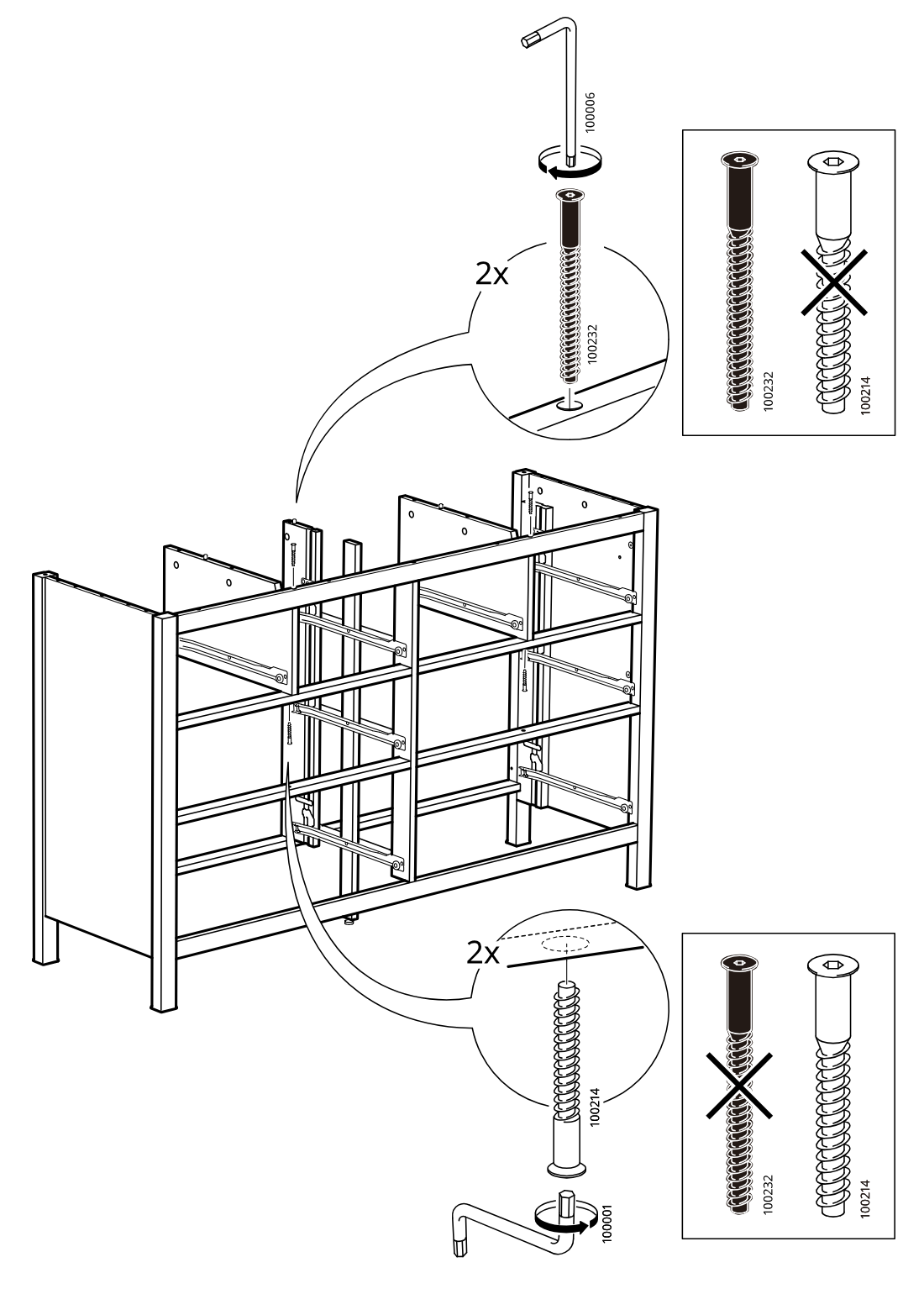
    Diagram for step 30: Using the Allen key, the assembler installs two screws of type 100232 at the upper position and two screws of type 100214 at the lower position in the frame, while following the do/not-do hardware orientation shown in the two boxed comparison callouts.
  38. Step 31

    The installer positions two metal brackets on the panel ends and screws each bracket down with two screws and washers, as shown in the zoom detail and hardware bag callout.
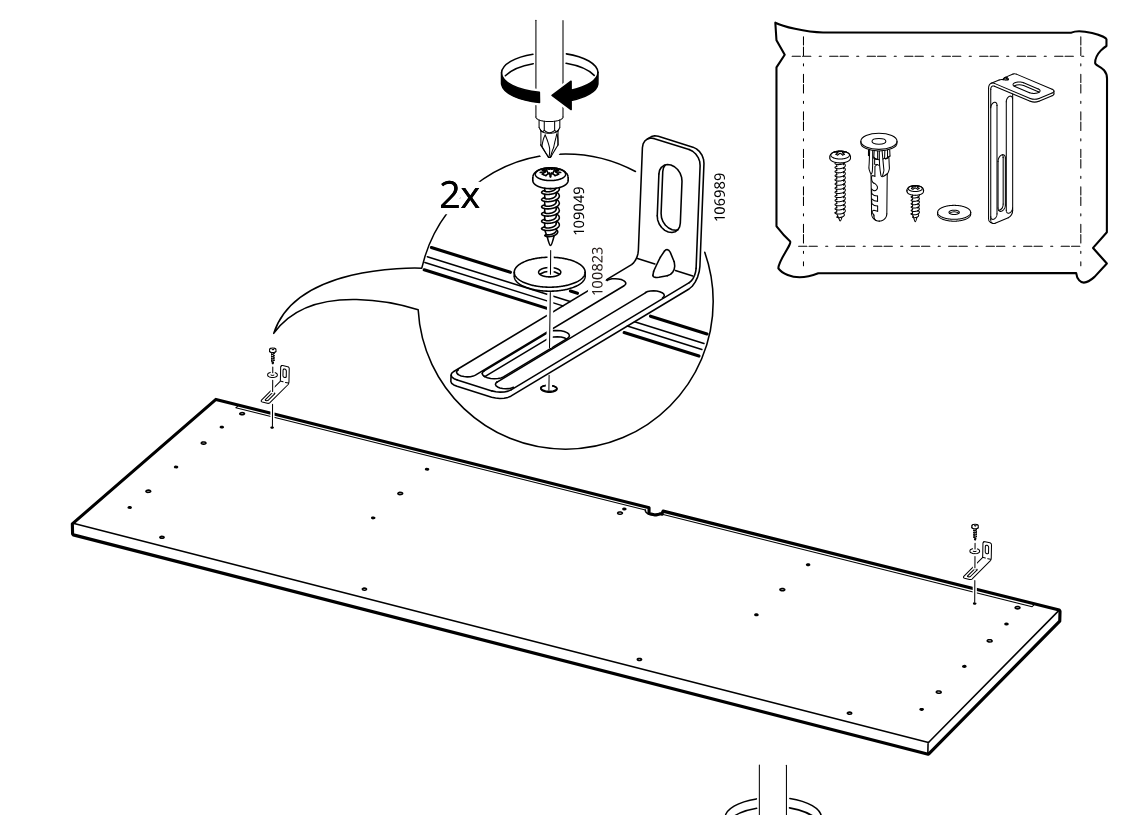
    Diagram for step 31: The installer positions two metal brackets on the panel ends and screws each bracket down with two screws and washers, as shown in the zoom detail and hardware bag callout.
  39. Step 32

    The installer drives eleven threaded inserts into the predrilled holes across the panel while following the orientation warning diagram and screwdriver rotation shown in the zoom callout.
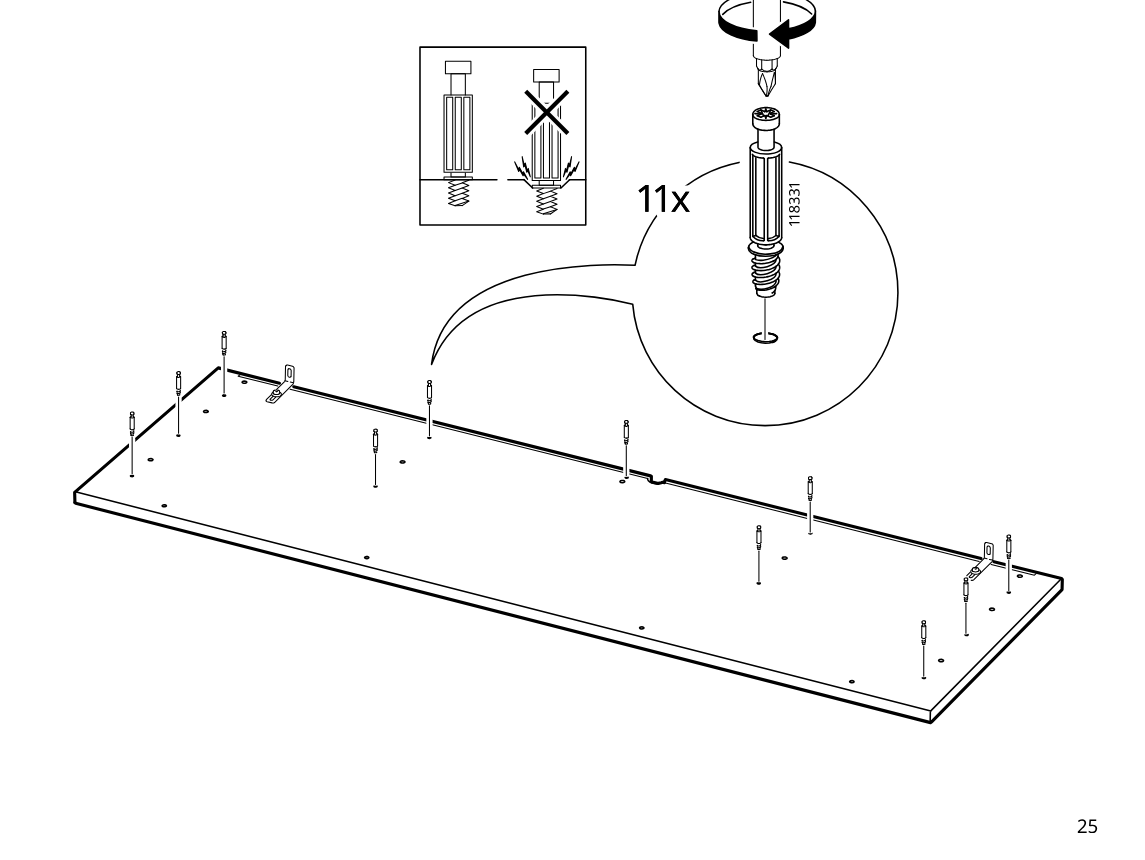
    Diagram for step 32: The installer drives eleven threaded inserts into the predrilled holes across the panel while following the orientation warning diagram and screwdriver rotation shown in the zoom callout.
  40. Step 33

    Insert six wooden dowels (101350) into the top holes of the frame sections as shown in the zoom callout.
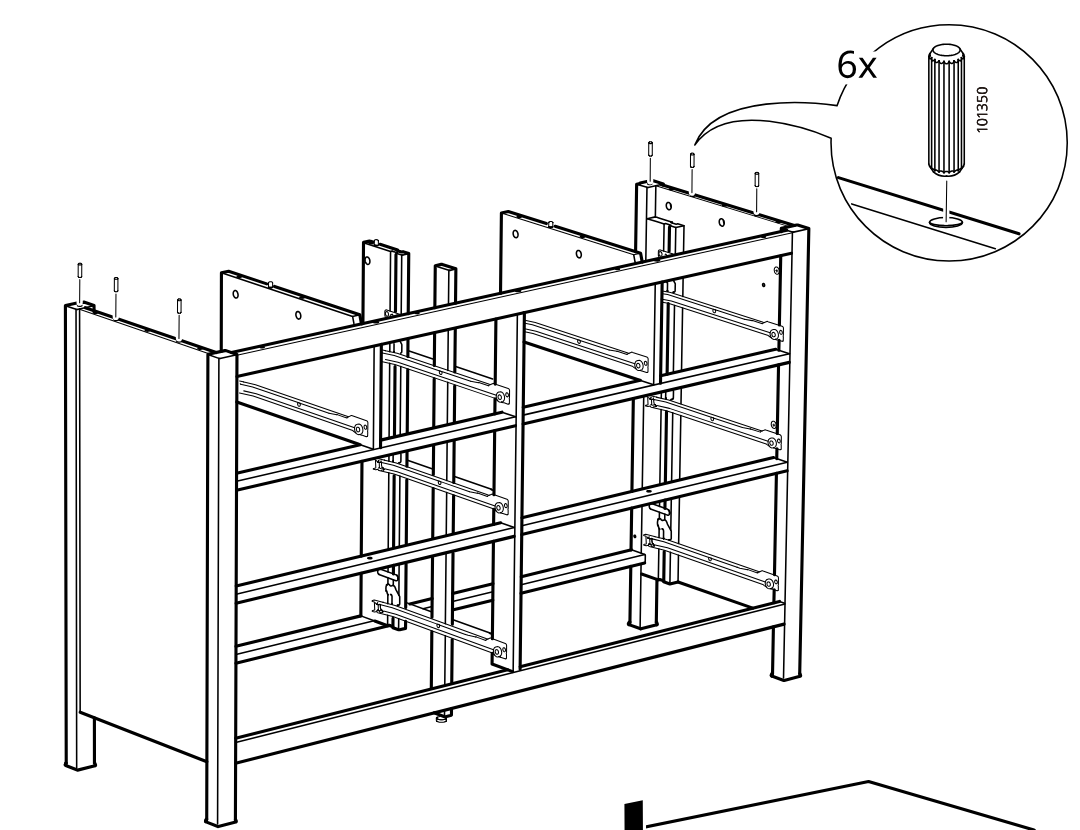
    Diagram for step 33: Insert six wooden dowels (101350) into the top holes of the frame sections as shown in the zoom callout.
  41. Step 34

    Lower the large top panel straight down onto the aligned dowels and frame.
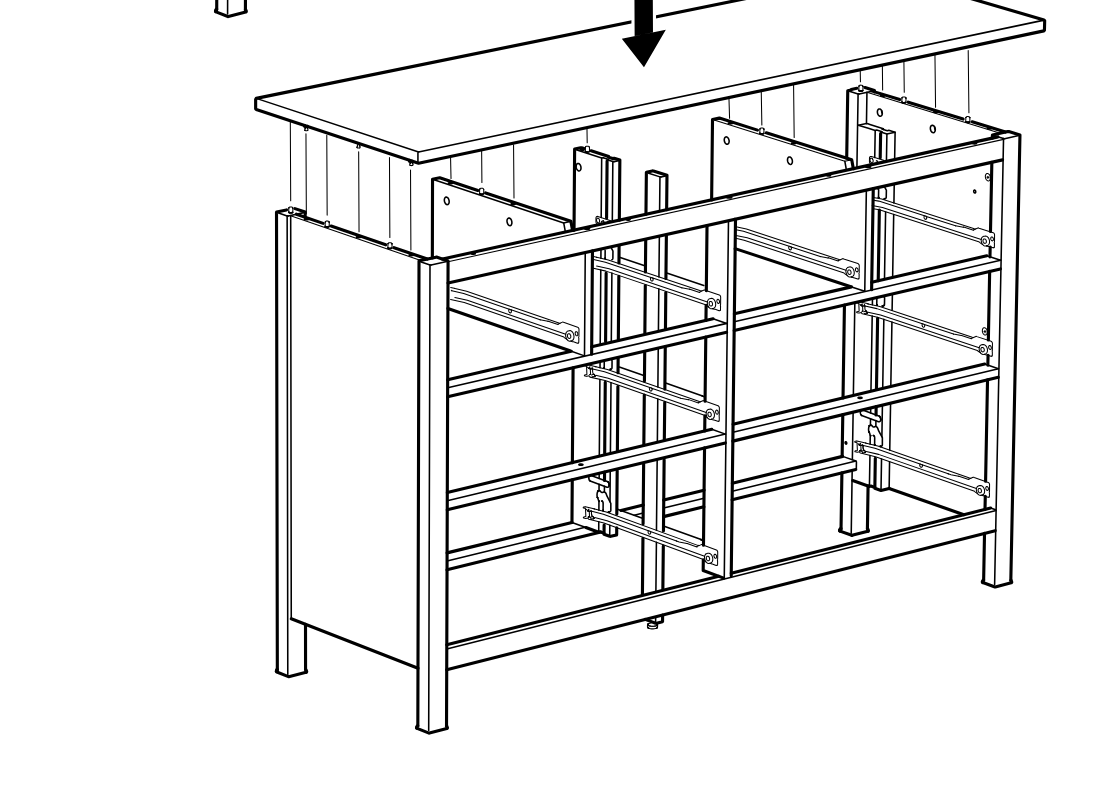
    Diagram for step 34: Lower the large top panel straight down onto the aligned dowels and frame.
  42. Step 35

    Tighten four long screws into the top from inside the frame using the Allen key.
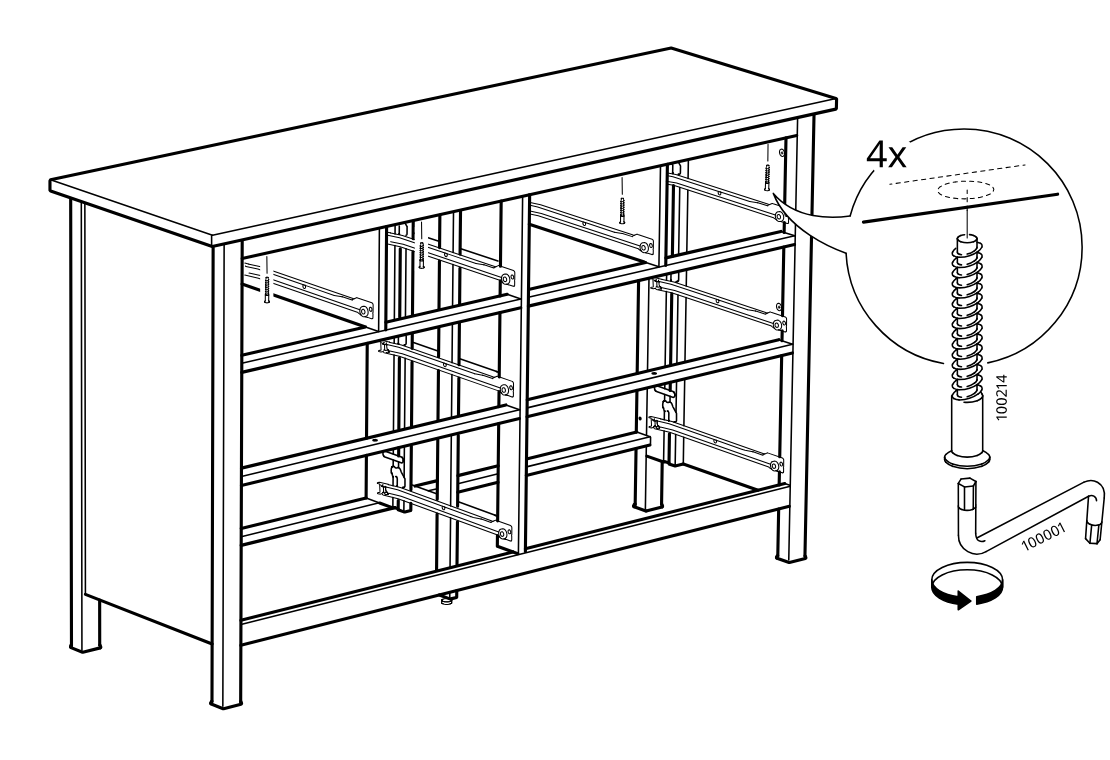
    Diagram for step 35: Tighten four long screws into the top from inside the frame using the Allen key.
  43. Step 36

    Insert and turn eleven cam locks along the top panel to secure the assembly.
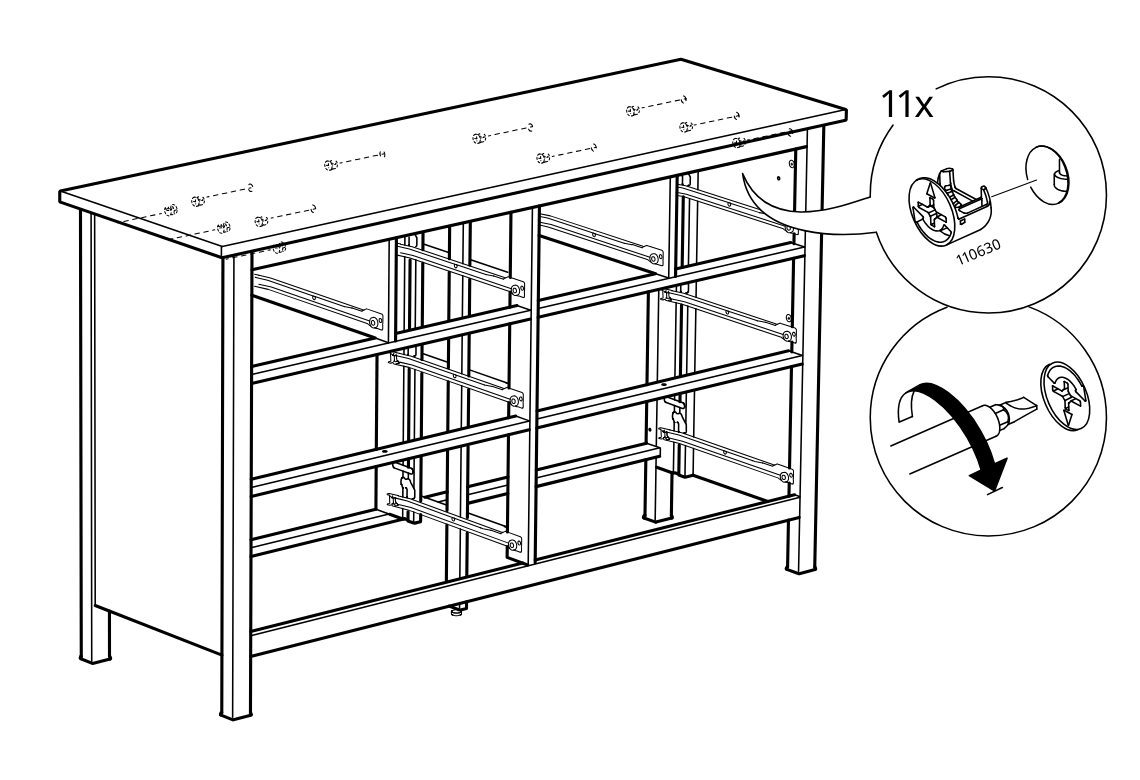
    Diagram for step 36: Insert and turn eleven cam locks along the top panel to secure the assembly.
  44. Step 37

    The frame is turned over, a large panel is positioned onto the structure, and a pencil marks the panel edge alignment as shown in the zoom detail.
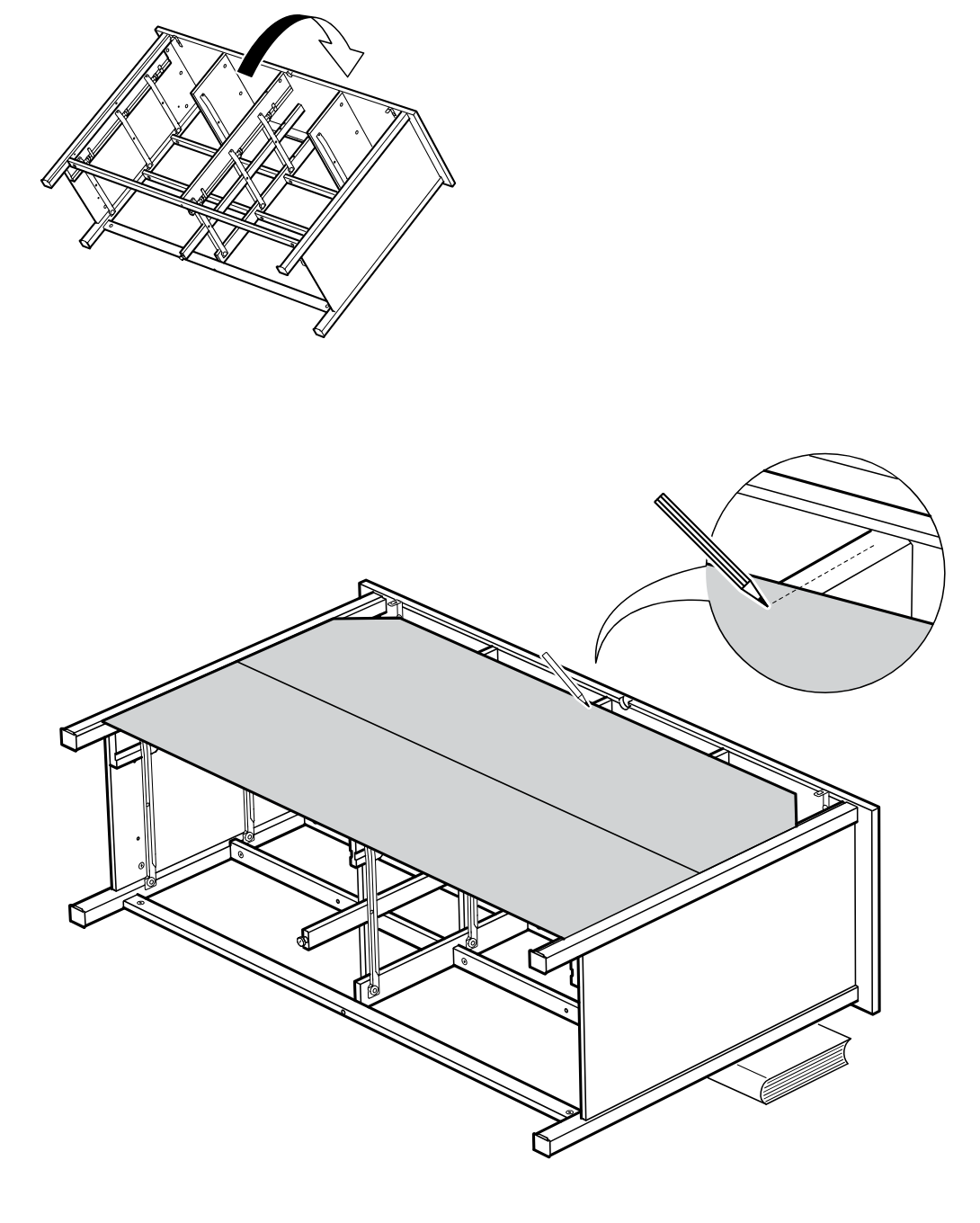
    Diagram for step 37: The frame is turned over, a large panel is positioned onto the structure, and a pencil marks the panel edge alignment as shown in the zoom detail.
  45. Step 38

    The top panels are aligned on the frame and their position is adjusted using the indicated alignment points, with a zoom detail showing the screw location reference.
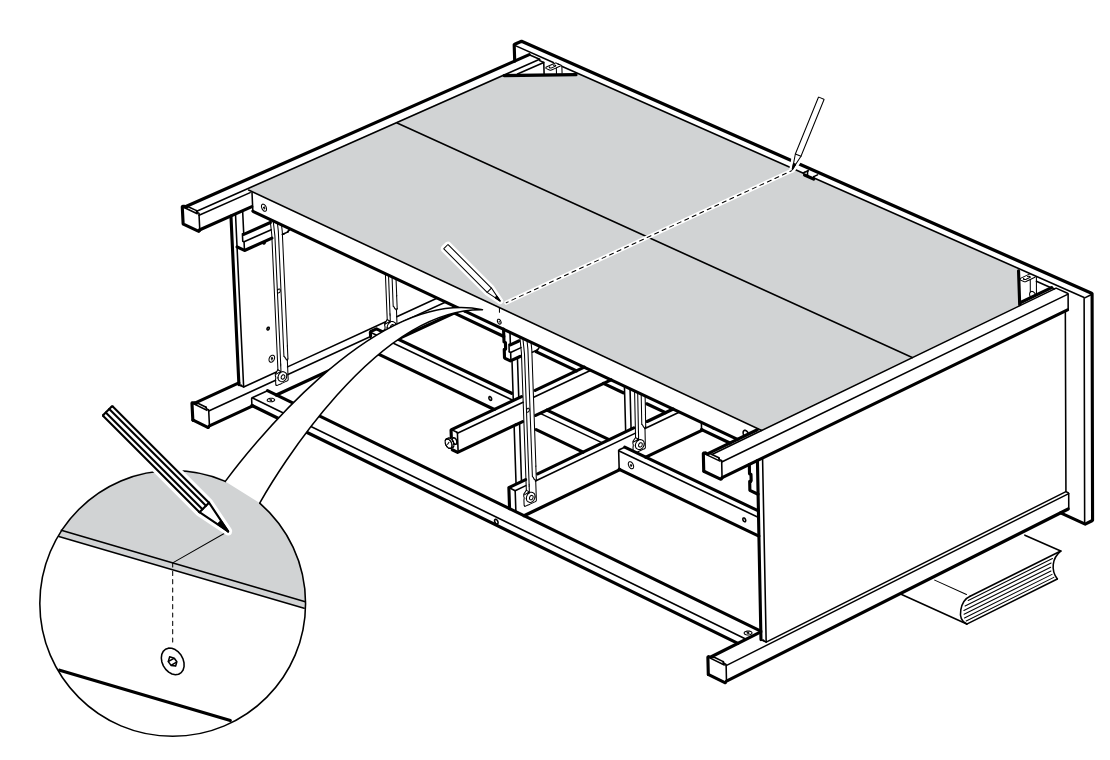
    Diagram for step 38: The top panels are aligned on the frame and their position is adjusted using the indicated alignment points, with a zoom detail showing the screw location reference.
  46. Step 39

    A single nail (part 101221) is hammered in while pushing the two top panels together so the center seam closes, as shown by the arrows and zoom callout.
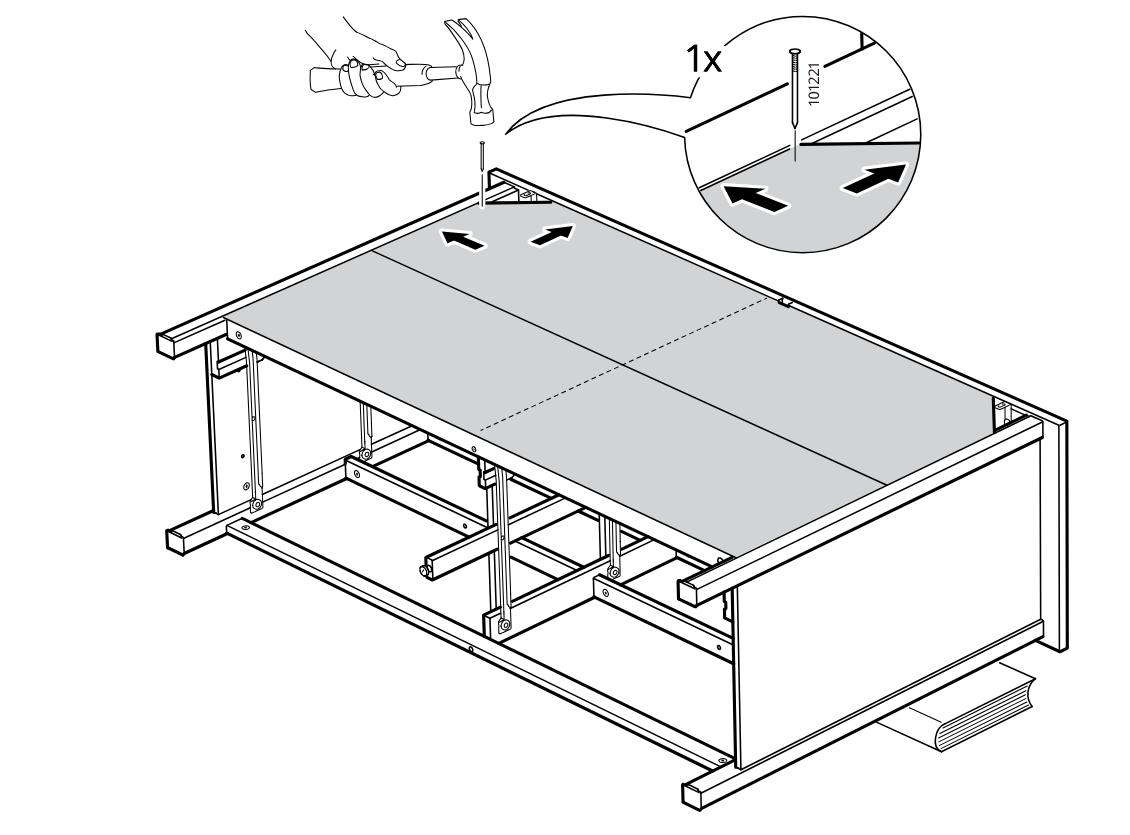
    Diagram for step 39: A single nail (part 101221) is hammered in while pushing the two top panels together so the center seam closes, as shown by the arrows and zoom callout.
  47. Step 40

    The assembler nails one fastener (101222) into the right side of the top panel while pressing the panel inward and supporting the frame.
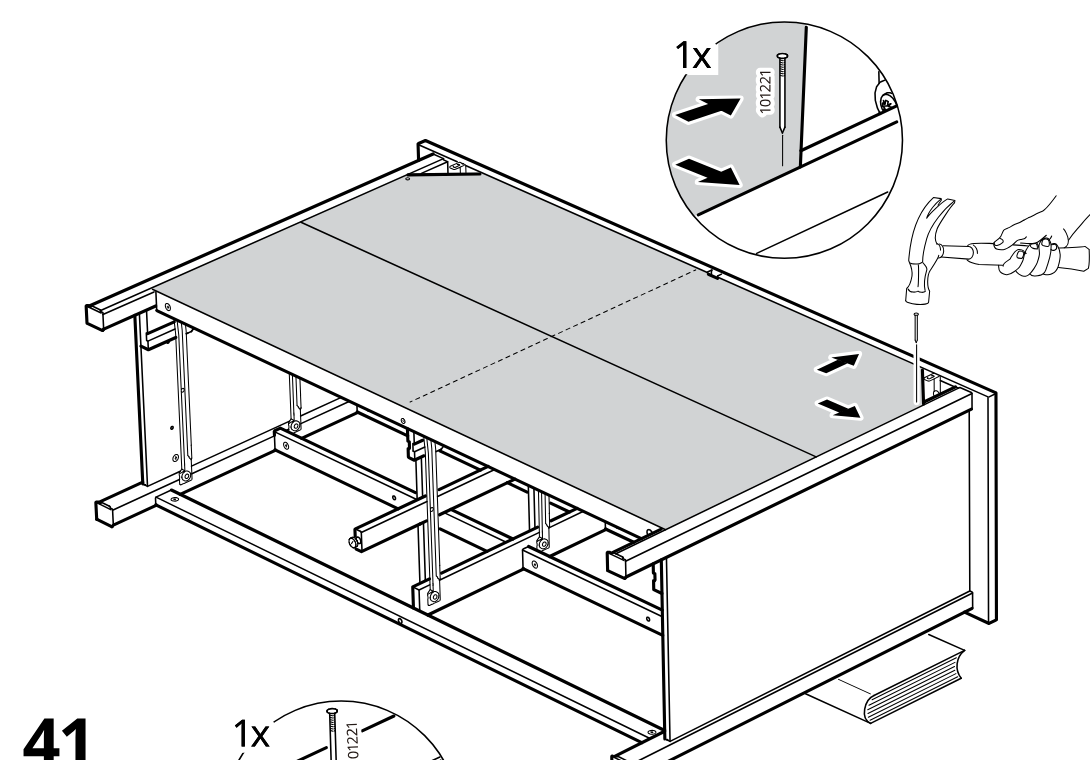
    Diagram for step 40: The assembler nails one fastener (101222) into the right side of the top panel while pressing the panel inward and supporting the frame.
  48. Step 41

    The assembler nails one fastener (101221) into the left side of the top panel while pushing the panel inward and supporting the frame.
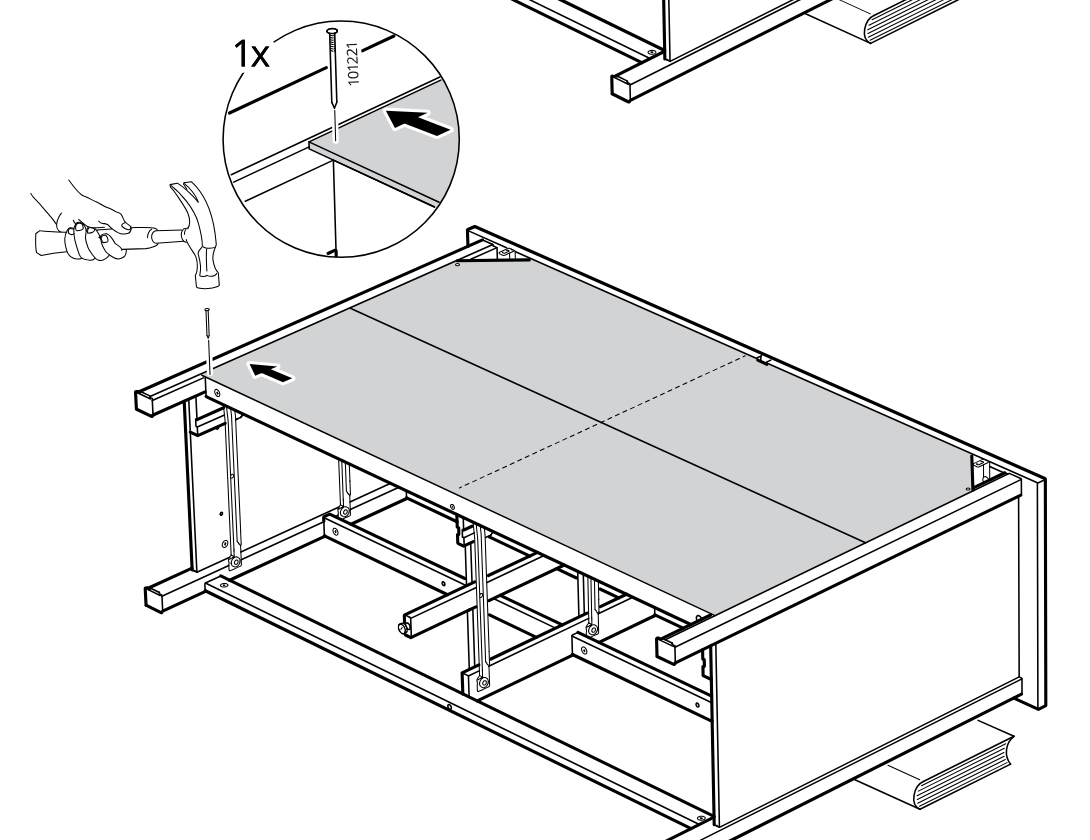
    Diagram for step 41: The assembler nails one fastener (101221) into the left side of the top panel while pushing the panel inward and supporting the frame.
  49. Step 42

    The top panel is secured to the frame by hammering in 27 nails (part 101221), then the unit is turned upright.
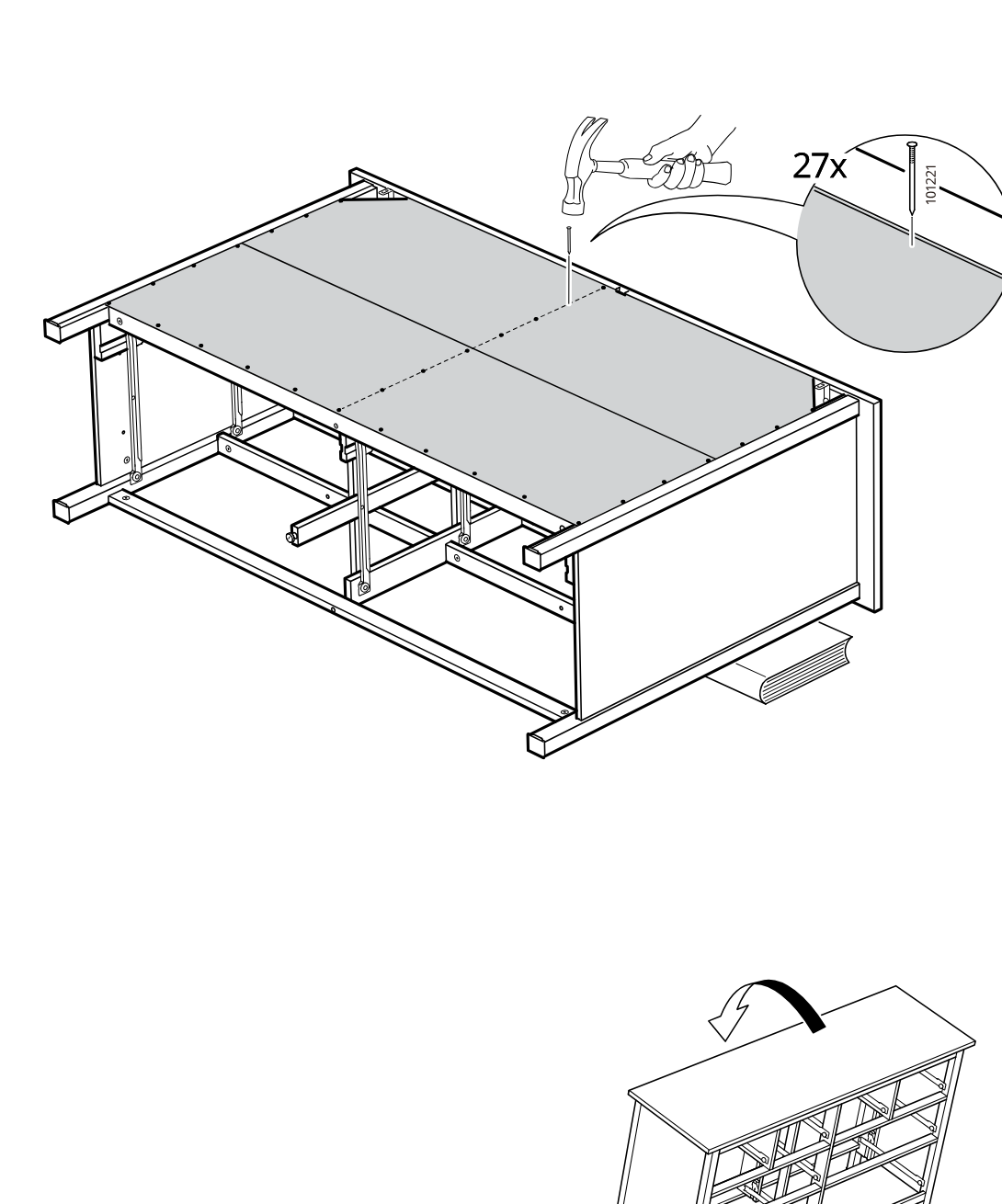
    Diagram for step 42: The top panel is secured to the frame by hammering in 27 nails (part 101221), then the unit is turned upright.
  50. Step 43

    The wall unit is secured by positioning the bracket at the top edge, tightening the screw, and then covering the slot with a cap, repeated twice.
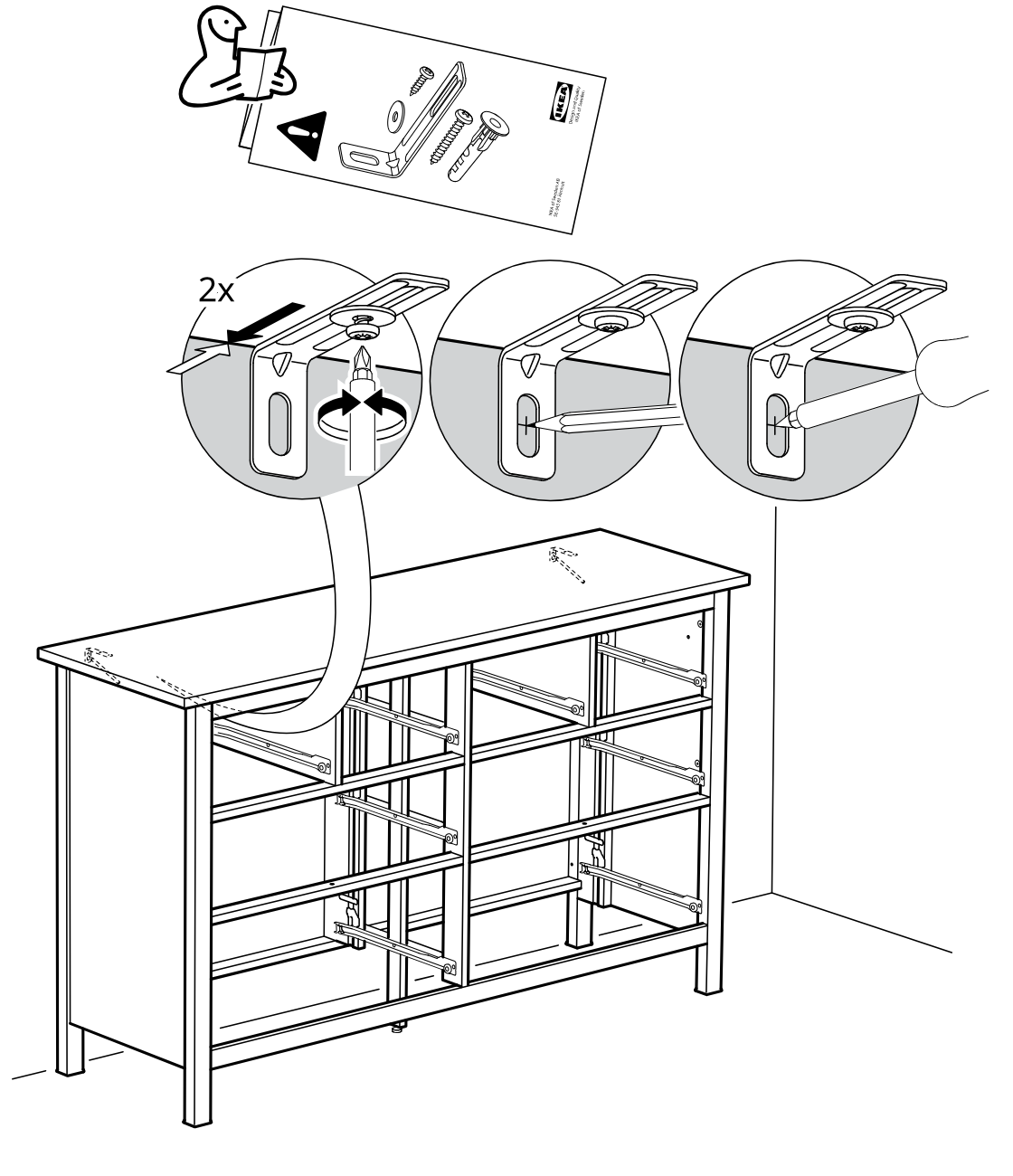
    Diagram for step 43: The wall unit is secured by positioning the bracket at the top edge, tightening the screw, and then covering the slot with a cap, repeated twice.
  51. Step 44

    The frame assembly is pushed inward from the left side under the countertop as indicated by the horizontal arrow.
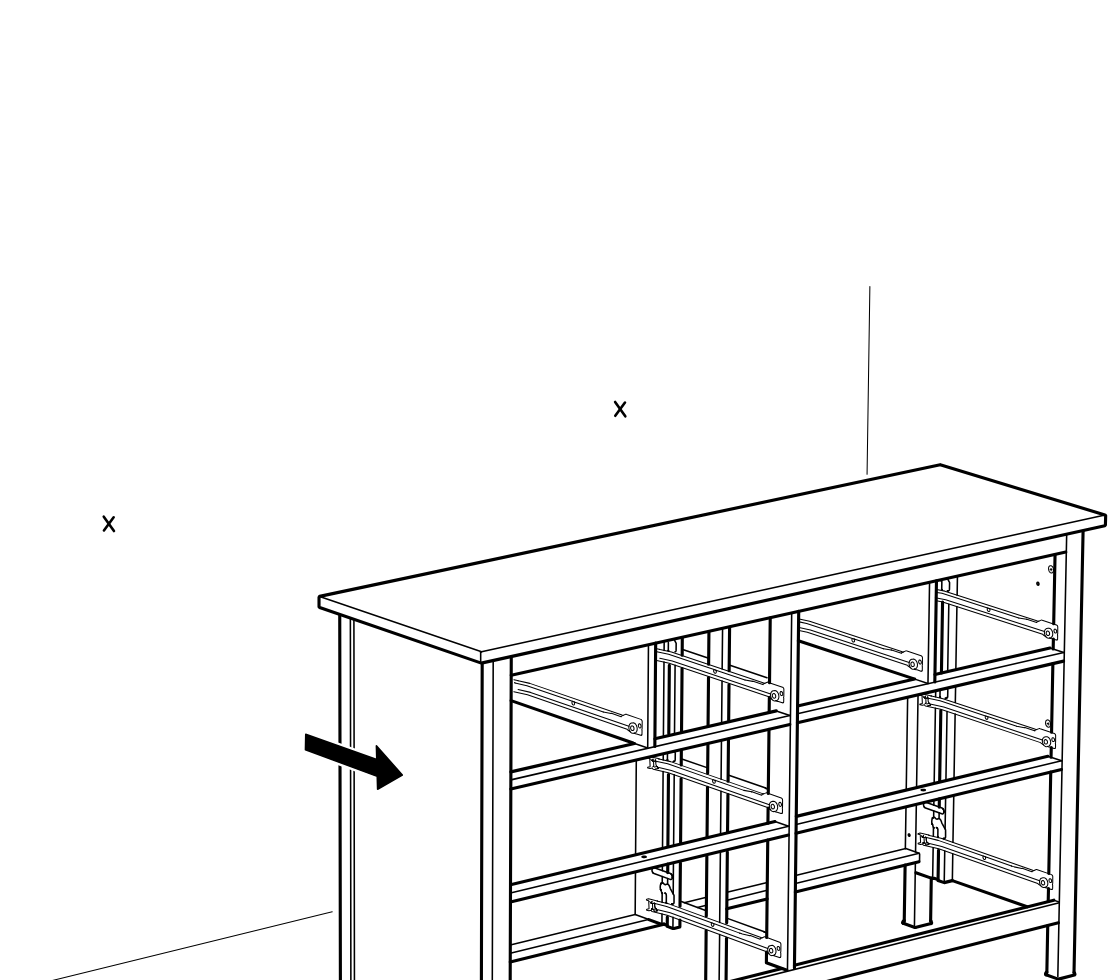
    Diagram for step 44: The frame assembly is pushed inward from the left side under the countertop as indicated by the horizontal arrow.
  52. Before you begin

    A freestanding information panel shows anti-tip guidance with a QR code link to secure-it information.
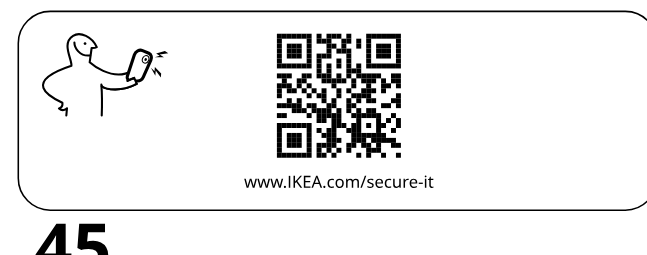
    Illustration for assembly note: A freestanding information panel shows anti-tip guidance with a QR code link to secure-it information.
  53. Before you begin

    A freestanding information panel shows a cabinet being secured to a wall with a screw.
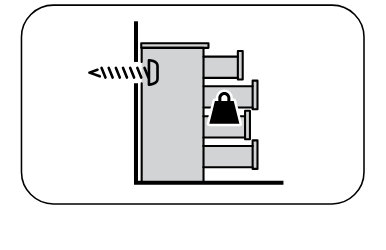
    Illustration for assembly note: A freestanding information panel shows a cabinet being secured to a wall with a screw.
  54. Before you begin

    Panel A shows fixing into solid wall type A with 5/16 in (8 mm) drill bit and three preparation steps including hole depth and inserting plug.
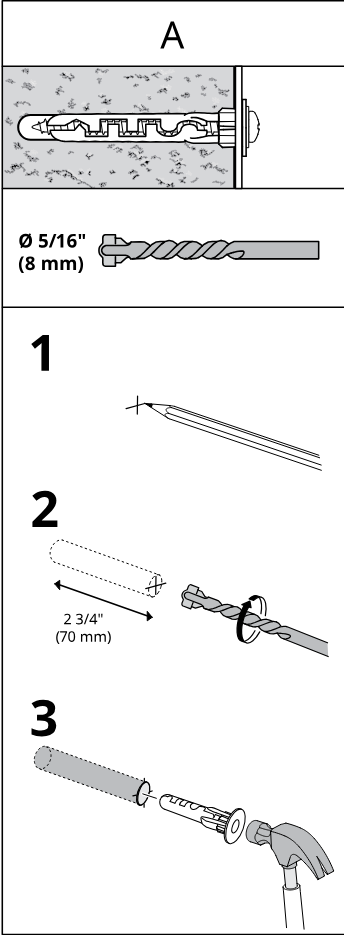
    Illustration for assembly note: Panel A shows fixing into solid wall type A with 5/16 in (8 mm) drill bit and three preparation steps including hole depth and inserting plug.
  55. Before you begin

    Panel B shows fixing into hollow wall type B with 5/16 in (8 mm) drill bit and three preparation steps including shorter depth and inserting plug.
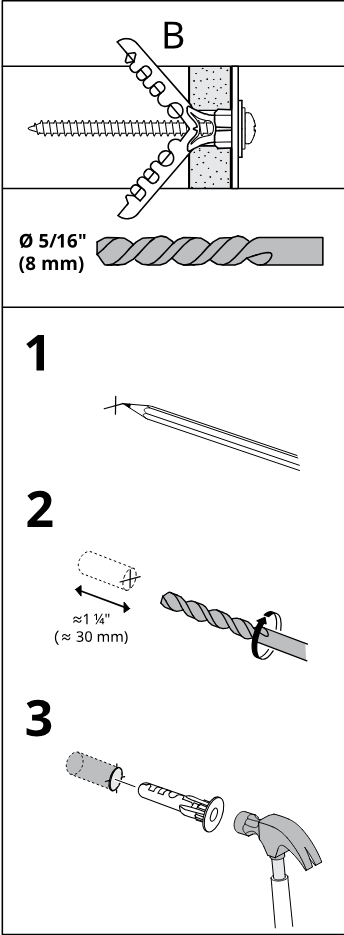
    Illustration for assembly note: Panel B shows fixing into hollow wall type B with 5/16 in (8 mm) drill bit and three preparation steps including shorter depth and inserting plug.
  56. Before you begin

    Panel C shows fixing into solid wood type C with 1/8 in (3 mm) drill bit and two preparation steps without wall plug.
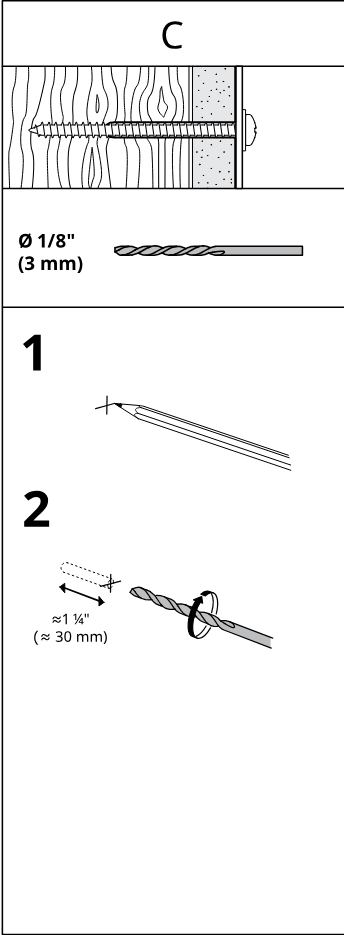
    Illustration for assembly note: Panel C shows fixing into solid wood type C with 1/8 in (3 mm) drill bit and two preparation steps without wall plug.
  57. Step 46

    The installer secures the top panel to the frame by driving two screws through a corner bracket, as shown in the magnified callout.
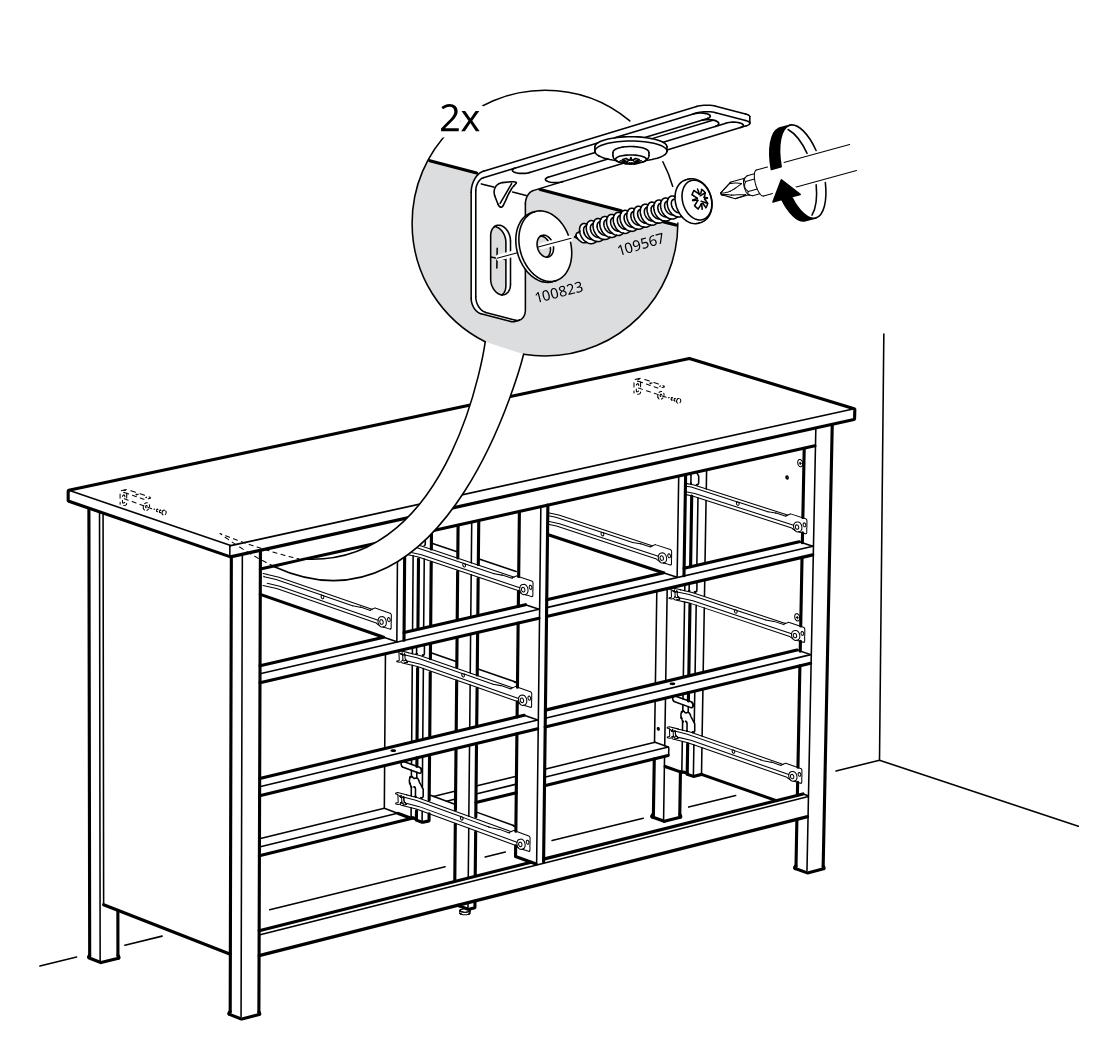
    Diagram for step 46: The installer secures the top panel to the frame by driving two screws through a corner bracket, as shown in the magnified callout.
  58. Step 55

    Insert and tighten four 123492 screw fittings into the panel holes using a screwdriver.
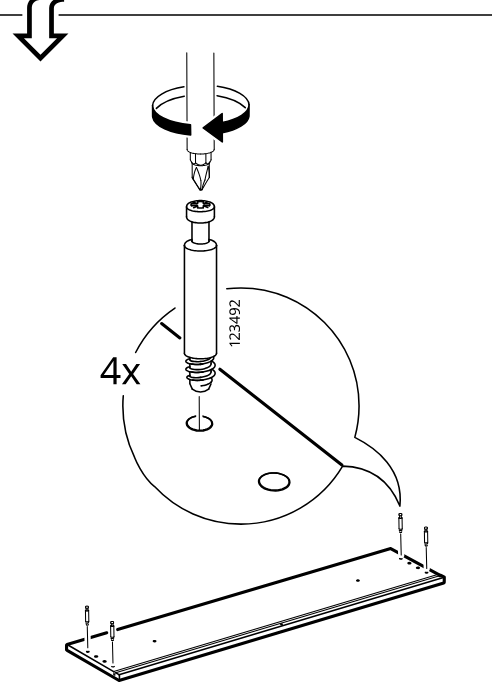
    Diagram for step 55: Insert and tighten four 123492 screw fittings into the panel holes using a screwdriver.
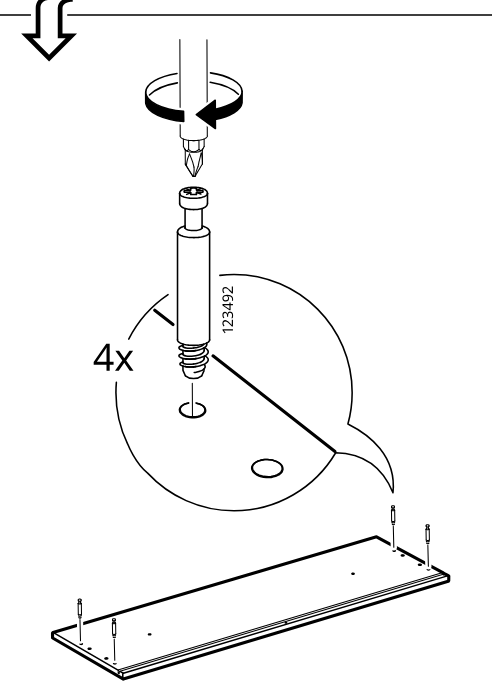
  59. Step 56

    Insert and tighten four 123492 screw fittings into the panel holes using a screwdriver.

    Diagram for step 56: Insert and tighten four 123492 screw fittings into the panel holes using a screwdriver.
  60. Step 57

    Push four 101345 wooden dowels into the side-board edge holes as shown in the zoom detail.
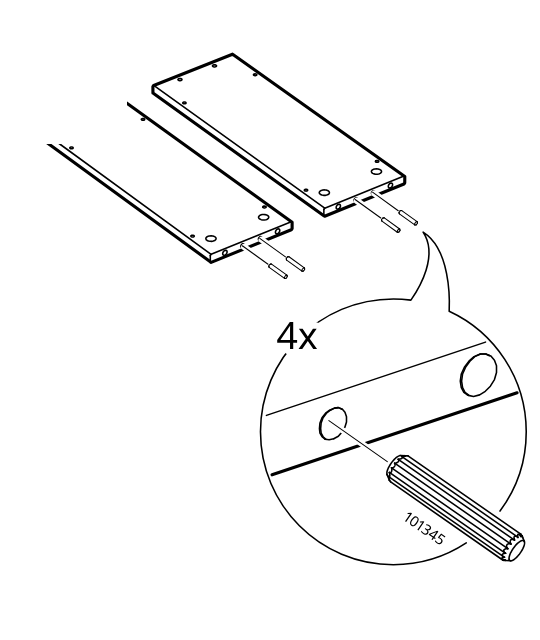
    Diagram for step 57: Push four 101345 wooden dowels into the side-board edge holes as shown in the zoom detail.
  61. Step 58

    Push four 101345 wooden dowels into the side-board edge holes as shown in the zoom detail.
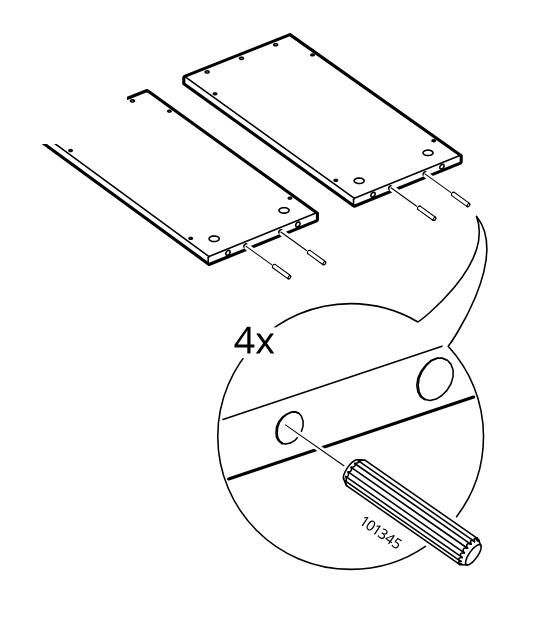
    Diagram for step 58: Push four 101345 wooden dowels into the side-board edge holes as shown in the zoom detail.
  62. Step 59

    Align two side panels vertically onto the base panel and lower them onto the prepared connector pins.
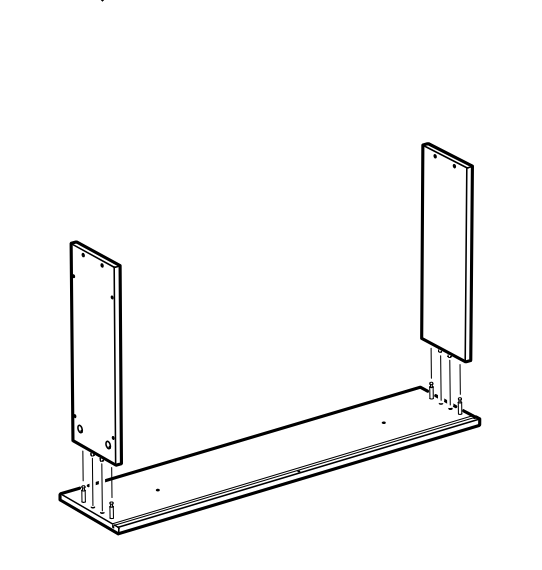
    Diagram for step 59: Align two side panels vertically onto the base panel and lower them onto the prepared connector pins.
  63. Step 60

    Align the mirrored pair of side panels onto the base panel and seat them onto the connector pins.
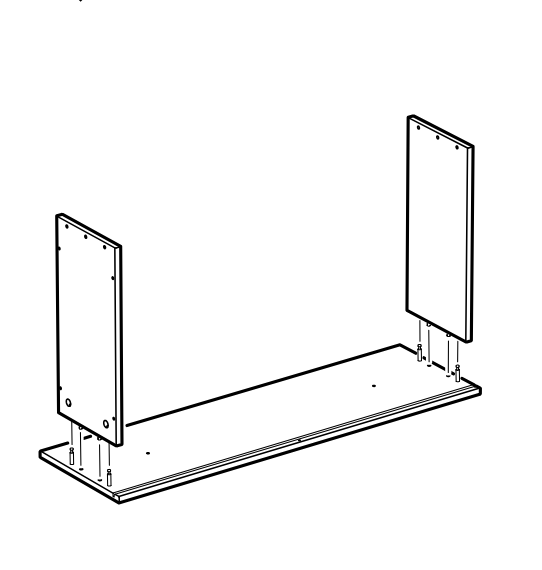
    Diagram for step 60: Align the mirrored pair of side panels onto the base panel and seat them onto the connector pins.
  64. Step 61

    Insert and tighten four cam locks labeled 110630 at the lower side connections to secure the side panels to the base.
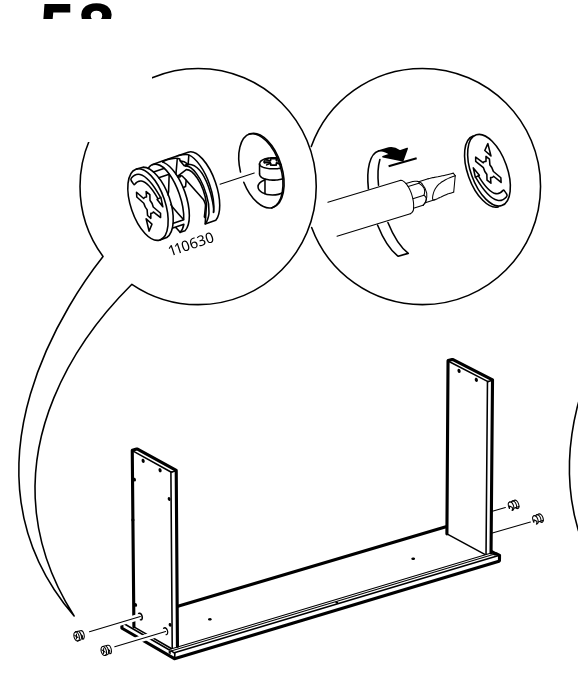
    Diagram for step 61: Insert and tighten four cam locks labeled 110630 at the lower side connections to secure the side panels to the base.
  65. Step 62

    Repeat the cam-lock tightening sequence on the mirrored assembly, turning four cams to lock the side panels to the base.
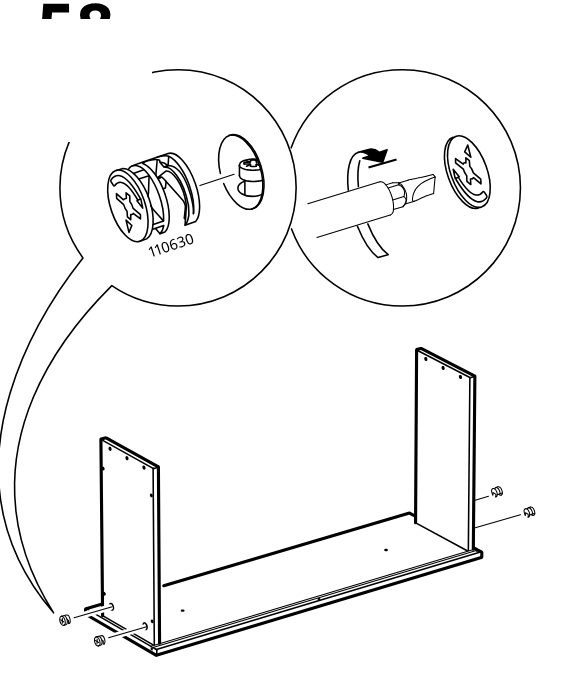
    Diagram for step 62: Repeat the cam-lock tightening sequence on the mirrored assembly, turning four cams to lock the side panels to the base.
  66. Step 63

    The large panel is lowered straight down into the left-side cabinet configuration.
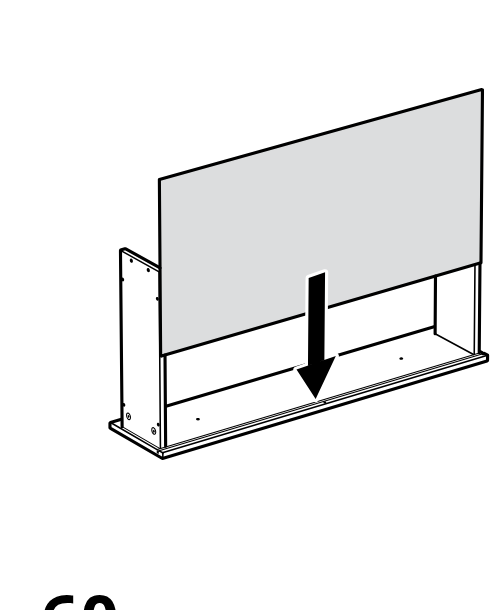
    Diagram for step 63: The large panel is lowered straight down into the left-side cabinet configuration.
  67. Step 64

    The large panel is lowered straight down into the right-side cabinet configuration.
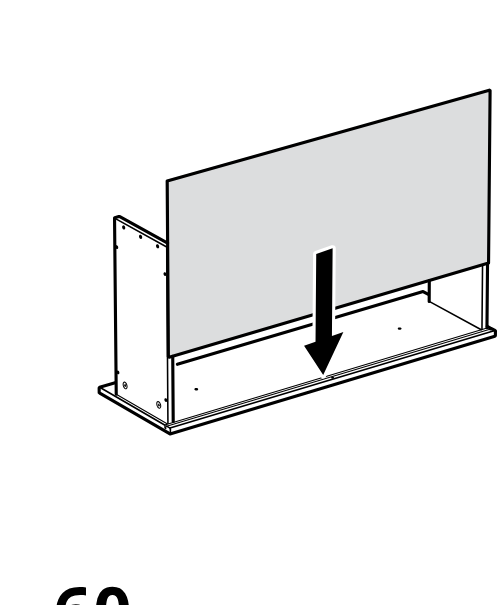
    Diagram for step 64: The large panel is lowered straight down into the right-side cabinet configuration.
  68. Step 65

    A top board is placed onto the left-side configuration and fixed with four 110519 nails, shown with a hammer and zoomed insertion detail.
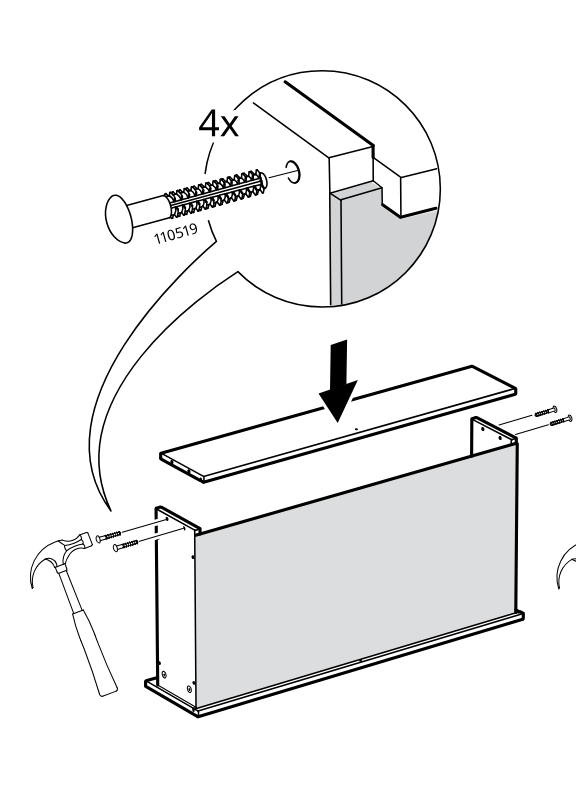
    Diagram for step 65: A top board is placed onto the left-side configuration and fixed with four 110519 nails, shown with a hammer and zoomed insertion detail.
  69. Step 66

    A top board is placed onto the right-side configuration and fixed with six 110519 nails, shown with a hammer and zoomed insertion detail.
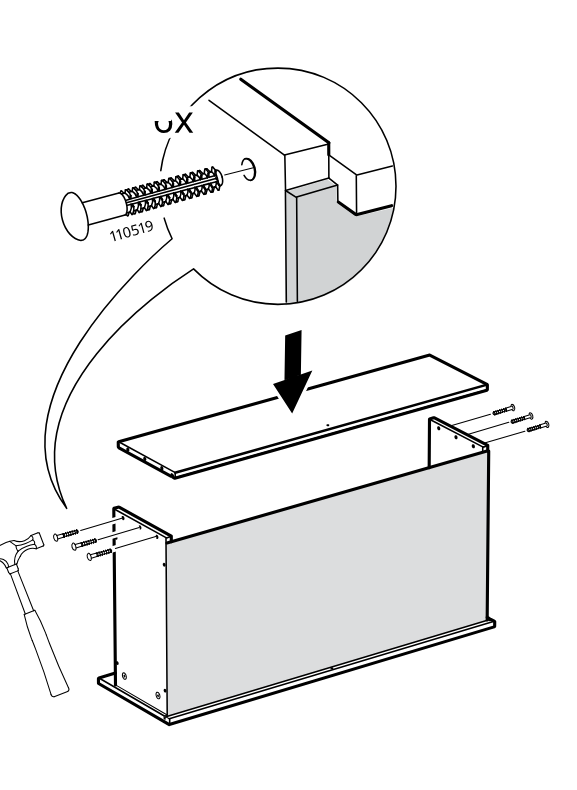
    Diagram for step 66: A top board is placed onto the right-side configuration and fixed with six 110519 nails, shown with a hammer and zoomed insertion detail.
  70. Step 67

    Slide the large front panel into position and fasten one screw into bracket part 10054466 as shown in the zoom callout.
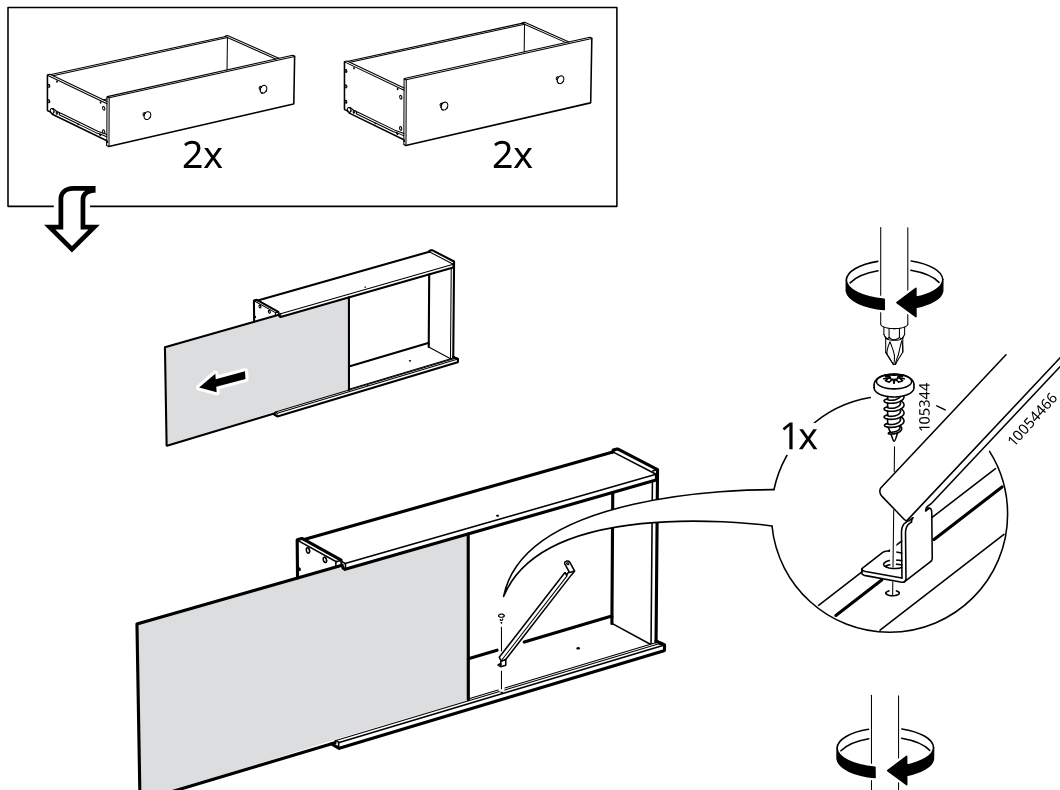
    Diagram for step 67: Slide the large front panel into position and fasten one screw into bracket part 10054466 as shown in the zoom callout.
  71. Step 68

    Insert and swing the vertical strip into place at the center joint, then secure it with one screw into bracket part 10054466 as detailed in the zoom callout.
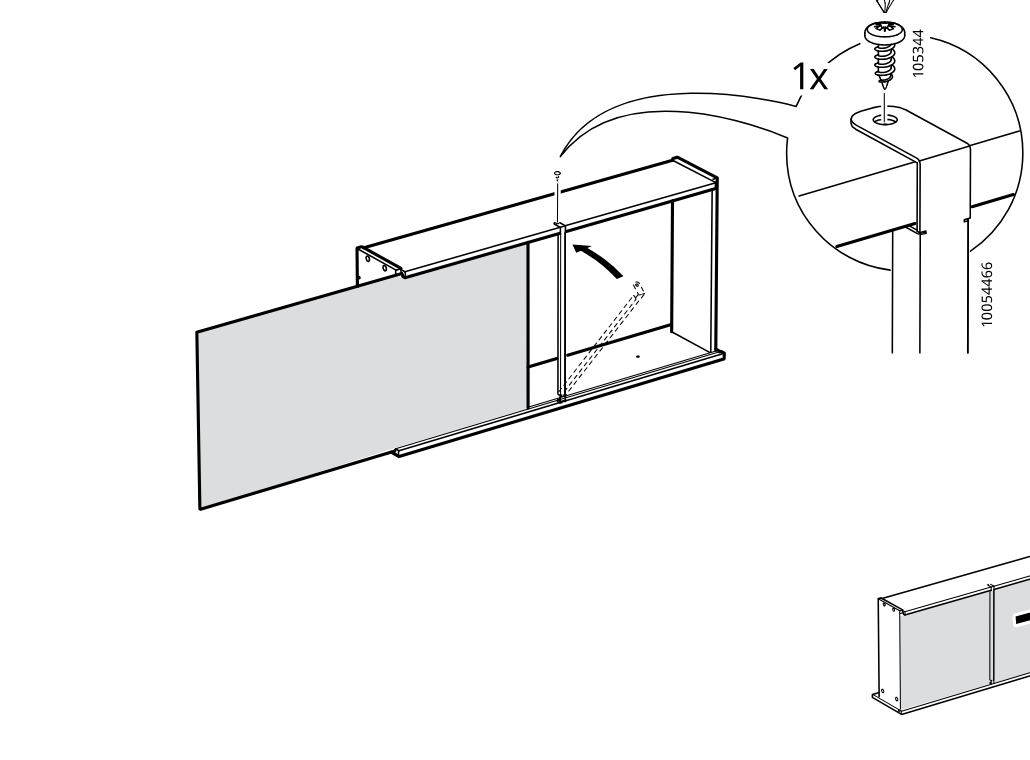
    Diagram for step 68: Insert and swing the vertical strip into place at the center joint, then secure it with one screw into bracket part 10054466 as detailed in the zoom callout.
  72. Step 69

    The rails and rollers are fitted onto the drawer assembly and secured with four screws, with close-ups showing the roller clip engagement and screw placement.
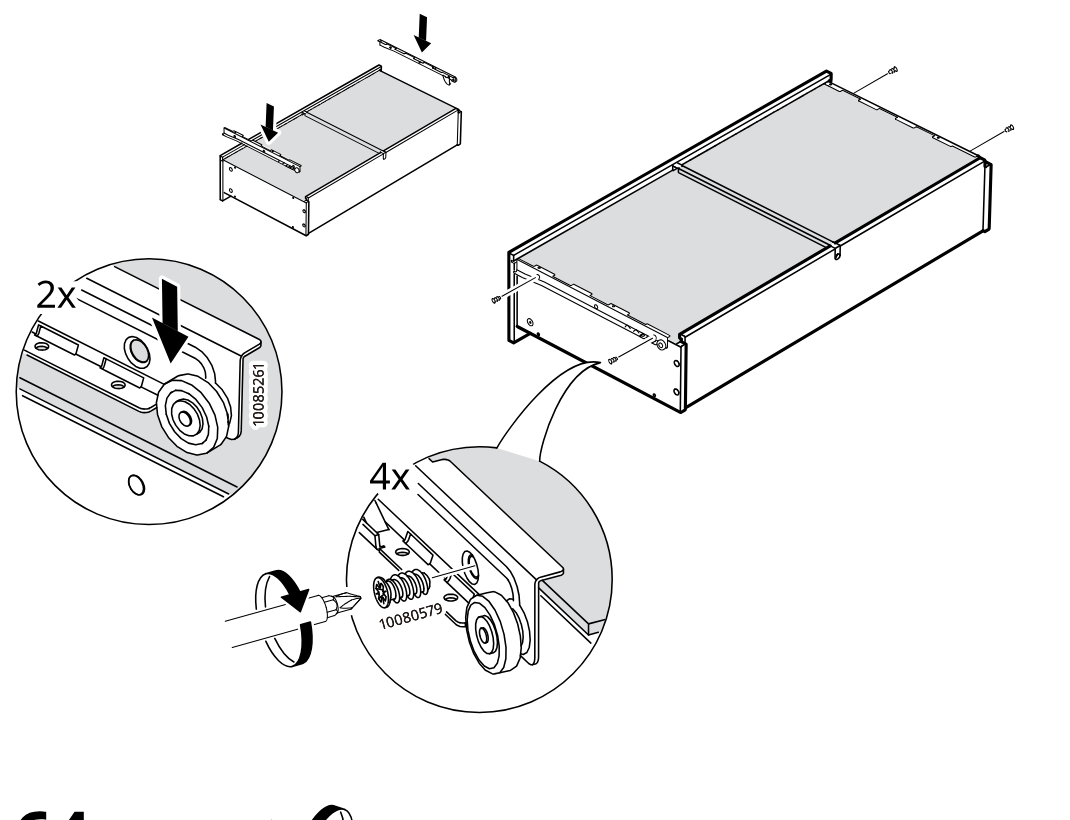
    Diagram for step 69: The rails and rollers are fitted onto the drawer assembly and secured with four screws, with close-ups showing the roller clip engagement and screw placement.
  73. Step 70

    Two long screws are driven into the drawer side from the inside and two round knobs are attached on the outside, as shown in the magnified callout.
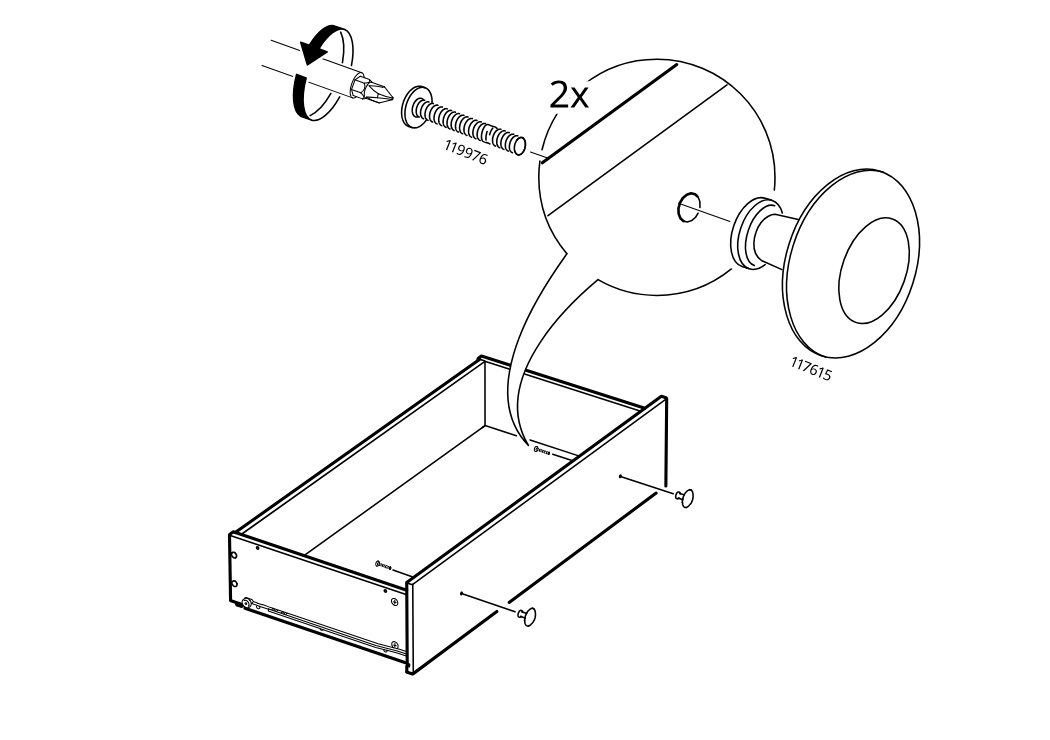
    Diagram for step 70: Two long screws are driven into the drawer side from the inside and two round knobs are attached on the outside, as shown in the magnified callout.
  74. Step 71

    A cam lock in the frame is turned once to secure the cabinet structure, shown with a hand close-up and two zoom insets linked to the main frame.
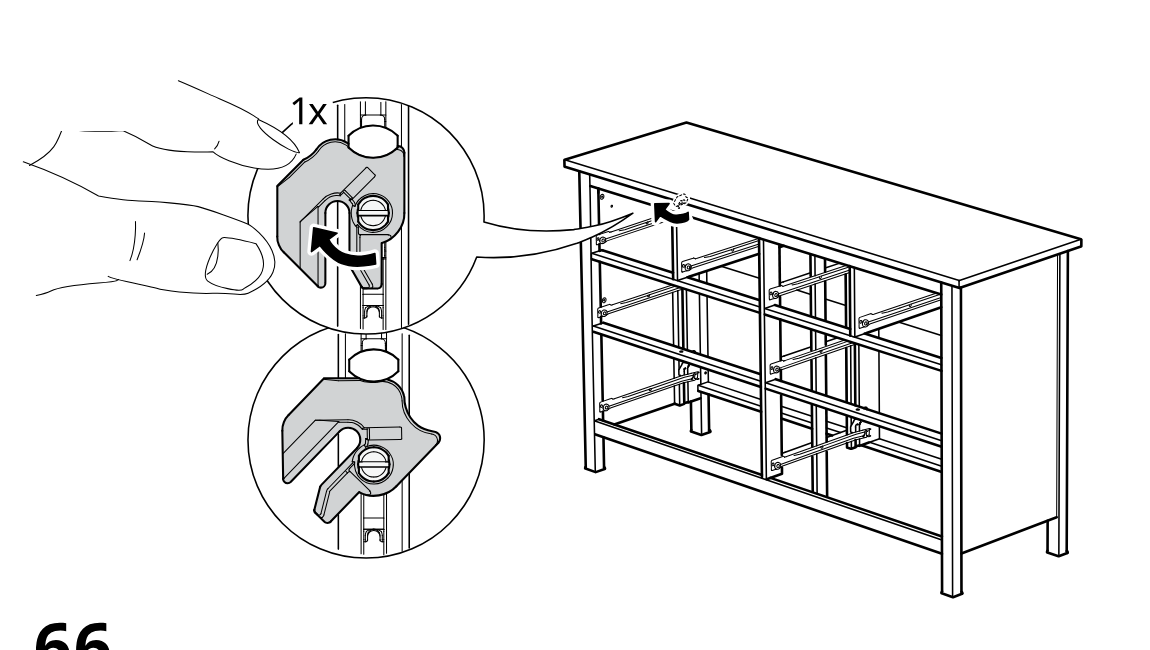
    Diagram for step 71: A cam lock in the frame is turned once to secure the cabinet structure, shown with a hand close-up and two zoom insets linked to the main frame.
  75. Before you begin

    A freestanding information panel warns about tip-over risk and shows that drawers should not be opened in an unstable stacked arrangement.
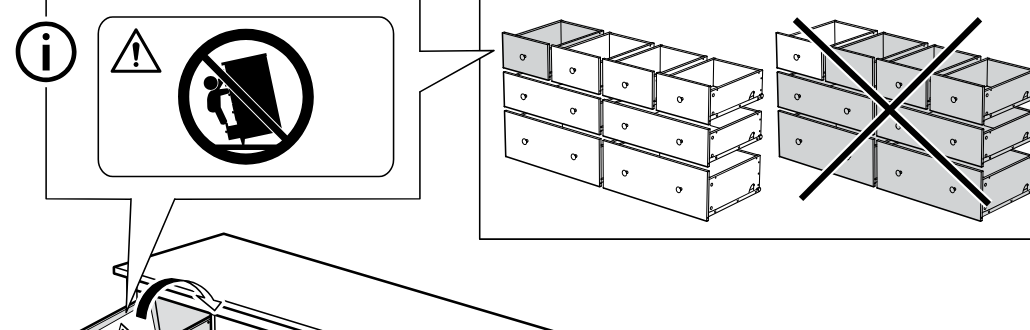
    Illustration for assembly note: A freestanding information panel warns about tip-over risk and shows that drawers should not be opened in an unstable stacked arrangement.
  76. Step 72

    A drawer is pulled open and then removed from the frame, with arrows indicating opening and sliding out.
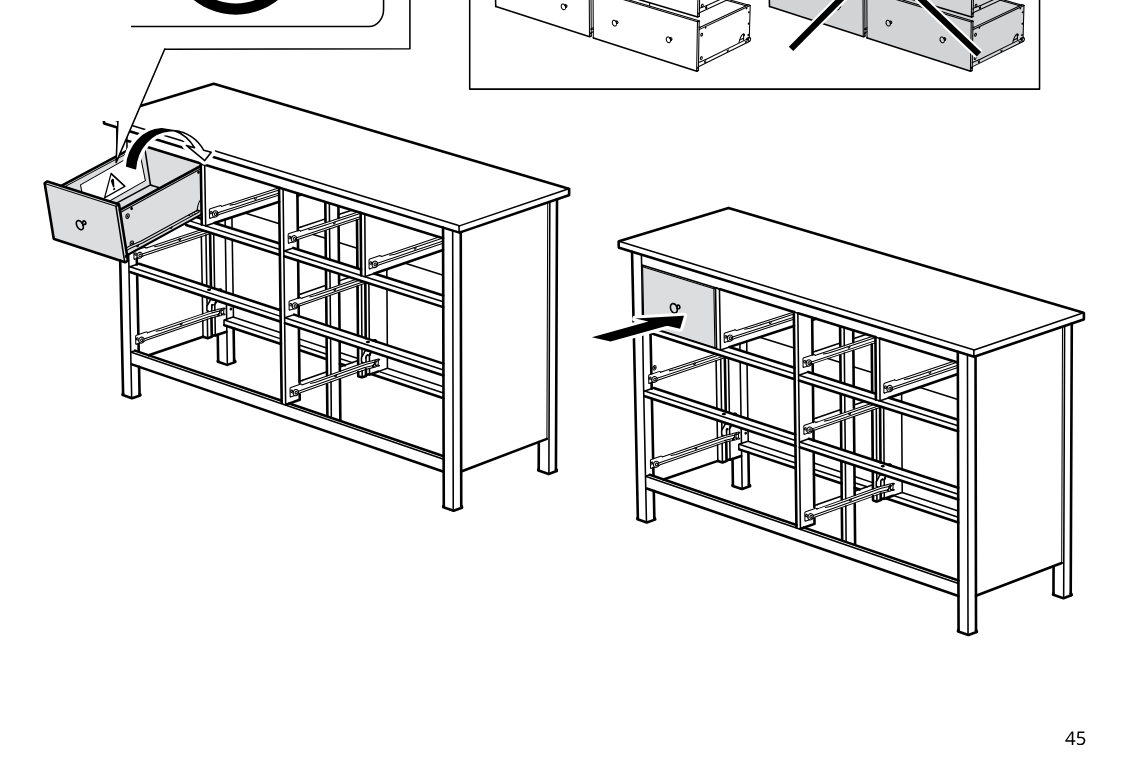
    Diagram for step 72: A drawer is pulled open and then removed from the frame, with arrows indicating opening and sliding out.
  77. Step 73

    The cam lock in the drawer slide area is rotated once and the drawer-frame section is secured on the cabinet.
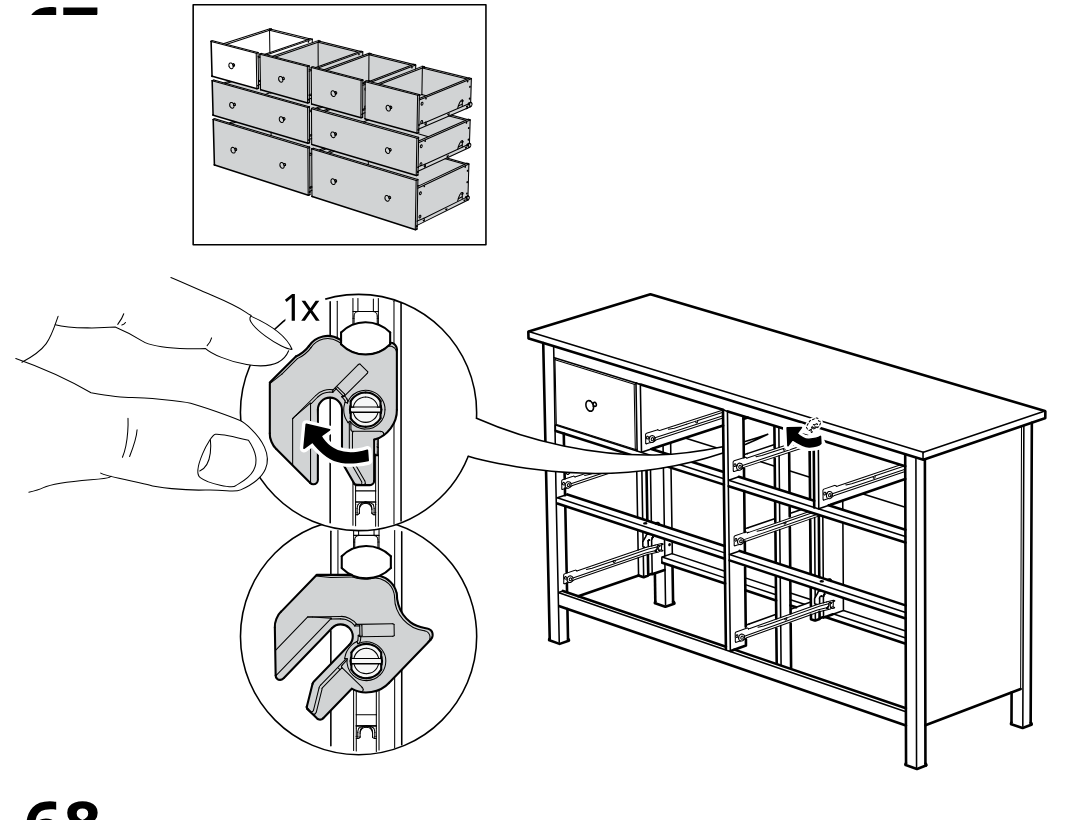
    Diagram for step 73: The cam lock in the drawer slide area is rotated once and the drawer-frame section is secured on the cabinet.
  78. Step 74

    A drawer is tilted in and set onto the runners, then pushed inward to seat in the frame.
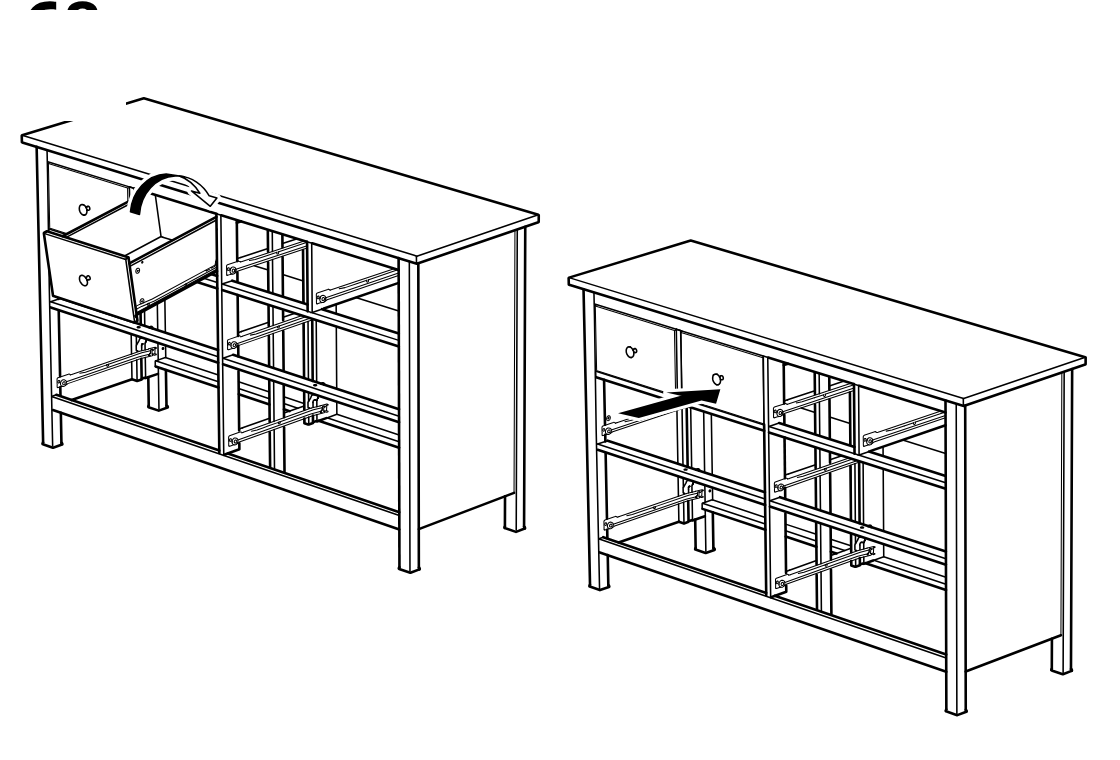
    Diagram for step 74: A drawer is tilted in and set onto the runners, then pushed inward to seat in the frame.
  79. Step 75

    You rotate the two locking catches by hand on the drawer runners to release them.
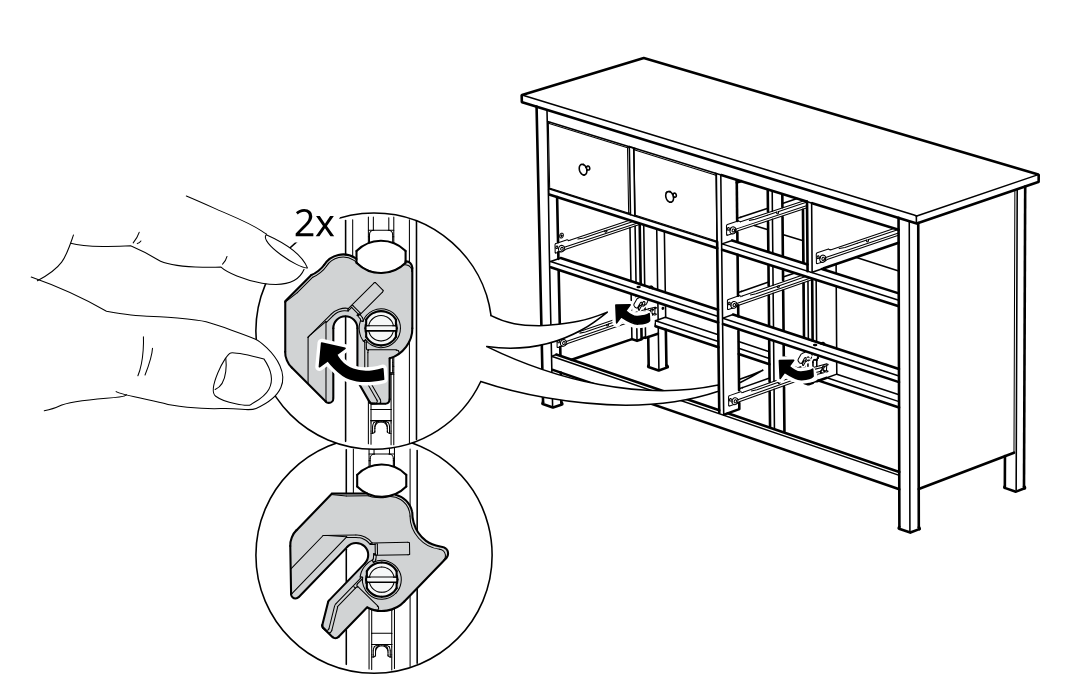
    Diagram for step 75: You rotate the two locking catches by hand on the drawer runners to release them.
  80. Step 76

    You place the drawer onto the extended runners and push it inward to engage the slides.
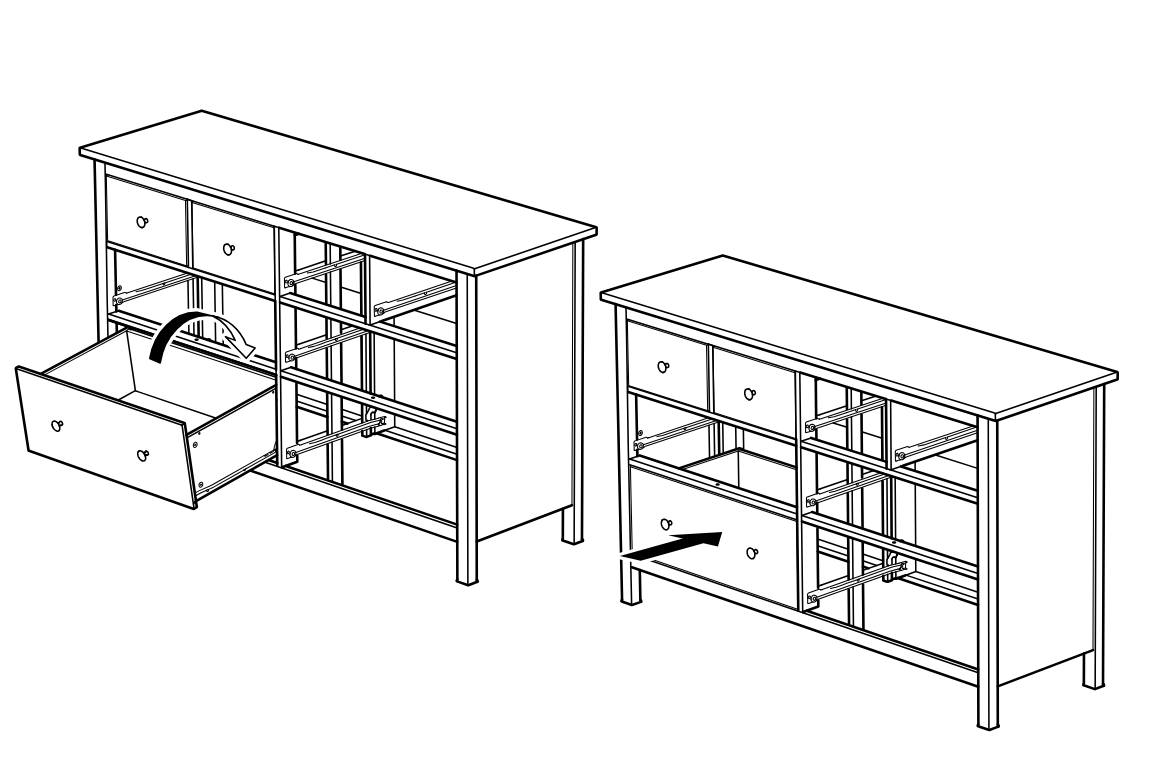
    Diagram for step 76: You place the drawer onto the extended runners and push it inward to engage the slides.
  81. Step 77

    The cam locks are turned with fingers (2x) to secure the drawer-slide frame connections, with zoom callouts showing the lock position and rotation.
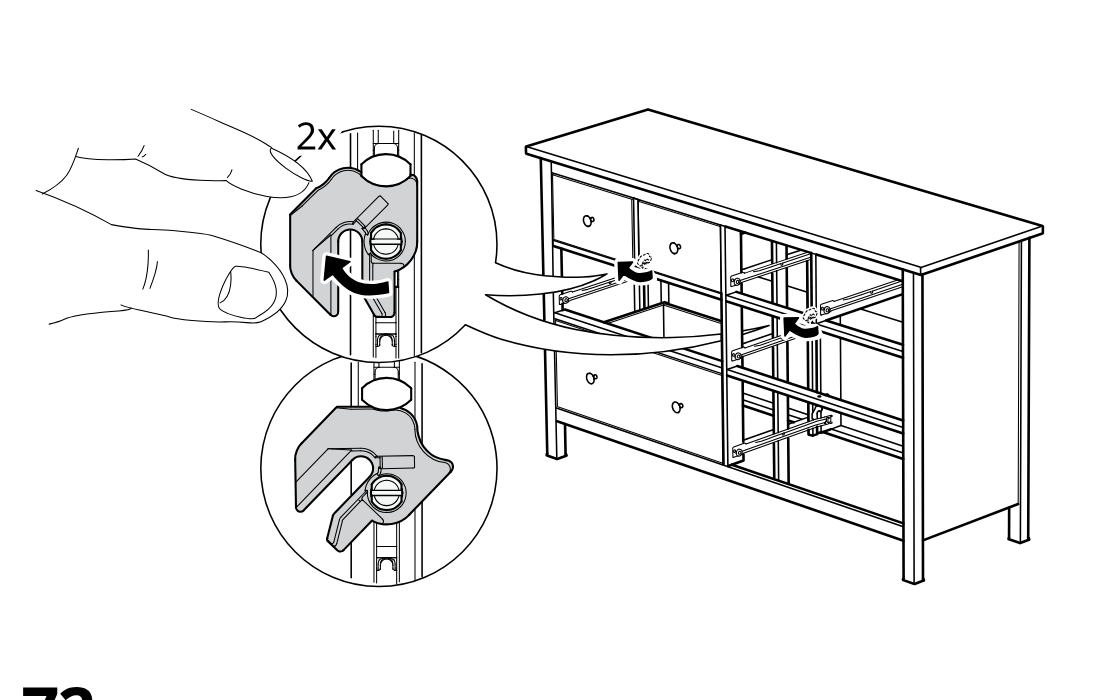
    Diagram for step 77: The cam locks are turned with fingers (2x) to secure the drawer-slide frame connections, with zoom callouts showing the lock position and rotation.
  82. Step 78

    A drawer is angled in and inserted onto the left-side runners, then pushed inward to seat into the dresser frame.
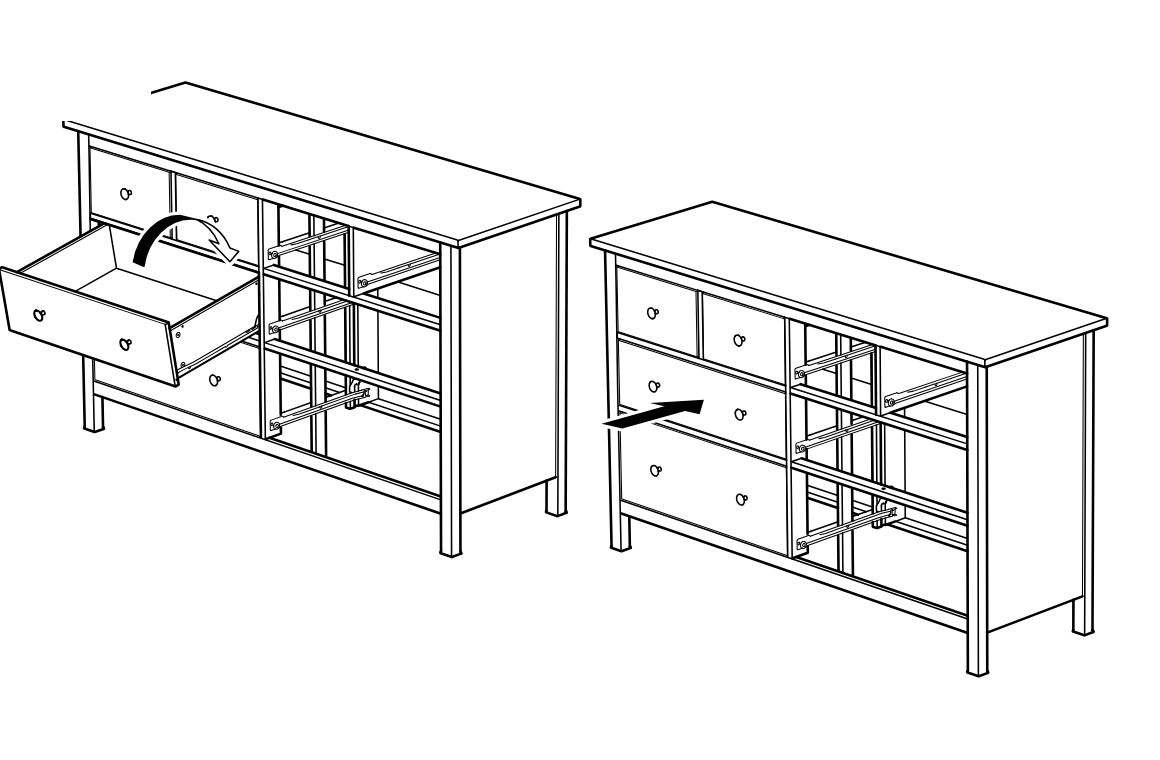
    Diagram for step 78: A drawer is angled in and inserted onto the left-side runners, then pushed inward to seat into the dresser frame.
  83. Step 79

    The drawer is aligned and pushed into the dresser while the side locking mechanism is turned in the shown direction on both sides (2x) to secure it.
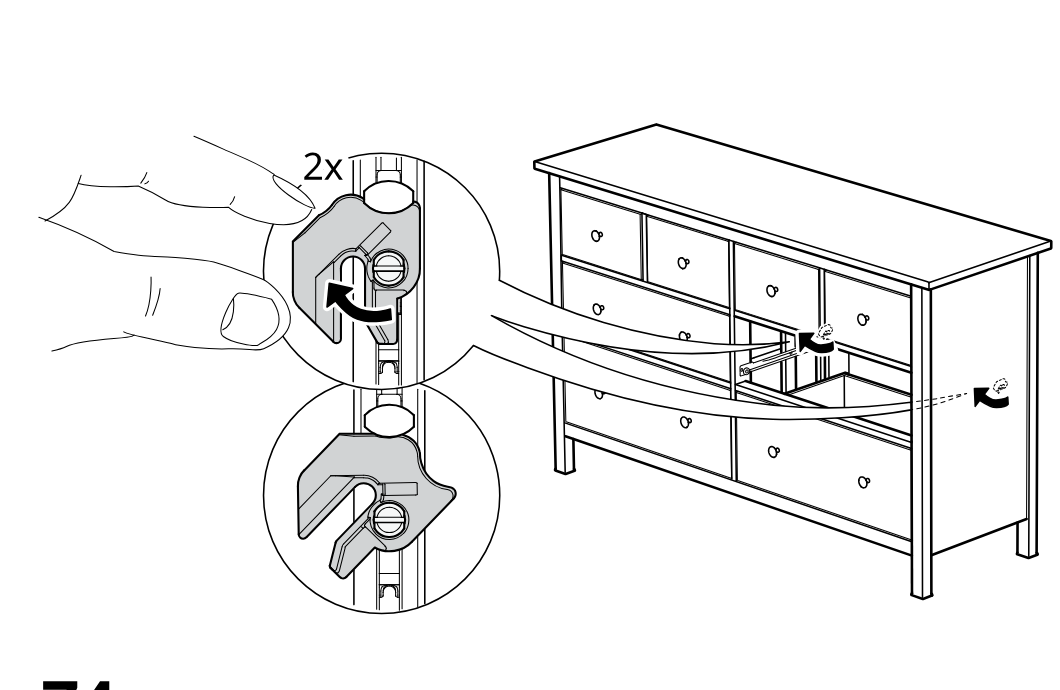
    Diagram for step 79: The drawer is aligned and pushed into the dresser while the side locking mechanism is turned in the shown direction on both sides (2x) to secure it.
  84. Step 80

    A drawer is tilted and inserted into the dresser, then pushed fully inward until it sits flush.
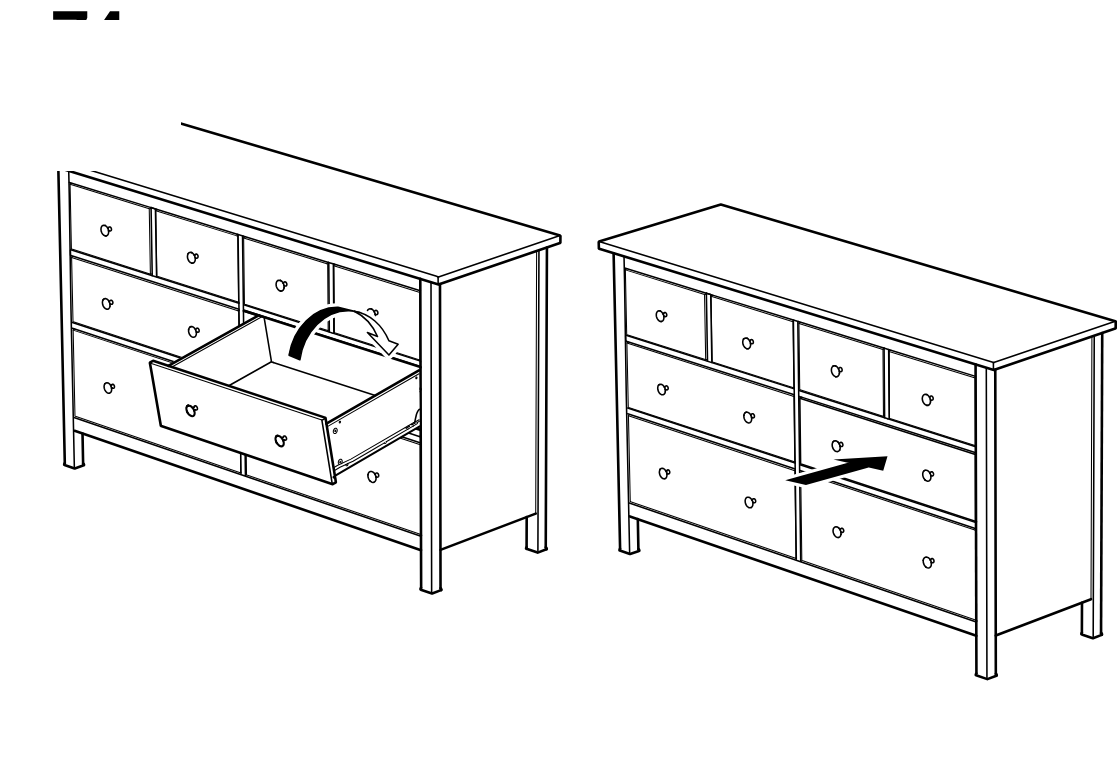
    Diagram for step 80: A drawer is tilted and inserted into the dresser, then pushed fully inward until it sits flush.
  85. Before you begin

    A standalone circled-information panel shows a three-part sequence for attaching and adjusting a cabinet door hinge/soft-close component, including insertion, clip engagement, and final locking rotation with finger action.
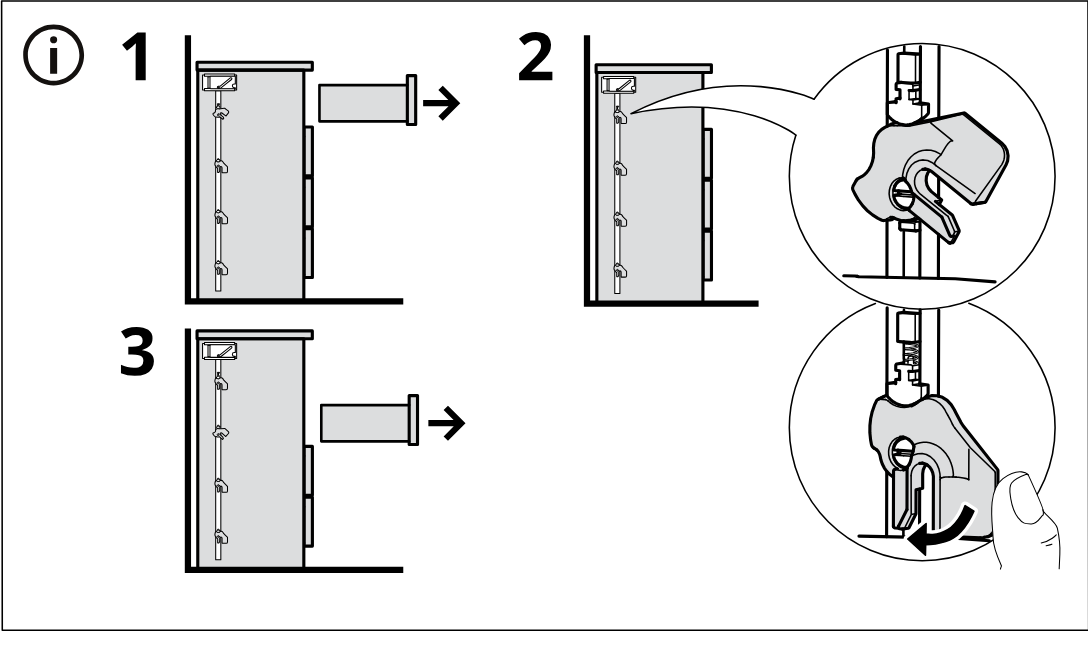
    Illustration for assembly note: A standalone circled-information panel shows a three-part sequence for attaching and adjusting a cabinet door hinge/soft-close component, including insertion, clip engagement, and final locking rotation with finger action.

Video guide