How to assemble IKEA MICKE desk

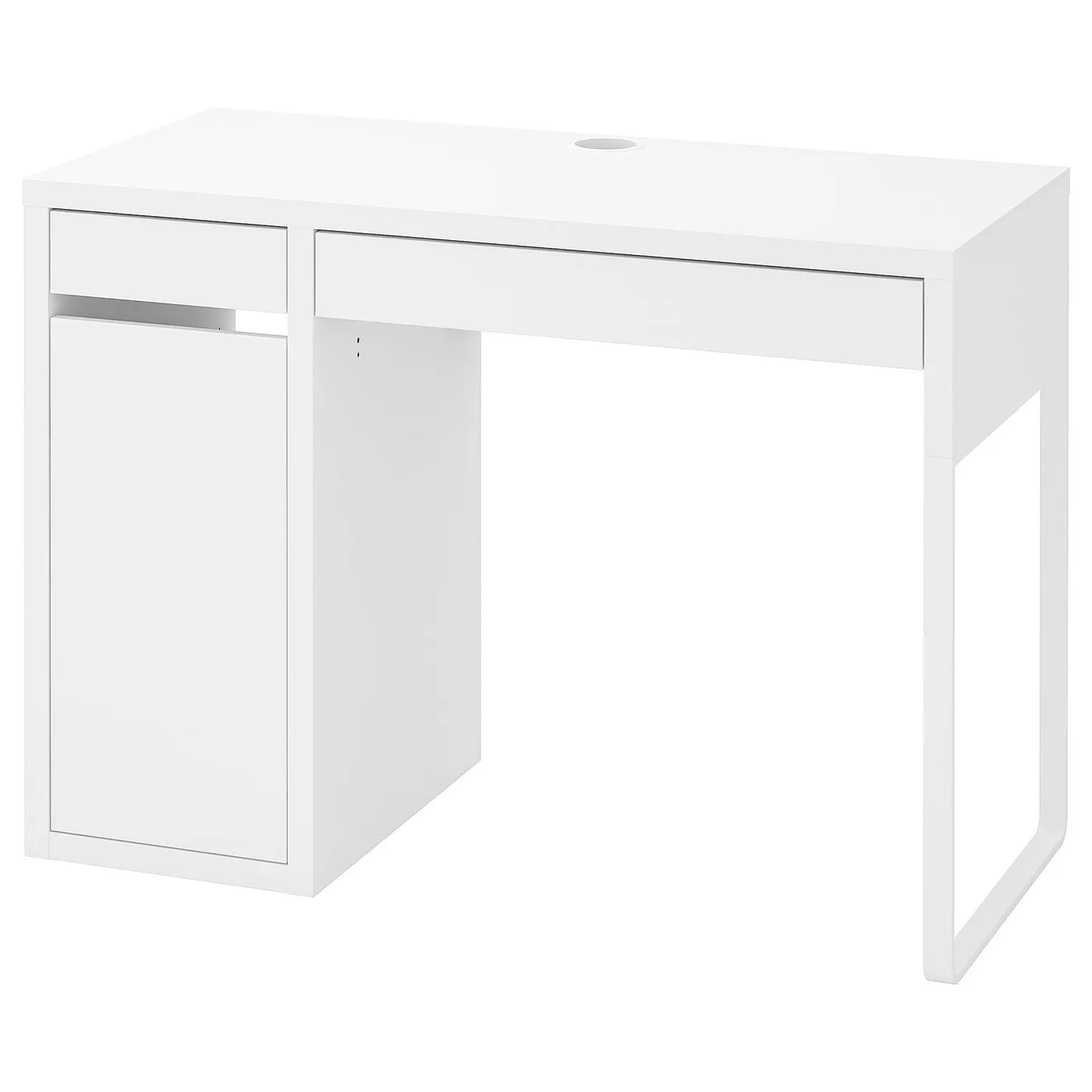
MICKE desk, white, 413/8x195/8"

This guide covers the white IKEA MICKE desk, article 802.130.74, measuring 41 3/8 inches wide. Follow the desk assembly diagrams and video for this variant.

View on IKEA
MICKE desk

Interactive assembly guide

Step-by-Step Instructions

1 different parts, 1 boxes total — click on a package to see step-by-step assembly instructions

MICKE Desk

802.130.74

x1

29 ¾ "

Width

4 ¼ "

Height

43 ¾ "

Length

62 lb 12 oz

Weight

Start Assembly

Written guide

Step-by-step instructions with diagrams

Follow the numbered assembly steps below, or open the interactive guide above to track progress and zoom into each diagram. This guide includes 70 illustrated steps.

MICKE Desk

Cabinet/support panel on left side

  1. Before you begin

    Preparation and safety panels show required tools, recommend two people for assembly, warn against assembling on a hard surface, and advise contacting IKEA if parts are missing or unclear.
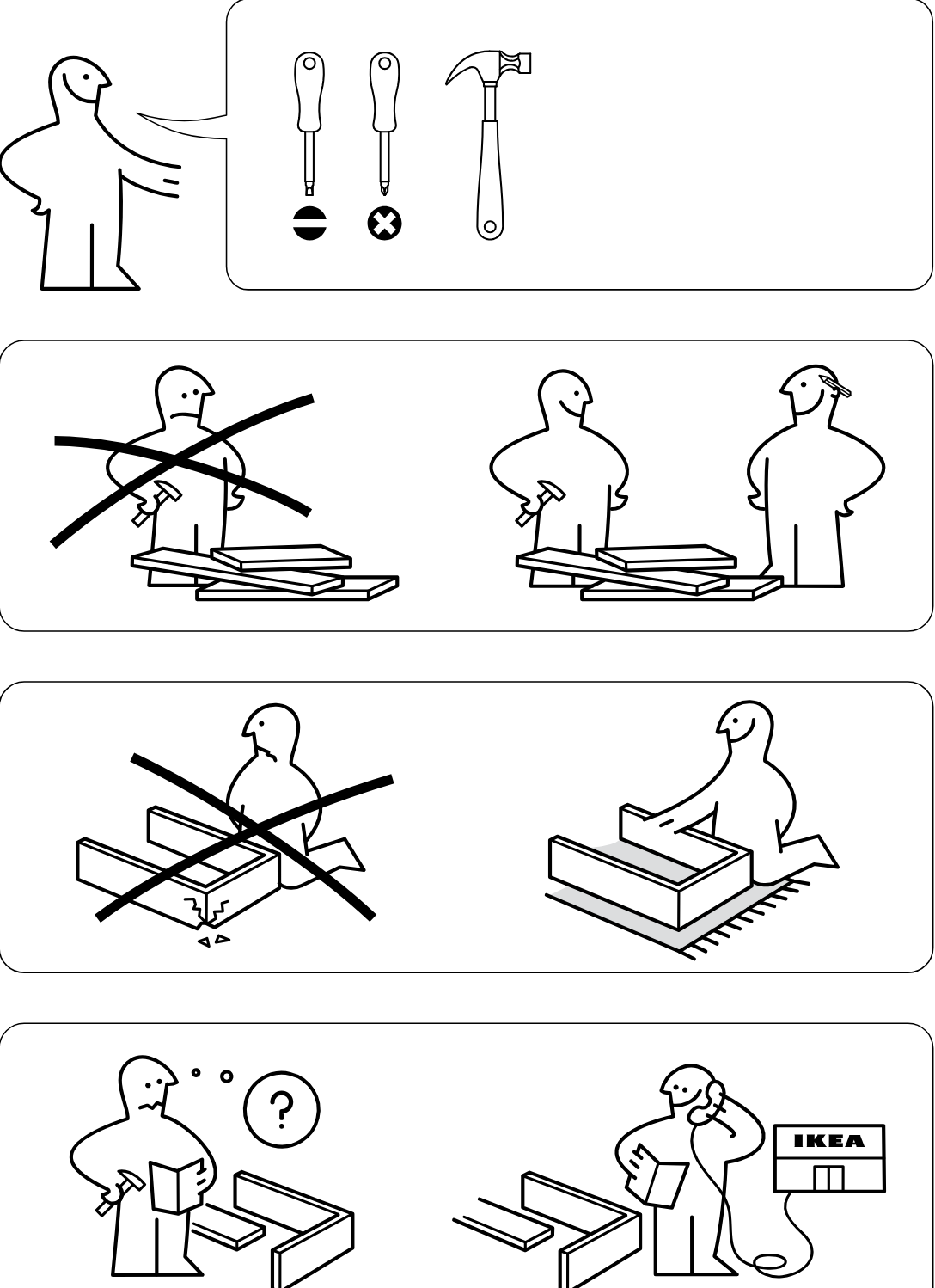
    Illustration for assembly note: Preparation and safety panels show required tools, recommend two people for assembly, warn against assembling on a hard surface, and advise contacting IKEA if parts are missing or unclear.
  2. Step 1

    The user screws two cam bolts into the long bottom panel while it lies on a soft surface.
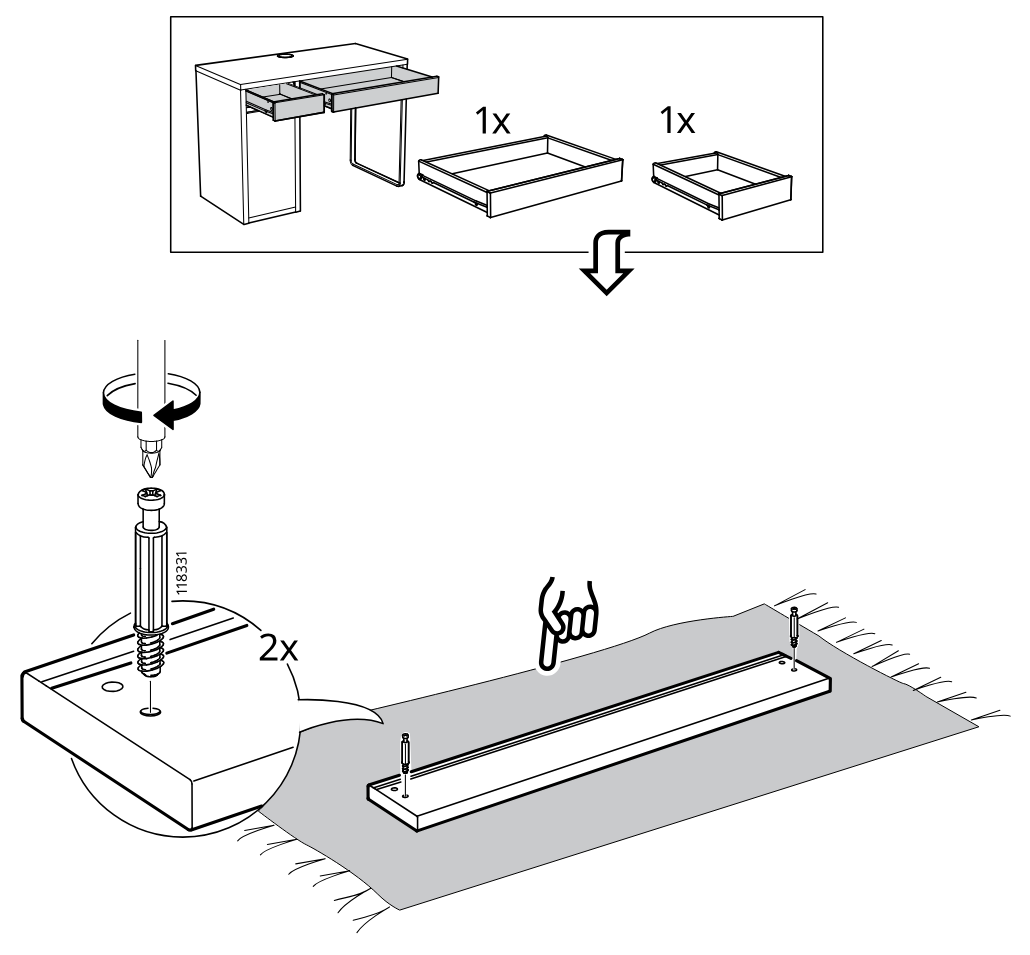
    Diagram for step 1: The user screws two cam bolts into the long bottom panel while it lies on a soft surface.
  3. Step 2

    The user inserts two wooden dowels into the long bottom panel and positions the two side panels above the matching holes.
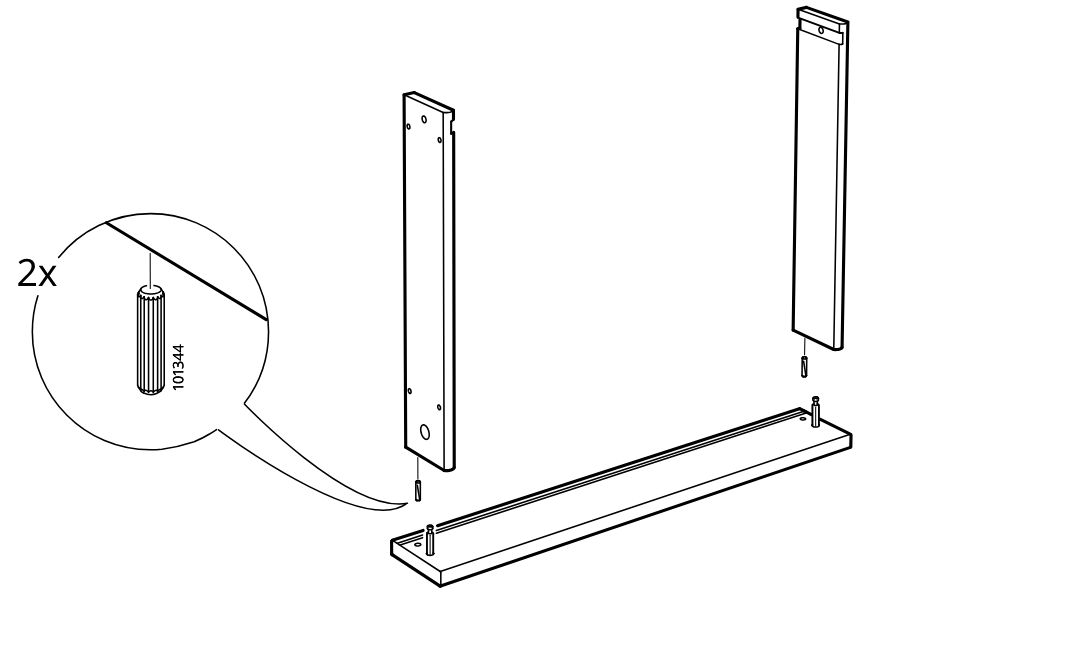
    Diagram for step 2: The user inserts two wooden dowels into the long bottom panel and positions the two side panels above the matching holes.
  4. Step 3

    Installs two cam locks in the side panels, checks the correct cam-lock type, and tightens them into the frame assembly.
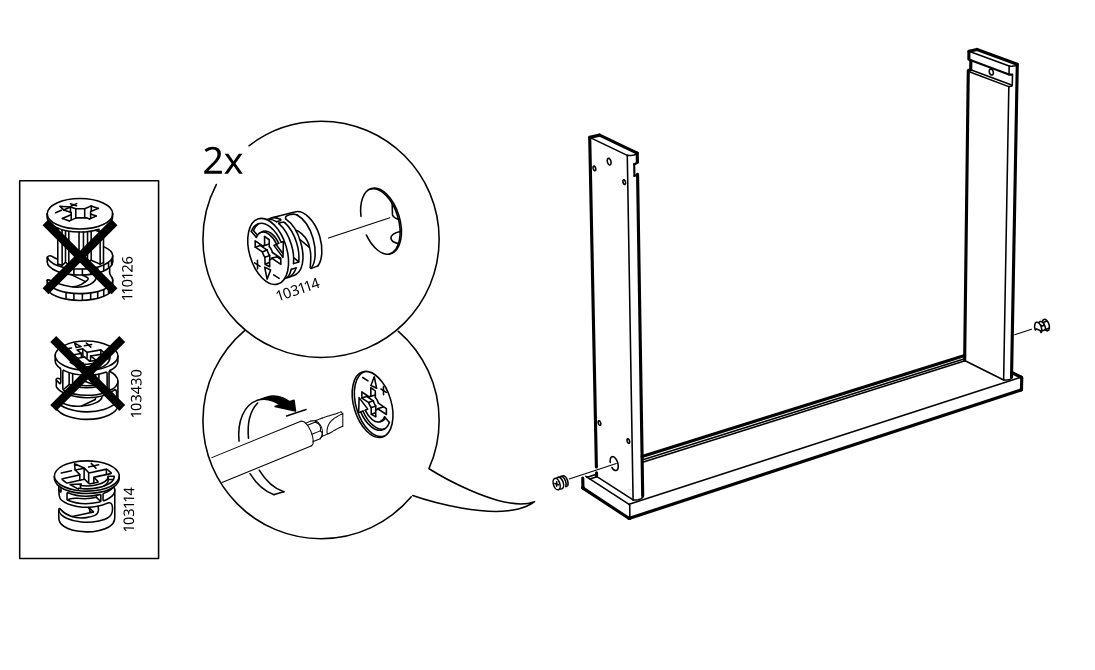
    Diagram for step 3: Installs two cam locks in the side panels, checks the correct cam-lock type, and tightens them into the frame assembly.
  5. Step 4

    Rotates the assembly upright and slides the large panel into the upper groove with the patterned surface oriented as shown.
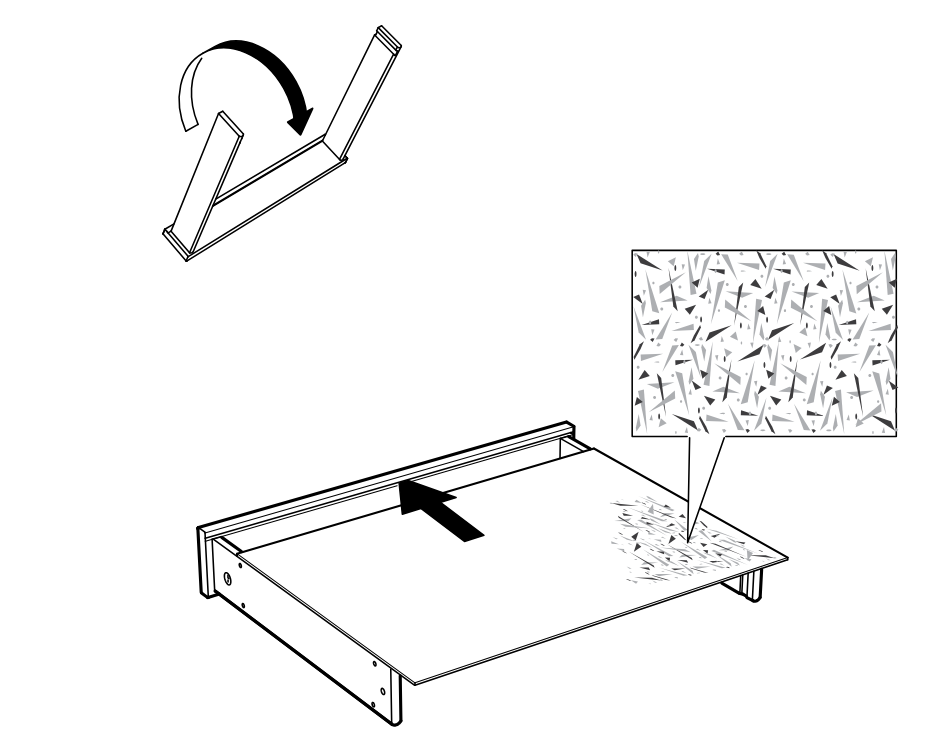
    Diagram for step 4: Rotates the assembly upright and slides the large panel into the upper groove with the patterned surface oriented as shown.
  6. Step 5

    The front panel is rotated upward and hooked into the side grooves, with a zoomed inset showing the joint detail.
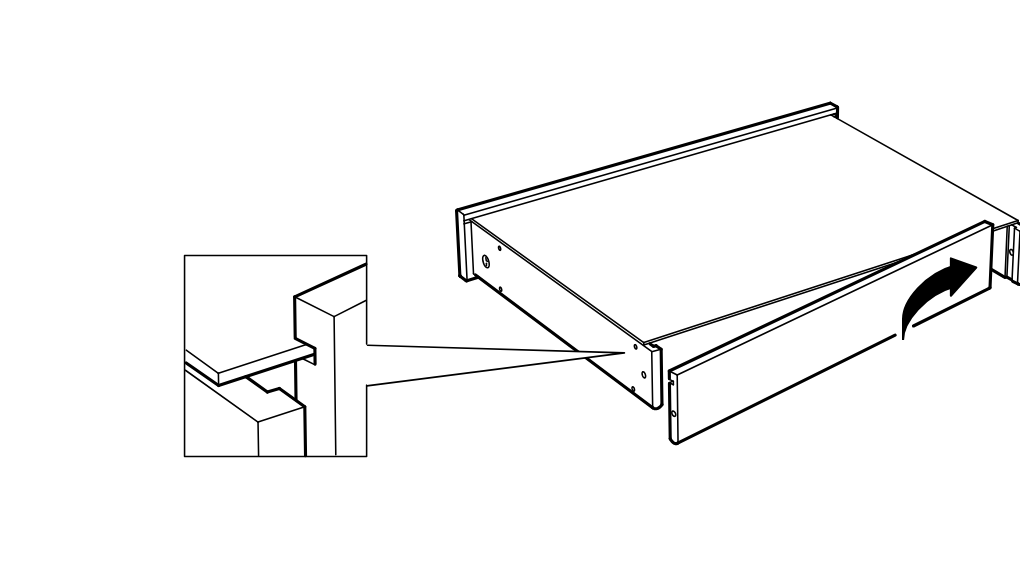
    Diagram for step 5: The front panel is rotated upward and hooked into the side grooves, with a zoomed inset showing the joint detail.
  7. Step 6

    Two 110519 fasteners are inserted and tightened at the side joints, and an inline info panel shows the unit upright while securing the top edge.
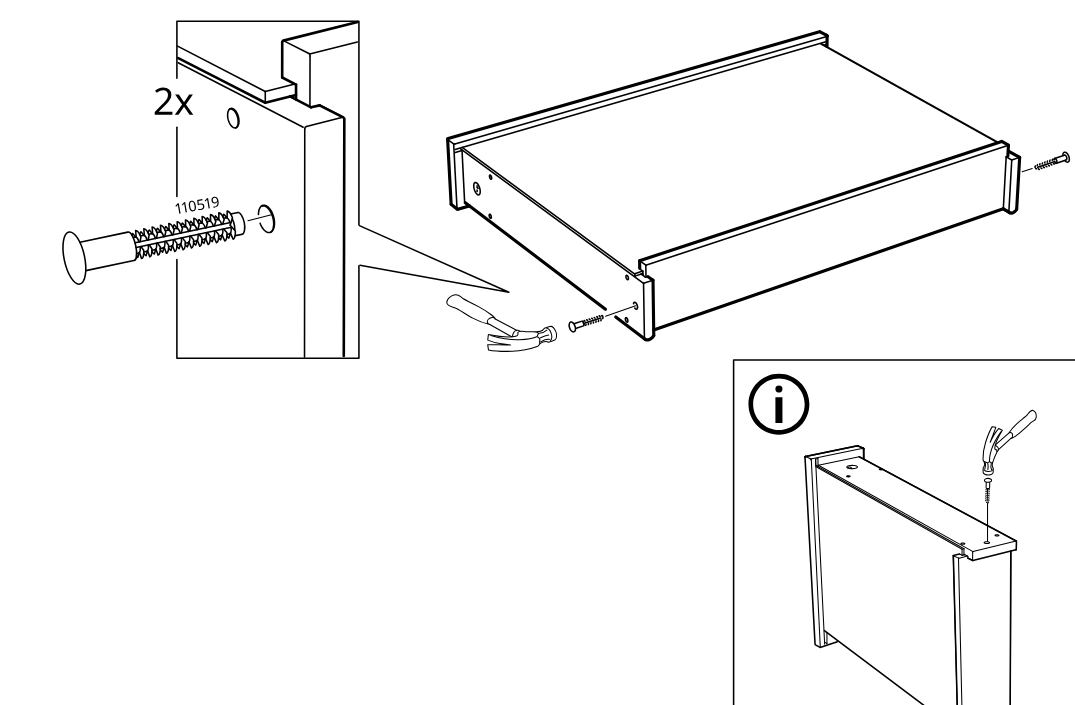
    Diagram for step 6: Two 110519 fasteners are inserted and tightened at the side joints, and an inline info panel shows the unit upright while securing the top edge.
  8. Step 7

    The drawer runners are placed onto the left and right sides of the drawer box.
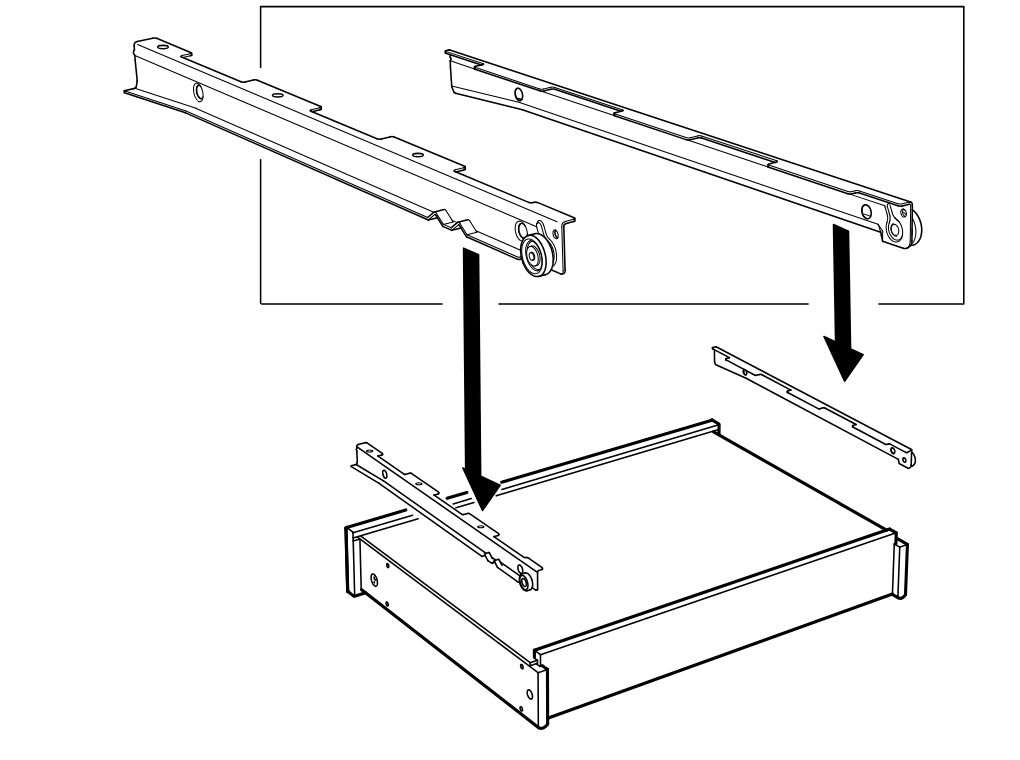
    Diagram for step 7: The drawer runners are placed onto the left and right sides of the drawer box.
  9. Step 8

    Four 100365 screws fasten the drawer runners to the drawer sides, and the longer 113287 screw is shown as incorrect.
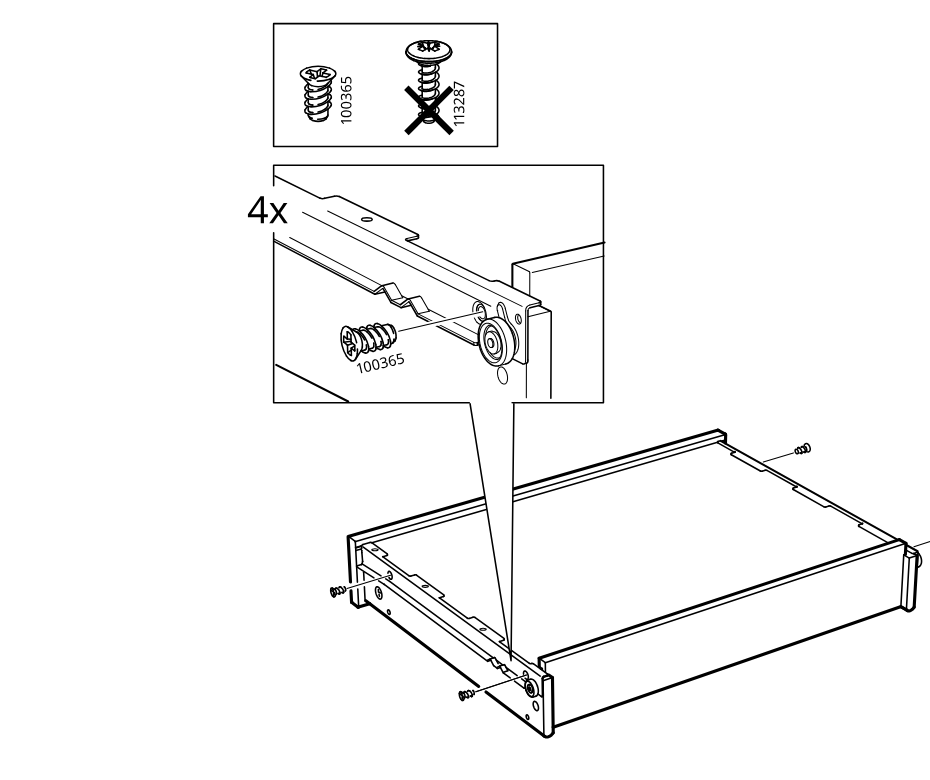
    Diagram for step 8: Four 100365 screws fasten the drawer runners to the drawer sides, and the longer 113287 screw is shown as incorrect.
  10. Step 9

    Insert 2 dowels (103344) into the long panel while working on a soft surface for the left-side configuration.
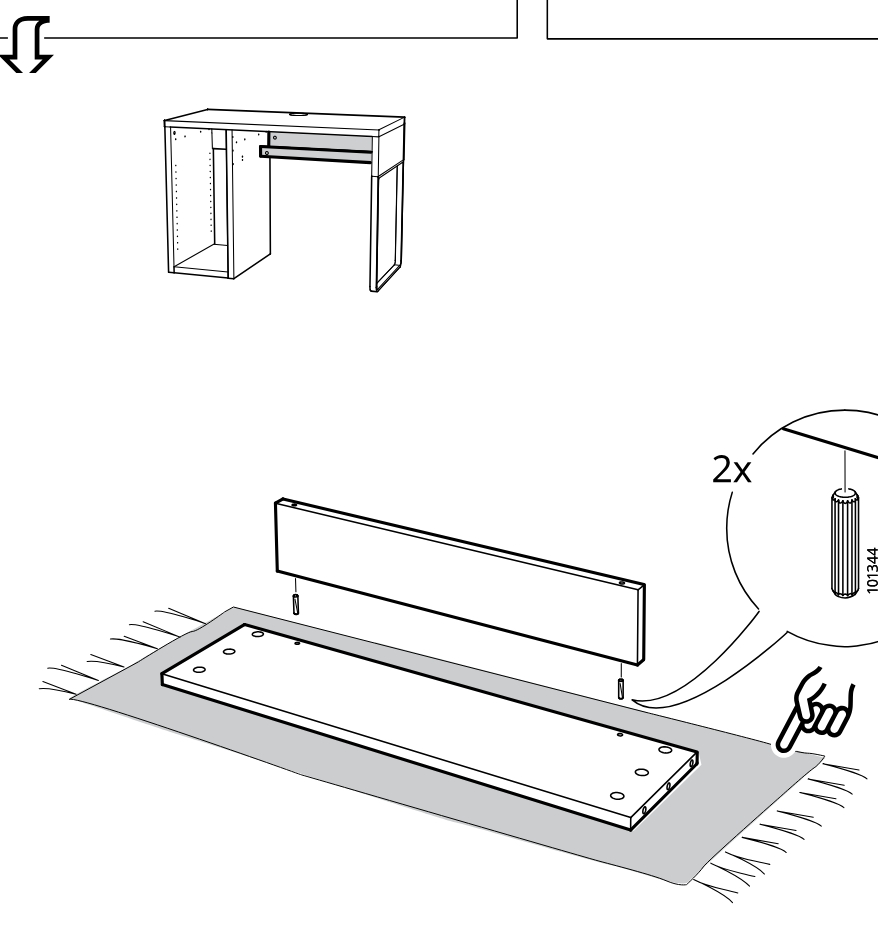
    Diagram for step 9: Insert 2 dowels (103344) into the long panel while working on a soft surface for the left-side configuration.
  11. Step 10

    Insert two wooden dowels into the indicated holes and orient the panel using the do/not-do hole-position callouts.
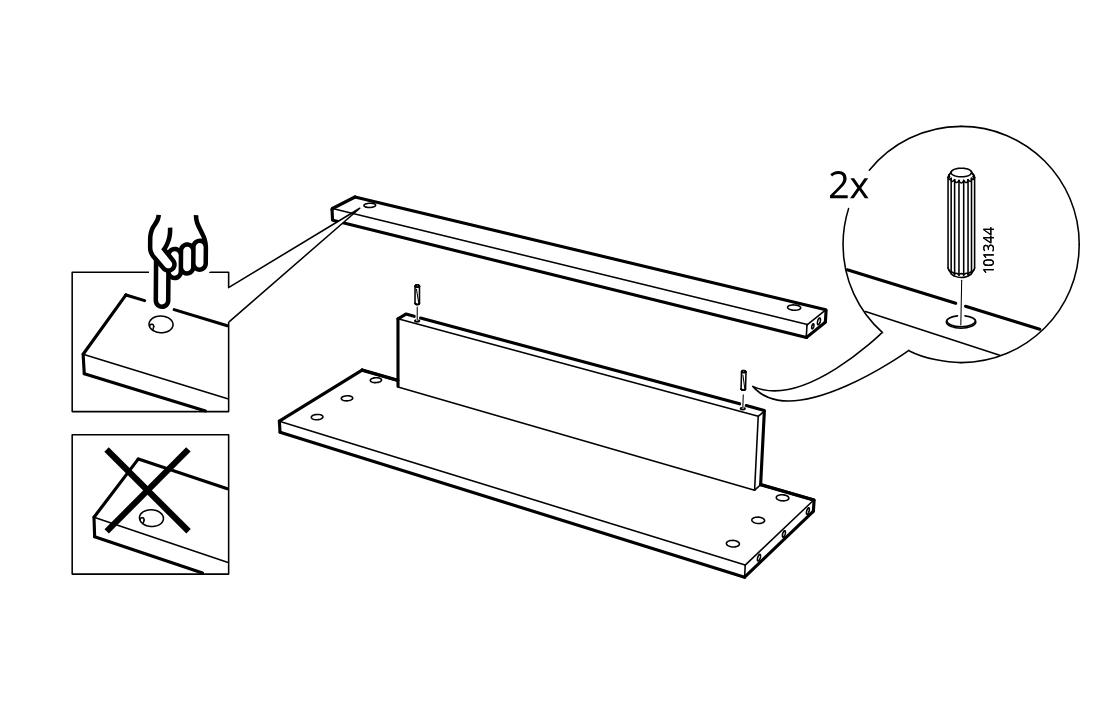
    Diagram for step 10: Insert two wooden dowels into the indicated holes and orient the panel using the do/not-do hole-position callouts.
  12. Step 11

    Screw eight cam bolts into the two large panels at the marked hole positions using a screwdriver.
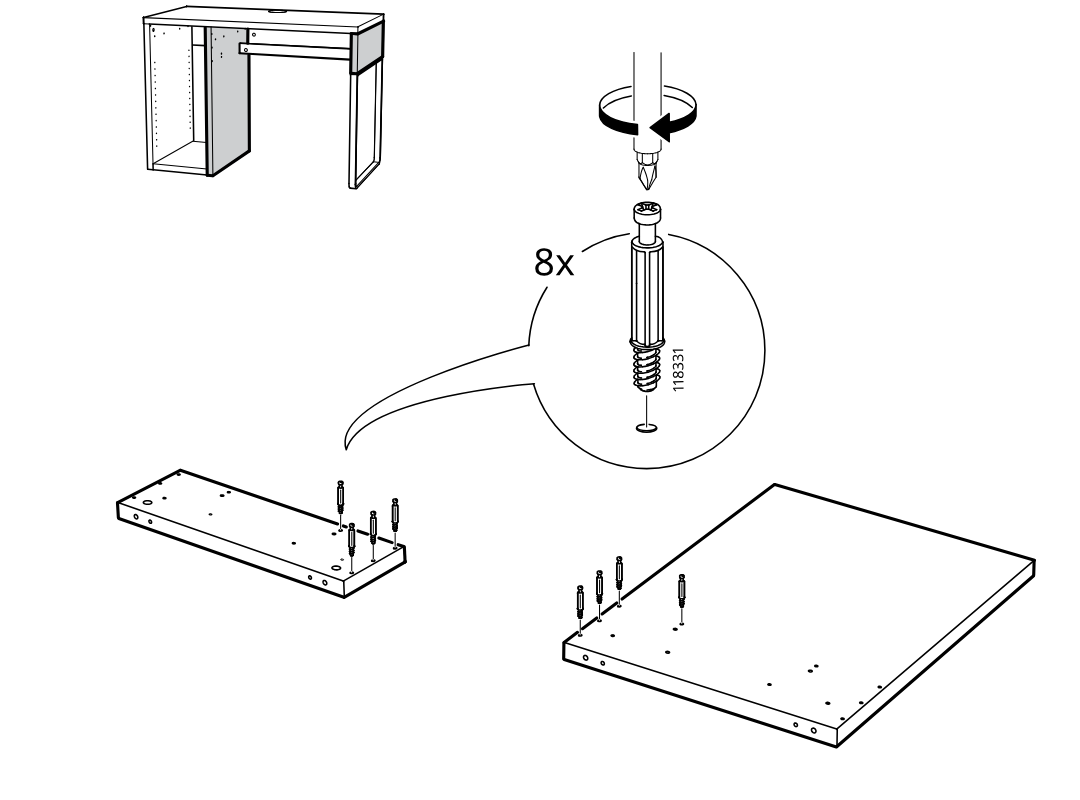
    Diagram for step 11: Screw eight cam bolts into the two large panels at the marked hole positions using a screwdriver.
  13. Step 12

    Screws one 100365 slide rail onto each of two panels, using the rail orientation shown and the screw-type reminder inset.
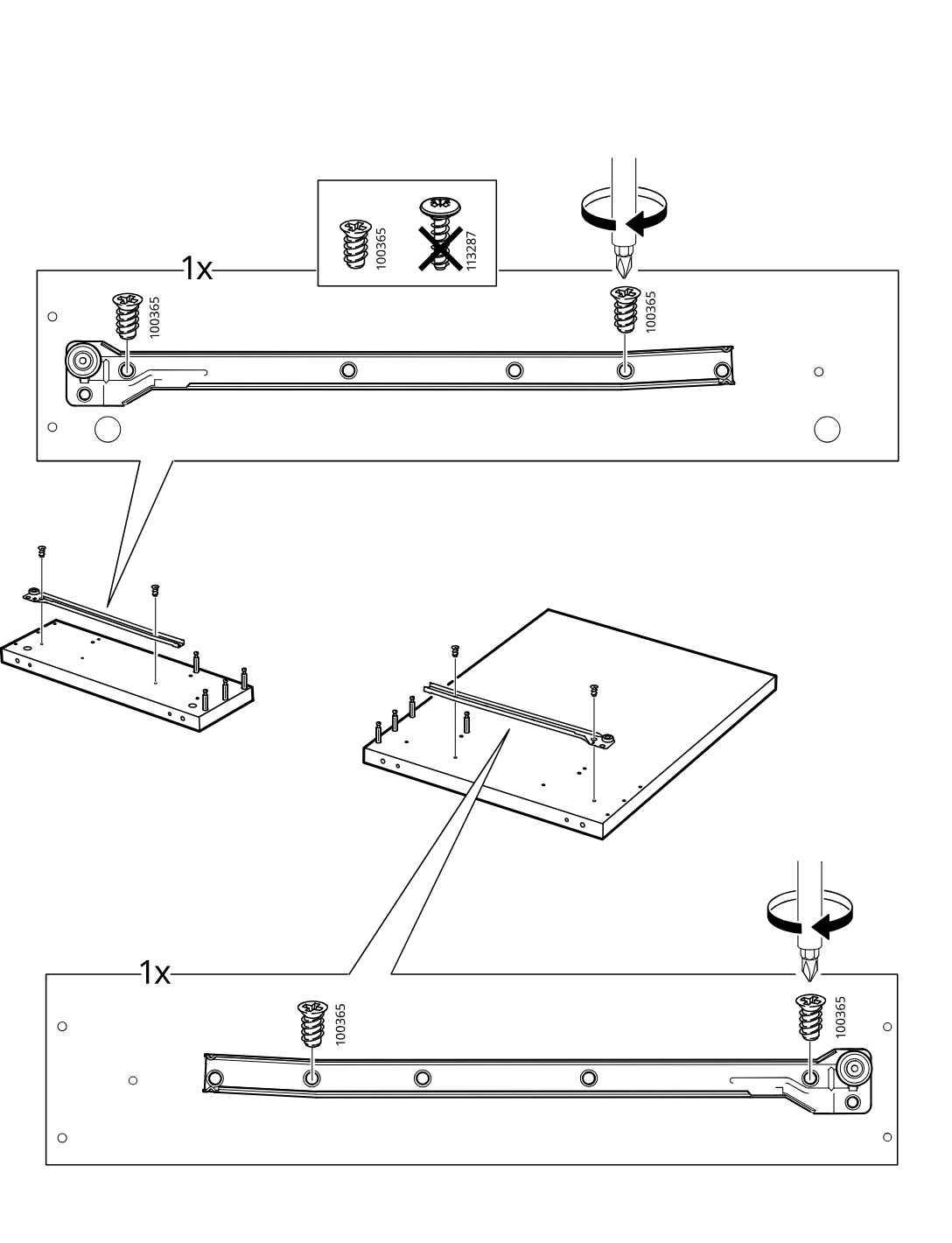
    Diagram for step 12: Screws one 100365 slide rail onto each of two panels, using the rail orientation shown and the screw-type reminder inset.
  14. Step 13

    Insert two 101344 dowels into the center rail and rotate the two side panels into position around the base and rail.
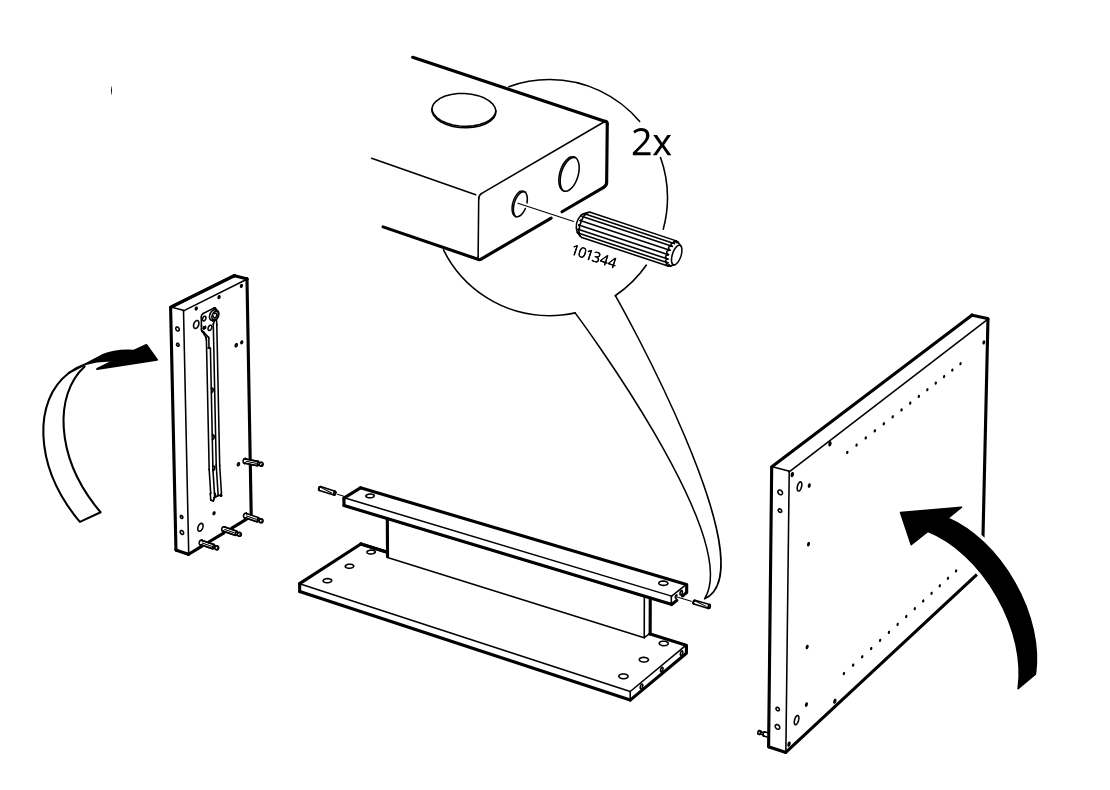
    Diagram for step 13: Insert two 101344 dowels into the center rail and rotate the two side panels into position around the base and rail.
  15. Step 14

    Place eight 103430 cam locks into the side panels and tighten them, using 103430 rather than 110126, to secure the frame together.
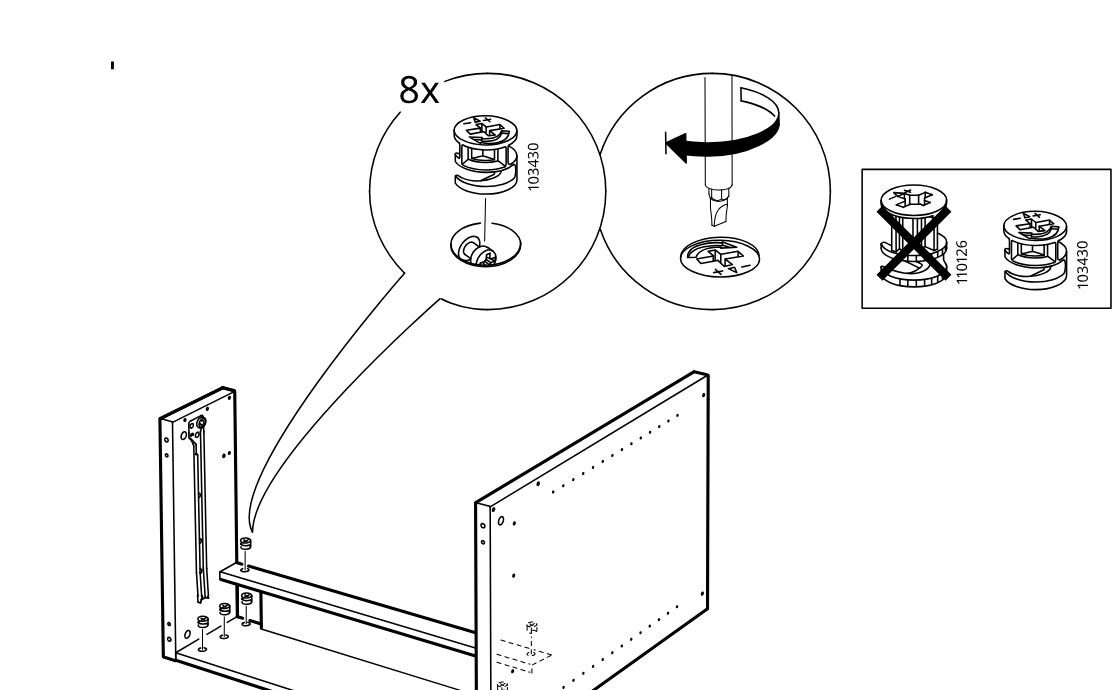
    Diagram for step 14: Place eight 103430 cam locks into the side panels and tighten them, using 103430 rather than 110126, to secure the frame together.
  16. Step 15

    The drawer slides are attached to the side panel and the large panel with 100365 screws, using the correct screw type and screwdriver orientation shown in the callouts.
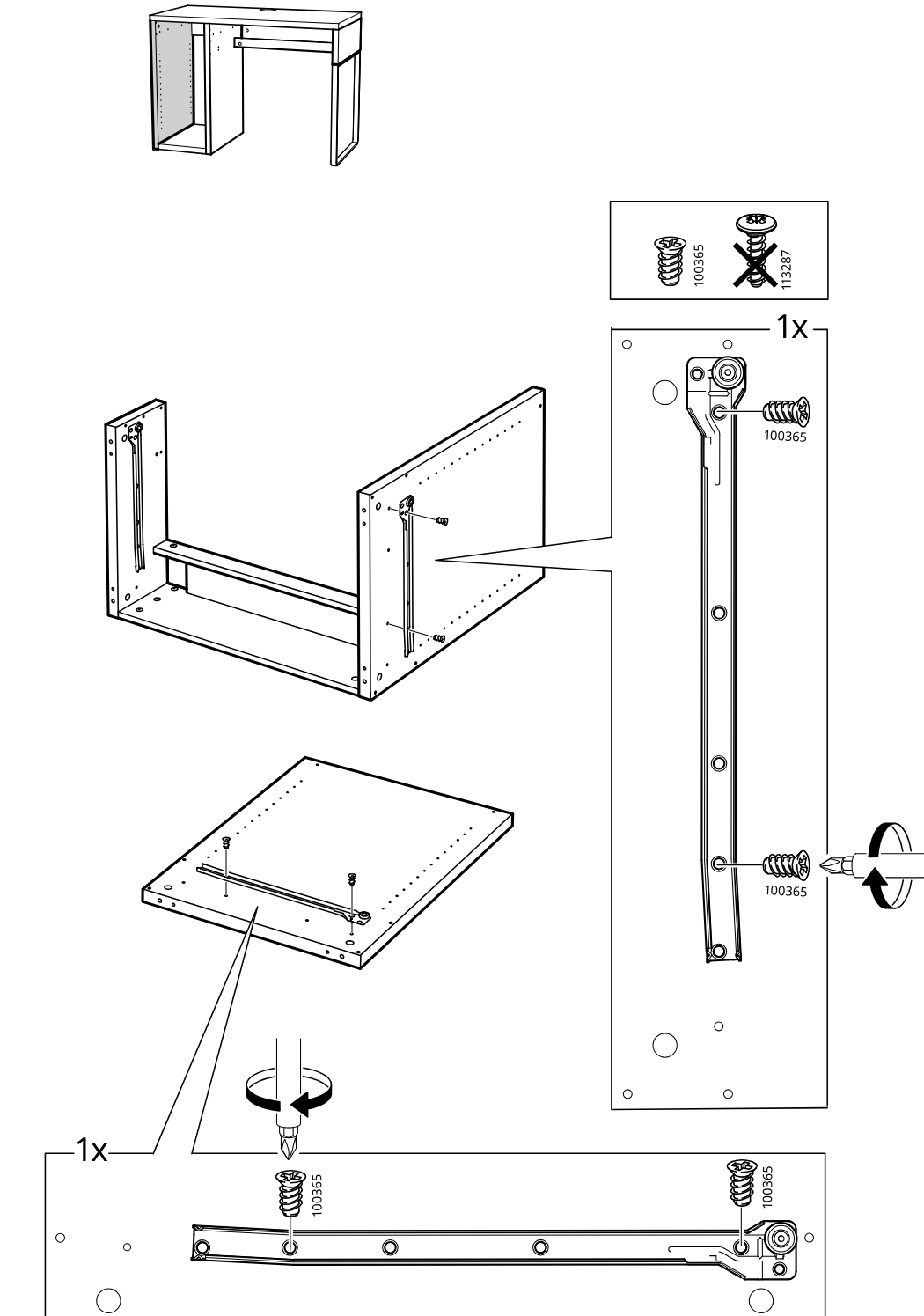
    Diagram for step 15: The drawer slides are attached to the side panel and the large panel with 100365 screws, using the correct screw type and screwdriver orientation shown in the callouts.
  17. Step 16

    The user screws two mounting plates onto panel A using the indicated screws and prepares the panel for attachment to the cabinet frame.
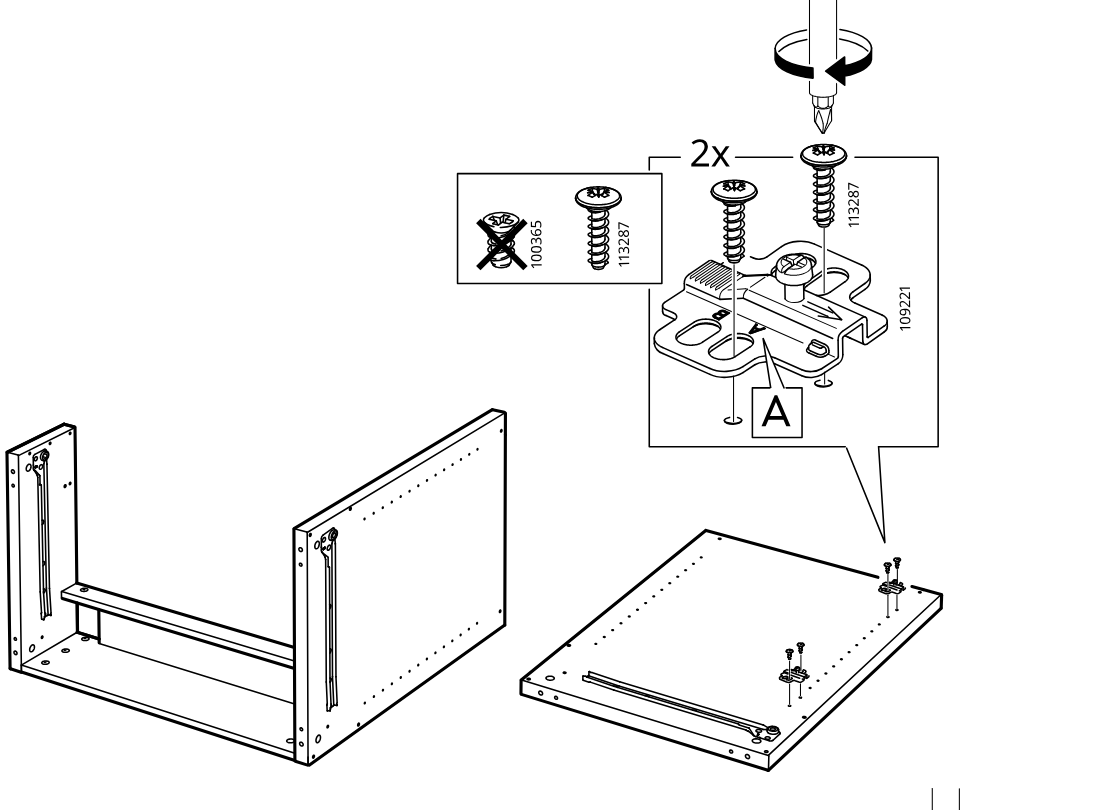
    Diagram for step 16: The user screws two mounting plates onto panel A using the indicated screws and prepares the panel for attachment to the cabinet frame.
  18. Step 17

    The user screws four threaded pins into the side panel edges before joining the panel to the cabinet frame.
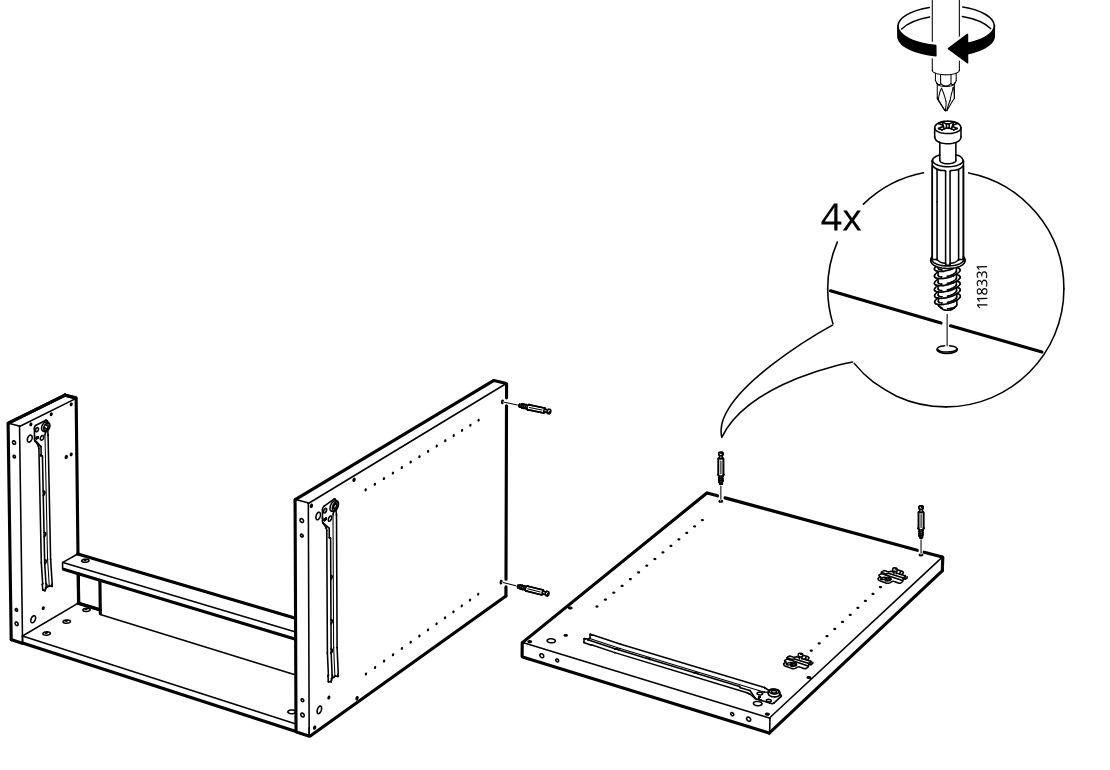
    Diagram for step 17: The user screws four threaded pins into the side panel edges before joining the panel to the cabinet frame.
  19. Step 18

    Push the side panel onto the frame and align it while keeping the patterned face oriented as shown.
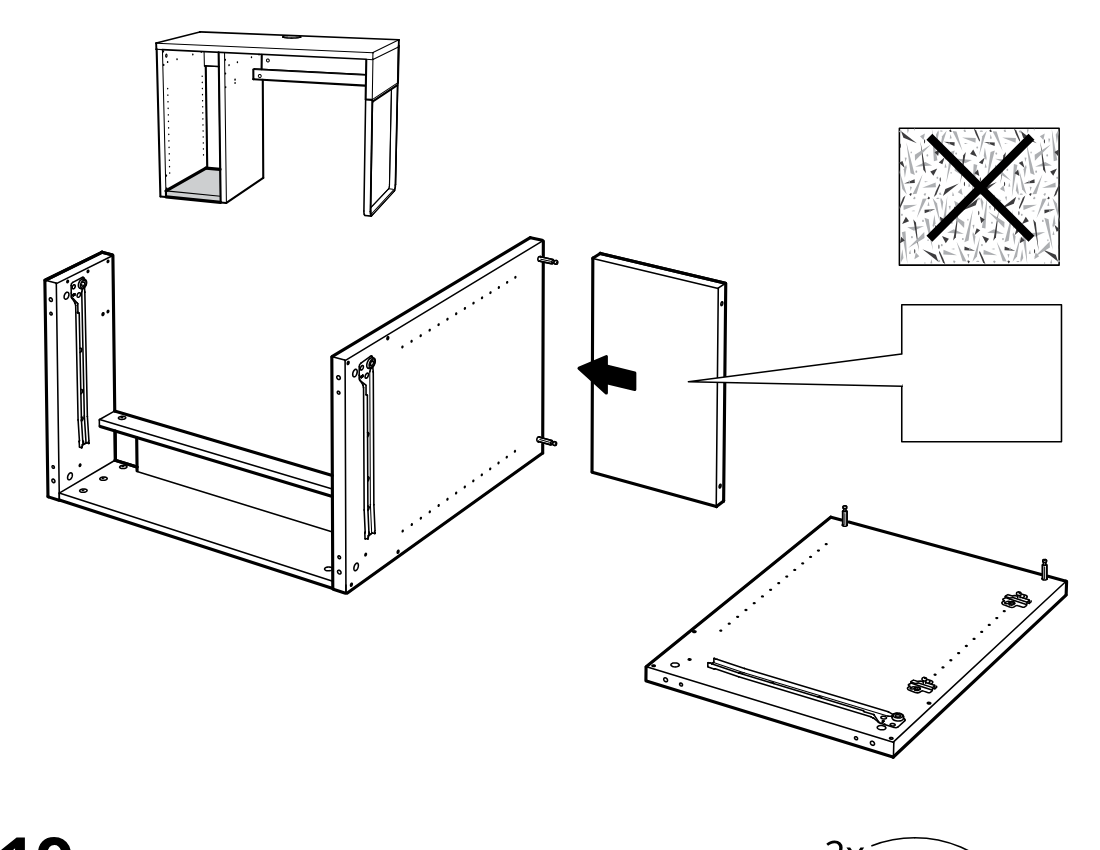
    Diagram for step 18: Push the side panel onto the frame and align it while keeping the patterned face oriented as shown.
  20. Step 19

    Insert and tighten two cam locks to secure the side panel to the frame.
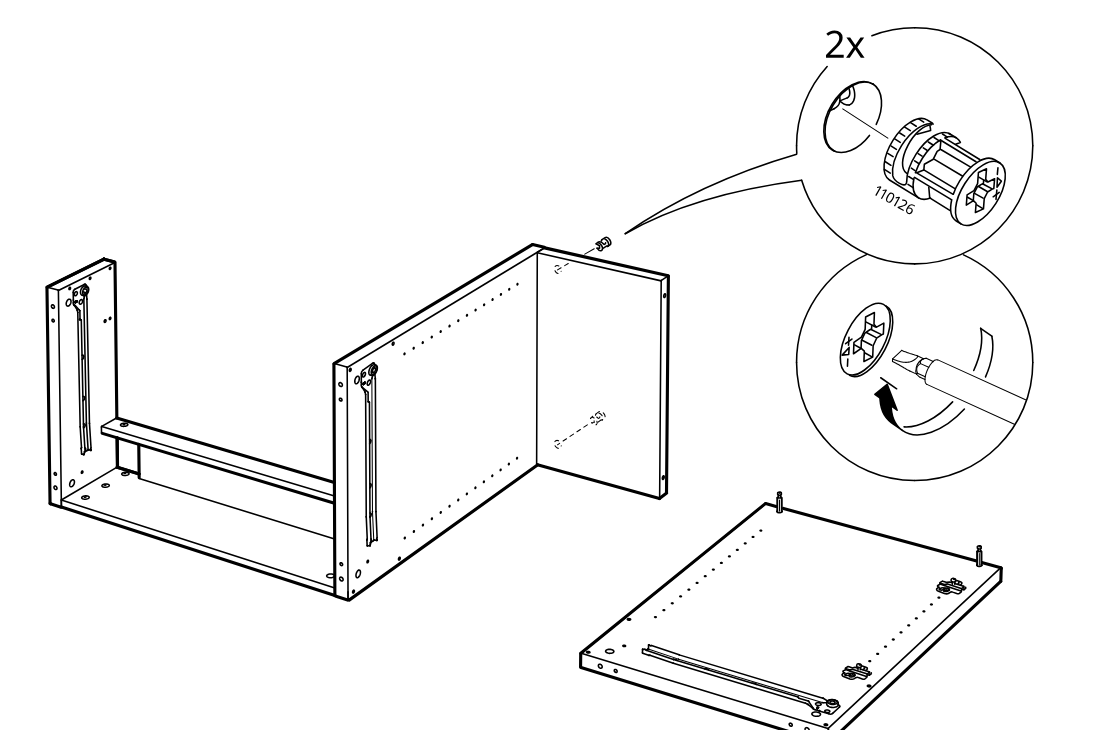
    Diagram for step 19: Insert and tighten two cam locks to secure the side panel to the frame.
  21. Step 20

    Insert four wooden dowels into the small panel and position it between the cabinet sides, with the zoom callout showing the dowel placement and edge orientation.
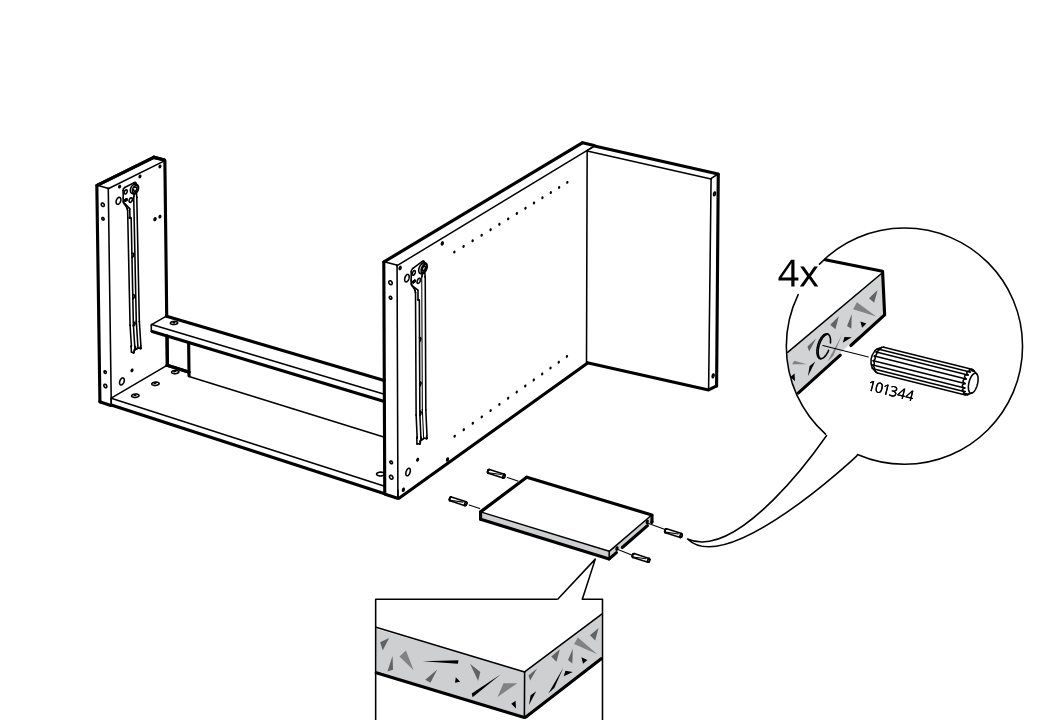
    Diagram for step 20: Insert four wooden dowels into the small panel and position it between the cabinet sides, with the zoom callout showing the dowel placement and edge orientation.
  22. Step 21

    Slide the small panel into place and rotate the large side panel inward to close the cabinet frame.
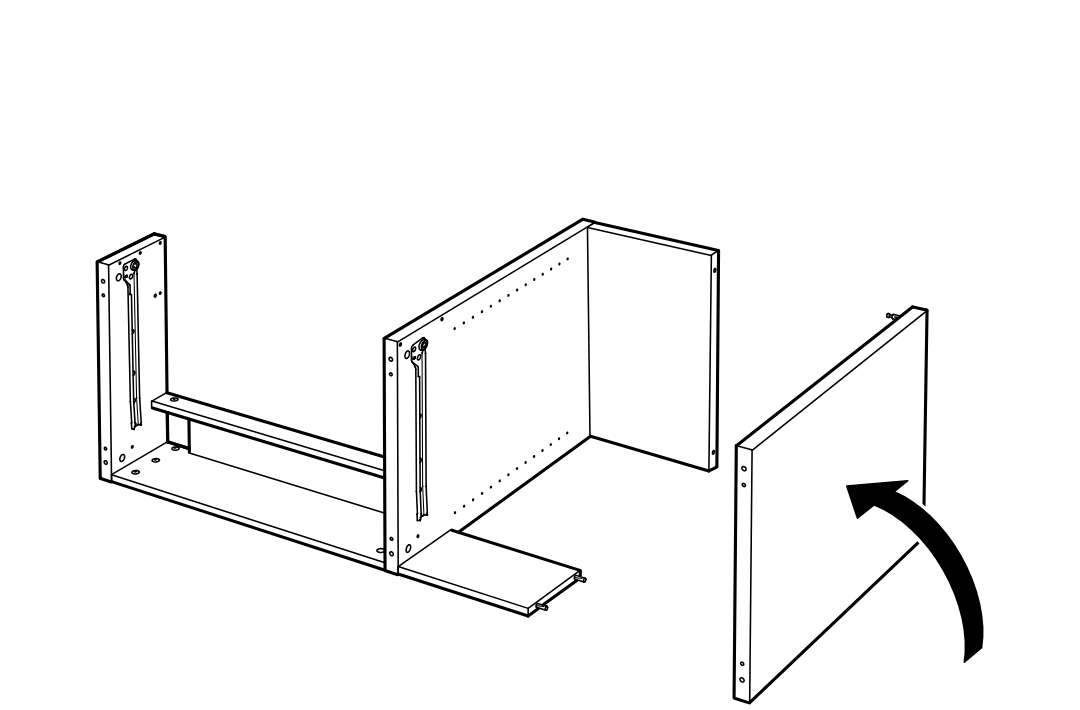
    Diagram for step 21: Slide the small panel into place and rotate the large side panel inward to close the cabinet frame.
  23. Step 22

    Two cam locks are inserted into the side panel and tightened to secure the cabinet body.
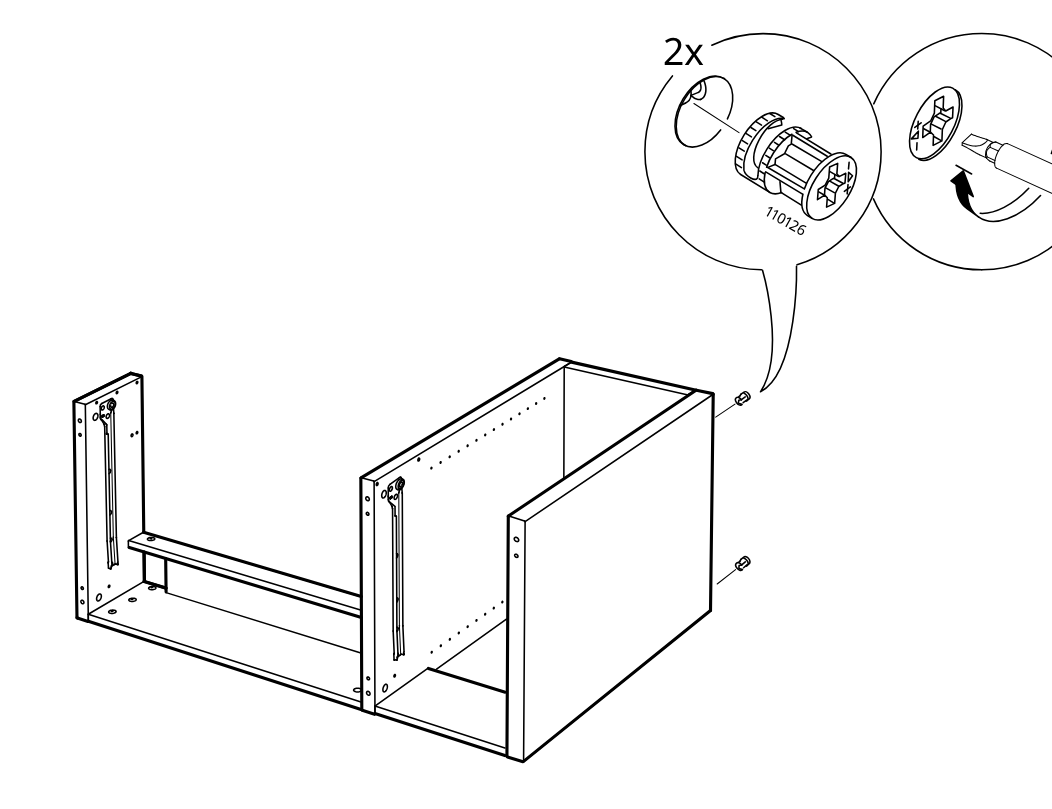
    Diagram for step 22: Two cam locks are inserted into the side panel and tightened to secure the cabinet body.
  24. Step 23

    Six ribbed dowels are inserted into the side panels and center divider.
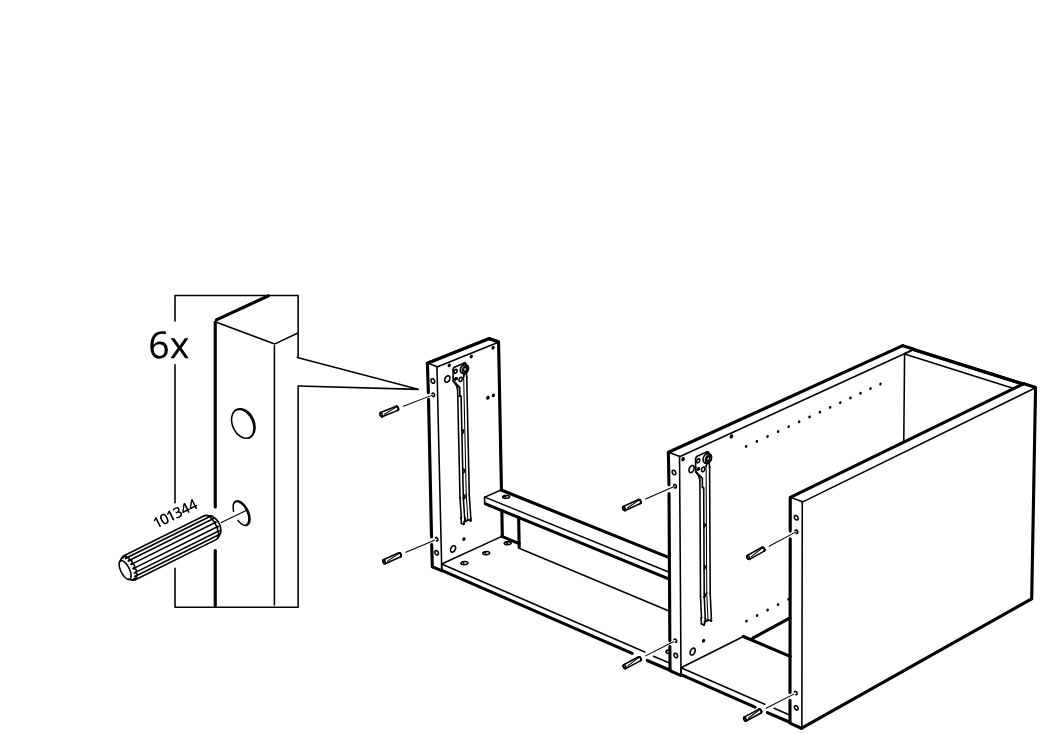
    Diagram for step 23: Six ribbed dowels are inserted into the side panels and center divider.
  25. Step 24

    Insert the rail insert into the side frame, then use the Allen key and screw to fasten the side assembly to the cabinet through three holes.
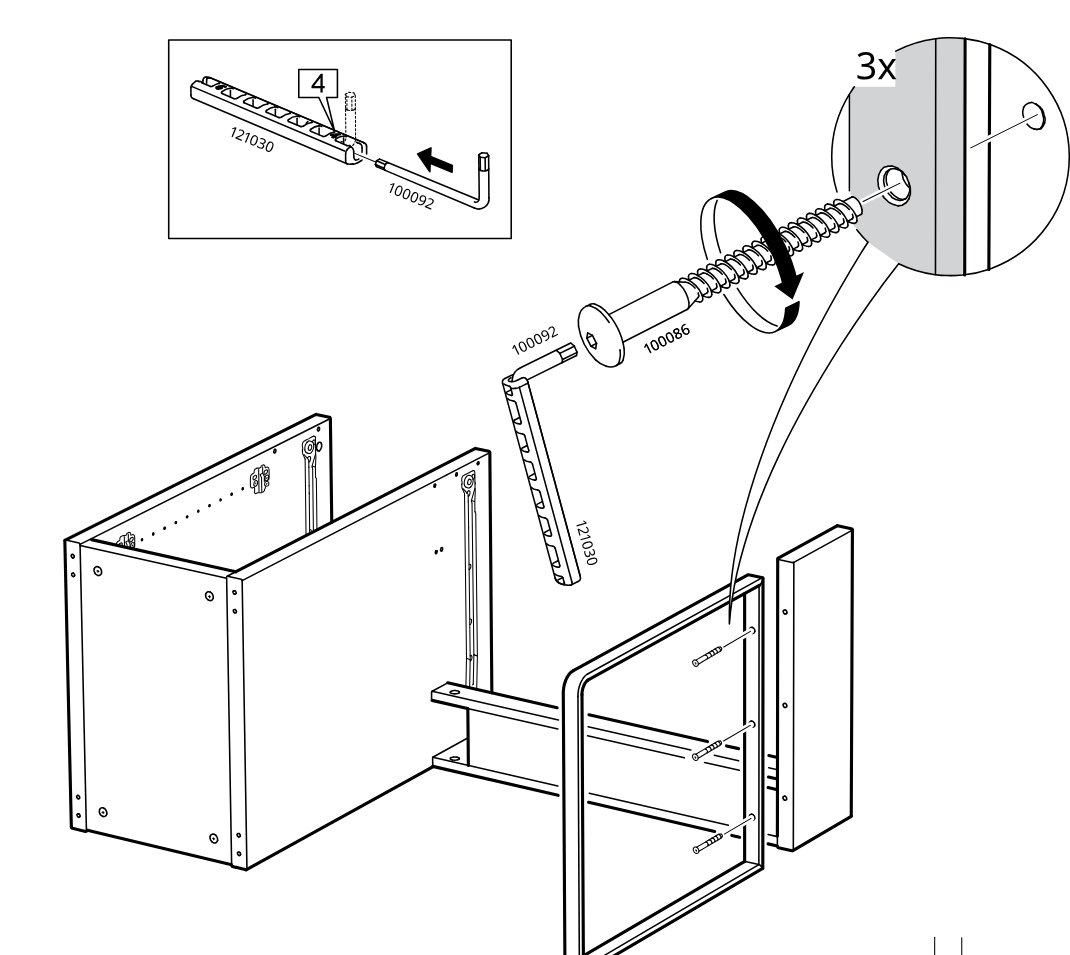
    Diagram for step 24: Insert the rail insert into the side frame, then use the Allen key and screw to fasten the side assembly to the cabinet through three holes.
  26. Step 25

    Screw six threaded fittings into the panel while it lies flat on a soft surface.
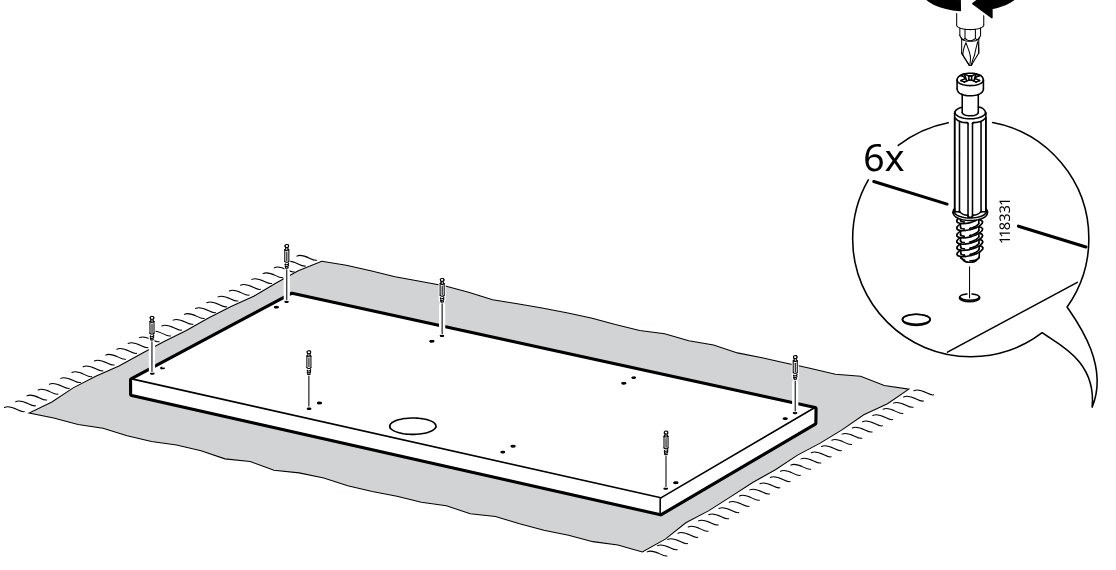
    Diagram for step 25: Screw six threaded fittings into the panel while it lies flat on a soft surface.
  27. Step 26

    The large back panel is aligned and pushed onto the cabinet frame from the right side.
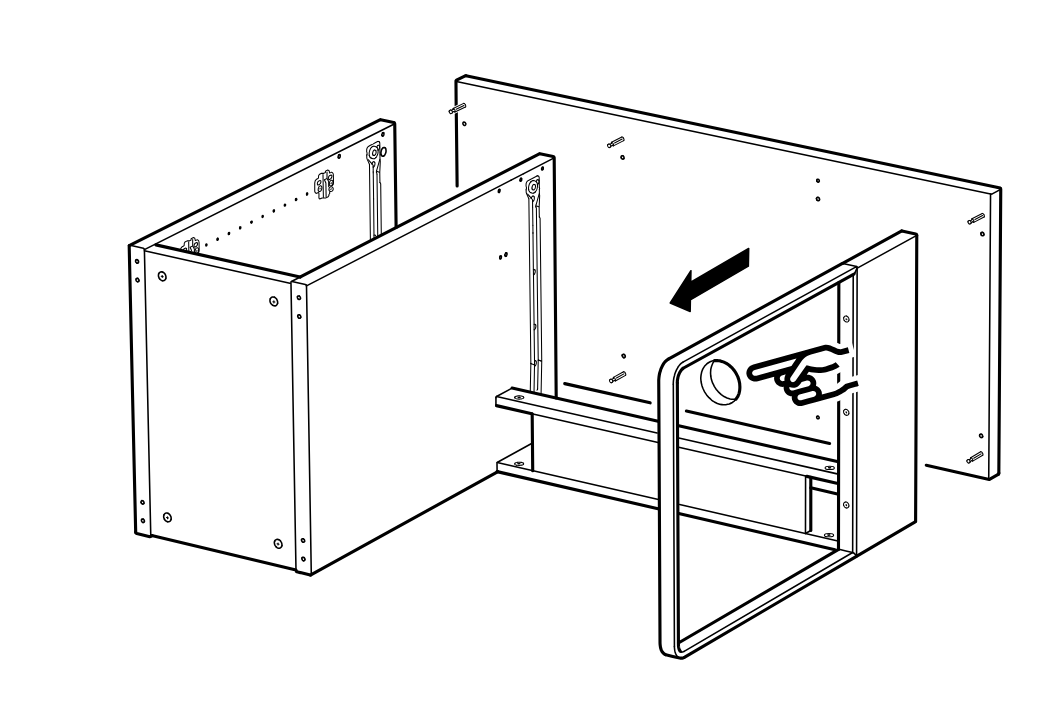
    Diagram for step 26: The large back panel is aligned and pushed onto the cabinet frame from the right side.
  28. Step 27

    Six cam lock fittings 110126 are inserted and tightened to secure the assembled unit.
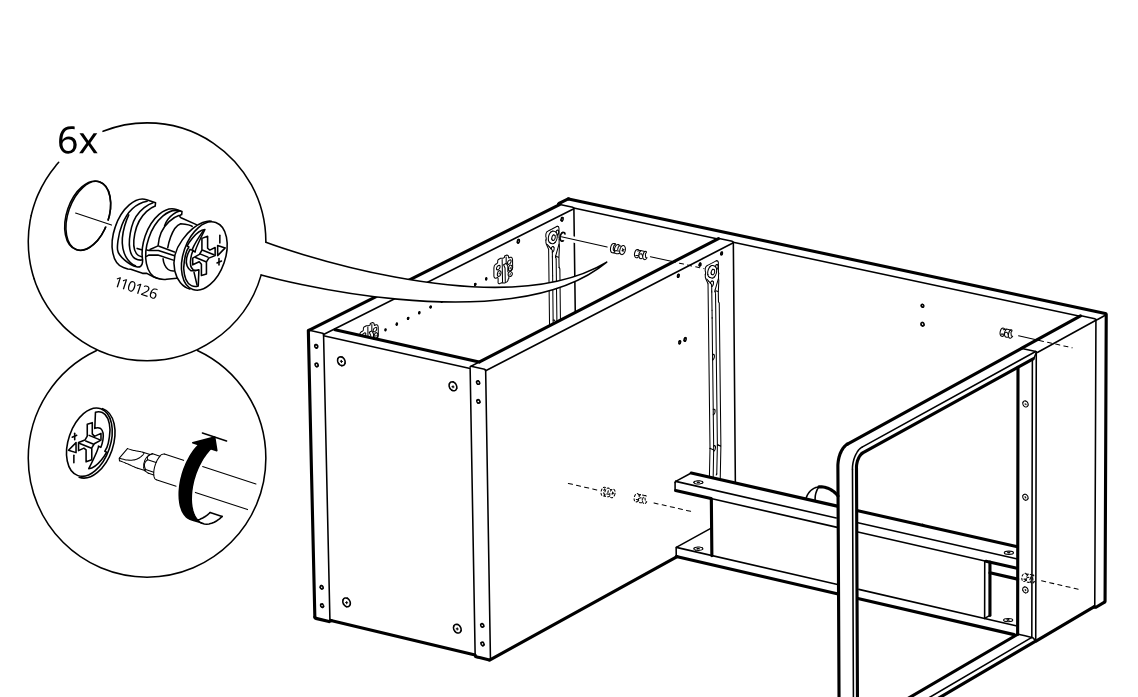
    Diagram for step 27: Six cam lock fittings 110126 are inserted and tightened to secure the assembled unit.
  29. Step 28

    Attach four plastic pads to the holes on the side panel edges of the cabinet frame.
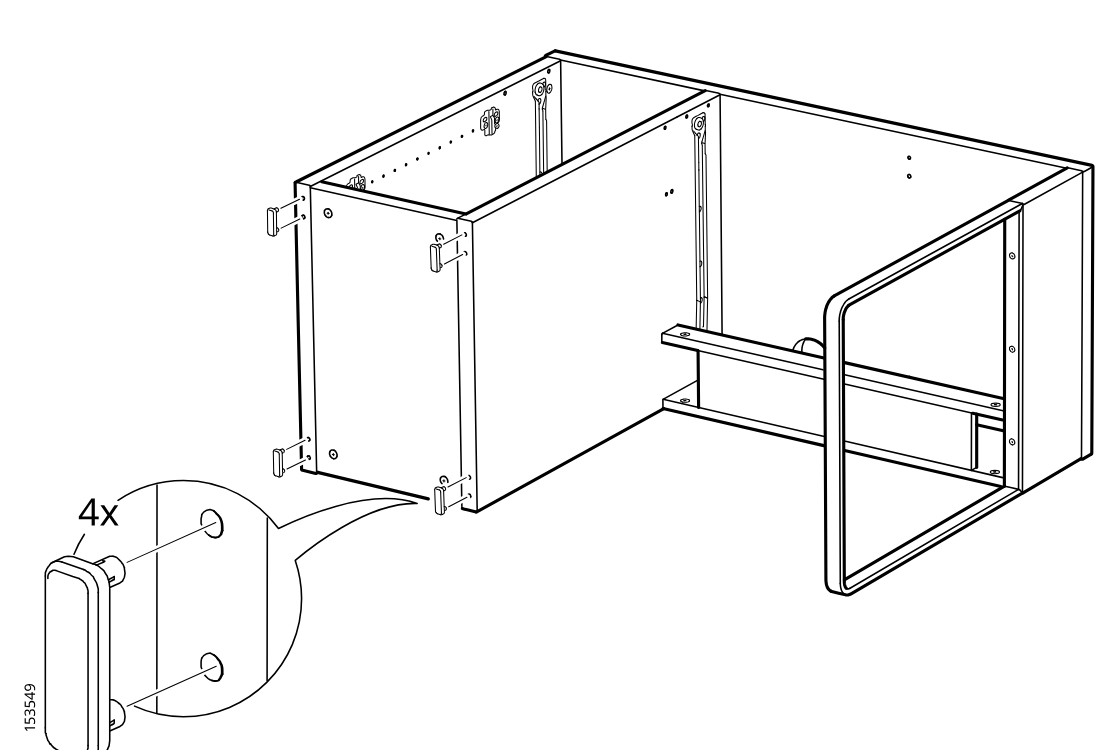
    Diagram for step 28: Attach four plastic pads to the holes on the side panel edges of the cabinet frame.
  30. Step 29

    Insert two hex nuts into the side opening of the front frame rail while the cabinet remains on its side.
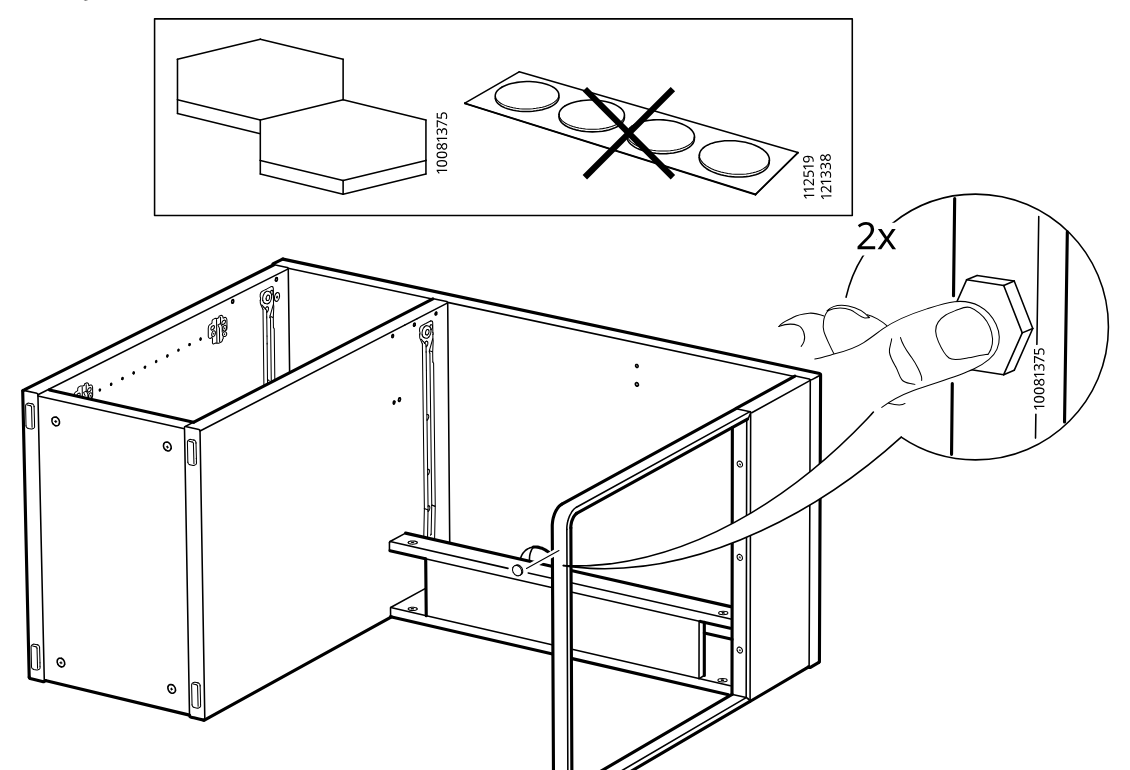
    Diagram for step 29: Insert two hex nuts into the side opening of the front frame rail while the cabinet remains on its side.
  31. Step 30

    The drawer is lifted onto the runners and slid inward until the roller engages.
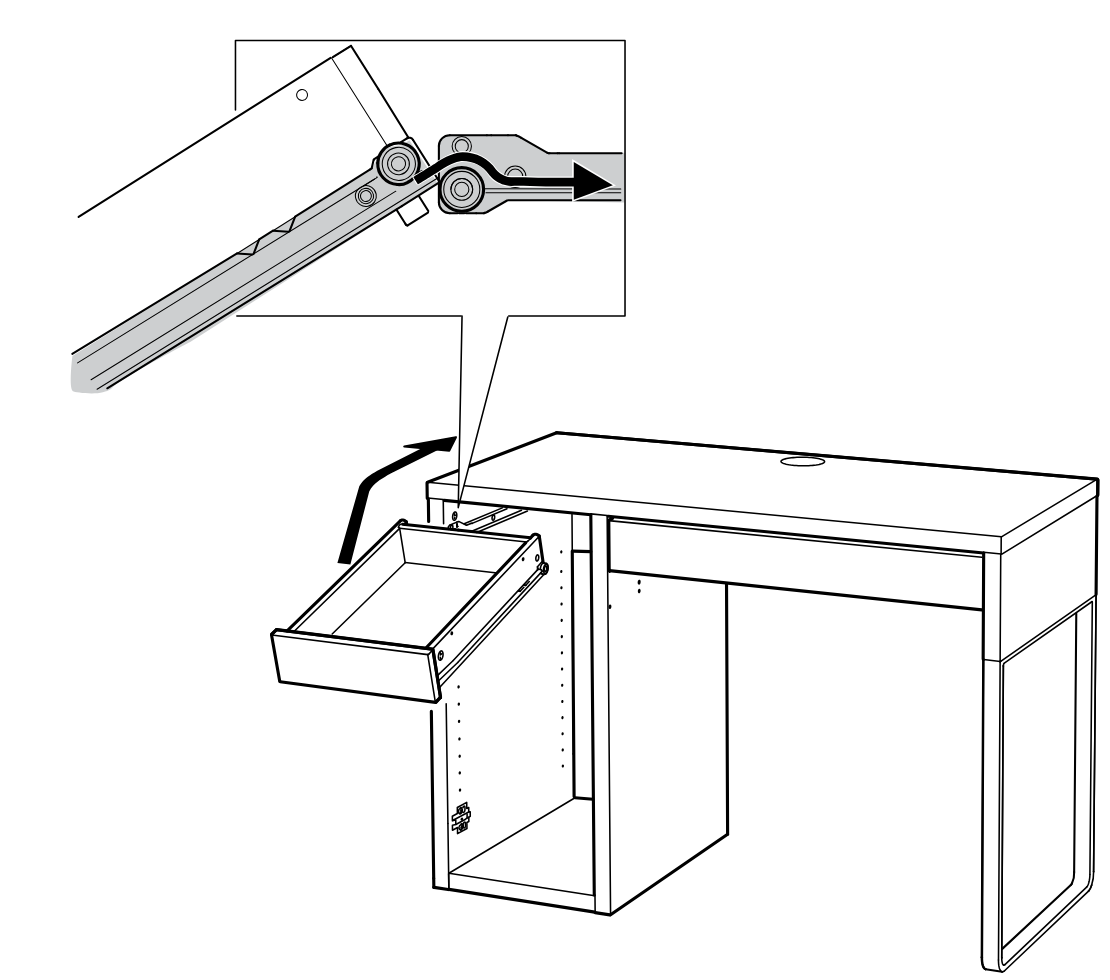
    Diagram for step 30: The drawer is lifted onto the runners and slid inward until the roller engages.
  32. Step 31

    Two mounting plates are fastened to the panel with screws as shown in the enlarged detail.
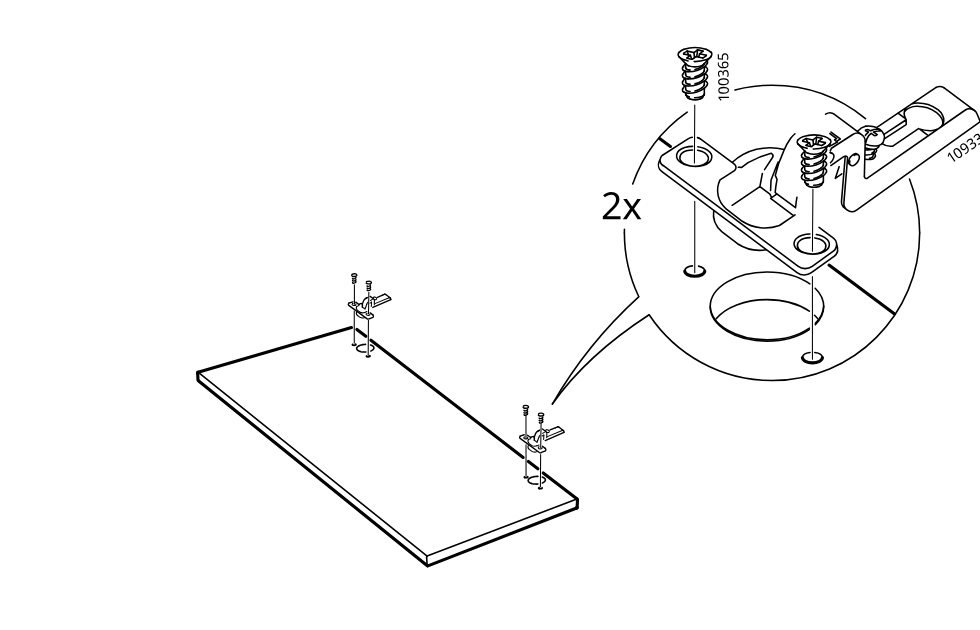
    Diagram for step 31: Two mounting plates are fastened to the panel with screws as shown in the enlarged detail.
  33. Step 32

    Adjust and tighten the two door hinges onto the cabinet side using the hinge screws as shown in the three zoom callouts, with an info note referring to page 40.
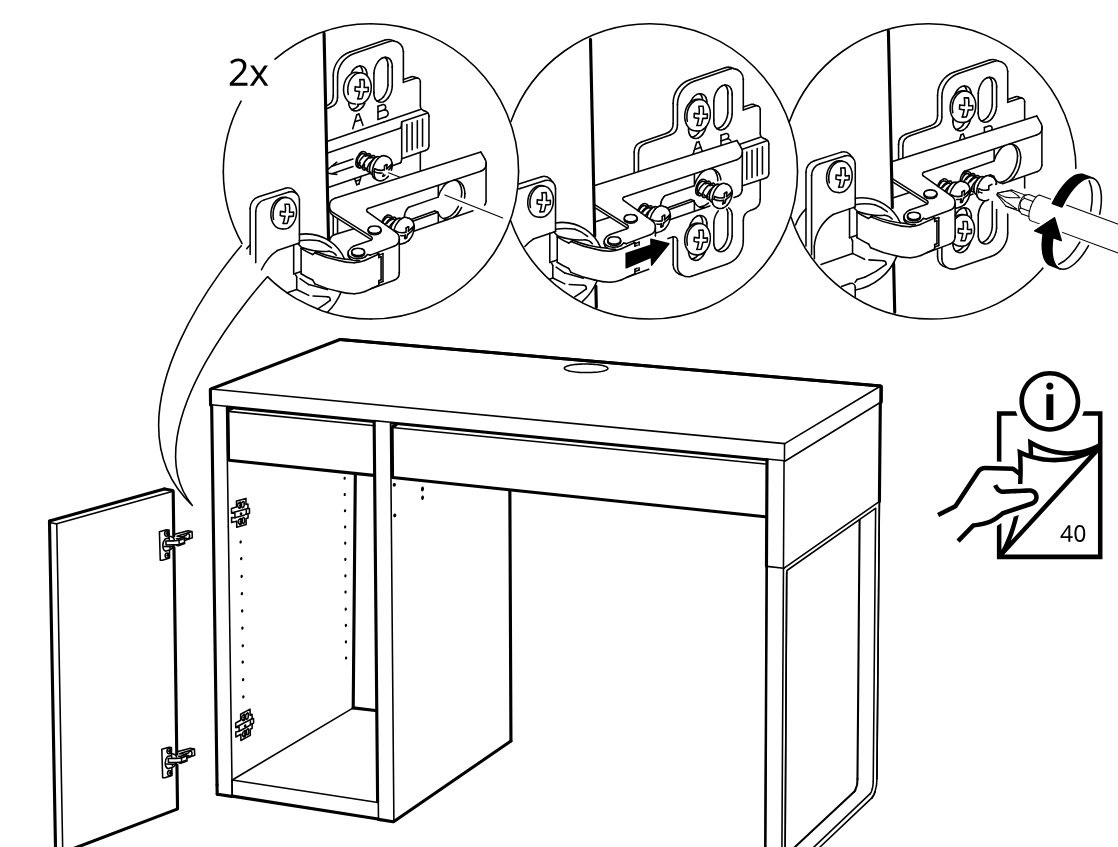
    Diagram for step 32: Adjust and tighten the two door hinges onto the cabinet side using the hinge screws as shown in the three zoom callouts, with an info note referring to page 40.
  34. Step 33

    Insert eight support pins labeled 101514 and place two shelves into the cabinet behind the open door.
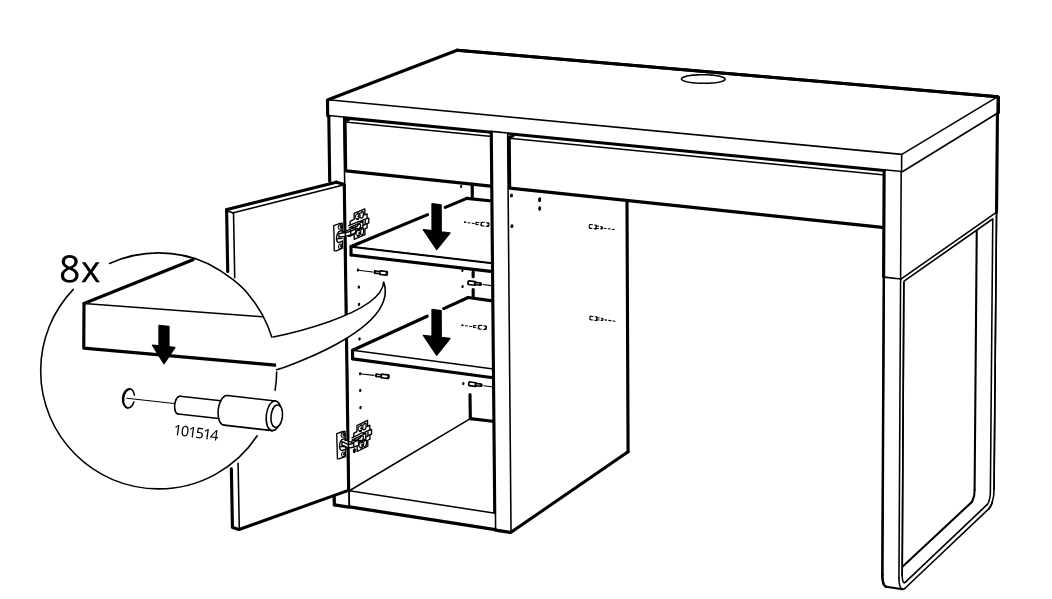
    Diagram for step 33: Insert eight support pins labeled 101514 and place two shelves into the cabinet behind the open door.
  35. Step 34

    Press two adhesive pads onto the indicated holes inside the cabinet area with the door open.
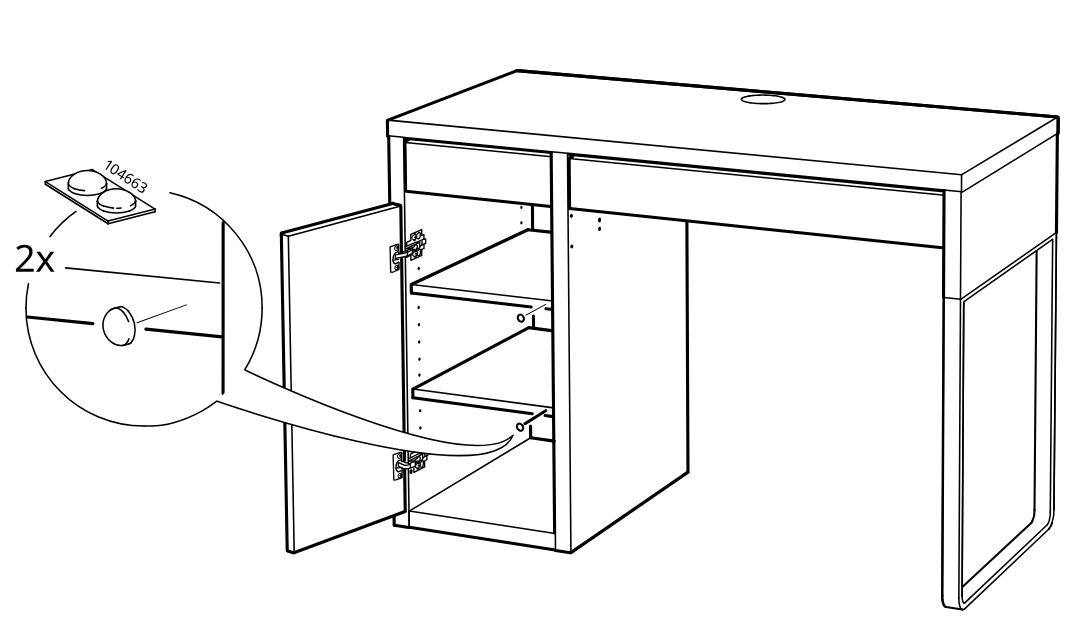
    Diagram for step 34: Press two adhesive pads onto the indicated holes inside the cabinet area with the door open.
  36. Step 35

    Insert one desk cable grommet into the top hole and apply four cover stickers to the exposed side holes, pressing them in by hand.
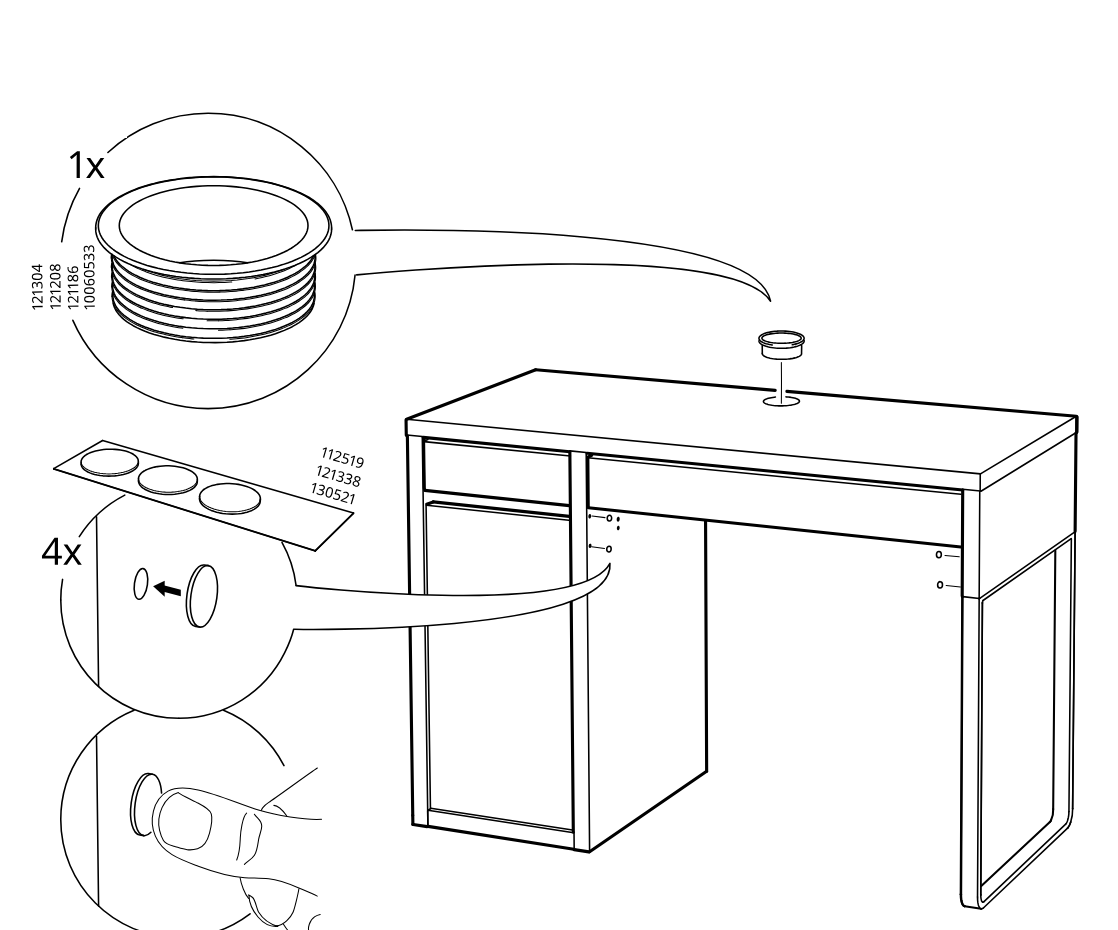
    Diagram for step 35: Insert one desk cable grommet into the top hole and apply four cover stickers to the exposed side holes, pressing them in by hand.

MICKE Desk

Cabinet/support panel on right side

  1. Before you begin

    Preparation and safety panels show required tools, recommend two people for assembly, warn against assembling on a hard surface, and advise contacting IKEA if parts are missing or unclear.

    Illustration for assembly note: Preparation and safety panels show required tools, recommend two people for assembly, warn against assembling on a hard surface, and advise contacting IKEA if parts are missing or unclear.
  2. Step 1

    The user screws two cam bolts into the long bottom panel while it lies on a soft surface.

    Diagram for step 1: The user screws two cam bolts into the long bottom panel while it lies on a soft surface.
  3. Step 2

    The user inserts two wooden dowels into the long bottom panel and positions the two side panels above the matching holes.

    Diagram for step 2: The user inserts two wooden dowels into the long bottom panel and positions the two side panels above the matching holes.
  4. Step 3

    Installs two cam locks in the side panels, checks the correct cam-lock type, and tightens them into the frame assembly.

    Diagram for step 3: Installs two cam locks in the side panels, checks the correct cam-lock type, and tightens them into the frame assembly.
  5. Step 4

    Rotates the assembly upright and slides the large panel into the upper groove with the patterned surface oriented as shown.

    Diagram for step 4: Rotates the assembly upright and slides the large panel into the upper groove with the patterned surface oriented as shown.
  6. Step 5

    The front panel is rotated upward and hooked into the side grooves, with a zoomed inset showing the joint detail.

    Diagram for step 5: The front panel is rotated upward and hooked into the side grooves, with a zoomed inset showing the joint detail.
  7. Step 6

    Two 110519 fasteners are inserted and tightened at the side joints, and an inline info panel shows the unit upright while securing the top edge.

    Diagram for step 6: Two 110519 fasteners are inserted and tightened at the side joints, and an inline info panel shows the unit upright while securing the top edge.
  8. Step 7

    The drawer runners are placed onto the left and right sides of the drawer box.

    Diagram for step 7: The drawer runners are placed onto the left and right sides of the drawer box.
  9. Step 8

    Four 100365 screws fasten the drawer runners to the drawer sides, and the longer 113287 screw is shown as incorrect.

    Diagram for step 8: Four 100365 screws fasten the drawer runners to the drawer sides, and the longer 113287 screw is shown as incorrect.
  10. Step 36

    Insert two dowels into the narrow panel and align it above the larger panel laid on a soft surface.

    Diagram for step 36: Insert two dowels into the narrow panel and align it above the larger panel laid on a soft surface.
  11. Step 37

    Insert two wooden dowels into the indicated holes and orient the panel using the top-hole guidance boxes before fitting the upright onto the base panel.

    Diagram for step 37: Insert two wooden dowels into the indicated holes and orient the panel using the top-hole guidance boxes before fitting the upright onto the base panel.
  12. Step 38

    Screw eight cam bolts into the two large panels in the indicated hole positions using a screwdriver.

    Diagram for step 38: Screw eight cam bolts into the two large panels in the indicated hole positions using a screwdriver.
  13. Step 39

    Fasten one drawer runner to each side panel with two 100365 screws, using the shown screw type and screwdriver rotation direction.

    Diagram for step 39: Fasten one drawer runner to each side panel with two 100365 screws, using the shown screw type and screwdriver rotation direction.
  14. Step 40

    Two dowels 101344 are inserted into the side panel edges, and the side panels are oriented and positioned around the central shelf assembly.

    Diagram for step 40: Two dowels 101344 are inserted into the side panel edges, and the side panels are oriented and positioned around the central shelf assembly.
  15. Step 41

    Eight cam locks 103430 are inserted into the side panels and turned to lock the assembled panels together.

    Diagram for step 41: Eight cam locks 103430 are inserted into the side panels and turned to lock the assembled panels together.
  16. Step 42

    Attach the drawer runners to the side panel and bottom panel using screw 100365, using the shorter screw instead of 113287 and tightening with a screwdriver.

    Diagram for step 42: Attach the drawer runners to the side panel and bottom panel using screw 100365, using the shorter screw instead of 113287 and tightening with a screwdriver.
  17. Step 43

    Screws the two mounting plates onto panel A using the indicated screws, then positions the prepared panel next to the frame assembly.

    Diagram for step 43: Screws the two mounting plates onto panel A using the indicated screws, then positions the prepared panel next to the frame assembly.
  18. Step 44

    Screws four connector bolts into the panel and aligns the panel with the side frame for attachment.

    Diagram for step 44: Screws four connector bolts into the panel and aligns the panel with the side frame for attachment.
  19. Step 45

    Attach the side panel to the frame, aligning it with the dowels, and note that the unfinished chipboard face orientation shown with an X is not allowed.

    Diagram for step 45: Attach the side panel to the frame, aligning it with the dowels, and note that the unfinished chipboard face orientation shown with an X is not allowed.
  20. Step 46

    Insert and tighten two cam locks into the newly attached side panel to secure it to the frame.

    Diagram for step 46: Insert and tighten two cam locks into the newly attached side panel to secure it to the frame.
  21. Step 47

    Insert four wooden dowels into the small shelf panel and position it to slide into the cabinet frame, with the close-up showing the patterned edge orientation.

    Diagram for step 47: Insert four wooden dowels into the small shelf panel and position it to slide into the cabinet frame, with the close-up showing the patterned edge orientation.
  22. Step 48

    Lift the large side panel and align it onto the exposed dowels and cabinet frame to close the assembly side.

    Diagram for step 48: Lift the large side panel and align it onto the exposed dowels and cabinet frame to close the assembly side.
  23. Step 49

    Insert two cam locks into the side panel holes and tighten them with a screwdriver.

    Diagram for step 49: Insert two cam locks into the side panel holes and tighten them with a screwdriver.
  24. Step 50

    Insert six wooden dowels into the marked holes on the cabinet side and divider panels.

    Diagram for step 50: Insert six wooden dowels into the marked holes on the cabinet side and divider panels.
  25. Step 51

    Tighten three connectors to attach the side panel/frame assembly to the cabinet using the hex key, with the inset showing the key fitting into part 121030.

    Diagram for step 51: Tighten three connectors to attach the side panel/frame assembly to the cabinet using the hex key, with the inset showing the key fitting into part 121030.
  26. Step 52

    Screw six dowel bolts into the large panel while it lies on a soft surface, as shown in the magnified detail.

    Diagram for step 52: Screw six dowel bolts into the large panel while it lies on a soft surface, as shown in the magnified detail.
  27. Step 53

    The large side panel is aligned and pushed onto the cabinet frame and side assembly.

    Diagram for step 53: The large side panel is aligned and pushed onto the cabinet frame and side assembly.
  28. Step 54

    Six cam locks labeled 110126 are inserted into the side panel holes and turned to secure the cabinet together.

    Diagram for step 54: Six cam locks labeled 110126 are inserted into the side panel holes and turned to secure the cabinet together.
  29. Step 55

    Attach four bumper pads to the side panel and fit the panel onto the cabinet frame using the side connectors.

    Diagram for step 55: Attach four bumper pads to the side panel and fit the panel onto the cabinet frame using the side connectors.
  30. Step 56

    Tighten the two fasteners to secure the side panel, using the indicated panel type and alignment details shown in the zoom callout.

    Diagram for step 56: Tighten the two fasteners to secure the side panel, using the indicated panel type and alignment details shown in the zoom callout.
  31. Step 57

    The drawer is tilted up and inserted onto the cabinet runners, with a zoom callout showing the slide mechanism engaging.

    Diagram for step 57: The drawer is tilted up and inserted onto the cabinet runners, with a zoom callout showing the slide mechanism engaging.
  32. Step 58

    Two mounting plates are fastened onto the panel with two screws each, shown with a magnified hardware detail.

    Diagram for step 58: Two mounting plates are fastened onto the panel with two screws each, shown with a magnified hardware detail.
  33. Step 59

    Adjust the two door hinges on the cabinet door using the hinge screws and refer to page 40 for more detail.

    Diagram for step 59: Adjust the two door hinges on the cabinet door using the hinge screws and refer to page 40 for more detail.
  34. Step 60

    Place the eight shelf supports (part 101514) into the side holes and lower the shelves into the cabinet.

    Diagram for step 60: Place the eight shelf supports (part 101514) into the side holes and lower the shelves into the cabinet.
  35. Step 61

    Open the cabinet door and place two adhesive bumpers inside on the indicated side panel positions.

    Diagram for step 61: Open the cabinet door and place two adhesive bumpers inside on the indicated side panel positions.
  36. Step 62

    Insert the desk cable grommet into the top hole and press two cover caps into the exposed side holes.

    Diagram for step 62: Insert the desk cable grommet into the top hole and press two cover caps into the exposed side holes.
  37. Before you begin

    Adjustment reference panel showing how to align the door front by changing height, side position, and depth at the hinge screws.

    Illustration for assembly note: Adjustment reference panel showing how to align the door front by changing height, side position, and depth at the hinge screws.

Make it yours

Small additions. A better setup.

These optional additions are separate from any parts, safety equipment, or tools required to assemble the product.

Browse lighting and power

Some links are affiliate links. We may earn a commission if you buy through them, at no extra cost to you. As an Amazon Associate, we earn from qualifying purchases.

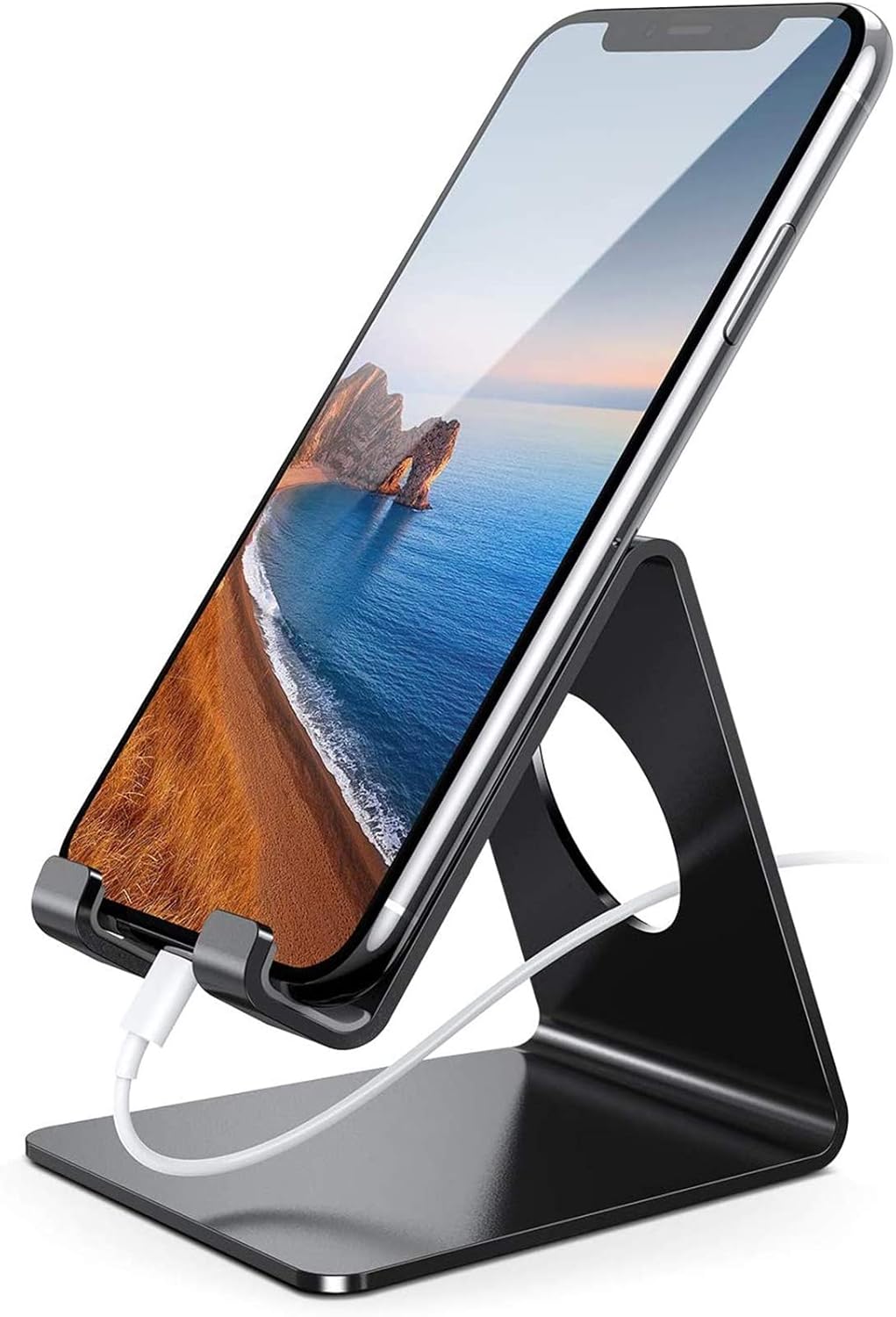
  • Lamicall freestanding phone stand, black

    Keeps a phone visible on MICKE without a clamp or drilling.

    The 9.5 × 8.48 cm base fits on the 105 × 50 cm desktop. It holds 4–8 in phones but is not a charger; check thick cases for a secure fit.

    Image reuse rights have not been independently verified.

    View product
  • Amazon Basics adjustable monitor riser, black

    A freestanding platform raises a monitor without attaching to the MICKE desk.

    The 16.1 × 11 in footprint fits the 105 × 50 cm desktop. Keep the monitor base on the platform and the combined concentrated load within IKEA’s 33 lb small-surface limit.

    View product
  • VELCRO Brand ONE-WRAP cable ties, black (100-pack)

    Reusable ties gather loose cables along MICKE’s existing cable route.

    Use only to bundle cables; do not attach ties to or modify the desk. Keep ties and cables clear of moving parts.

    Image reuse rights have not been independently verified.

    View product
  • LEPOWER metal desk lamp, white, E26

    A freestanding lamp adds task lighting to a MICKE workstation.

    The 6.69 × 5.7 in base fits on the 105 × 50 cm desktop. Keep the lamp clear of the monitor and desk edges.

    Image reuse rights have not been independently verified.

    View product
  • Bright Stone Felt Desk Mat, Light Gray (27.5 × 11.8 in)

    A felt desk mat adds a soft work surface and helps protect part of the MICKE desktop from routine abrasion.

    The selected 27.5 × 11.8 in (about 70 × 30 cm) size fits within MICKE 80213074’s approximately 105 × 50 cm desktop and covers only part of it. Amazon’s listing describes 3 mm felt with anti-slip rubber particles; these are seller claims. Felt may add friction for fast mouse movement, and the listing does not specify a waterproof surface. Keep liquids away and test the backing on an inconspicuous area of the desk finish.

    Image reuse rights have not been independently verified.

    View product

Video guide